
In the intricate world of software development, IT infrastructure, and cybersecurity, the ability to peer directly into the raw data of files and drives is not merely a convenience—it’s an absolute necessity. This is precisely the domain where 010 Editor excels, establishing itself as a premier trial version Windows software. Categorized under “Development software” with a specific subcategory of “Assemblers & Hex Editors,” 010 Editor offers an unparalleled level of control and insight into binary data, making it an indispensable tool for professionals and enthusiasts alike.
Since its inclusion in the comprehensive catalog of software and applications on PhanMemFree.org in 2006, 010 Editor has demonstrated its enduring utility and popularity. Over its extensive history, it has garnered an impressive 22,900 downloads on the platform, with more recent figures showing 10.2K total downloads and 21 downloads in the last month alone, underscoring its continued relevance. The software is known for its relatively compact footprint, requiring less free space compared to many other programs within the demanding “Development software” category. Its global reach is evident in its heavy usage in countries such as Indonesia, China, and Estonia, highlighting its widespread appeal and effectiveness across diverse technological landscapes.
Developed by Sweetscape, 010 Editor has continually evolved to meet the complex demands of binary data manipulation. The latest iteration, version 14.0.1, released on June 10, 2024, reflects Sweetscape’s ongoing commitment to refinement and enhancement. While the application itself is primarily available in English, its download page on PhanMemFree.org caters to a multilingual audience, offering options in various languages, though the core functionality and interface remain English-centric.
The Indispensable Role of Binary and Hex Editing in Modern Computing
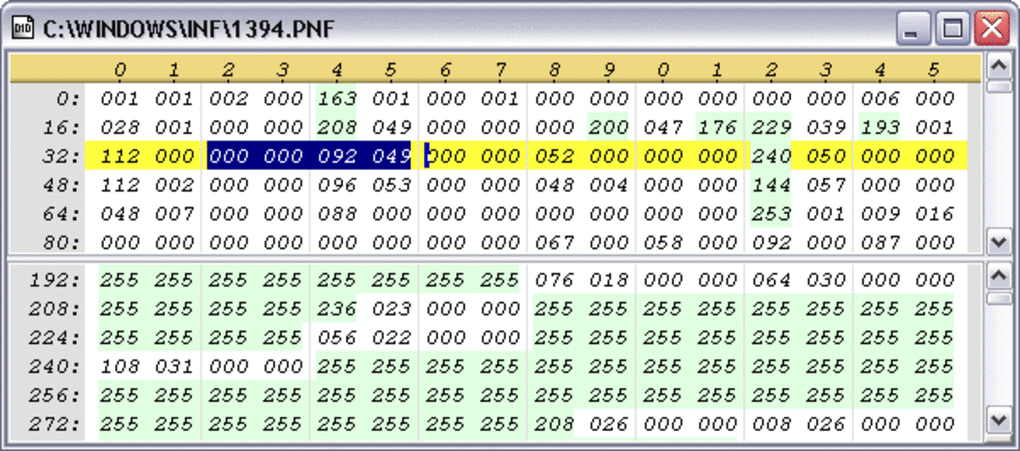
At its heart, 010 Editor is a powerful utility designed to allow users to “quickly edit any binary file or drive.” This seemingly simple statement belies the profound capabilities and critical applications of hexadecimal and binary editing in contemporary computing. Unlike text editors that interpret data as characters, a hex editor displays the raw, underlying bytes of a file or disk, typically in hexadecimal (base-16) format, alongside their ASCII or Unicode interpretations. This direct access to the byte-level representation of data is crucial for tasks that demand precision and an understanding of how information is stored and processed at the most fundamental level.
Core Functionality: Unlocking Raw Data
010 Editor’s core strength lies in its comprehensive suite of tools for binary manipulation. It allows users to open and edit files of any size, from small configuration files to multi-gigabyte disk images, without compromising performance. The interface is meticulously designed to present data clearly, with customizable views that can show hex values, decimal values, ASCII characters, and more. This flexibility ensures that users can interpret data in the most relevant format for their specific task.
The ability to edit raw drive data is particularly significant. This feature enables advanced users to recover lost files by directly manipulating file system structures, repair corrupted partitions, or even analyze the contents of an entire hard drive at the sector level. For forensic analysts, this capability is invaluable, providing the means to uncover hidden data, reconstruct fragmented files, or examine evidence that would be inaccessible through standard operating system tools.
Beyond simple editing, 010 Editor provides powerful search and replace functionalities. Users can search for specific byte sequences, strings, or even regular expressions, making it possible to locate patterns within vast amounts of binary data. This is essential for tasks like identifying malware signatures, finding specific data structures in proprietary file formats, or patching software. The replace function, in turn, allows for precise modifications, whether it’s correcting a single byte error or injecting new code into an executable.
Another foundational feature is the comparison tool, which enables users to compare two binary files or parts of files byte-by-byte. This is critical for identifying differences between software versions, analyzing changes made by malware, or verifying the integrity of data. The visual representation of differences makes it easy to spot discrepancies, helping developers debug issues or security professionals understand system modifications.
Advanced Features: Scripting, Templates, and Deep Analysis
What truly elevates 010 Editor above basic hex editors are its advanced features, particularly its powerful scripting engine and binary templates. These capabilities transform it from a mere byte editor into a sophisticated data analysis and automation platform.
Binary Templates: This is perhaps 010 Editor’s most revolutionary feature. A binary template is essentially a structure definition that tells 010 Editor how to interpret a specific binary file format. Users can write their own templates (or use pre-built ones) to parse complex file structures like executables (EXE, DLL), image files (JPEG, PNG), archive files (ZIP, RAR), or even custom proprietary formats. When a template is applied to a file, 010 Editor automatically displays the file’s components in an easy-to-understand tree structure, labeling individual fields, arrays, and sub-structures. This eliminates the tedious manual process of mapping out file formats byte-by-byte and allows users to modify specific fields by name rather than by offset, significantly speeding up analysis and editing. This is invaluable for reverse engineering, understanding undocumented file formats, or recovering specific pieces of data from corrupted files.
Scripting Engine: 010 Editor incorporates a powerful scripting engine based on C-like syntax. This allows users to automate complex tasks, perform batch operations, and implement custom data processing algorithms. Scripts can interact with the editor, reading and writing bytes, manipulating selections, and even executing template functions. For example, a script could be written to automatically analyze a directory of files for a specific malware signature, decrypt encrypted data blocks, or reformat data according to a custom specification. This level of automation is a game-changer for repetitive analysis tasks and bespoke data manipulation requirements.
The combination of templates and scripting makes 010 Editor an incredibly flexible and extensible tool. It empowers users to tackle virtually any binary data challenge, from simple byte modifications to complex structural analyses, providing insights that are often unavailable through higher-level tools.
010 Editor in the Professional Landscape: Development, IT, and Cybersecurity
The versatile nature of 010 Editor positions it as a vital utility across a multitude of technical professions, reflecting its presence in the “Development & IT” category on PhanMemFree.org. Its ability to work directly with raw data makes it invaluable for tasks that extend far beyond simple code editing.
A Versatile Tool Across Technical Disciplines
Software Developers: While developers primarily work with source code in IDEs/Source Editors, 010 Editor provides a crucial complementary view. It allows them to inspect compiled executables, analyze the structure of data files their applications generate, or debug low-level issues that manifest as corrupted binary data. When dealing with proprietary or legacy file formats, templates can be developed to rapidly understand and interact with these structures, a task often associated with “Development Kits” for understanding SDK specifics or “Programming Languages” for bytecode analysis.
Cybersecurity Professionals: For reverse engineers, malware analysts, and incident responders, 010 Editor is a cornerstone tool. It allows them to dissect malicious binaries, understand how exploits manipulate data, analyze network packet captures at the byte level, and even recover encrypted information. The ability to apply templates to common file formats (like PE files for Windows executables) helps quickly identify sections, imports, and exports within malware, while scripting can automate the extraction of configuration data or obfuscated strings. This directly ties into “Security & Privacy” concerns, particularly for anti-spam/anti-spy, antivirus, and encryption analysis.
IT Administrators and Data Recovery Specialists: When faced with corrupted file systems, damaged disk images, or inaccessible data, administrators often turn to hex editors. 010 Editor’s drive editing capabilities allow for direct manipulation of partition tables, boot sectors, and file allocation tables, making it a powerful tool for “Data Recovery.” Its integration into workflows related to “Backup & Cloud Storage” can help verify data integrity at a low level or diagnose issues with raw backup images.
Embedded Systems Engineers: In the realm of embedded systems, developers frequently work with firmware images and hardware registers directly. 010 Editor provides the means to inspect, modify, and analyze these binary blobs, often crucial for debugging or patching embedded software.
Network Engineers: For those working with network protocols, 010 Editor can be used to analyze raw packet captures. By understanding the binary structure of network frames and packets, engineers can diagnose communication issues, analyze protocol compliance, or even craft custom packets for testing purposes, making it relevant for “Networking” and “Internet & Network” analyses.
Seamless Integration into Complex Workflows
010 Editor is not designed to replace an IDE or a full-fledged debugger but rather to augment them by providing a unique, low-level perspective. It fits seamlessly into workflows that involve multiple tools. For instance, a developer might use an IDE for coding, a debugger for runtime analysis, and then switch to 010 Editor to inspect the raw memory dumps or file outputs generated during a crash or specific operation.
Its capabilities complement tools in “IDEs/Source Editors” by offering a granular view of compiled code. When working with “Database” files, directly inspecting the raw data can reveal corruption or structural anomalies not visible through standard database management tools. For “Web Development,” while not directly editing web code, it can be used to inspect binary assets, analyze network traffic (if captured raw), or work with specialized binary components.
The ability to create custom scripts means that 010 Editor can be integrated into automated pipelines. For instance, a security team could have a script that, upon detection of a suspicious file, automatically opens it in 010 Editor, applies a specific template, extracts key information, and logs it. This level of extensibility ensures that the tool remains relevant and adaptable to evolving technical challenges and diverse operational requirements.
Practical Considerations: Performance, Accessibility, and the PhanMemFree View
Understanding the practical aspects of 010 Editor, including its system requirements, performance, and user community feedback, is crucial for potential users. PhanMemFree.org provides a clear overview of these details, aiding users in making informed decisions.
Technical Specifications and System Requirements
010 Editor is primarily a Windows-based application, with compatibility extending from older operating systems like Windows ME (and even Windows 98 as per historical data) to modern versions. This broad compatibility ensures that a wide range of users can leverage its capabilities regardless of their specific Windows environment. Its current version, 14.0.1, indicates continuous development and updates by Sweetscape, with the latest update being on June 10, 2024. This regular maintenance schedule is vital for software, ensuring bug fixes, performance improvements, and adaptation to new operating system features and security standards.
The software’s compact size, approximately 19.11 MB, is another significant advantage. In an era where many professional tools demand gigabytes of disk space, 010 Editor’s light footprint means it installs quickly and doesn’t consume excessive system resources. This makes it an ideal tool for deployment on various machines, including those with limited storage or older hardware. Despite its power, it remains efficient, a testament to its optimized design.
As a trial version, 010 Editor allows prospective users to experience its full functionality before committing to a purchase. This “try before you buy” model is beneficial, enabling users to thoroughly assess if the software meets their specific needs and integrates well into their existing workflows without initial financial commitment.
User Experience, Community Feedback, and Future Outlook
The user experience of 010 Editor is often praised for its intuitive interface, despite the complex nature of the tasks it performs. The ability to customize views, apply templates with ease, and leverage a powerful scripting language contributes to a highly productive environment. The developer, Sweetscape, has focused on creating a tool that is both feature-rich and user-friendly, a balance that is often difficult to achieve in specialized software.
On PhanMemFree.org, 010 Editor holds a rating of 3.5 out of 5 stars based on 17 reviews, indicating a generally positive reception. While the number of user reviews is not exceptionally high, the feedback is valuable for new users. PhanMemFree encourages users to “Be the first to leave your opinion!” and “Rate it!” to enrich the community’s understanding of the software. User reviews often highlight specific features that are particularly useful or areas where improvements could be made, providing valuable insights for both potential users and the developer.
The mention of “Alternative apps” on the PhanMemFree.org page suggests that while 010 Editor is highly regarded, the platform also guides users who might be looking for different options based on their specific requirements, pricing, or operating system preferences. Similarly, “Top downloads Development & IT for Windows” provides a context of what other tools developers and IT professionals are frequently downloading, allowing users to discover complementary software like “UltraViewer” or “AnyDesk” for remote control, or “SPSS” for statistical analysis.
Related topics such as “Text Editor,” “Hex Editor For Windows,” “Binary File,” and “Calculator” further categorize 010 Editor’s functionalities and provide keywords for users seeking similar utilities. This contextualization helps users understand its niche and how it compares or relates to other tools.
Looking ahead, the enduring relevance of 010 Editor is clear. As technology continues to advance, the need to understand and manipulate data at its most fundamental level will only grow. With the proliferation of new file formats, complex software, and persistent cybersecurity threats, tools like 010 Editor that offer deep binary insights will remain indispensable. Its ongoing development by Sweetscape, coupled with its robust feature set, ensures that 010 Editor will continue to be a go-to solution for binary and hexadecimal editing for years to come.
The Enduring Relevance of 010 Editor in a Data-Driven World
In an increasingly data-centric world, where information is stored, transmitted, and processed in myriad binary forms, the ability to directly interact with this raw data remains a critical skill and a powerful capability. 010 Editor stands as a testament to this necessity, offering a robust, feature-rich, and continuously updated solution for Windows users. From its inception as a specialized tool for binary file and drive editing, it has evolved into a comprehensive platform that supports a wide array of professional activities.
The statistics on PhanMemFree.org — its consistent download numbers, global usage, and positive user feedback — reflect its strong position in the market. Its compact size, combined with its profound capabilities in scripting and templating, make it an attractive option for anyone who needs to delve deep into the mechanics of data. Whether it’s a developer debugging a low-level application bug, a cybersecurity analyst dissecting malware, or an IT professional recovering critical data, 010 Editor provides the tools necessary to perform these tasks with precision and efficiency.
In essence, 010 Editor is more than just a hexadecimal editor; it is a gateway to understanding the digital world at its foundational level. Its dedication to providing direct binary access, coupled with intelligent parsing and automation features, ensures its continued importance for technical professionals navigating the complex digital landscape. As new challenges emerge in software development, data management, and cybersecurity, the ability to effectively manipulate and analyze raw binary data, as offered by 010 Editor, will remain an indispensable asset.
File Information
- License: “Trial version”
- Latest update: “June 10, 2024”
- Platform: “Windows”
- OS: “Windows ME”
- Language: “English”
- Downloads: “10.3K”
- Size: “19.11 MB”


