
OSToto Hotspot, formerly known as 160WiFi, is a free and user-friendly software application designed to transform your Windows computer into a portable WiFi hotspot. This allows you to effortlessly share your internet connection—whether it’s from WiFi, LAN, DSL, cable, Bluetooth, mobile broadband, dial-up, or other sources—with various devices such as laptops, smartphones, tablets, and more. Compatible with a wide range of Windows operating systems, including Windows 10, 8.1, 8, 7, XP, and Vista, OSToto Hotspot provides a convenient and cost-effective solution for accessing and sharing internet connectivity.
Effortless Setup and Minimalist Interface
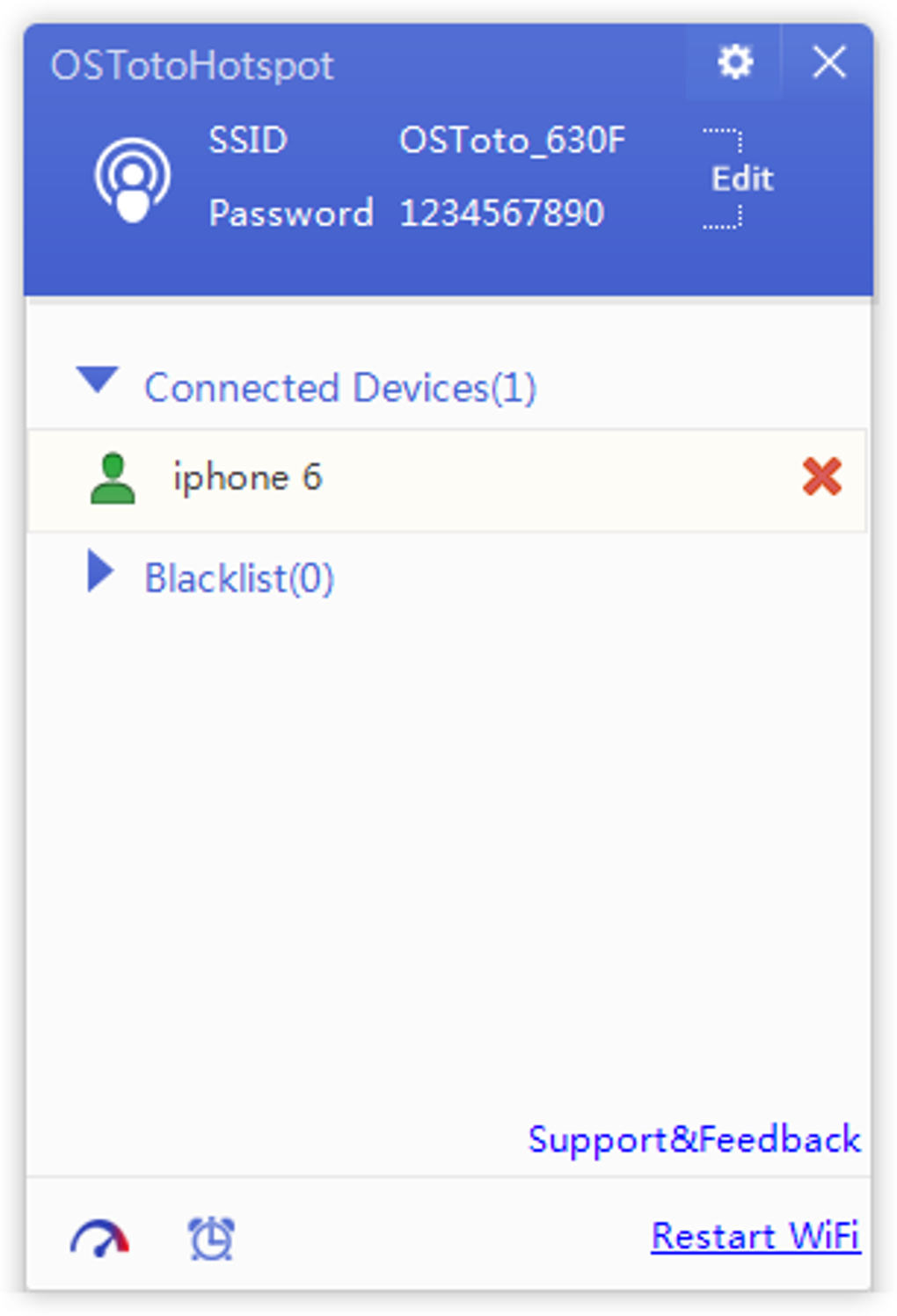
One of the most appealing aspects of OSToto Hotspot is its remarkably simple installation and intuitive interface. The software installs quickly and efficiently, requiring minimal user intervention. The clean, minimalist design prioritizes ease of use, focusing on essential features without overwhelming the user with complex settings. The primary screen displays all necessary options, with a small, unobtrusive pop-up menu providing additional customization choices. This streamlined approach makes OSToto Hotspot particularly well-suited for users with varying levels of technical expertise.
While the program requires a functioning wireless adapter to operate, once this prerequisite is met, the user experience is smooth and straightforward. The software clearly displays all connected devices, providing a real-time overview of the network. A valuable feature is the ability to blacklist specific devices, ensuring that only authorized users can access your shared internet connection. This control enhances both security and peace of mind. The program also features a “Timing Shutdown” function, allowing you to schedule the automatic shutdown of your computer after a predetermined period, further enhancing convenience and energy efficiency.
Security and Customization Features
While OSToto Hotspot shines in its simplicity and functionality, it’s important to acknowledge its limitations regarding security and customization. While a password is crucial for securing your network and preventing unauthorized access, the security options are relatively basic compared to more feature-rich alternatives. This lack of advanced security measures should be considered carefully, especially if you require robust protection for sensitive data.
Customization options are also somewhat limited. Users can adjust program behavior on startup, control notification preferences, and update the driver version, but extensive modifications are not possible. This minimalism, while contributing to ease of use, may disappoint users seeking granular control over network settings. The automatic minimization to the system tray, while intended to conserve screen real estate, cannot be disabled, which some users might find inconvenient. This presents a minor usability concern.
Performance and Functionality
Despite its simplicity, OSToto Hotspot effectively performs its primary function: creating a reliable and readily accessible WiFi hotspot. The software efficiently shares your internet connection, enabling multiple devices to simultaneously connect and access the internet. For users primarily needing a basic, dependable WiFi hotspot without the complexities of advanced configurations, OSToto Hotspot proves to be a highly effective tool. The ability to quickly share your internet connection removes the need for additional hardware or complex setup processes, making it particularly useful in situations where mobile data is expensive or unavailable, or when sharing a connection between devices is necessary.
Its performance remains consistent across various Windows operating systems, confirming its reliability and versatility. The seamless sharing of various internet connections (WiFi, LAN, etc.) highlights the flexibility of the application, further enhancing its utility and appeal. The software’s lightweight nature means it doesn’t significantly impact the performance of the host computer, ensuring smooth operation of other applications while the hotspot is active. This is especially beneficial for users with systems that have limited resources.
Comparison with Alternative Hotspot Software
Several alternative WiFi hotspot applications are available, each offering various strengths and weaknesses. Compared to these options, OSToto Hotspot stands out in its simplicity and ease of use. While some competitors may boast more extensive security features, advanced customization options, or specialized functionalities, OSToto Hotspot’s core focus on user-friendliness makes it a compelling choice for users prioritizing simplicity.
For users who require heightened security or extensive customization capabilities, more feature-rich alternatives may be more suitable. However, for the majority of users who simply need a reliable and easy-to-use WiFi hotspot, OSToto Hotspot delivers a highly effective solution without the complexities of more advanced software. This straightforward design makes it ideal for both technically proficient users and individuals with limited technical expertise.
Who Should Use OSToto Hotspot?
OSToto Hotspot caters to a broad audience, but is particularly well-suited for specific user groups:
- Beginners: The intuitive interface and straightforward setup process make it an ideal choice for individuals who are new to networking software or have limited technical knowledge.
- Casual Users: Users who need a basic WiFi hotspot for occasional use without the need for intricate configurations will find OSToto Hotspot highly convenient.
- Travelers: Sharing internet connection in locations with limited Wi-Fi access becomes effortless and cost-effective.
- Students/Educators: Sharing a single internet connection among several devices in classrooms or study groups becomes readily accessible.
- Small Businesses: (with caution): While the security features are basic, small businesses with limited networking needs might find the ease of use beneficial (though robust security options should be considered).
However, OSToto Hotspot may not be the ideal solution for all users:
- Users Requiring Advanced Security: The lack of extensive security features makes it unsuitable for scenarios requiring robust protection of sensitive data. Users with high security requirements should consider software with more advanced encryption and access controls.
- Users Needing Extensive Customization: If highly specific network configurations are necessary, OSToto Hotspot’s limited customization capabilities might be limiting.
Conclusion: A Simple, Effective Solution
OSToto Hotspot provides a simple, effective, and free solution for turning your Windows computer into a WiFi hotspot. Its ease of use, coupled with its reliable functionality, makes it an excellent option for users prioritizing simplicity and convenience. While it lacks the advanced features found in more sophisticated alternatives, OSToto Hotspot’s strengths lie in its user-friendly design and efficient performance, making it a valuable tool for a wide array of users who need a straightforward and hassle-free way to share their internet connection. The trade-off between simplicity and advanced features should be carefully considered to determine if OSToto Hotspot meets individual user needs. However, for users prioritizing ease of use above all else, OSToto Hotspot remains a strong contender in the free WiFi hotspot software market.
File Information
- License: “Free”
- Latest update: “August 27, 2024”
- Platform: “Windows”
- OS: “Windows 8”
- Language: “English”
- Downloads: “307.4K”
- Size: “4.67 MB”


