
8-Zip is a versatile file archiving utility designed for Windows 8 and later versions, offering a robust suite of features for compressing and decompressing files across a wide range of formats. This review delves into the capabilities, pros and cons, and overall user experience of this popular software. We’ll explore its functionality, compatibility, and how it stacks up against competitors in the crowded field of file compression tools.
Core Functionality and Supported Formats
8-Zip excels in its ability to handle a multitude of archive formats, addressing a key need for users dealing with various file types. At its core, it functions as an all-in-one solution for creating and extracting compressed files. Beyond the basic ZIP format, it seamlessly supports 7z, TAR, GZIP, BZIP2, and XZ for compression. On the decompression side, it extends its capabilities even further, allowing users to effortlessly unpack files from RAR, ZIP, 7z, ZipX, ISO, BZIP2, GZIP, TAR, ARJ, CAB, CHM, MSI, and NSIS archives. This broad support eliminates the need for multiple utilities, streamlining the file management process for users working with diverse file types. Furthermore, 8-Zip’s integration with various archive formats allows for encryption support in certain formats (specifically 7z and ZIP), providing an extra layer of security for sensitive data. This is a crucial feature for users who prioritize data protection.
The software’s ability to handle a large number of compressed formats speaks to its versatility and is a major advantage for users in various situations. For example, developers might work with many different archive types, especially when downloading project libraries and dependencies. Similarly, researchers working with large datasets may need to handle a variety of archive types. This wide format support eliminates the need for multiple archiving tools.
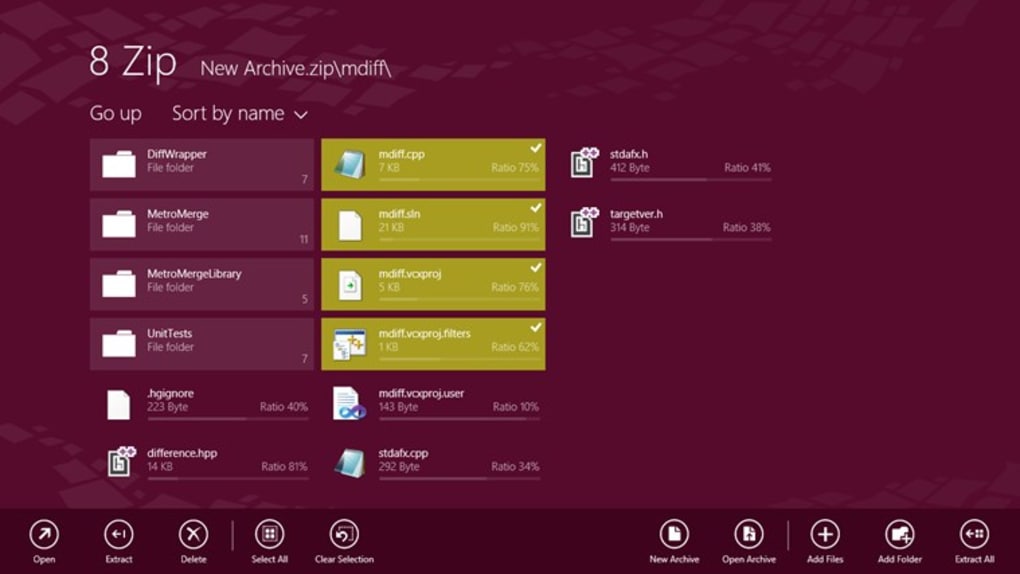
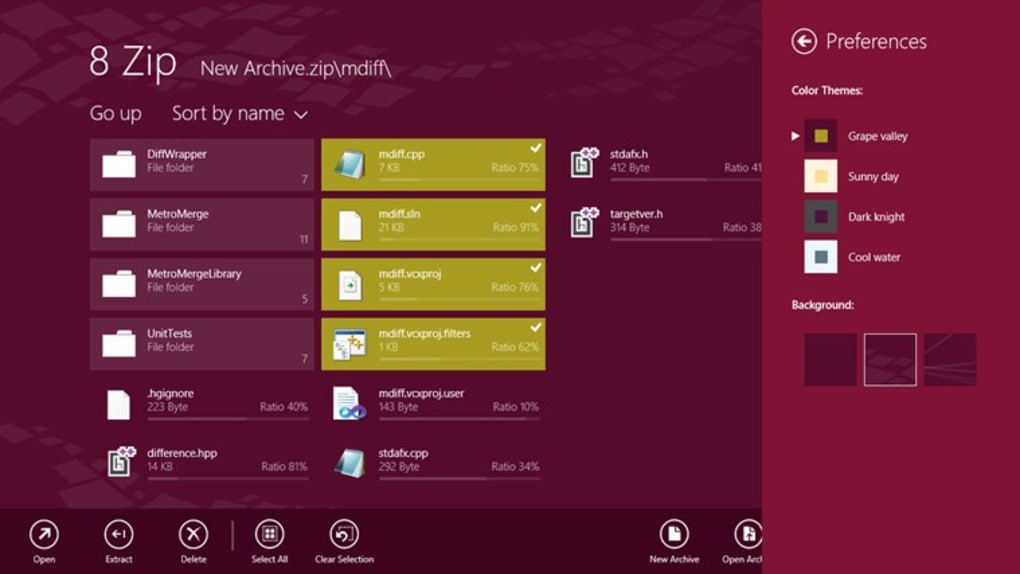
The user interface, while relatively straightforward, offers a degree of customization. Users can tweak the appearance by altering colors and backgrounds, allowing for personalization to match individual preferences. While not a game-changer, the customization options enhance the overall user experience by catering to a wide range of aesthetic preferences.
System Requirements and Compatibility
8-Zip boasts impressive compatibility, extending its reach beyond traditional desktop environments. Its support for personal computers, mobile phones, and even the HoloLens VR headset highlights its adaptability. This wide range of compatibility makes it a truly versatile tool, appealing to users across different platforms and devices. The ability to use the same license across multiple devices provides both convenience and economic value, eliminating the need for multiple purchases.
The software’s system requirements are relatively modest. Requiring approximately 42.06 megabytes of free RAM, it is unlikely to impose a significant burden on most modern systems. This low footprint is a crucial point for users with less powerful hardware, ensuring that the software remains accessible and usable across a wider range of devices, even those with limited resources.
Pros and Cons of 8-Zip
As with any software, 8-Zip presents both advantages and disadvantages. Its strengths lie in its extensive format support, cross-platform compatibility (with a single license), and ease of use. These factors combine to make it a highly attractive option for users needing a robust and versatile file archiving tool. The multilingual support, encompassing more than 25 languages, is another testament to its inclusivity and accessibility to a global user base. The addition of features like Cortana and Continuum integration (where applicable) shows the effort to integrate with modern Windows features.
However, certain shortcomings are worth noting. The absence of right-click options for file extraction could be inconvenient for users accustomed to this workflow. This limitation can lead to additional steps being needed for extraction, potentially slowing down workflow for some users. Additionally, price discounts are reported to be limited to certain Windows versions, limiting potential savings for some users. While not dealbreakers for many, these aspects can impact user experience and affordability, depending on individual circumstances.
Comparison with Other File Compression Utilities
8-Zip stands alongside other popular file compression utilities like WinRAR, 7-Zip, and WinZip. While offering overlapping functionality, 8-Zip differentiates itself through its combination of extensive format support and cross-platform licensing. WinRAR and 7-Zip, for instance, are also known for their robust capabilities, but may lack the cross-device licensing feature offered by 8-Zip. WinZip, on the other hand, focuses more on user-friendly design, but might not offer the same breadth of format support as 8-Zip.
The choice between these tools often boils down to individual priorities. Users prioritizing a wide range of supported formats and cross-device compatibility may find 8-Zip to be the most suitable choice. Users seeking a simpler, more intuitive interface might prefer WinZip, whereas those focused primarily on compression efficiency may lean towards 7-Zip or WinRAR.
User Reviews and Feedback
User reviews generally portray 8-Zip positively, with many praising its efficiency and wide format compatibility. Frequent positive comments emphasize its convenient workflow and intuitive interface, highlighting its ease of use even for less tech-savvy users. The ability to function seamlessly on various devices, such as Surface tablets, further solidifies its reputation for user-friendliness and versatility across platforms.
However, some criticism points towards the lack of a background processing mode, a feature available in competing software. This lack of background functionality can be a hindrance for users who require simultaneous archiving and other tasks. The occasional feedback regarding issues with specific file types underscores the importance of regular updates and ongoing software maintenance.
Conclusion
8-Zip presents itself as a strong contender in the world of file compression utilities. Its robust feature set, encompassing wide format support, cross-platform compatibility, and a relatively user-friendly interface, makes it a valuable tool for various user needs. While minor shortcomings like the absence of right-click extraction and certain Windows-version-specific discounts exist, these are not necessarily deal-breakers for most users.
The software’s strong points, such as its extensive format compatibility and single-license cross-device usage, provide significant benefits that outweigh the minor drawbacks for many. Therefore, 8-Zip remains a highly competitive option in the crowded market of file compression and archiving software, offering a compelling balance of features and usability. Its suitability for individual users will depend on specific needs and preferences, but overall, 8-Zip stands as a worthy contender in this domain.
File Information
- License: “Trial version”
- Version: “18.03.2016”
- Latest update: “November 24, 2021”
- Platform: “Windows”
- OS: “Windows 8.1”
- Language: “English”
- Downloads: “100.6K”


