
AAStore is a utility application designed to simplify the process of installing Android Auto apps directly onto Android mobile devices. Developed by croccio, this third-party app acts as an alternative to the traditional method of installing Android Auto applications, which typically requires a computer connection. While offering a convenient solution for many users, AAStore also comes with limitations that potential users should be aware of before downloading and using the application. This comprehensive review will explore the functionality, advantages, disadvantages, and overall utility of AAStore, providing a thorough understanding of its capabilities and limitations.
Understanding AAStore and its Purpose
Android Auto is a specialized version of the Android operating system specifically optimized for in-car infotainment systems. This system allows for the integration of various applications designed for safer and more convenient usage while driving. These apps range from navigation and music streaming services (like Spotify) to communication tools and more. However, the standard installation process for Android Auto apps necessitates the use of a computer, a potentially cumbersome and inconvenient procedure for many users. This is where AAStore steps in, offering a mobile-first solution.
AAStore essentially functions as a miniature app store specifically curated for Android Auto applications. Unlike the Google Play Store, which hosts a vast library of diverse applications, AAStore focuses exclusively on apps designed to be compatible with Android Auto. Users can browse through the app catalog, view descriptions, and initiate the download and installation process directly from their smartphones or tablets. This user-friendly interface mirrors the simplicity and intuitiveness of other app stores, making it easy for even technically less-proficient users to navigate and install applications.
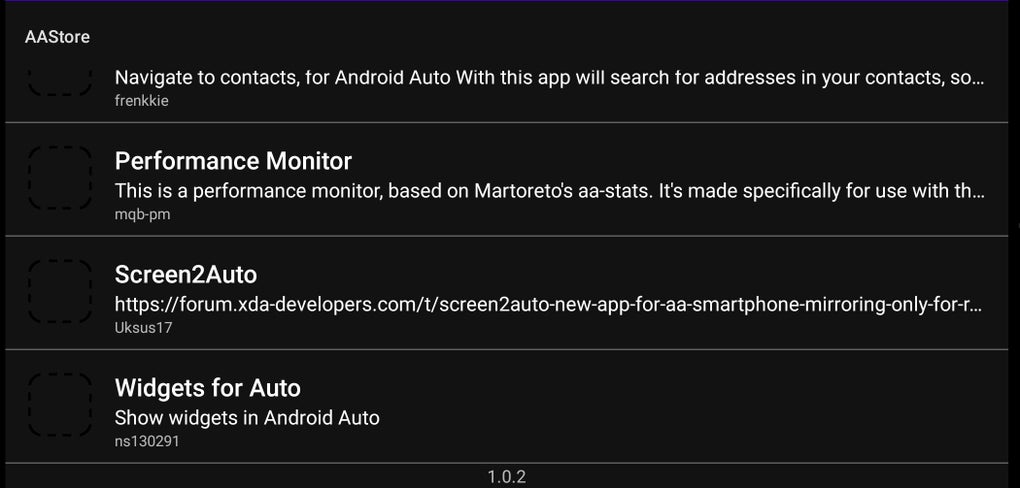
The core benefit of AAStore lies in its ability to circumvent the need for a computer during the installation process. This convenience is particularly appealing for individuals who may not have easy access to a computer or prefer a streamlined, mobile-centric approach to managing their applications. The app boasts a clean and functional design, prioritising ease of use and intuitive navigation. Furthermore, it supports both rooted and non-rooted Android devices, expanding its accessibility to a wider range of users. The developers claim to offer unlimited downloads, eliminating potential restrictions on the number of apps users can install.
The Mechanics of AAStore: Installation and Usage
Using AAStore is remarkably straightforward. Once installed on your Android device, users can launch the app and explore the catalog of available Android Auto applications. Each application listing typically includes a brief description, allowing users to gain an understanding of its functionality before installation. The download and installation process is similar to that of the Google Play Store, requiring only a few taps to complete. AAStore handles the download and installation seamlessly, notifying users upon successful completion.
While the app strives for ease of use, it’s important to note that not all Android applications are compatible with AAStore. The app’s primary function is to manage Android Auto apps, meaning it will not support applications not designed for this specific platform. Attempting to install general Android applications through AAStore will result in failure. This limitation significantly restricts the app’s overall functionality, confining its use to a specific subset of available applications.
Advantages and Disadvantages of Using AAStore
AAStore presents several compelling advantages that make it an attractive option for some Android users:
Pros:
- Convenience: The most significant advantage is the elimination of the need for a computer during the installation process. This greatly simplifies the procedure, making it accessible to a wider range of users.
- Ease of Use: The app’s interface is intuitive and easy to navigate, mimicking the user-friendly experience of established app stores.
- Unlimited Downloads: AAStore allows users to download and install an unlimited number of compatible Android Auto applications.
- Root and Non-Root Support: Compatibility with both rooted and non-rooted Android devices expands its potential user base.
- Mobile-First Approach: The entire process takes place on the mobile device, eliminating the need for any external equipment.
Cons:
- Limited App Selection: AAStore only supports applications designed for Android Auto, significantly limiting its app catalog compared to the Google Play Store or other comprehensive app markets.
- Android Auto Version Compatibility: A critical limitation is the incompatibility with newer versions of Android Auto. Reports indicate that AAStore may not function correctly on Android Auto version 6.4 and above, requiring users to downgrade their operating system to use the app. This limitation is a significant drawback, potentially rendering the app unusable for users who rely on the latest Android Auto features.
- Potential Security Risks: As with any third-party application, there are inherent security risks involved. While the developers strive for security, using an unofficial app store introduces the possibility of encountering malicious software or compromising the security of your device. This risk is amplified by the fact that AAStore operates outside of the official Google Play Store’s rigorous security checks.
- No User Reviews: The lack of user reviews on the app store page makes it harder for potential users to gauge the experience and reliability of the application. This lack of feedback limits the opportunity for informed decision-making by users.
AAStore Alternatives and Conclusion
While AAStore offers a convenient alternative for installing Android Auto apps, users should carefully weigh the advantages and disadvantages before opting for this application. The limited app selection and incompatibility with newer Android Auto versions pose significant limitations. Users should explore alternative methods, such as using a computer to install applications directly, before resorting to a third-party solution like AAStore. The potential security risks associated with using third-party app stores should also be considered.
Several alternative methods exist for installing Android Auto applications, including using the official Android Auto app and connecting to a computer. These methods may require more technical expertise or access to a computer but offer a safer and more reliable way to manage Android Auto apps. A thorough investigation into these alternatives is strongly recommended before relying solely on AAStore.
Ultimately, AAStore caters to a specific niche of Android users who prioritize the convenience of installing Android Auto apps directly from their mobile device despite the inherent limitations and potential risks. However, given the considerable limitations, it is crucial to weigh the pros and cons carefully and consider safer alternatives before using this application. The decision to use AAStore should be made with a full understanding of its capabilities and limitations, along with a cautious assessment of the potential security risks involved.
File Information
- License: “Free”
- Latest update: “November 7, 2023”
- Platform: “Android”
- OS: “Android 8.0”
- Language: “English”
- Downloads: “411.2K”
- Size: “10.23 MB”
- Download Options: “APK, Google Play”
- Filename: “aastore.2.1.apk”


