
Acrylic WiFi Home is a powerful and versatile network analysis tool designed for Windows. While its interface might appear dated to some, its capabilities significantly outweigh its aesthetic shortcomings, providing users with a comprehensive suite of features to monitor and manage their WiFi networks. This in-depth review explores its functionality, strengths, and weaknesses, providing a clear picture of whether Acrylic WiFi Home is the right choice for your network monitoring needs.
Understanding Acrylic WiFi Home’s Core Functionality
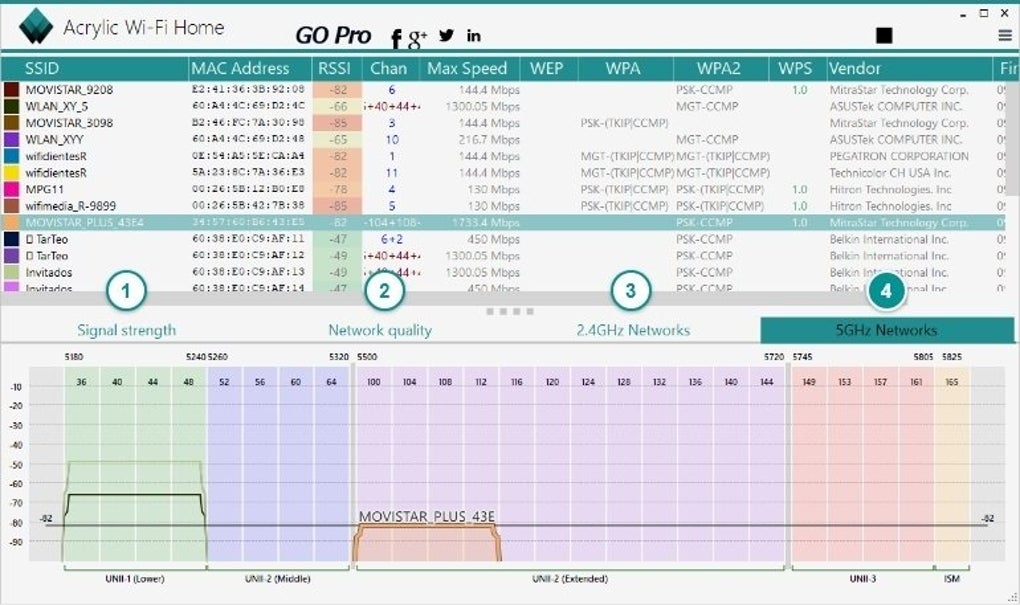
At its heart, Acrylic WiFi Home functions as a robust WiFi scanner, capable of detecting and displaying detailed information about all wireless networks within its range. This includes crucial data points such as SSID (Service Set Identifier), BSSID (Basic Service Set Identifier – the unique MAC address of the access point), vendor type, RSSI (Received Signal Strength Indicator), channel usage, and supported 802.11 standards (b, g, n, ac, etc.). This information is presented in a clear, tabular format, allowing users to easily identify potential issues and opportunities for optimization.
Beyond basic network discovery, Acrylic WiFi Home excels in its ability to visualize network activity in real-time. The program displays signal strength graphically, allowing for quick identification of areas with weak signals or significant interference. This visual representation is invaluable for troubleshooting connectivity problems and optimizing network placement for improved coverage and performance. Furthermore, the channel scanner helps users identify optimal channels with minimal overlap, leading to improved speeds and reduced congestion. By analyzing channel usage, users can strategically configure their own access point to avoid interference and maximize throughput.
The ability to detect hidden networks is a standout feature. Unlike many basic WiFi scanners that only detect networks broadcasting their SSID, Acrylic WiFi Home utilizes monitor mode to uncover networks deliberately hidden from general discovery. This is crucial for detecting potential security vulnerabilities or unauthorized networks operating within the user’s vicinity. The detail provided extends beyond simply identifying hidden networks; it also provides comprehensive information on their signal strength, security protocols, and connected devices. This capability is a significant advantage for both security professionals and individuals looking to gain a more complete understanding of their wireless environment.
Advanced Features and Capabilities
Acrylic WiFi Home goes beyond the basics, offering several advanced features that differentiate it from simpler WiFi scanners. One notable feature is its integration with Wireshark, a widely used network protocol analyzer. This integration enables the capture and analysis of WLAN packets, providing a granular view of network traffic. This level of detail can be invaluable for troubleshooting complex network problems or identifying malicious activity. Analyzing packet captures allows for deep insights into network behaviors, revealing potential vulnerabilities or performance bottlenecks that might otherwise go unnoticed.
The software’s ability to obtain generic WiFi passwords, though limited in scope, warrants attention. It’s crucial to emphasize that this functionality is primarily effective against networks employing default or easily guessable passwords. Acrylic WiFi Home doesn’t brute-force passwords; instead, it leverages plugins to check for known vulnerabilities and weak passwords. Ethical considerations must be paramount when using this feature. Using this functionality against networks without proper authorization is illegal and unethical. The feature is best utilized for educational purposes or in scenarios where the user has explicit permission to access the network.
Acrylic WiFi Home’s Strengths and Weaknesses
Acrylic WiFi Home boasts several compelling advantages. Its ease of use, even for novice users, is a significant strength. The interface, while dated, is intuitive enough to navigate without extensive technical expertise. High hardware compatibility is another significant benefit, ensuring compatibility with a broad range of wireless adapters and network interfaces. The program’s real-time monitoring capabilities provide up-to-the-minute insights into network activity, facilitating timely interventions to address performance issues or security threats. The detailed reporting and visualization of network data makes identifying problems and finding solutions a more efficient process.
Despite its strengths, Acrylic WiFi Home isn’t without its weaknesses. The most prominent is its outdated and clunky interface. While functionality is paramount, an improved user interface would significantly enhance the overall user experience. The quality of the graphical representations can also be inconsistent, sometimes lacking the clarity and precision that more modern tools might provide. Finally, the automatic update system can be disruptive, occasionally interrupting ongoing scans or analysis.
Should You Download Acrylic WiFi Home?
The decision to download and use Acrylic WiFi Home hinges on your specific needs and technical proficiency. If you require a highly sophisticated and visually appealing network analysis tool with advanced features, you might find other, more modern options more suitable. However, if you prioritize robust functionality and detailed data at an accessible price point (it’s free!), Acrylic WiFi Home remains a compelling choice.
Its capabilities, especially for identifying hidden networks and analyzing network traffic via Wireshark integration, make it a powerful tool for security professionals and advanced users. The ability to troubleshoot network issues, identify overlapping channels, and monitor real-time activity provides considerable value for both personal and professional use. The limitation of the password-cracking feature to easily guessable passwords and its ethical implications should be carefully considered.
In conclusion, Acrylic WiFi Home is a functional and informative tool for anyone wanting to gain a deeper understanding of their wireless network. While its interface could benefit from a modernization, its core functionality remains impressive, especially considering its free price tag. Weigh the pros and cons, and consider your specific needs before making a decision. Remember always to use this software responsibly and ethically, adhering to all applicable laws and regulations.
File Information
- License: “Free”
- Latest update: “May 23, 2023”
- Platform: “Windows”
- OS: “Windows 7”
- Language: “English”
- Downloads: “40.7K”
- Size: “4.42 MB”


