
Actionaz is a powerful and versatile task automation tool designed to streamline workflows and boost productivity. Unlike many automation solutions that require extensive programming knowledge, Actionaz offers a user-friendly interface that allows users to create and execute complex action lists, or scripts, without writing a single line of code. This intuitive drag-and-drop functionality makes it accessible to both novice and experienced users. For those with programming expertise, however, Actionaz opens up a world of advanced customization options through its support for JavaScript (EcmaScript). This blend of accessibility and extensibility makes Actionaz a truly unique and powerful tool in the field of task automation.
Intuitive Interface and Drag-and-Drop Functionality
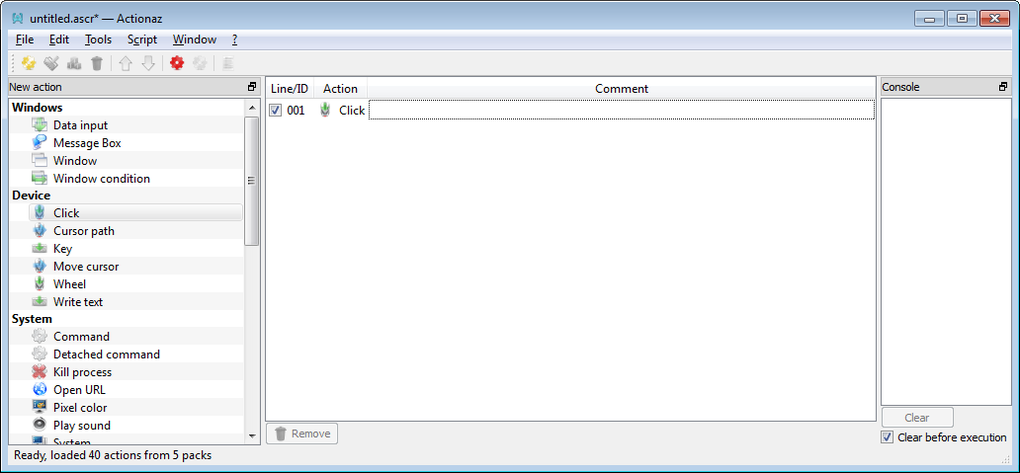
The core strength of Actionaz lies in its user-friendly interface. The program’s design prioritizes simplicity and ease of use, allowing users to create sophisticated automation scripts with minimal effort. The drag-and-drop interface forms the backbone of this simplicity. Users can visually construct their action lists by dragging pre-defined actions onto a workspace, arranging them in the desired sequence, and setting parameters as needed. This visual approach eliminates the need for complex syntax and coding, significantly lowering the barrier to entry for users unfamiliar with programming languages. The system is highly intuitive; users can quickly grasp the fundamentals and begin automating tasks within minutes of launching the application.
This visual approach is particularly beneficial for users who want to automate repetitive tasks without delving into the intricacies of programming. Tasks such as file management, data processing, web browsing, and application launching can be readily automated using Actionaz’s drag-and-drop functionality. The pre-defined actions offer a wide range of capabilities, covering many common automation needs. This combination of a visual interface and pre-built actions allows for rapid prototyping and implementation of automation scripts, making Actionaz an efficient tool for increasing productivity.
Extending Functionality with JavaScript
While Actionaz’s drag-and-drop interface provides a powerful and accessible way to automate tasks, its true potential is unlocked through the integration of JavaScript. For advanced users and developers, the ability to extend the software’s functionality using JavaScript (EcmaScript) offers a level of customization rarely found in other task automation tools. This opens up a vast array of possibilities, allowing users to create highly specific and tailored automation solutions.
The integration of JavaScript provides a seamless way to augment the pre-defined actions with custom-built scripts. Users can create completely new actions, modify existing ones, or integrate with external services and APIs. This level of customization is invaluable for automating tasks that require complex logic or interaction with specialized software or online services. The power of JavaScript, combined with the ease of use of Actionaz’s interface, creates a robust and adaptable system capable of handling an extremely wide range of automation challenges.
This integration allows for seamless interoperability with other technologies and services. For example, users can create scripts that interact with web APIs to retrieve and process data, automate social media interactions, or control external devices. This extensibility dramatically expands the scope of tasks that can be automated, making Actionaz a suitable tool for a broad range of users and applications.
Cross-Platform Compatibility and Open Source Nature
Actionaz stands out from many other task automation tools due to its commitment to cross-platform compatibility and open-source principles. The software is designed to run on both Windows and GNU/Linux operating systems. Binaries are readily available for various architectures (32-bit and 64-bit), ensuring broad compatibility across different hardware platforms. This commitment to cross-platform functionality makes it a valuable asset for users operating in heterogeneous environments, as it avoids the limitations and compatibility issues often associated with software confined to a single operating system.
This commitment to cross-platform compatibility is further enhanced by the software’s development in C++ and its use of the Qt framework. This combination ensures that Actionaz can run smoothly and consistently across different operating systems without requiring significant modifications. It also increases portability; users can easily move their automation scripts and configurations between different systems without compatibility issues.
Furthermore, Actionaz’s underlying development philosophy is rooted in open-source principles. This fosters transparency and allows for community contributions to the project’s ongoing development. This approach ensures the software’s long-term viability and promotes collaboration amongst users and developers. The open-source nature also fosters a sense of community and collaborative development, encouraging users to contribute to its evolution and contribute code, thereby enriching the functionality of the application.
Actionaz: A Comparison with Alternatives
While the market offers several task automation tools, Actionaz distinguishes itself through its unique blend of accessibility and extensibility. Other tools may focus primarily on ease of use, often lacking the sophisticated capabilities that come with scripting languages. Conversely, some automation tools are heavily reliant on complex scripting, which might be a significant barrier for non-programmers. Actionaz finds a sweet spot, offering a user-friendly drag-and-drop interface for quick automation and providing powerful scripting options for advanced users.
Consider the example of Freebyte Task Scheduler, a popular alternative. Freebyte focuses primarily on scheduling tasks, lacking the extensive action library and scripting capabilities of Actionaz. While effective for basic scheduling needs, it pales in comparison to Actionaz’s versatility and customizable features. Similarly, other tools, like Macro Express, focus heavily on macro recording, but they lack the comprehensive visual interface and the flexible JavaScript integration offered by Actionaz. AutoIT, another popular alternative, relies heavily on scripting, potentially making it inaccessible to users without programming experience.
Actionaz stands apart by bridging the gap between user-friendly interfaces and powerful customization options. Its drag-and-drop interface caters to users of all skill levels, while its JavaScript integration empowers more experienced users to develop intricate and customized automation solutions. This combination of accessibility and extensibility positions Actionaz as a leading choice for individuals and organizations seeking a comprehensive task automation solution. The combination of visual tools for simpler tasks and JavaScript integration for complex ones ensures Actionaz serves a broader spectrum of users.
In conclusion, Actionaz is more than just a task automation tool; it’s a flexible and powerful platform for streamlining workflows and boosting productivity. Its intuitive interface, drag-and-drop functionality, JavaScript integration, and commitment to cross-platform compatibility make it a unique and valuable asset for individuals and organizations across diverse computing environments. Whether you are a novice user looking to automate basic tasks or an experienced programmer seeking advanced customization options, Actionaz provides a comprehensive solution that effectively balances ease of use with powerful functionality.
File Information
- License: “Free”
- Latest update: “June 30, 2025”
- Platform: “Windows”
- OS: “Windows 2003”
- Language: “English”
- Downloads: “9.3K”
- Size: “58.76 MB”


