
The Active Jellyfish Screensaver offers a tranquil escape from the digital world, immersing users in a mesmerizing underwater scene populated by gracefully moving jellyfish. This screensaver, available for Windows operating systems, provides a visually appealing and relaxing alternative to the standard desktop display. While simple in its core functionality, its realistic 3D rendering and calming aesthetic have earned it a dedicated following since its release. This article delves into the features, history, and user experience associated with the Active Jellyfish Screensaver.
A Glimpse into the Underwater World
The Active Jellyfish Screensaver stands out for its straightforward yet effective approach to screen-saver design. It forgoes complex animations and interactive elements in favor of a serene, realistic depiction of jellyfish drifting in a three-dimensional environment. The jellyfish themselves are rendered with a high degree of detail, exhibiting realistic movements and subtle variations in color and texture. The background environment, typically a dark blue or black, subtly enhances the jellyfish’s luminescence, creating a captivating visual effect. The absence of jarring transitions or overly flashy elements contributes to the overall sense of calm and tranquility. This simple elegance is its strength, appealing to those seeking a visually pleasing and unobtrusive screensaver that won’t distract from other tasks.
The program’s design prioritizes performance and efficiency. The relatively small file size ensures minimal impact on system resources, making it suitable for computers with limited processing power or older operating systems. The smooth, fluid animation of the jellyfish further contributes to this smooth performance. The lack of complex features means that the screensaver demands minimal processing power, making it suitable for a broad range of machines.
Technical Specifications and System Requirements
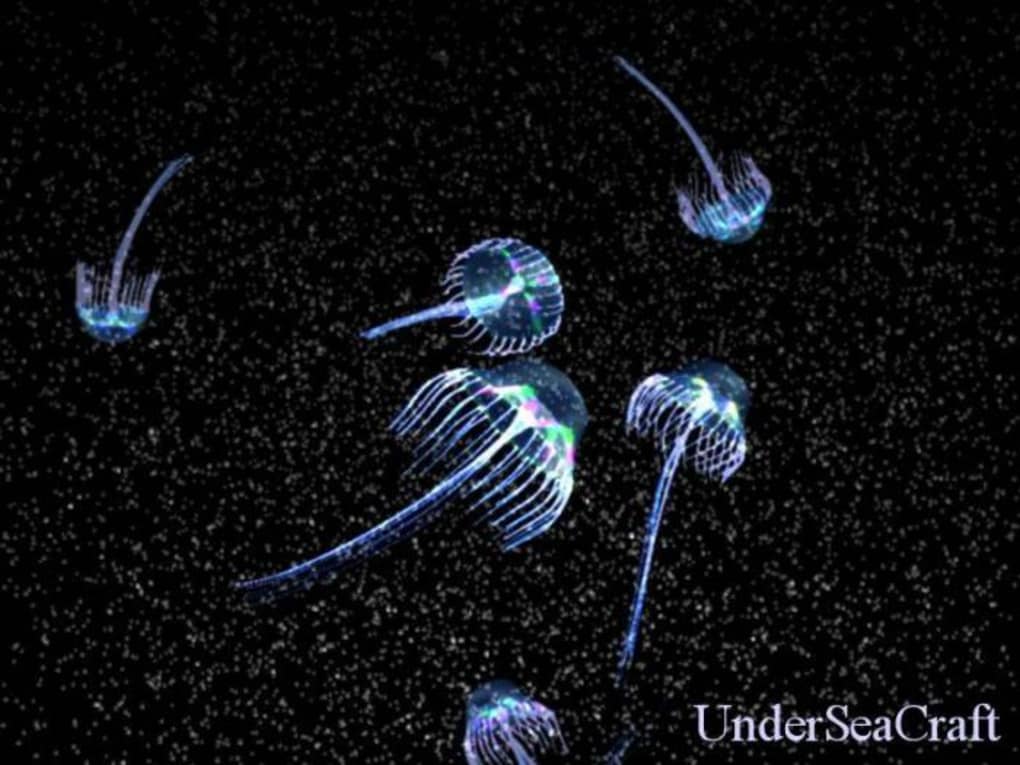
Active Jellyfish Screensaver has a remarkably low system footprint. Its small file size (approximately 1.62 MB) minimizes the impact on storage space, a benefit particularly appreciated by users with older systems or limited hard drive capacity. The program’s modest resource demands ensure compatibility with a wide range of Windows operating systems, extending back to Windows 98. This broad compatibility demonstrates the developers’ focus on accessibility and user-friendliness. The program’s simplicity allows it to run smoothly even on older hardware configurations.
The screensaver’s core functionality relies on basic 3D rendering techniques, rendering complex calculations unnecessary. This design choice not only contributes to efficient resource usage but also ensures compatibility with older hardware. The program is designed for easy installation and requires minimal user intervention beyond the standard screensaver setup procedure in Windows. The uncluttered interface and lack of complicated settings make the setup process straightforward, even for users unfamiliar with computer configuration.
User Experience and Reception
The Active Jellyfish Screensaver’s primary strength lies in its ability to create a relaxing and visually engaging experience. User reviews, though limited in number, consistently highlight the screensaver’s calming effect and its aesthetically pleasing underwater visuals. The simplicity of the screensaver’s design minimizes distractions and allows users to passively enjoy the graceful movements of the jellyfish. The absence of intrusive elements or annoying sounds contributes to its calming nature. The screensaver successfully achieves its goal of providing a soothing and visually appealing break from the typical desktop environment. The immersive nature of the 3D visuals helps users momentarily escape the digital workspace and relax.
Although comprehensive user reviews are scarce, the lack of negative feedback suggests a largely positive user experience. The uncomplicated functionality avoids potential user frustration or technical difficulties. The absence of complex settings or advanced features reduces the likelihood of errors and ensures a user-friendly experience.
History and Development
The Active Jellyfish Screensaver has a relatively long history, first appearing in 2006. This longevity speaks to the enduring appeal of its simple yet effective design. The program has seen a relatively stable development cycle. The latest update, released in March 2017, likely focused on bug fixes and compatibility improvements rather than significant feature additions. This suggests the developers’ focus on maintaining the existing functionality and ensuring smooth operation rather than actively developing new features. The consistent availability and continued downloads indicate a sustained level of user interest. This stable approach highlights a dedication to providing a reliable and consistent product.
The relatively infrequent updates also reflect the simplicity of the screensaver’s design. With no complex features to update or maintain, the developers likely prioritized stability and compatibility over adding new functionalities. The lack of significant feature changes throughout its lifespan suggests a stable and well-polished product.
Active Jellyfish Screensaver: A Timeless Classic?
In a world of increasingly complex and feature-rich software, the Active Jellyfish Screensaver offers a refreshing counterpoint. Its simple design, coupled with its visually pleasing underwater scenes, provides a soothing escape from the digital world. The longevity of the screensaver, along with its consistent downloads, speaks to its enduring appeal. While lacking in sophisticated interactive features, its core functionality—providing a calming and visually engaging screensaver—is effectively executed.
For those seeking a simple yet effective screensaver that provides a tranquil respite, the Active Jellyfish Screensaver remains a compelling choice. Its low system requirements, ease of use, and calming visuals make it a suitable option for a broad range of users and systems. The understated elegance and enduring popularity of this screensaver solidify its place as a testament to the effectiveness of simplicity in design. While the absence of extensive user reviews may limit our understanding of its widespread impact, the consistent downloads and relatively long lifespan suggest that the Active Jellyfish Screensaver continues to resonate with users who value a peaceful and visually calming experience. Its enduring appeal lies in its ability to deliver a simple but elegant visual experience, promoting relaxation and providing a refreshing contrast to the often demanding digital environment.
File Information
- License: “Trial version”
- Version: “1.0”
- Latest update: “March 9, 2017”
- Platform: “Windows”
- OS: “Windows ME”
- Language: “English”
- Downloads: “4.3K”
- Size: “1.62 MB”


