
Activity Launcher is a free utility application for Android devices developed by Adam Szalkowski. Unlike typical app launchers that focus on providing visually appealing and customizable home screens, Activity Launcher serves a more specialized purpose: granting users direct access to hidden system processes and activities within their installed applications. This makes it a powerful tool for advanced users and developers, but its simplicity and lack of broad appeal mean it may not be suitable for everyone. This in-depth analysis explores the functionality, advantages, and limitations of Activity Launcher, comparing it to other launchers and examining its place within the Android ecosystem.
Understanding Activity Launcher’s Core Function
At its core, Activity Launcher’s function is to create shortcuts for any application and its internal components – even those not directly exposed through the app’s user interface. Standard app launchers provide shortcuts to the main entry points of applications. Activity Launcher goes a step further, allowing users to create shortcuts to specific activities, services, or even hidden configuration menus within those applications. This opens up a world of possibilities for users who need to frequently access less-accessible parts of their apps. Consider the scenario of accessing a rarely used setting buried deep within an app’s menu structure. With Activity Launcher, this setting can be assigned its own shortcut, eliminating the need to navigate multiple layers of menus each time access is required.
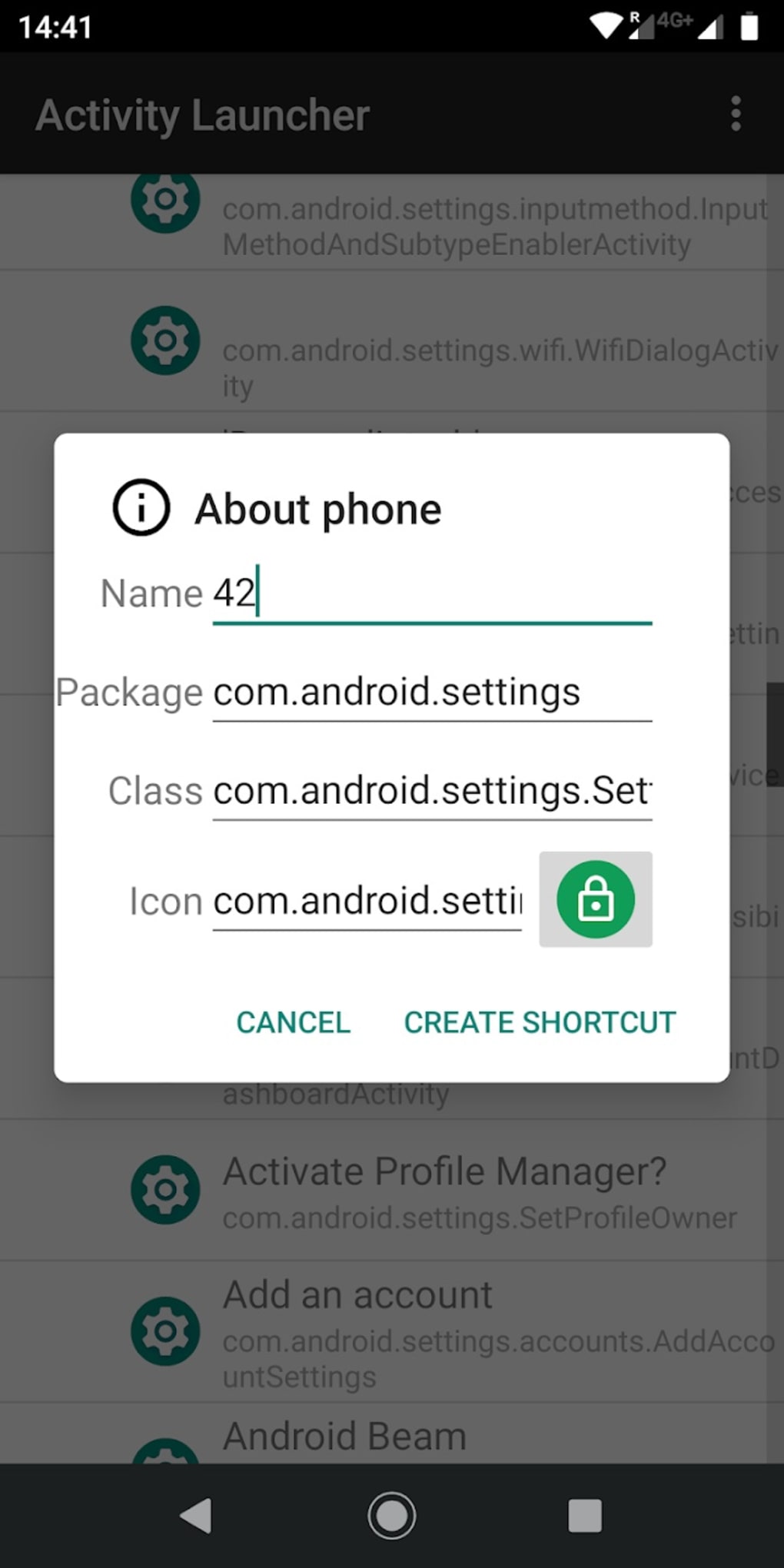
This functionality extends beyond simply creating shortcuts. The app allows users to customize these shortcuts with descriptive names and custom icons, making them easily identifiable within the launcher. This level of customization ensures that users can quickly identify and launch the specific activity they need without confusion.
The ability to access hidden activities also has implications for developers. While not the primary intended use case, Activity Launcher can be a useful tool for developers during the debugging process. It allows for quick and easy access to various components of an application, facilitating testing and troubleshooting.
Comparing Activity Launcher to Other Launchers
Compared to mainstream launchers like Nova Launcher, Action Launcher, or Microsoft Launcher, Activity Launcher adopts a remarkably minimalist approach. These popular launchers focus on extensive customization options, providing users with the ability to radically alter the look and feel of their home screen. They offer a vast array of widgets, themes, gestures, and advanced features. Activity Launcher, in contrast, prioritizes functionality over aesthetics. It lacks the extensive customization features found in its more visually-oriented counterparts.
It’s crucial to understand that Activity Launcher isn’t a replacement for a standard home screen launcher. It’s a supplemental tool, designed to work alongside a primary launcher. While it can technically launch any application, its true value lies in its ability to provide access to otherwise inaccessible components within those applications. Therefore, directly comparing it to other launchers on the basis of features like widget support or icon pack compatibility is inherently inaccurate.
Advantages and Use Cases of Activity Launcher
Activity Launcher’s strengths lie in its specific niche. Its advantages are most evident when dealing with specific scenarios where quick access to hidden functionalities is paramount. These include:
-
System Administration: Accessing advanced system settings or hidden diagnostic tools can often be cumbersome. Activity Launcher streamlines this process by creating easily accessible shortcuts. This is particularly useful for users who regularly perform system-level tasks or need to troubleshoot issues.
-
Developer Tools: As previously mentioned, it offers a handy way for developers to test and debug applications by providing rapid access to internal components. This can significantly speed up the development cycle.
-
Productivity Enhancement: For users who frequently access specific functionalities within particular applications, Activity Launcher can significantly boost productivity. By creating shortcuts to frequently used hidden settings or tasks, users can reduce the time spent navigating menus.
-
Accessibility Improvements: In some instances, Activity Launcher might even indirectly improve accessibility. For users with motor impairments, navigating complex menu structures can be challenging. Direct shortcuts to crucial functions can significantly enhance usability.
- Specialized Applications: Certain applications may contain features or options that are not prominently displayed in the main user interface. Activity Launcher empowers users to discover and utilize these often-overlooked functionalities.
Limitations and Considerations
Despite its usefulness in specific contexts, Activity Launcher also possesses certain limitations that should be considered:
-
Limited Appeal: The app’s highly specialized nature means that it won’t be useful to the average Android user. Its functionality is not immediately obvious or beneficial to those who primarily use their phones for basic tasks.
-
Steep Learning Curve: Understanding how to effectively utilize Activity Launcher requires some technical knowledge. Users need to be comfortable with the concept of Android activities and processes to fully exploit its potential. Simply launching the app won’t automatically reveal its hidden powers.
-
Potential for Errors: Incorrectly using Activity Launcher to access or modify system processes could lead to unintended consequences. Users need to exercise caution and thoroughly understand the implications of their actions.
-
Lack of Visual Customization: Unlike mainstream launchers, Activity Launcher doesn’t offer extensive customization features. While users can customize shortcut names and icons, they lack broader options for visual personalization.
-
Dependence on App Structure: The effectiveness of Activity Launcher relies heavily on the internal structure of the applications it interacts with. If an app is poorly designed or lacks well-defined activities, the usefulness of the tool is diminished.
Conclusion: Activity Launcher’s Niche Role
Activity Launcher occupies a unique niche within the Android landscape. It’s not a replacement for a general-purpose launcher; rather, it’s a specialized tool designed to cater to a specific user base – those who require quick and easy access to hidden or less-accessible functionalities within their applications. Its simplicity and direct approach are its strengths, but its limited scope and inherent technical nature mean it will not appeal to all users.
For developers, power users, or those who frequently need to access buried settings within their apps, Activity Launcher offers a valuable service. However, for the average Android user seeking a visually stunning and highly customizable launcher, this app likely won’t meet their needs. The decision of whether or not to use Activity Launcher rests entirely on the individual user’s needs and technical proficiency. If the ability to directly access hidden application activities is a priority, then Activity Launcher warrants a closer look. Otherwise, it might be best to explore more user-friendly and visually appealing alternatives.
File Information
- License: “Free”
- Latest update: “June 12, 2025”
- Platform: “Android”
- OS: “Android 13.0”
- Language: “English”
- Downloads: “487K”
- Download Options: “Google Play”


