
ADB AppControl is a free Windows program offering advanced control over your Android device through the Android Debug Bridge (ADB) protocol. This powerful tool goes beyond the limitations of standard Android management, enabling users to perform actions not typically accessible through the device’s built-in settings. By leveraging the ADB protocol, ADB AppControl provides a convenient interface for a wide range of tasks, significantly enhancing the user experience and offering greater flexibility in customizing their Android device.
Accessing the Power of ADB: Unlocking Android’s Hidden Features
The Android Debug Bridge (ADB) is a versatile command-line tool that forms the backbone of ADB AppControl’s functionality. It acts as a bridge between your Windows computer and your Android device, allowing for direct communication and execution of commands. While ADB itself is a powerful tool, its command-line interface can be daunting for less technically inclined users. ADB AppControl simplifies this process by providing a user-friendly graphical interface, making the power of ADB accessible to everyone.
This intuitive interface allows users to interact with their Android device without the need to navigate complex command-line instructions. ADB AppControl streamlines the process, allowing for simple point-and-click management of applications and settings. The result is a more efficient and straightforward method for interacting with your Android device’s core functionalities.
Core Functionality: Managing Your Android Applications with Ease
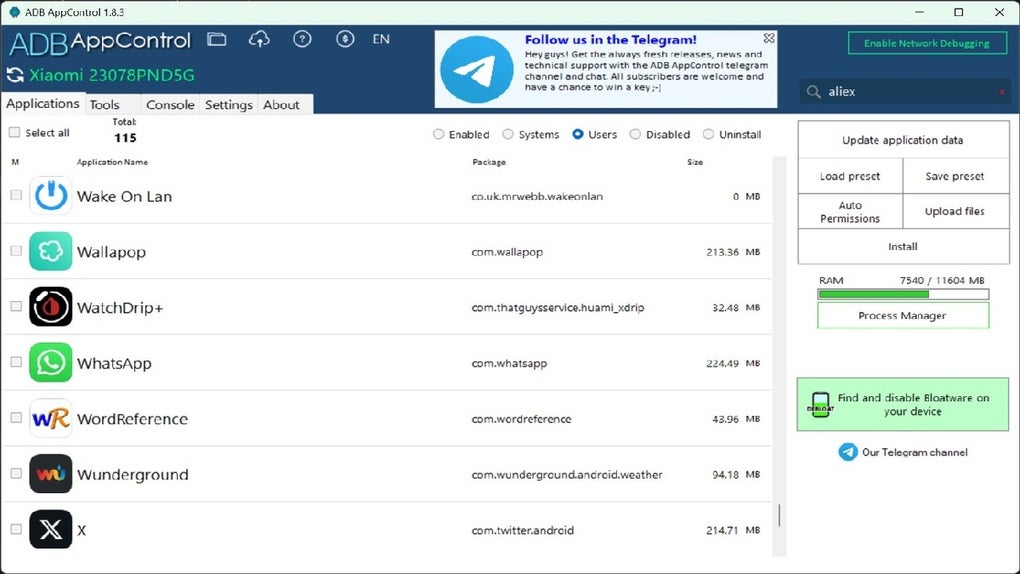
ADB AppControl empowers users with comprehensive control over their installed applications. Unlike standard Android settings, which may restrict access to certain system apps or functionalities, ADB AppControl provides the tools to manage nearly all applications on your device. This includes:
- Viewing Installed Applications: The program provides a clear and organized list of all installed applications, distinguishing between user-installed and system applications. This comprehensive view allows for easy identification of specific apps for management.
-
Application Information: For each application, ADB AppControl displays crucial information such as the application name, package name, and version. The package name is especially useful for more advanced tasks, acting as a unique identifier for each app within the Android system.
-
App Name and Package Name Copying: The ability to easily copy app names and package names is a significant time saver, facilitating the use of this information in other contexts, such as scripting or further app management tasks.
-
Permission Management: ADB AppControl allows users to review and manage app permissions. Understanding and controlling which permissions an app has access to is crucial for maintaining the privacy and security of your device. This feature enhances the user’s ability to control what data each application can access.
-
Application Uninstallation: A primary benefit of ADB AppControl is its ability to uninstall applications, including pre-installed system apps that are usually difficult or impossible to remove through standard methods. This provides significant flexibility in customizing your device’s software.
-
Backup and Restore Functionality: ADB AppControl facilitates the creation of application backups, allowing users to safeguard their data and easily restore apps in the event of a system reset or device failure. This safeguards user data and settings, providing a safety net for unforeseen issues.
Beyond Application Management: Exploring Additional Capabilities
While application management is a central feature, ADB AppControl extends its functionality beyond this core element. The program offers a range of additional features to further enhance the user experience and customization options:
-
Simplified ADB Connection: The program simplifies the often-complicated process of connecting your Android device to your computer via ADB. It guides the user through the necessary steps, including enabling USB debugging on the Android device, and handles the connection process seamlessly.
-
User-Friendly Interface: The program’s intuitive graphical user interface makes it accessible to users of all technical skill levels. Complex ADB commands are abstracted away, providing a simple and easy-to-use experience.
-
Regular Updates: ADB AppControl benefits from regular updates, ensuring compatibility with the latest Android versions and incorporating new features and bug fixes. Staying up-to-date is vital for maintaining optimal performance and security.
-
Community Support: While the tool itself doesn’t directly include forums or community support within the application, its widespread use often leads to community-driven resources, online tutorials, and support forums on platforms such as Reddit and Stack Overflow. These resources offer additional assistance and solutions to common issues or queries.
-
Open-Source Potential (If Applicable): Depending on the licensing and availability of the source code, ADB AppControl’s open-source nature (if any) allows for customization and extension by developers, potentially leading to community-driven enhancements and modifications.
Security Considerations and Responsible Use
While ADB AppControl offers significant advantages, it’s essential to use it responsibly and be mindful of security implications. Granting ADB access to your Android device requires enabling USB debugging, which necessitates a certain level of trust in the application and its developers. Always download the software from reputable sources to mitigate the risk of malware or compromised versions.
Furthermore, the ability to uninstall system applications should be exercised cautiously. Removing critical system applications could lead to system instability or malfunctions. Before uninstalling any system application, it is recommended to research its purpose and potential impact to avoid unintended consequences. The program should only be used by individuals comfortable with the potential risks and consequences associated with advanced Android device management.
Disclaimer: The use of ADB AppControl, and ADB in general, carries inherent risks. Incorrect usage can potentially damage your Android device. Proceed with caution and at your own risk. Always back up your data before undertaking any significant changes to your device’s system settings or application configurations. Phanmemfree provides this information for educational purposes; we are not responsible for any damages resulting from the use of this software. Always ensure you understand the potential consequences of your actions before using this type of tool. The laws governing the use of such software vary depending on your jurisdiction; using this software in violation of these laws is not encouraged or condoned.
File Information
- License: “Free”
- Latest update: “March 13, 2025”
- Platform: “Windows”
- OS: “Windows 11”
- Language: “English”
- Downloads: “5.4K”


