
Adobe Edge Animate, once a promising contender in the world of web animation, holds a significant place in the history of web design. While it’s no longer actively developed by Adobe, understanding its capabilities and limitations provides valuable insight into the evolution of HTML5 animation and the challenges faced in transitioning away from Flash. This article delves into the features, advantages, disadvantages, and ultimate legacy of Adobe Edge Animate.
A Flash Alternative? Bridging the Gap to HTML5
Adobe Edge Animate emerged as Adobe’s attempt to provide a smooth transition from the then-dominant Flash technology to the emerging world of HTML5. Flash, while powerful, suffered from significant drawbacks: platform incompatibility (notably Apple’s refusal to support it on iOS devices), security vulnerabilities, and performance issues. Edge Animate aimed to address these concerns by leveraging open web standards – HTML5, CSS3, and JavaScript – to create interactive animations and web content. While Adobe never explicitly declared it a direct replacement for Flash Professional, the software shared many similarities in its design and functionality, appealing to existing Flash users seeking a future-proof solution.
The software offered a familiar timeline-based interface, allowing designers to animate various properties of objects, including position, size, color, rotation, and more, with fine-grained control. This ease of use, coupled with the ability to import assets from other Adobe Creative Suite applications like Photoshop and Illustrator, made the transition relatively manageable for many designers already comfortable with the Adobe ecosystem. The incorporation of a robust easing function further enhanced the creative possibilities, offering a wide range of animation curves for refined and nuanced movements.
Features and Capabilities: A Deep Dive
Adobe Edge Animate’s core strength lay in its ability to create animations using modern web technologies. This ensured cross-platform compatibility, addressing a major shortcoming of Flash. Key features included:
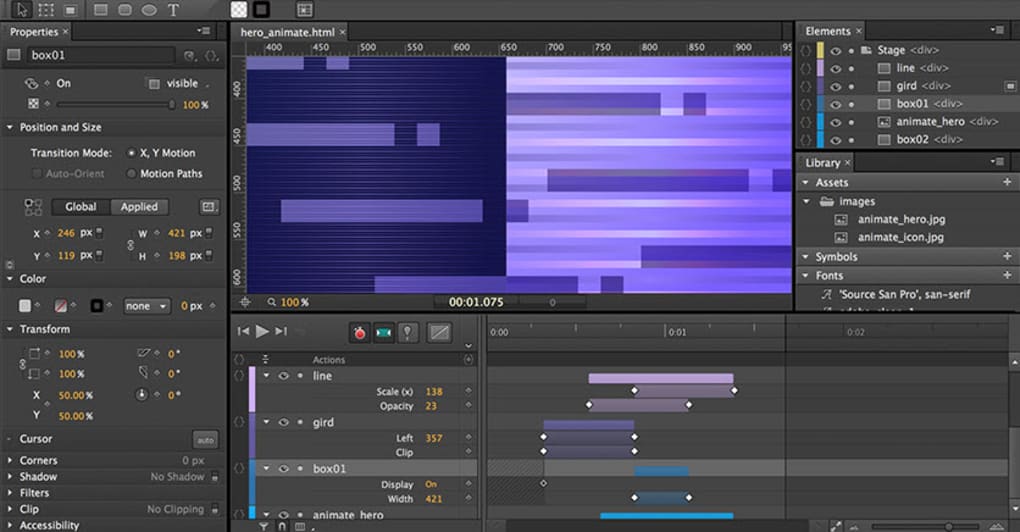
- Timeline-Based Animation: The intuitive timeline editor formed the heart of the software, allowing designers to create complex animations by manipulating object properties over time. This familiar approach minimized the learning curve for users transitioning from Flash.
-
Support for Web Standards: The reliance on HTML5, CSS3, and JavaScript ensured that the generated animations were compatible with modern browsers and devices, including smartphones and tablets. This was a crucial differentiator from Flash, which struggled with cross-platform compatibility.
-
Asset Importing: Edge Animate supported the import of various image formats (SVG, PNG, JPG, GIF) and assets created in other Adobe applications, streamlining the workflow for designers working within the Adobe Creative Suite. Importantly, it offered support for sprite sheets, a feature crucial for efficient animation of character or object sequences.
-
Built-in Easing Functions: A diverse library of easing functions provided a wide array of animation curves, allowing for subtle adjustments to the speed and timing of animations. This added a level of sophistication and polish to the final output.
-
Code Editing Capabilities: While not a fully-fledged code editor, Edge Animate allowed for manual editing of the generated HTML, CSS, and JavaScript code, granting advanced users the ability to fine-tune the animation behavior and integrate custom functionality. This feature provided a degree of flexibility not available in simpler animation tools.
-
HTML5 Video Integration: The ability to incorporate HTML5 videos into animations significantly broadened its creative potential. This enabled the seamless integration of rich media content, enhancing the overall user experience.
-
Support for DPS Articles: The integration with Adobe Digital Publishing Suite (DPS) Articles further cemented its position within the Adobe ecosystem, allowing designers to incorporate Edge Animate animations into interactive digital publications.
Limitations and Challenges: Where Edge Animate Fell Short
Despite its strengths, Adobe Edge Animate faced several challenges that ultimately hindered its widespread adoption. These included:
-
Steep Learning Curve: Although the timeline-based interface aimed to ease the transition from Flash, mastering the nuances of HTML5, CSS, and JavaScript remained a significant hurdle for many designers. This complexity deterred casual users and those without a strong coding background.
-
Feature Limitations Compared to Flash Professional: While Edge Animate aimed to match Flash’s capabilities, some features remained absent or less developed. This limitation impacted the ability of experienced Flash users to seamlessly transition their workflows.
-
Community and Support: Compared to Flash, Edge Animate had a smaller and less vibrant community. This resulted in reduced access to resources, tutorials, and troubleshooting support, adding to the challenges faced by users.
-
Adobe’s Shifting Focus: As HTML5 matured and became more widely adopted, Adobe’s own focus shifted towards other tools and technologies within its creative suite. This resulted in less investment in Edge Animate’s development and ultimately led to its discontinuation.
-
Performance Issues in Certain Browsers and Devices: While generally reliable, Edge Animate occasionally experienced performance issues, particularly in older or less powerful browsers and devices. This highlighted the ongoing challenges in optimizing HTML5 animations for diverse platforms.
-
Limited Third-Party Plugin Support: Unlike Flash, Edge Animate had limited support for third-party plugins and extensions, limiting the potential for expanding its functionality and integrating external tools.
The Legacy of Adobe Edge Animate: A Bridge to the Future
Despite its eventual sunsetting, Adobe Edge Animate played a crucial role in the transition from Flash to HTML5 animation. It provided a stepping stone for designers, offering a more accessible entry point into the world of web animation using open web standards. While its feature set didn’t completely eclipse Flash Professional’s capabilities, it offered a bridge that allowed many designers to adapt to the evolving landscape of web development and deploy animations that were truly future-proof. The lessons learned from its development and adoption continue to inform the creation of modern web animation tools and practices. While Edge Animate is no longer supported, its contributions to the evolution of web animation are undeniable, paving the way for the diverse and powerful HTML5 animation tools we see today. Its legacy serves as a reminder of the constant evolution of web technologies and the need for adaptability in the design world. The experience gained from using Edge Animate helped to shape the development of subsequent HTML5 animation tools and techniques, improving the workflow and possibilities for web designers working with dynamic and interactive content.
File Information
- License: “Trial version”
- Version: “2014”
- Latest update: “May 20, 2020”
- Platform: “Windows”
- OS: “Windows 7”
- Language: “English”
- Downloads: “35.7K”
- Size: “68.67 MB”


