
Adobe Fireworks, once a cornerstone in the web design landscape, offered a unique blend of vector and raster editing capabilities specifically tailored for web development. While no longer actively developed by Adobe, its legacy continues to influence modern web design practices. This comprehensive guide delves into the features, functionalities, and impact of Adobe Fireworks, exploring why it held a prominent position and what alternatives designers now utilize.
The Powerhouse of Web Graphics Creation and Editing
Adobe Fireworks was more than just an image editor; it was a complete web graphics creation and editing suite. Its strength lay in its ability to seamlessly handle both vector and bitmap graphics, a crucial element for creating dynamic and visually appealing web content. This dual capability allowed designers to leverage the scalability of vector graphics for elements like logos and icons, while simultaneously utilizing the richness and detail of bitmap images for photographs and textures.
The software provided a streamlined workflow for creating assets specifically optimized for web use. Unlike general-purpose image editors, Fireworks prioritized efficient file sizes and quick rendering times – vital considerations for website performance. This focus on web optimization was a key differentiator, making it a preferred choice among web developers and designers. The program’s intuitive interface simplified tasks like cropping, resizing, and optimizing images, significantly accelerating the design process.
Furthermore, Fireworks integrated seamlessly with other Adobe Creative Suite applications, notably Photoshop, Illustrator, and Dreamweaver. This tight integration fostered a smooth workflow, enabling designers to easily transfer assets between programs and maintain consistency throughout the design process. The ability to directly import and export files in various formats, including PSD, JPEG, PNG, and GIF, added to its versatility and streamlined collaboration.
A defining feature was its support for CSS code extraction. This allowed designers to generate CSS sprites directly from their Fireworks designs, significantly reducing the manual coding required for web development. This capability, combined with support for newer CSS properties and jQuery Mobile themes, made it a powerful tool for creating mobile-friendly websites and applications with minimal coding effort. For designers unfamiliar with complex coding languages, this feature simplified the creation of interactive web elements.
Key Features and Functionalities: A Deep Dive
Adobe Fireworks boasted a rich array of features, each carefully designed to enhance the web design workflow. These features extended beyond basic image manipulation, encompassing tools for creating interactive elements, optimizing images for web performance, and streamlining the overall design process.
Vector and Bitmap Editing: The core strength of Fireworks resided in its ability to handle both vector and raster graphics efficiently. Vector graphics, owing to their scalability, were ideal for logos, illustrations, and scalable interface elements. Bitmap graphics, with their photorealistic capabilities, were perfect for images and textures. This combination was essential for creating visually diverse and engaging web designs.
Optimized File Sizes: Understanding the importance of web performance, Fireworks included built-in tools for optimizing images. These tools allowed designers to fine-tune the balance between image quality and file size, minimizing loading times without compromising visual appeal. The ability to customize quality-size ratios based on project requirements ensured optimal web performance without sacrificing design integrity.
CSS Code Extraction and Sprite Generation: This groundbreaking feature greatly accelerated the development process. Designers could export clean, efficient CSS code directly from their designs, eliminating the tedious process of manually writing CSS for every element. The ability to generate CSS sprites streamlined the management of multiple images, minimizing HTTP requests and improving page loading times.
Integration with Adobe Creative Suite: The seamless integration with other Adobe applications, including Photoshop, Illustrator, and Dreamweaver, streamlined the collaborative design process. Designers could effortlessly transfer assets between programs, ensuring consistency and efficiency throughout the development cycle. This interoperability was a significant advantage for teams working on complex web projects.
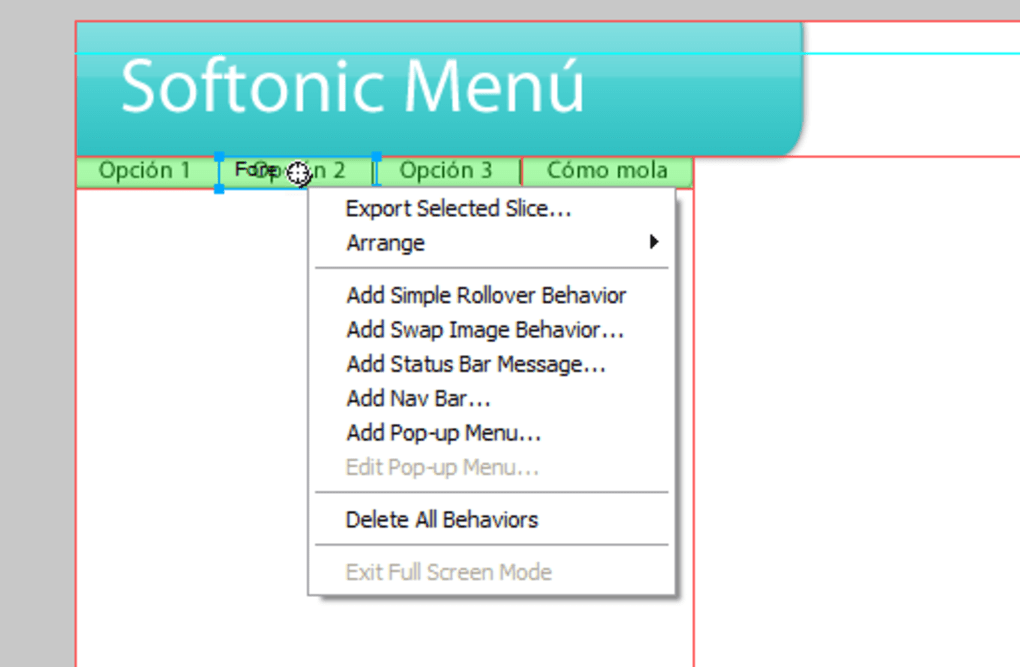
Interactive Prototyping: Fireworks allowed for the creation of interactive prototypes, facilitating early testing and iterative design refinement. This capability proved invaluable in assessing user experience and ensuring the functionality of website designs before implementation. The ability to preview interactive elements within the software itself accelerated the iterative design process.
Support for Multiple Devices: The software catered to the growing need for responsive web design, supporting multiple devices, including smartphones and kiosks. This feature ensured the consistent and optimized display of web content across diverse screen sizes and resolutions.
HTML Export: The ability to export designs directly in HTML format simplified the upload process and eliminated the need for additional conversion steps. This feature streamlined the workflow, allowing designers to quickly deploy their creations to the web.
Supported File Formats and Compatibility
Adobe Fireworks supported a range of file formats, allowing for flexible integration within diverse workflows. Key supported formats included:
-
PSD (Photoshop Document): Seamless integration with Adobe Photoshop facilitated effortless exchange of assets and design elements.
-
JPEG (Joint Photographic Experts Group): A widely used format for photographic images, ideal for its balance between image quality and file size.
-
PNG (Portable Network Graphics): A versatile format that supported transparency, making it suitable for elements like logos and buttons that needed to blend seamlessly with backgrounds.
-
GIF (Graphics Interchange Format): Supported animated graphics, perfect for creating engaging and dynamic visual elements for web pages.
-
HTML (HyperText Markup Language): The ability to export designs directly in HTML simplified the web deployment process.
This comprehensive range of supported formats ensured that Fireworks could integrate with various software and platforms within the web design ecosystem.
Advantages and Disadvantages of Adobe Fireworks
Like any software, Adobe Fireworks presented both advantages and disadvantages. Understanding these aspects provides context for its position within the web design tools landscape.
Advantages:
- Web Optimization: Its focus on web performance made it an ideal choice for creating lightweight, fast-loading web assets.
- Vector and Bitmap Editing: The ability to handle both vector and raster graphics provided unmatched design flexibility.
- CSS Code Extraction: This feature streamlined the development process, saving designers considerable time and effort.
- Adobe Creative Suite Integration: The seamless integration with other Adobe products enhanced workflow efficiency.
- Interactive Prototyping: The prototyping capabilities accelerated the design iteration process.
Disadvantages:
- Steep Learning Curve: The software’s feature-rich nature presented a steep learning curve for novice users.
- Discontinuation: Adobe’s discontinuation of the software left users without direct support and updates.
- Limited Community Support: Compared to other active design software, the community support and readily available resources for Fireworks were relatively limited.
Alternatives to Adobe Fireworks
With Adobe’s discontinuation of Fireworks, designers and developers needed to adopt alternative tools. Several options emerged, each offering a unique set of capabilities aimed at replacing specific functionalities of Fireworks. These alternatives include, but aren’t limited to:
-
Adobe Photoshop: While not a direct replacement, Photoshop offers extensive capabilities for raster graphics editing and, with plugins, some vector capabilities.
-
Adobe Illustrator: Ideal for vector-based graphics and illustrations.
-
Sketch: A popular macOS-based vector editor specifically targeted towards UI/UX design.
-
Figma: A collaborative web-based design tool increasingly popular for its teamwork features and prototyping capabilities.
-
Affinity Designer: A strong contender offering a comprehensive feature set at a lower price point than Adobe products.
Conclusion: A Lasting Legacy
Despite its discontinuation, Adobe Fireworks left a lasting impact on web design. Its focus on web optimization and its unique combination of vector and raster capabilities influenced subsequent design tools and development practices. While alternatives now exist, the legacy of Fireworks underscores the continued need for software specifically tailored to the unique requirements of web graphics creation and editing. Its efficiency in streamlining the design workflow, its focus on web performance, and its innovative feature set continue to serve as a benchmark for future design tools.
File Information
- License: “Trial version”
- Version: “cs6”
- Latest update: “May 23, 2024”
- Platform: “Windows”
- OS: “Windows XP”
- Language: “English”
- Downloads: “435.3K”
- Size: “522.24 MB”


