
Adobe Media Encoder is a powerful and versatile video encoding software application developed by Adobe, a leading provider of creative software solutions. Designed for professionals and enthusiasts alike, it streamlines the process of converting video files into various formats, resolutions, and sizes optimized for different platforms and devices. This comprehensive guide explores the features, functionalities, and advantages of Adobe Media Encoder, addressing its role within the Adobe Creative Cloud ecosystem and offering insights into its practical applications.
Understanding the Role of Adobe Media Encoder in Video Production
Adobe Media Encoder occupies a crucial position in the Adobe Creative Cloud suite, acting as the engine behind efficient and high-quality video encoding. Unlike editing software that focuses on manipulating video content, Adobe Media Encoder specializes in preparing finalized video projects for distribution. This involves converting videos into appropriate formats compatible with target platforms, such as YouTube, Vimeo, streaming services, or various mobile devices. The software accomplishes this by leveraging sophisticated encoding algorithms, ensuring optimal balance between file size and video quality.
Its significance extends beyond simply converting files. The software provides features designed to simplify and expedite the post-production workflow. Batch processing, for instance, allows users to queue multiple video and audio files for simultaneous encoding, dramatically reducing overall processing time. This is particularly valuable for projects involving numerous video clips or versions tailored for different platforms. The ability to monitor and manage the encoding queue ensures efficient utilization of system resources and enables users to maintain control over the process even when encoding large batches of media.
Key Features and Functionalities of Adobe Media Encoder
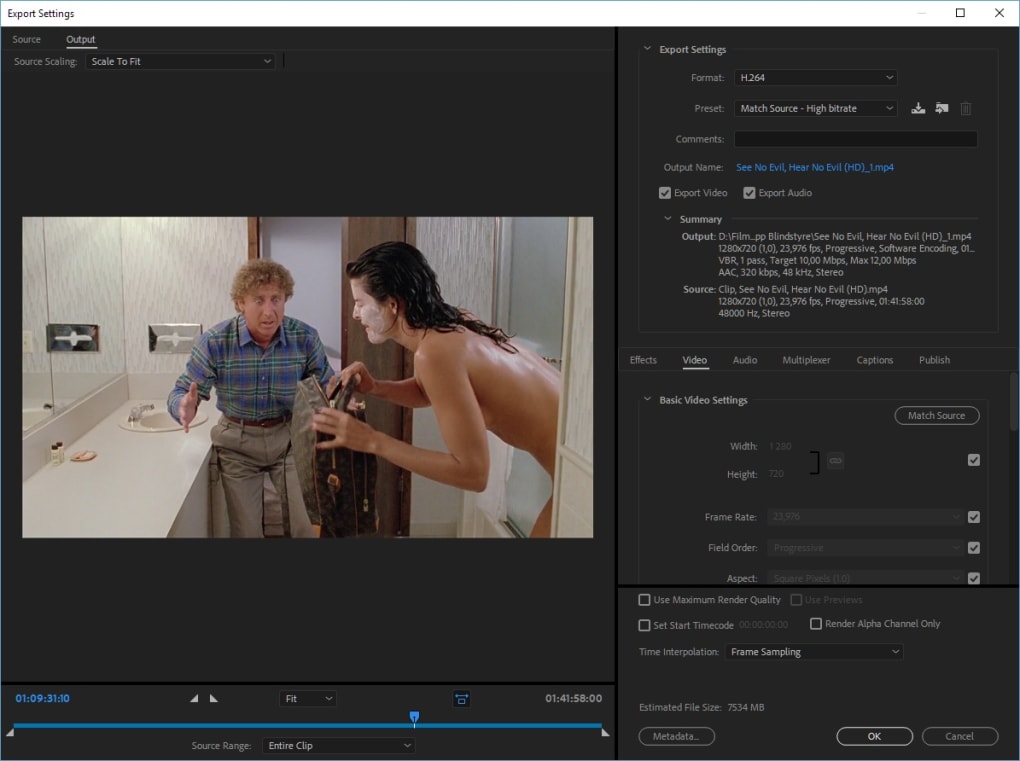
Adobe Media Encoder boasts a comprehensive array of features designed to meet the diverse needs of video professionals. These features enhance efficiency, quality control, and overall workflow management:
- Wide Range of Formats and Presets: The software supports a vast selection of video and audio codecs, allowing users to export their content in formats compatible with a wide variety of devices and platforms. Presets, optimized for specific platforms or applications, are provided to simplify the selection process. These presets account for variations in resolution, bitrate, and other encoding parameters, thereby optimizing the file for the target use. Whether it’s preparing a video for YouTube, a high-resolution film for a streaming platform, or a mobile-optimized clip, Adobe Media Encoder provides relevant presets to expedite the process.
-
Resolution and Aspect Ratio Control: Users retain full control over the output resolution of their encoded videos, ranging from standard definition to ultra-high definition (UHD) 4K and beyond. This capability ensures the video meets the specific requirements of the targeted platform or viewing device, optimizing visual fidelity without unnecessary file size bloat. Aspect ratio adjustments, coupled with the ability to crop videos, offer further flexibility in adapting the video content for different screen formats.
-
Bitrate Encoding and Quality Settings: Adobe Media Encoder provides comprehensive control over the bitrate, a critical parameter influencing video quality and file size. Users can fine-tune the bitrate setting to balance visual quality with file size requirements. Higher bitrates generally result in better video quality but larger files. Conversely, lower bitrates save space but can compromise image quality. The balance depends heavily on the nature of the video and the intended viewing method.
-
Batch Processing and Queue Management: This is one of the most time-saving features. The ability to add, reorder, and manage multiple videos simultaneously in a processing queue dramatically improves workflow efficiency. Users can add numerous files and adjust encoding settings for individual items as needed, streamlining the post-production process. This feature is especially important for projects involving numerous versions or platforms.
-
Integration with other Adobe Applications: A key strength of Adobe Media Encoder is its seamless integration with other Adobe Creative Cloud applications, notably Adobe Premiere Pro and After Effects. This integration simplifies the workflow by facilitating the direct export of projects from these applications to Adobe Media Encoder for encoding. This tight integration reduces the need for intermediate steps and file transfers, enhancing productivity. The close relationship with other programs allows for a smooth transition between editing and encoding.
Advantages of Using Adobe Media Encoder
The advantages of employing Adobe Media Encoder in video production are multifaceted:
- Efficiency and Time Savings: The batch processing functionality dramatically reduces the overall time needed for encoding multiple video files. This is particularly crucial in professional environments where time is a valuable asset. By automating the encoding process, Adobe Media Encoder significantly enhances workflow efficiency.
-
High-Quality Encoding: Adobe Media Encoder utilizes advanced encoding algorithms that optimize video quality while minimizing file size. The fine-grained control over encoding parameters ensures users can achieve an optimal balance between video fidelity and storage space.
-
Platform Compatibility: The support for a wide variety of video formats ensures compatibility with virtually all platforms and devices. Whether the video is intended for web, mobile, or broadcast, Adobe Media Encoder guarantees its accessibility.
-
Seamless Workflow Integration: The integration with other Adobe applications creates a streamlined workflow, reducing the manual steps required in transferring and processing video files. This minimizes errors and streamlines the entire production process.
-
Professional-Grade Features: Adobe Media Encoder provides features typically found in professional-level encoding applications, making it a suitable choice for both beginners and professionals. Features like comprehensive control over encoding parameters, batch processing, and the wide format support contribute to its professional capabilities.
Alternatives to Adobe Media Encoder
While Adobe Media Encoder is a powerful and popular choice, alternative video encoding software applications exist catering to different needs and budgets. These alternatives provide comparable functionality, sometimes with different strengths and weaknesses:
-
HandBrake: A free, open-source, and cross-platform video transcoder known for its ease of use and wide codec support. It lacks some of the advanced features of Adobe Media Encoder, but serves as an excellent free alternative for basic encoding needs.
-
FFmpeg: A powerful command-line based video processing tool providing unmatched versatility and control over encoding parameters. It requires a higher level of technical expertise but offers unparalleled flexibility.
-
Shutter Encoder: Another popular, free encoding option offering a user-friendly interface and support for a wide array of formats and codecs. It provides a good balance between functionality and ease of use.
-
VLC Media Player: Although primarily a media player, VLC also includes encoding functionality. While not as feature-rich as Adobe Media Encoder, it’s a convenient option for simple encoding tasks.
The choice of video encoding software ultimately depends on the individual’s specific needs, technical expertise, and budget. Adobe Media Encoder’s strengths lie in its robust feature set, seamless integration within the Adobe ecosystem, and professional-grade performance. However, viable alternatives exist for those seeking simpler, free, or more specialized solutions.
File Information
- License: “Trial version”
- Latest update: “July 11, 2023”
- Platform: “Windows”
- OS: “Windows 7”
- Language: “English”
- Downloads: “81.7K”
- Size: “2.86 MB”


