
Adobe PDF Converter, a free software application, provides a straightforward method for converting various file formats into PDF documents. While offering a convenient solution for everyday PDF creation needs, it also presents certain limitations that users should be aware of before adopting it as their primary PDF converter. This review delves into the software’s features, advantages, and drawbacks, helping you determine if it aligns with your specific requirements.
Functionality and Features
Adobe PDF Converter’s core function revolves around converting files from various sources into the universally compatible PDF format. It supports a wide range of input formats, including popular document types like Microsoft Word (.doc, .docx), Excel (.xls, .xlsx), and PowerPoint (.ppt, .pptx), along with image files (JPEG, PNG, etc.) and others. This broad compatibility makes it a versatile tool for consolidating different file types into a standardized format suitable for sharing, archiving, or printing.
The software boasts a user-friendly interface, making the conversion process simple and intuitive even for novice users. The steps involved generally consist of selecting the files you wish to convert, choosing the output location, and initiating the conversion process. The speed of conversion is generally efficient, depending on the size and complexity of the input files.
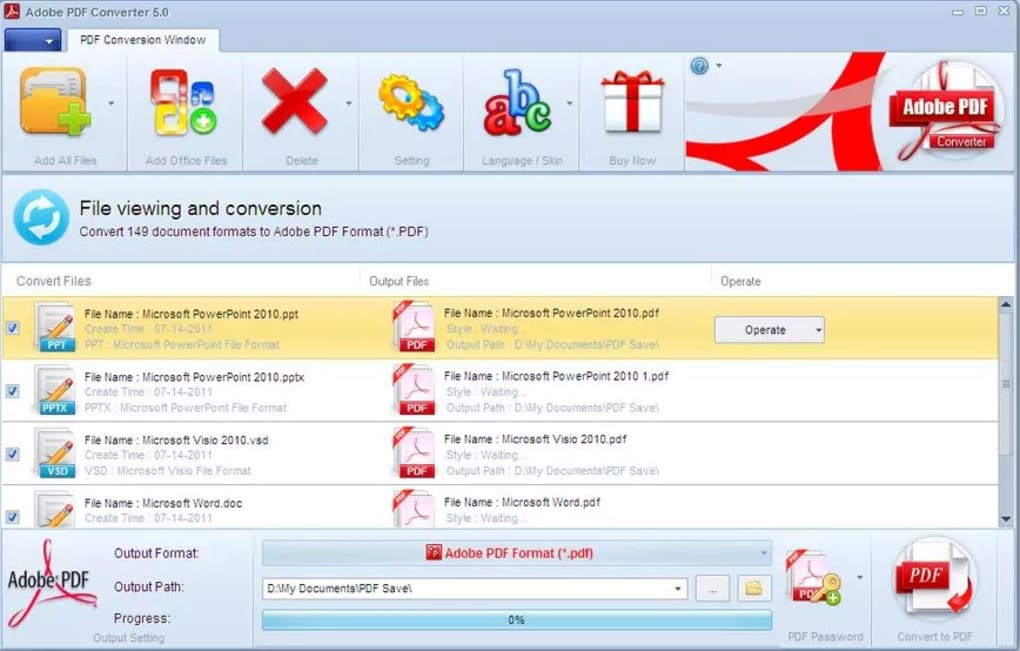
A noteworthy feature is the inclusion of password protection for the generated PDF files. This security option allows users to restrict access to their documents, ensuring confidentiality for sensitive information. Furthermore, the software supports multiple languages, making it accessible to a global user base.
Pros and Cons of Adobe PDF Converter
While Adobe PDF Converter offers a convenient and generally efficient way to create PDFs, it’s crucial to weigh its advantages and disadvantages to determine its suitability for your needs.
Advantages:
- Wide File Format Support: The ability to convert a broad range of file types into PDF format is a significant advantage. This eliminates the need for multiple conversion tools, streamlining the workflow.
- User-Friendly Interface: The intuitive interface simplifies the conversion process, making it accessible to both tech-savvy and less experienced users. Even without extensive instruction, users can quickly grasp the software’s functionality.
- Password Protection: The inclusion of password protection for the created PDFs enhances the security of sensitive documents, a crucial aspect for many users.
- Multiple Language Support: Supporting multiple languages broadens the accessibility and usability of the software for a wider international audience.
- Generally Fast Conversion Speed: The software processes conversions relatively quickly, reducing the waiting time for users who need to convert large numbers of documents or large individual files.
- No Apparent Quality Loss: The conversion process generally maintains the quality of the original files, ensuring that the resulting PDF accurately represents the content of the source document.
Disadvantages:
- Watermark on Free Version: A significant drawback is the presence of a watermark on all PDFs generated using the free version. This watermark can be distracting and unprofessional, making the free version unsuitable for official or formal documents. The watermark serves as a clear indication that the free version is being used.
- Limited Functionality in Free Version: The free version of Adobe PDF Converter is somewhat restricted in its capabilities. While it allows basic conversions, more advanced features might require upgrading to a paid version or utilizing alternative software.
- Infrequent Updates: The infrequent updates of the software could indicate a lack of active development and potential security vulnerabilities. Users should be aware that this might limit the software’s ability to adapt to evolving file formats and technologies.
- PDF-Only Conversion: A notable limitation is the inability to convert PDFs into other formats. If you require conversion capabilities beyond PDF creation, you will need a different software solution. The software’s functionality is solely focused on creating PDFs.
- Potential for Bugs and Glitches: Like any software, Adobe PDF Converter might occasionally experience minor bugs or glitches. While generally stable, some users might encounter issues during the conversion process, particularly with larger or more complex files.
Alternatives to Adobe PDF Converter
Considering the limitations of the free version, exploring alternative PDF converters is worthwhile. Several free and paid options provide a wider range of features and capabilities. Some popular alternatives include:
- Smallpdf: A web-based solution offering a variety of PDF-related tools, including conversion, merging, splitting, and compression.
- PDF24: Another free online PDF creator and converter with a user-friendly interface and extensive features.
- Nitro PDF Reader: A powerful PDF reader and editor with advanced conversion capabilities (paid version).
- Adobe Acrobat Pro DC: The industry-standard PDF software, offering a comprehensive suite of features including sophisticated editing, conversion, and security options (paid subscription).
The choice of alternative depends on individual needs and budget. Free online converters might suffice for occasional use, while users requiring professional features or high-volume conversion might opt for paid software like Adobe Acrobat Pro DC or Nitro PDF Reader.
Conclusion
Adobe PDF Converter offers a basic yet functional approach to converting various file types into PDFs. Its ease of use and broad compatibility make it appealing for simple conversion tasks. However, the limitations of the free version, notably the watermark and restricted functionality, significantly impact its suitability for professional or high-volume use. Users should carefully weigh the advantages and disadvantages, and potentially explore the alternative solutions discussed above, before deciding if Adobe PDF Converter is the right fit for their specific PDF conversion needs. For individuals with occasional, non-critical PDF conversion requirements, the free version might be sufficient. However, for professional users or those needing advanced features, investing in a more comprehensive solution would be advisable.


