
Adobe Premiere Rush CC is a video editing application designed for streamlined, on-the-go editing. It aims to bridge the gap between professional-grade editing capabilities and user-friendly accessibility, making it a compelling option for both seasoned editors and beginners venturing into the world of video production. This review delves into the features, strengths, and weaknesses of Adobe Premiere Rush CC, evaluating its suitability for different user groups and comparing it to other available video editing software.
Editing on the Go: Portability and Cloud Integration
In today’s fast-paced digital landscape, content creation necessitates rapid turnaround times. Social media platforms demand consistent uploads, and traditional video editing software, while powerful, often lacks the portability required for immediate editing needs. Adobe Premiere Rush CC directly addresses this challenge. Its core design philosophy centers around mobile editing, enabling users to capture footage, edit it on the go, and share it across multiple platforms seamlessly. The application’s lightweight nature makes it easily installable on both desktop and mobile devices, enhancing its versatility and practicality.
A critical aspect of Premiere Rush CC’s portability is its cloud synchronization capabilities. Projects seamlessly integrate with Adobe Creative Cloud, allowing for effortless transfer between devices. This eliminates the cumbersome process of transferring large video files between computers and smartphones. Editors can start a project on their phone, continue editing on their laptop, and then finalize it on a tablet, maintaining a consistent workflow without worrying about data loss or compatibility issues. This cross-platform compatibility drastically improves productivity and workflow flexibility.
Basic but Powerful Features: A User-Friendly Interface
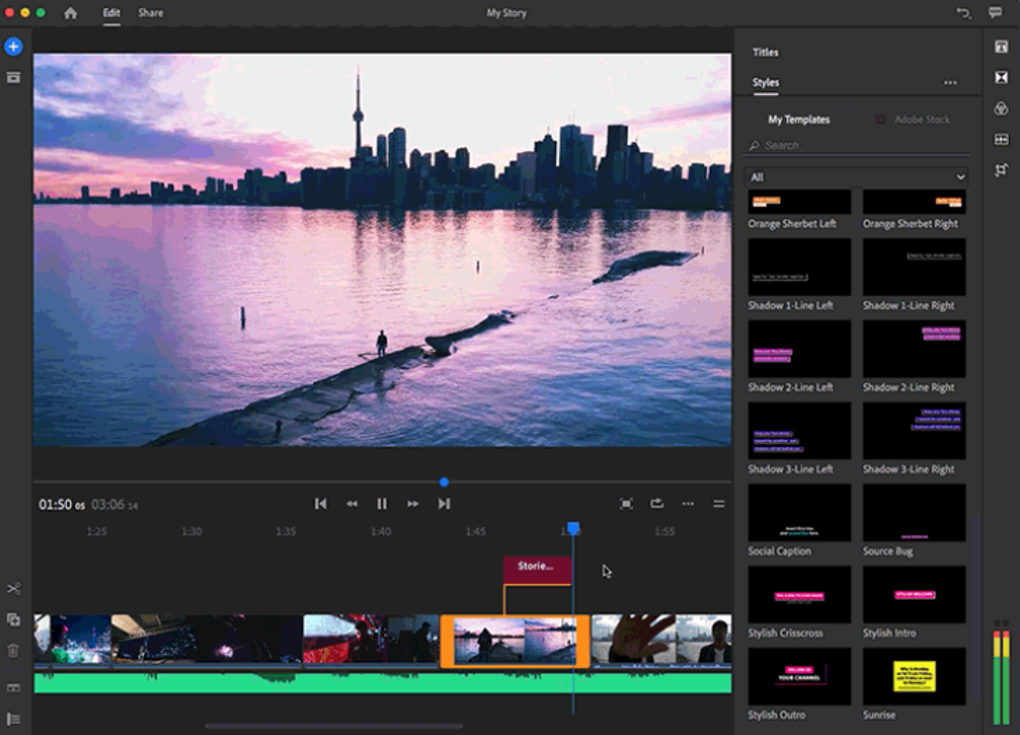
Premiere Rush CC boasts a remarkably intuitive interface that belies its powerful capabilities. The core elements are straightforward: a preview window for real-time monitoring of edits, a timeline for arranging and manipulating video and audio clips, and a project panel that keeps track of imported assets and project settings. This user-friendly layout is particularly advantageous for beginners who might feel overwhelmed by the complexity of more extensive video editing software.
However, despite its simplistic approach, Premiere Rush CC is not lacking in power. It supports up to four video tracks and three audio tracks, providing sufficient capacity for layering different visual elements and audio enhancements. The software intelligently distinguishes between speech and sound effects, simplifying the process of identifying and managing audio elements within a project. This automated analysis streamlines the editing process, particularly beneficial for videos containing dialogue and background sounds. The capability to overlay several media tracks allows for creative layering effects, enhancing visual storytelling capabilities.
Optimized for Social Media: Seamless Sharing and Metadata Integration
The app’s design clearly caters to the needs of social media content creators. One of its standout features is the direct sharing capability to popular platforms such as YouTube, Facebook, and Instagram. Users can upload their finished videos directly from the application, streamlining the post-production workflow and minimizing the need to switch between different apps.
Beyond direct sharing, Premiere Rush CC excels in its metadata integration. Before uploading, users can add essential metadata, including titles, descriptions, hashtags, and custom thumbnails. This built-in functionality enhances video discoverability on social media platforms, maximizing engagement and visibility for the content creator. This integration into the social media ecosystem is a key differentiator for Premiere Rush CC.
Adobe Premiere Rush CC: A Comparison and Evaluation
While Premiere Rush CC shines in its ease of use and social media integration, it’s essential to consider its limitations in comparison to more professional-grade software like Adobe Premiere Pro or DaVinci Resolve.
Strengths:
- Portability and Mobility: Its lightweight design and cross-platform compatibility make it ideal for on-the-go editing.
- Ease of Use: The intuitive interface is perfect for beginners, minimizing the learning curve.
- Social Media Integration: Direct sharing to multiple platforms and metadata integration optimize content reach.
- Cloud Synchronization: Seamlessly syncs projects across devices via Adobe Creative Cloud.
- Automatic Sound Balancing: Automatically balances audio levels, simplifying sound mixing.
Weaknesses:
- High Minimum Requirements: While lightweight, the software still requires relatively powerful hardware to perform optimally, potentially excluding users with older devices.
- Slow Render Times: Rendering can be slow, especially for high-resolution videos or complex projects.
- Large Download File: Despite being designed for mobile editing, the download size is comparatively large.
- Initial Learning Curve: While generally user-friendly, some users might experience a slight learning curve, especially with advanced features.
- Limited Feature Set Compared to Professional Software: Lacks some advanced features found in professional applications like Premiere Pro.
Who is Adobe Premiere Rush CC for?
Premiere Rush CC is best suited for individuals and businesses who:
- Need to edit videos quickly and easily on the go.
- Primarily create content for social media platforms.
- Prioritize ease of use over extensive advanced features.
- Require seamless integration with other Adobe Creative Cloud applications.
- Value the convenience of cloud synchronization and cross-platform editing.
Who might not find Adobe Premiere Rush CC ideal?
Premiere Rush CC might not be the best choice for users who:
- Require advanced professional video editing features such as advanced color grading, keyframing, and complex effects.
- Work on large, high-resolution projects that demand significant processing power.
- Need exceptional rendering speeds for efficient workflow.
- Do not utilize other Adobe Creative Cloud applications.
- Need extensive collaboration features found in other professional software.
Conclusion
Adobe Premiere Rush CC provides a compelling solution for users seeking a balance between user-friendly functionality and professional-grade capabilities. Its mobile-first design, streamlined interface, and seamless social media integration make it an excellent choice for content creators, particularly those focused on social media platforms. While it might lack some of the advanced features of professional video editing software, its ease of use and convenient features make it an invaluable tool for both novices and seasoned editors needing a quick and efficient workflow. The software’s strengths lie in its portability, usability, and optimized workflow for the fast-paced demands of online content creation. However, users with high-end needs or a preference for extensive advanced features should consider exploring other applications that cater to those specific requirements.
File Information
- License: “Trial version”
- Version: “1.0”
- Latest update: “January 31, 2023”
- Platform: “Windows”
- OS: “Windows 10”
- Language: “English”
- Downloads: “82.5K”
- Size: “2.08 MB”


