
Adobe XD, or Adobe Experience Design, stands as a premier design software application developed by Adobe. This powerful tool empowers users to craft and refine user interfaces (UI) and user experiences (UX) for websites and mobile applications. Its vector-based capabilities, coupled with intuitive prototyping features, make it a go-to choice for professionals across various design disciplines. This comprehensive guide delves into the functionalities, features, and advantages of Adobe XD, comparing it to other leading design software and exploring its suitability for both individual designers and collaborative teams.
Understanding Adobe XD: Functionality and Applications
Adobe XD is a vector-based software application specifically designed for the creation of user interfaces and user experiences. Its primary purpose is to facilitate the design and prototyping of websites and mobile applications, streamlining the entire process from initial wireframes to interactive prototypes. Unlike traditional design tools that focus primarily on visual aesthetics, Adobe XD excels in its ability to bridge the gap between design and development, allowing designers to create interactive prototypes that simulate the actual user experience. This eliminates the need for extensive coding knowledge, making it accessible to designers with varied technical backgrounds.
The software’s strength lies in its integration of design and prototyping functionalities within a single environment. Designers can create visually appealing mockups, seamlessly transition to interactive prototyping, and test the usability of their designs before handing them over to developers. This iterative design process significantly reduces the likelihood of errors and ensures the final product aligns precisely with the design vision. The ability to create and connect screens, define transitions, and include user interactions without coding is a significant advantage. This feature saves considerable time and resources, especially for complex projects.
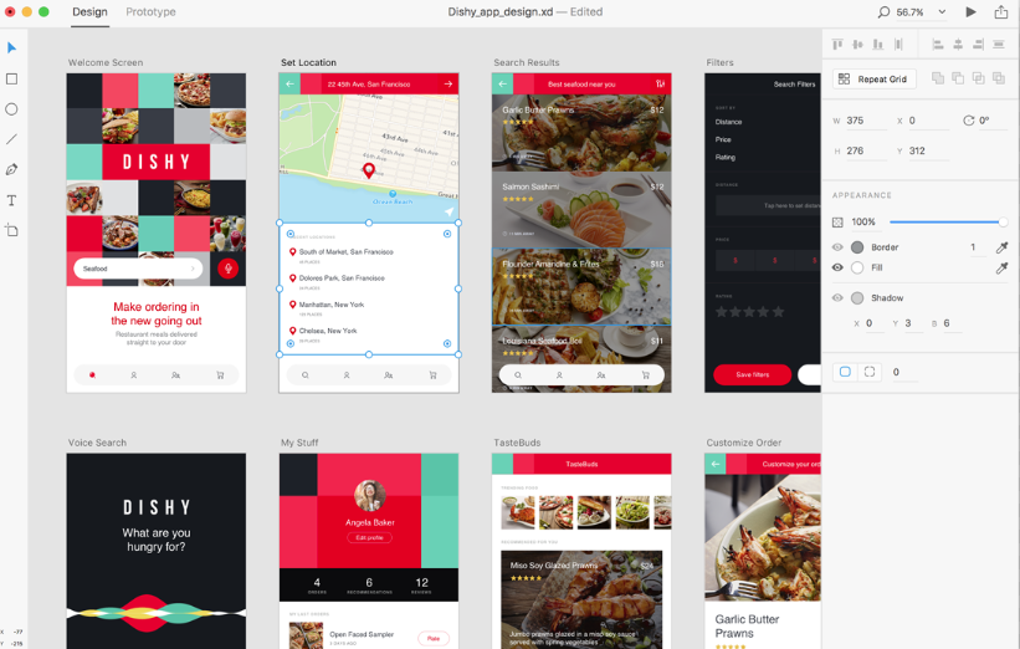
Key Features and Capabilities of Adobe XD
Adobe XD boasts a wide array of features that enhance the design and prototyping workflow. These features contribute to its popularity amongst UI/UX designers globally:
-
Vector Graphics Creation and Editing: Adobe XD provides native support for vector graphics, allowing users to create and edit shapes, illustrations, and other design elements directly within the application. This ensures scalability and crispness across different resolutions, a crucial aspect of modern UI/UX design.
-
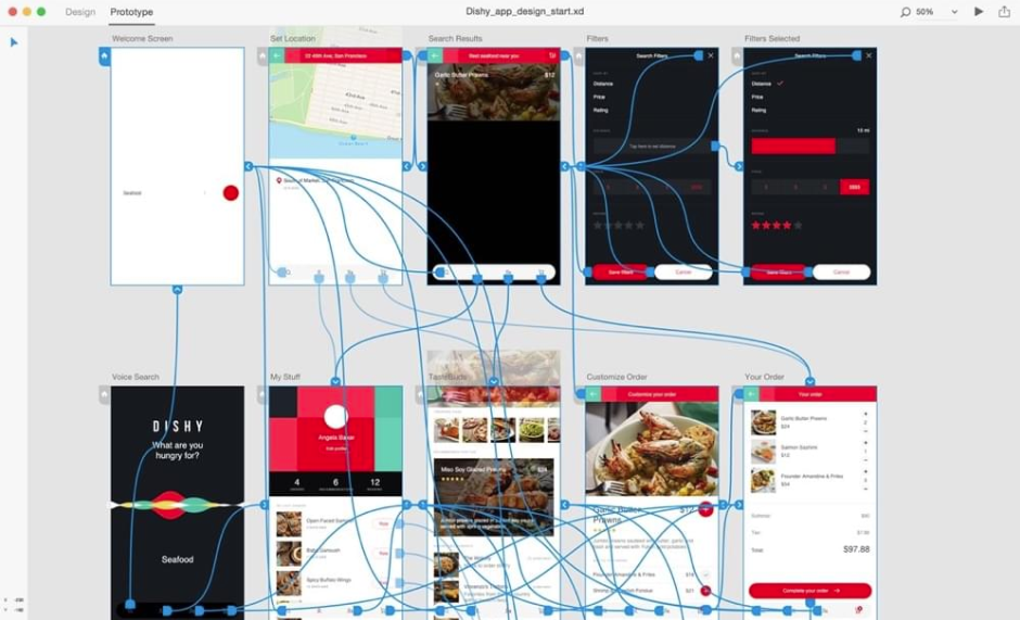
Interactive Prototyping: This is arguably Adobe XD’s most significant feature. Designers can link artboards, define transitions (like fades, slides, and pushes), and incorporate user interactions, such as buttons and links, to create interactive prototypes. This allows designers to simulate the user experience and identify potential usability issues early in the design process, before development begins.
-
Artboard Design and Auto-Animate: XD allows for efficient management of multiple artboards, each representing a unique screen or view within the application or website. The auto-animate feature simplifies the creation of micro-interactions and animations, adding dynamism and engagement to prototypes.
-
Repeat Grid: This tool automates the creation of repeating lists and grids. This significantly accelerates the design process for elements such as navigation menus, product catalogs, or data-driven interfaces. Simply create one instance of the item and then let XD populate the rest, maintaining consistent spacing and alignment.
-
Responsive Resize: This feature allows designers to resize artboards and their contained elements to adapt to different screen sizes and orientations. This is crucial for creating responsive designs that work seamlessly across a range of devices.
-
Plugin Support: Adobe XD supports a range of third-party plugins that extend its functionality. These plugins can integrate with other design tools, automate tasks, or add specialized features, enhancing the overall design workflow.
-
User-Friendly Interface: XD’s interface is intuitive and closely resembles other Adobe applications, making it easy for users familiar with the Adobe Creative Cloud ecosystem to adapt quickly. The tool panel, layers panel, and other controls are logically organized, minimizing the learning curve.
Project Creation and Workflow in Adobe XD
Starting a new project in Adobe XD is straightforward. The initial step involves creating an artboard, which represents a specific screen in the design. Users can select pre-set sizes for common web and mobile resolutions or create custom artboards tailored to specific project needs.
The software facilitates easy movement of elements between artboards using a drag-and-drop mechanism. Multiple artboards can be selected and manipulated simultaneously, allowing for efficient editing and management of design components. Adobe XD also integrates grid systems to enhance the precision and consistency of design layouts. Layout grids help define columns, ideal for responsive designs, while square grids assist in aligning elements accurately.
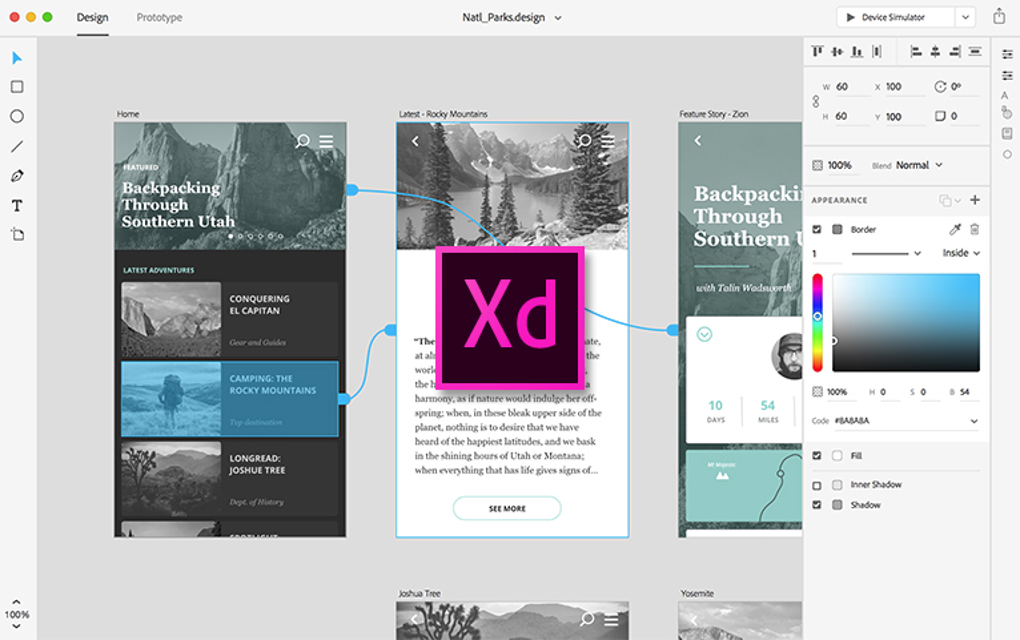
Adobe XD offers two distinct modes: Design mode and Prototype mode. Design mode allows for the creation of visual elements, wireframes, and mockups. Prototype mode enables the addition of interactions and animations, bringing the design to life and simulating the user experience. Switching between these modes is seamless, allowing designers to iterate between visual design and interactive prototyping.
Seamless Integration with Adobe Creative Cloud and Collaboration Features
As a core component of the Adobe Creative Cloud suite, Adobe XD benefits from excellent integration with other Adobe applications like Photoshop, Illustrator, and InDesign. This integration streamlines the design workflow, allowing designers to seamlessly transfer assets between applications. The Creative Cloud also offers cloud-based storage, ensuring accessibility to projects from various devices and enabling effortless collaboration.
Adobe XD facilitates collaborative design through its integrated sharing features. Design specifications and assets can be shared with developers, ensuring clear communication and minimizing misinterpretations. Furthermore, compatibility with collaborative applications like Jira and Slack enhances teamwork efficiency. The ability for project members to view and provide feedback on designs directly within the application streamlines the design review process, making it easy to incorporate feedback and iterate on designs quickly.
Pricing and Availability of Adobe XD
Unlike some competitor products that offer free plans or free versions with limitations, Adobe XD is exclusively available through a Creative Cloud subscription. This subscription-based model provides access to the full suite of features and ongoing updates. While this means there is no free option, it also assures users of consistent support, access to updates, and inclusion within the wider Adobe Creative Cloud ecosystem. Pricing details can be found on Adobe’s official website, with various subscription options available to suit individual needs and budget.
Adobe XD: Pros and Cons
Pros:
- Intuitive Interface: The user-friendly interface is a significant advantage, especially for users familiar with the Adobe Creative Cloud.
- Extensive Feature Set: Adobe XD offers a comprehensive array of tools and features for design and prototyping.
- Seamless Integration: The integration with other Adobe products and Creative Cloud streamlines the workflow.
- Powerful Collaboration Tools: Features facilitating collaboration and sharing are highly effective for team projects.
- Responsive Design Capabilities: The responsive resize feature is crucial for modern, cross-platform design.
Cons:
- Subscription-Based Model: The lack of a free option can be a barrier for some users.
- Steep Learning Curve (for complex features): While the basic interface is user-friendly, mastering all the advanced features may require significant time investment.
Alternatives to Adobe XD
Several alternative design and prototyping tools compete with Adobe XD. These include Figma, a powerful cloud-based collaborative tool, and InVision Studio, another strong contender in the prototyping space. Other options, such as Sketch (primarily Mac-based) and even some limited functionalities within Adobe InDesign, cater to different needs and workflows. The choice of the best tool depends on individual preferences, project requirements, and budget considerations. However, Adobe XD’s integration within the wider Adobe ecosystem and its extensive feature set remain significant advantages for many designers.
Conclusion
Adobe XD stands as a leading design and prototyping tool for creating user interfaces and experiences. Its intuitive interface, coupled with a robust feature set, makes it a compelling choice for both individual designers and large design teams. While it operates on a subscription model and features a learning curve for its advanced functionalities, the benefits of seamless integration, powerful collaboration features, and efficient prototyping capabilities outweigh these drawbacks for many. The choice ultimately rests on individual needs and preferences, but Adobe XD remains a strong contender in the ever-evolving landscape of UI/UX design software.
File Information
- License: “Free”
- Version: “varies-with-device”
- Latest update: “May 6, 2025”
- Platform: “Windows”
- OS: “Windows 8”
- Language: “English”
- Downloads: “622.8K”


