
In today’s interconnected world, identification cards and badges are more than just pieces of plastic or paper; they are critical tools for security, access control, brand representation, and organizational efficiency. From corporate employee badges to student IDs, event passes, and membership cards, the need for professional, secure, and easily verifiable identification is paramount. Entering this essential landscape is Advanced ID Creator, a robust and versatile software solution designed to empower individuals and organizations to design and print high-quality ID cards and badges with unparalleled ease and precision.
Developed by Xpress Software, Advanced ID Creator stands out for its intuitive interface, comprehensive design tools, and scalable editions that cater to a wide spectrum of needs, from individual, low-volume requirements to the complex demands of large enterprises. Running natively on Windows, this application, last updated in March 2015, has cemented its place as a reliable choice for creating identification documents that not only look professional but also integrate vital security and informational elements. This article will delve into the core functionalities, diverse editions, and practical applications of Advanced ID Creator, exploring why it remains a go-to solution for crafting identification materials.
Understanding Advanced ID Creator: Core Features and Philosophy
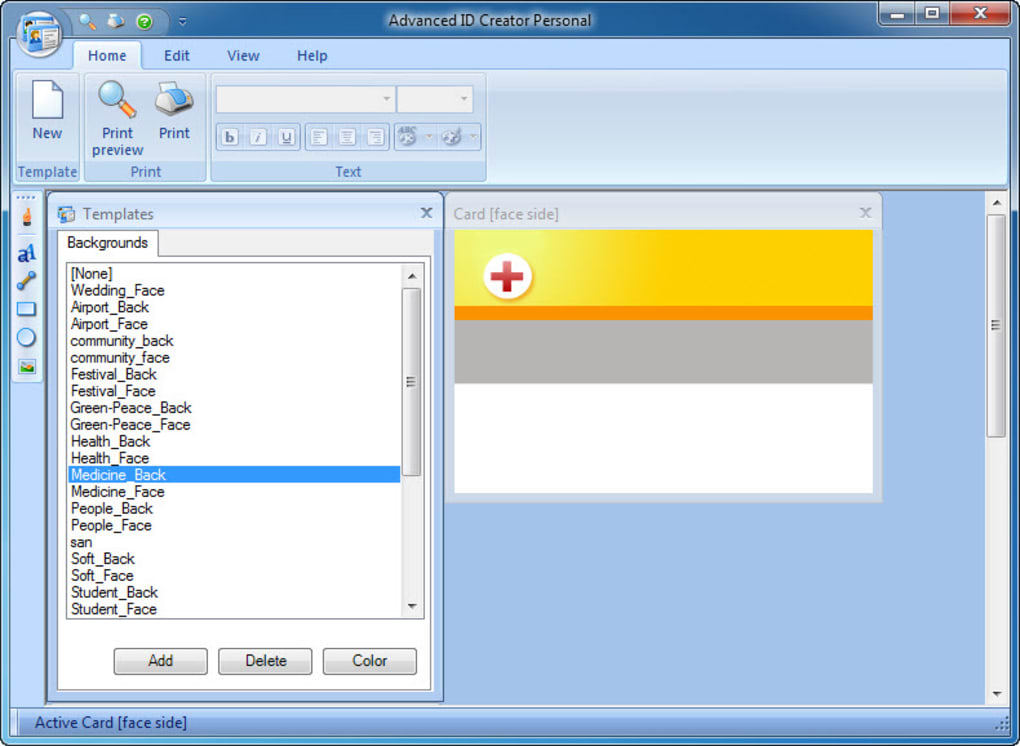
At its heart, Advanced ID Creator is built on a philosophy of making professional ID card design accessible to everyone, regardless of their graphic design expertise. The software provides a comprehensive suite of tools that enable users to move beyond generic templates and create truly custom identification that reflects their specific brand or organizational requirements. This powerful yet user-friendly approach is evident in every aspect of its design, from initial concept to final print.
The primary function of Advanced ID Creator is to facilitate the creation and instant printing of professional-grade ID cards and badges. This isn’t just about placing a photo and a name; it’s about integrating various design elements and data points into a cohesive, functional, and visually appealing card. The software’s design canvas allows for meticulous control over every element, ensuring that the final product meets stringent professional standards. It’s designed to transform what could be a complex and time-consuming task into a streamlined and efficient process.
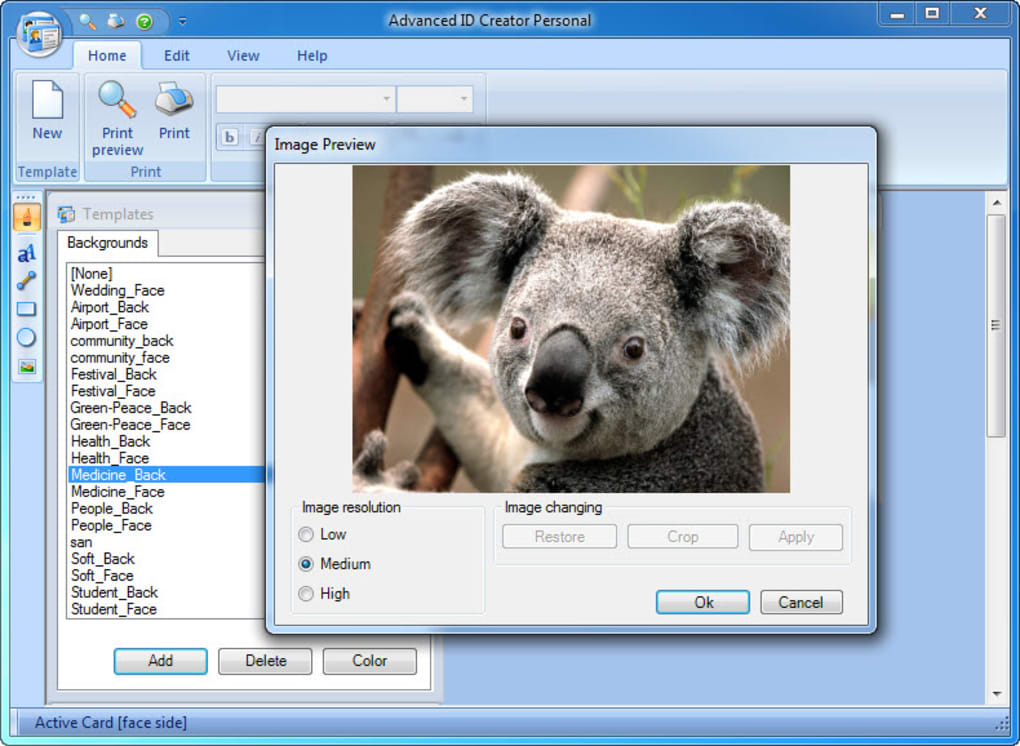
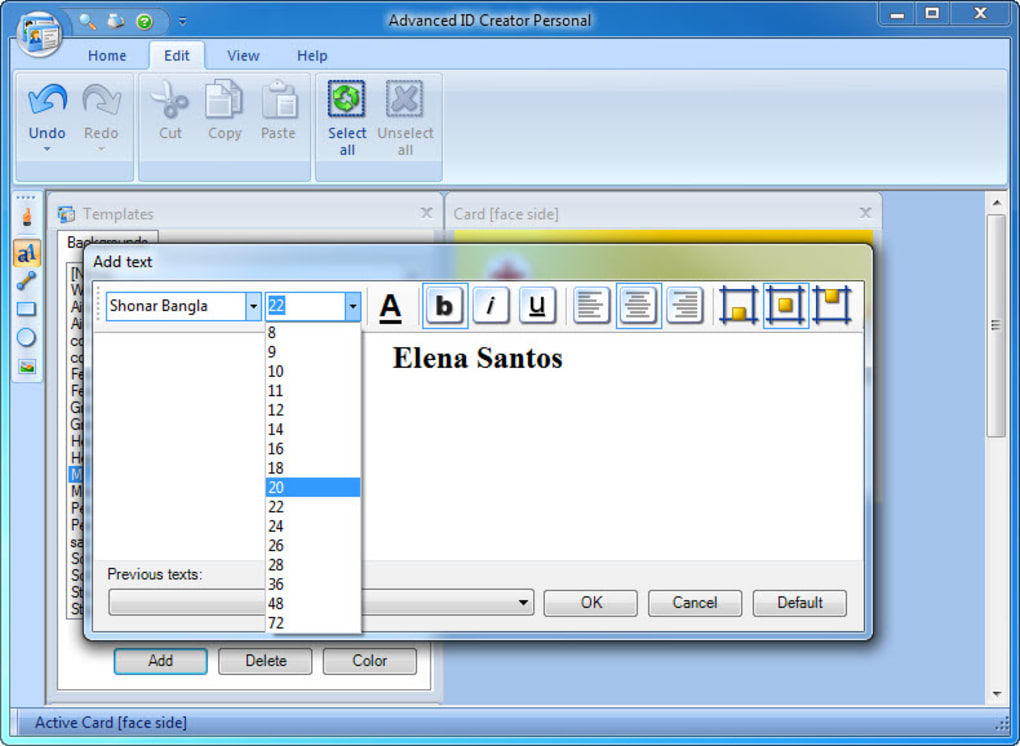
The core strength lies in its versatility. Users can leverage a wide array of tools to incorporate diverse elements into their card designs. This includes essential components like text fields for names, titles, and IDs, alongside sophisticated graphic capabilities for logos, images, and custom backgrounds. Beyond aesthetics, the software also integrates practical features such as barcode generation, crucial for access control systems, inventory management, or quick data retrieval. The ability to add shadows and other visual effects further enhances the professional appearance of the cards, allowing for a polished and refined output that stands out. Whether the goal is to create a simple visitor pass or a multi-layered employee ID with various security features, Advanced ID Creator provides the necessary toolkit.
Intuitive Design Interface
One of the most frequently lauded aspects of Advanced ID Creator, as echoed by numerous users, is its user-friendly interface. A well-designed ID card requires precision, and the software achieves this without overwhelming the user. The workspace is typically laid out with a clear design canvas at the center, surrounded by toolbars and panels for accessing various design elements and properties. This intuitive arrangement allows users to easily drag and drop elements, resize them, change colors, fonts, and positions with minimal effort. Even those with limited experience in graphic design can quickly grasp the fundamentals and begin creating effective ID cards.
The drag-and-drop functionality, coupled with clear menu options, significantly reduces the learning curve. Instead of complex command sequences, users can visually manipulate elements directly on the card preview. This approach fosters creativity and allows for rapid prototyping and iteration, ensuring that the final design is exactly what is envisioned. The design interface is structured to guide the user through the process, making it easy to add layers, group elements, and align components for a clean and professional look.
Graphic Elements and Customization
Beyond basic text, Advanced ID Creator shines in its ability to incorporate and customize a wide range of graphic elements. Organizations can effortlessly integrate their corporate logos, branding guidelines, and specific imagery to ensure brand consistency across all identification materials. The software supports various image formats, allowing for high-resolution graphics that maintain their clarity even when printed.
- Logos and Company Branding: Users can upload company logos and set specific brand colors to be used throughout the card design, reinforcing corporate identity.
- Backgrounds and Textures: Custom backgrounds, gradients, or textures can be applied to give cards a unique look and feel.
- Shapes and Lines: Predefined shapes (rectangles, circles, lines) can be added and customized in terms of color, thickness, and fill, useful for creating design segments, borders, or accents.
- Photo Integration: A crucial aspect of ID cards is the holder’s photo. The software allows for easy photo insertion, resizing, and positioning, ensuring a clear and professional headshot.
- Shadows and Effects: The ability to add shadows to text, images, or shapes provides a depth and sophistication often missing in more basic ID card solutions, enhancing the overall aesthetic appeal and perceived quality.
These customization options ensure that each ID card is not just a functional item but also a reflection of the organization’s professionalism and attention to detail.
Barcodes and Data Integration
In an age where efficiency and data management are key, Advanced ID Creator’s ability to generate and integrate barcodes is a standout feature. Barcodes (such as Code 39, Code 128, QR codes, etc., although specific types aren’t detailed in the reference, these are common for ID software) are indispensable for various applications:
- Access Control: Scanning an ID card at entry points to grant or deny access.
- Time and Attendance Tracking: Employees can clock in and out using their ID cards.
- Asset Tracking: Using ID cards to check out equipment or resources.
- Library Systems: For student or employee library cards.
- Event Management: Quick check-in for attendees at conferences or events.
The software likely allows users to link barcode data to specific fields on the card, ensuring accuracy and reducing manual data entry errors. For higher editions, the ability to link external data sources, as highlighted in user reviews, becomes particularly powerful here. This means a database containing employee IDs, names, and other details can be directly integrated, automating the process of generating barcodes and populating card fields, saving significant time and reducing errors for large-scale operations.
Tailored Solutions: Personal, Premier, and Enterprise Editions
Advanced ID Creator recognizes that the needs of a small startup differ significantly from those of a multinational corporation. To address this diversity, Xpress Software offers the program in distinct editions: Personal, Premier, and Enterprise. This tiered approach ensures that users can select a version that perfectly aligns with their operational scale, budget, and functional requirements.
The Free Personal Edition: Your Entry Point
The Advanced ID Creator Personal Edition serves as an excellent starting point for individuals or small organizations with low-volume ID card needs. As a FREE version, it provides essential functionalities to create and print professional-looking cards one by one. This edition is ideal for:
- Small Businesses: For a handful of employees, a basic visitor pass system, or unique membership cards.
- Educational Settings: Creating IDs for a small club, a specific class project, or faculty members where individual cards are needed infrequently.
- Personal Use: Crafting custom event badges for a party, personalized luggage tags, or unique identification for hobbies.
Users consistently praise the Personal Edition for being “Decent” and providing “basic functions” without any cost. While it’s limited to creating cards one by one and is not designed for mass production, it offers a solid foundation for understanding the software’s capabilities and producing high-quality individual outputs. It’s a testament to PhanMemFree’s policy of offering accessible tools, allowing users to experience the core functionality before committing to a paid version for expanded features. As one user noted, “I don’t think anyone should expect a lot from free stuff especially when there are not even any ads,” highlighting its value proposition.
Stepping Up to Premier: Enhanced Functionality
For users who find the Personal Edition “too basic” for their evolving needs, the Advanced ID Creator Premier Edition represents a significant step up. While the specific enhanced functions are not detailed in the provided content, common improvements in Premier versions of such software typically include:
- Increased Volume Capabilities: Moving beyond one-by-one printing, allowing for batch printing of a small to moderate number of cards.
- More Advanced Design Tools: A broader selection of fonts, graphics, templates, and effects.
- Limited Database Integration: The ability to import data from simple spreadsheets (like CSV or Excel) to automate population of card fields, though perhaps not with the full robustness of the Enterprise edition.
- Advanced Security Features: Potentially adding watermarks, microtext, or other visual security elements.
- Expanded Barcode Options: Support for a wider range of barcode types.
- Customer Support: Access to dedicated technical support.
The Premier Edition is designed for small to medium-sized businesses or organizations that require more efficiency and a broader feature set than the free version offers, without needing the industrial-scale capabilities of the Enterprise edition. As one user reviewed, after trying the free version, they “upgraded to professional edition. That’s not expensive but does the job well,” indicating a good balance of cost and functionality.
Enterprise Edition: Powering Large-Scale Operations
The pinnacle of the Advanced ID Creator family is the Enterprise Edition. This version is specifically engineered to meet the demanding requirements of large organizations, educational institutions, or businesses that need to issue thousands of ID badges efficiently and consistently. User reviews consistently highlight its advanced capabilities, describing it as “simply amazing” and essential for high-volume needs.
Key features implied and explicitly mentioned for the Enterprise Edition include:
- Robust External Data Linking: This is a crucial differentiator. The Enterprise Edition allows for seamless integration with external databases (e.g., SQL, Access, ODBC sources). This means an organization’s existing employee or student records can be directly linked to the ID card design, automating the population of names, IDs, photos, departments, and other relevant information. This eliminates manual data entry, reduces errors, and dramatically speeds up the card creation process for hundreds or thousands of individuals. One user specifically praised this: “They’ve recently added ability to link external data which is excellent!”
- Batch Processing and High-Volume Printing: Designed to handle thousands of badges, this edition supports efficient batch printing, allowing for continuous production without constant manual intervention.
- Advanced Security Protocols: Likely includes features for secure data handling, user roles, and more sophisticated anti-counterfeiting measures for the cards themselves.
- Multi-User Environment Support: Potentially allowing multiple users to access and work on card designs and databases simultaneously within an organization.
- Comprehensive Reporting: Tools to track card issuance, design history, and other relevant metrics.
- Dedicated Enterprise Support: Higher-tier support services tailored for large deployments.
As one reviewer pragmatically stated, “Frankly speaking if you need to do a lot of badges bad by a lot I mean thousands, this won’t cut it. Go with Enterprise.” This clearly positions the Enterprise Edition as the go-to solution for any organization facing significant ID card production demands, providing the tools necessary for “Multifunctional” and “Robust” operations that can literally “save your life” from the logistical nightmares of manual ID creation.
User Experience and Practical Applications
Beyond its technical features, the true measure of Advanced ID Creator’s value lies in its user experience and its applicability across various real-world scenarios. The software has garnered significant positive feedback for its ease of use, ability to produce professional results, and overall effectiveness.
Simplicity Meets Professionalism
A common thread in user testimonials is the balance Advanced ID Creator strikes between simplicity and professional output. Reviewers frequently describe the program as “User friendly and not hard to learn,” and “Painfully easy to use.” This ease of access ensures that even individuals without a background in graphic design can quickly become proficient in creating visually appealing and functional ID cards.
The intuitive design process, coupled with the ability to add sophisticated elements like barcodes and shadows, means that ease of use does not come at the expense of quality. Users report achieving “Professional grade results” and finding the software “effective” with “no problem.” This capability to deliver high-quality output without a steep learning curve is a significant advantage, reducing training time and enabling faster deployment of identification solutions. For many, it means they can design their “name tags without much trouble” and have them look professionally made, a critical factor for an organization’s image.
Diverse Use Cases
The versatility of Advanced ID Creator allows it to be deployed across a multitude of industries and for various identification purposes. Its ability to create “professional ID cards and badges instantly” translates into numerous practical applications:
- Corporate Identification: Employee ID cards are essential for security, time tracking, and fostering a sense of belonging. Organizations can customize cards with employee photos, names, titles, department information, and scannable barcodes for access control.
- Educational Institutions: Schools, colleges, and universities require student IDs, faculty badges, and visitor passes. These cards can be used for library access, meal plans, attendance tracking, and campus security.
- Event Management: For conferences, festivals, trade shows, and concerts, temporary badges are crucial for staff, volunteers, VIPs, and attendees. Advanced ID Creator can quickly generate event-specific badges with logos, dates, and access levels.
- Healthcare Facilities: Hospitals and clinics need staff IDs for security and patient trust, as well as visitor badges for controlled access areas.
- Membership Organizations: Clubs, gyms, and associations can create personalized membership cards that may include membership numbers, expiration dates, and QR codes for discounts or loyalty programs.
- Government and Public Services: Identification for municipal employees, volunteers, or specific program participants.
- Retail and Hospitality: Loyalty cards, employee badges for customer service roles, or visitor passes for specific areas.
The capacity to link external data in the Enterprise Edition is particularly beneficial for these larger-scale applications, allowing for dynamic card generation based on existing databases, which dramatically improves efficiency when managing hundreds or thousands of IDs.
Why Choose Advanced ID Creator for Your Organization?
When faced with numerous options for ID card software, Advanced ID Creator presents a compelling case due to several key advantages:
- Accessibility and Scalability: The availability of a free Personal Edition makes it highly accessible for individuals and small operations, offering a risk-free entry point. The clear upgrade path to Premier and Enterprise editions ensures that the software can grow with an organization’s needs, from low-volume, single-card creation to high-volume, database-driven batch printing.
- Professional Output: The emphasis on design tools, graphic integration, barcode capabilities, and visual effects means that the cards produced are not just functional but also professional, enhancing an organization’s image and security. Users consistently praise the “Professional grade results” and effectiveness.
- Ease of Use: Despite its powerful features, the software is designed to be “User friendly and not hard to learn,” making it suitable for users of all technical skill levels. This reduces the need for extensive training and allows for quicker implementation.
- Cost-Effectiveness: Starting with a free version and offering reasonably priced upgrades (as indicated by user reviews) makes Advanced ID Creator a financially attractive option, especially when compared to outsourcing ID card production or investing in complex, high-cost design software.
- Robust Data Integration (Enterprise): For larger organizations, the ability to link with external databases is a game-changer. It streamlines workflows, minimizes errors, and saves countless hours in managing and issuing identification.
While the last update was in March 2015, the core functionality for ID card creation remains stable and effective. The praise from users years after its release underscores its enduring utility and reliability as a dedicated tool for its specific purpose.
Installation, System Requirements, and Support
Advanced ID Creator is designed for the Windows operating system, with specific mention of Windows 7 compatibility, implying broad support across various Windows versions. The software package is relatively compact, with a size of 9.92 MB, ensuring a quick download and installation process. Its light footprint means it runs efficiently without requiring high-end system specifications.
Installation Process: Typically, the installation involves a straightforward download from PhanMemFree.org, followed by a standard Windows installer wizard that guides the user through the setup steps. System Requirements:
- Platform: Windows (compatible with Windows 7 and likely newer versions)
- Language: Available in English, Portuguese, and Russian, offering flexibility for a global user base.
- Disk Space: Minimal, given the 9.92 MB file size.
- RAM/Processor: Standard modern Windows PC specifications are usually sufficient.
Support: While specific support channels for Xpress Software are not detailed in the reference, paid versions (Premier and Enterprise) typically come with dedicated customer support. For the free Personal Edition, online forums or community resources might be available, though direct developer support is usually reserved for paying customers. PhanMemFree.org, as a platform, also provides security status and user reviews that can offer insights and troubleshooting tips.
Conclusion
Advanced ID Creator, by Xpress Software, offers a compelling solution for anyone needing to produce professional ID cards and badges. From its free Personal Edition, which provides a risk-free entry point for low-volume needs, to its powerful Enterprise Edition, designed for large-scale, data-driven operations, the software caters to a broad spectrum of users. Its intuitive design interface, comprehensive suite of graphic tools, and crucial barcode and data integration capabilities make it a highly effective and user-friendly choice.
The consistent positive feedback from users, highlighting its ease of use, professional results, and valuable features like external data linking, underscores its enduring relevance. Despite its last update being some years ago, its core functionality remains robust and highly effective for its intended purpose. For organizations seeking an efficient, scalable, and cost-effective way to manage their identification needs, Advanced ID Creator, available through PhanMemFree.org, stands as a reliable and recommended tool for crafting professional, secure, and visually appealing ID cards and badges.
File Information
- License: “Free”
- Version: “personal-9.5.245”
- Latest update: “March 31, 2015”
- Platform: “Windows”
- OS: “Windows 7”
- Language: “English”
- Downloads: “116.8K”
- Size: “9.92 MB”


