
In the digital age, data is king, and its integrity is paramount. From critical business documents and cherished personal photos to extensive game archives and essential software installations, much of our digital life is stored in compressed formats to save space and facilitate easier transfer. Among these, RAR and SFX files stand out as popular choices for their robust compression and error correction capabilities. However, even these resilient formats are not immune to corruption. Imagine the frustration: you’ve spent hours downloading a large RAR archive, eagerly anticipating its contents, only to be met with an error message during decompression – “corrupt file,” “checksum error,” or “unexpected end of archive.” The data you were counting on is suddenly inaccessible, seemingly lost. This is precisely where a specialized utility like Advanced RAR Repair steps in, offering a beacon of hope to recover what seemed to be irrevocably damaged.
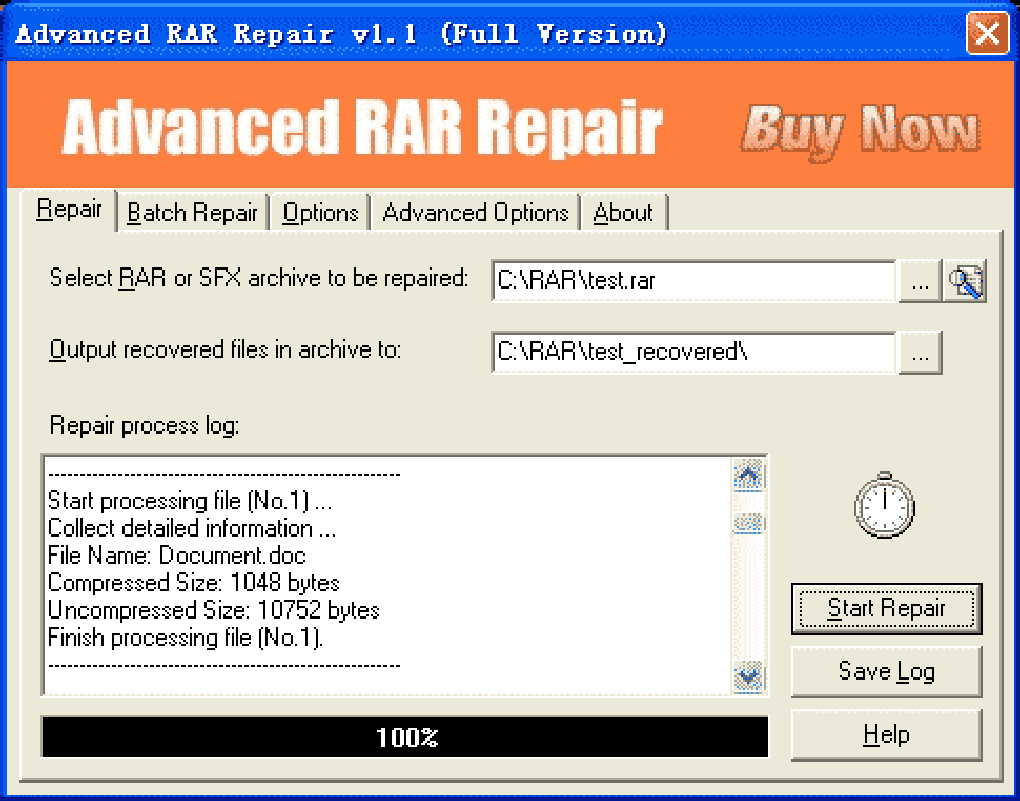
Advanced RAR Repair (ARAR) is a dedicated software tool designed to meticulously analyze and restore compromised RAR and SFX files. Developed by Rar-repair, this application serves as a crucial line of defense against data loss stemming from archive corruption. It’s a pragmatic solution for a problem that can plague anyone from casual users to IT professionals, transforming potential digital disasters into manageable recovery tasks. This comprehensive review will delve into the functionalities, benefits, limitations, and overall value proposition of Advanced RAR Repair, providing a thorough understanding of why this utility deserves a place in your digital toolkit.
The prevalence of RAR files is undeniable. Created by Eugene Roshal, the RAR format, along with its self-extracting counterpart SFX (Self-eXtracting), has been a staple for archiving large collections of files for decades. Its advantages, such as superior compression ratios compared to some older formats, robust error recovery features (when properly configured during creation), and the ability to split archives into multiple parts, have cemented its status. Users rely on RAR archives for distributing software, backing up extensive datasets, packaging multimedia collections, and more. When these vital containers become corrupted, the implications can range from minor inconvenience to significant data loss, impacting productivity, project timelines, and even personal memories. Common causes of RAR file corruption include incomplete downloads, hard drive errors, network transmission issues, malware infections, unexpected system shutdowns, and even flaws during the initial creation of the archive. Regardless of the origin of the damage, the end result is the same: an inaccessible archive. Advanced RAR Repair aims to reverse this misfortune, salvaging as much data as possible from the digital wreckage.
Utilities & Tools: An Essential Digital Lifesaver
Advanced RAR Repair firmly positions itself within the “Utilities & Tools” category, a broad but vital segment of software that encompasses applications designed to maintain, optimize, and repair computer systems and data. Within this domain, ARAR stands out by focusing on a specific, yet incredibly common, problem: archive corruption. Unlike general-purpose system optimizers or disk cleaners, ARAR has a singular, highly specialized function, performing it with considerable efficacy.
The core mechanism of Advanced RAR Repair involves a deep-scan analysis of the corrupted RAR or SFX file. When a standard decompression program fails, it’s often because critical header information, file pointers, or checksums within the archive have been compromised. ARAR bypasses these damaged sections where possible, meticulously scanning the entire file byte by byte to identify and reconstruct recoverable data. It attempts to piece together the intact parts of the archive, ignoring or intelligently rebuilding the corrupted segments. This process is far more sophisticated than a simple “retry” button; it’s an intelligent forensic examination of the archive’s internal structure. The program can recover multiple files and folders from the damaged archive, provided the data blocks corresponding to those files are not entirely destroyed. This makes it an indispensable tool for anyone who regularly deals with downloaded or archived content, especially in scenarios where re-downloading or recreating the archive is not feasible or would be excessively time-consuming.
One of the most noteworthy features of Advanced RAR Repair is its capability to handle files with encrypted passwords. In an era where data security is paramount, many RAR archives are protected with passwords. While encryption adds a layer of security, it can also complicate recovery if the file structure itself becomes damaged. ARAR’s ability to work with encrypted archives means that users don’t have to sacrifice security for the sake of potential recovery. This is a significant advantage, as many generic file repair tools might falter when encountering an encrypted structure, assuming it’s part of the corruption rather than a legitimate security measure. The fact that ARAR can navigate this adds a layer of versatility and professionalism to its offerings, making it suitable for both casual and more security-conscious users.
The user experience with Advanced RAR Repair is designed for simplicity and efficiency. Its interface is clean and straightforward, featuring intuitive menus that guide the user through the repair process. This ease of use is critical, as users encountering corrupt files are often already stressed and don’t need the added burden of learning a complex new piece of software. The typical workflow involves selecting the damaged RAR/SFX file, specifying an output directory for the recovered data, and initiating the repair. The software then provides feedback on the progress and the success rate of the recovery.
Further enhancing its convenience, ARAR offers seamless integration with Windows Explorer. By activating this option during installation, users can simply right-click on a corrupt RAR or SFX file directly from their file explorer and initiate the repair process. This streamlines the workflow significantly, eliminating the need to open the application separately and navigate to the file each time. This level of integration is a hallmark of well-designed utility software, blending into the operating system rather than feeling like an external add-on.
Moreover, Advanced RAR Repair is highlighted as a portable program. This means it can be installed and run directly from a USB flash drive or other portable storage device without requiring a full installation on the host computer. The benefits of portability are immense: IT technicians can carry it on a thumb drive to troubleshoot issues on various client machines; users can quickly deploy it on a borrowed computer without leaving residual files; and it provides an emergency solution that’s always at hand. In situations where a computer might be struggling with system instability, running a portable application can often be more reliable than a full installation, adding another layer of practical utility. This “pocket-sized solution,” as described by the developer, truly delivers on its promise of convenience and readiness.
Enhancing Productivity and Data Integrity
The impact of file corruption on productivity can be severe. Whether it’s a critical project archive, a client delivery, or a personal backup, inaccessible data causes delays, frustration, and potentially significant financial losses. Advanced RAR Repair directly addresses this by providing a reliable pathway to retrieve lost information, thereby acting as a powerful enabler of productivity and a guardian of data integrity.
Consider a scenario where a large software development project’s source code, archived for distribution or backup, becomes corrupted. Without a tool like ARAR, the developers might face days or even weeks of re-coding, resorting to older backups, or worst-case, losing parts of their work. With Advanced RAR Repair, the potential to salvage most, if not all, of the data dramatically reduces downtime and allows teams to continue their work with minimal interruption. This immediate recovery capability directly translates into saved time, resources, and averted project delays. For businesses, where “time is money,” such a utility can pay for itself many times over in a single recovery instance.
The concept of data integrity refers to the accuracy, consistency, and reliability of data over its entire lifecycle. Corrupt archives fundamentally compromise data integrity. They imply that the data you thought you had is no longer what it should be, or indeed, might not be there at all. ARAR helps restore this integrity by recovering the original data content, ensuring that what you extract from the repaired archive is as close to the original as possible. While no repair tool can guarantee 100% recovery if the damage is catastrophic, ARAR’s effectiveness “in most cases” means it significantly improves the odds of maintaining data integrity even after an unexpected event. This is particularly important for professionals who deal with sensitive documents, legal files, or scientific data where absolute accuracy is crucial.
The application’s ability to integrate with Windows Explorer further enhances productivity by minimizing context switching. Users don’t need to break their workflow to open a separate application; they can initiate the repair right from where they discovered the problem. This seemingly small feature contributes to a smoother and more efficient user experience, reducing cognitive load and saving precious seconds that add up over time. In a professional environment, every efficiency gain, no matter how minor, contributes to overall productivity.
However, it’s crucial to address the caveat: “Like any solution, it is not 100% foolproof.” This is an honest and realistic assessment. The success rate of recovery depends heavily on the extent and nature of the damage. If an archive’s core data blocks are completely overwritten or severely fragmented, even the most advanced tools may not be able to reconstruct them perfectly. ARAR excels at repairing logical errors, partially corrupted headers, and corrupted file entries where the underlying data might still be present. It performs a remarkable job of stitching together recoverable pieces, but it cannot create data out of thin air. Therefore, while Advanced RAR Repair is a powerful productivity enhancer, it should be seen as a crucial recovery tool, not a substitute for regular backups and good data management practices. Its existence, however, allows for a more robust disaster recovery strategy, ensuring that even when backups are slightly out of date or a fresh download is compromised, there’s still a strong chance of salvaging the needed information.
Security & Privacy Considerations in File Archiving
While Advanced RAR Repair’s primary function is data recovery, its operation inevitably touches upon aspects of “Security & Privacy,” particularly in how it handles encrypted files and the implications of accessing potentially sensitive data within archives. The integrity of an archive is directly related to its security – if an archive can be corrupted, it raises questions about its reliability for storing confidential information.
One of the explicit features of ARAR is its ability to download (which likely means “process” or “recover”) files with encrypted passwords. This is a crucial security consideration. For legitimate users who have forgotten their passwords or are dealing with a company archive whose password is known but the file itself is corrupt, ARAR provides a valuable service. It means that the encryption itself doesn’t become an insurmountable barrier to data recovery in the face of structural damage. This functionality underscores that ARAR is not designed to crack passwords but rather to work around the corruption in an already encrypted file, assuming the password will be provided or known by the user for eventual decryption after repair. This maintains the integrity of the encryption while still allowing for repair.
From a privacy perspective, knowing that a tool exists to repair archives can offer peace of mind. If you’ve encrypted sensitive documents in a RAR file and that file gets corrupted, the ability to repair it ensures that your private data isn’t permanently lost or exposed due to a technical glitch. The alternative could be losing access to vital personal records, financial statements, or proprietary business information, which would be a significant privacy and security incident. By restoring access, ARAR indirectly safeguards the user’s control over their private information.
However, the user must be mindful of how they handle sensitive data during the repair process. Using ARAR means processing the potentially sensitive content of the archive. Therefore, it’s essential to ensure the operating environment is secure and that the repaired files are saved to a protected location. Furthermore, in the context of IT support or corporate environments, the use of such a tool must align with data handling policies and privacy regulations. IT administrators utilizing ARAR to repair an employee’s corrupted archive must ensure they are authorized to access the content and that all privacy protocols are followed. The tool itself is neutral, but its application requires careful consideration of the data it processes.
In essence, Advanced RAR Repair contributes to data security by helping to ensure the availability and integrity of encrypted data, even when the archive structure is damaged. It mitigates the risk of data loss, which in itself is a security concern, while respecting the existing encryption. Its operation underpins the principle that legitimate access to data should not be hindered by technical corruption, provided proper authentication (password) can eventually be supplied for decryption of the recovered content.
Advanced RAR Repair in a Professional Context: Development & IT Applications
For professionals in “Development & IT,” reliable data handling is not just a convenience; it’s a fundamental requirement for project success and operational continuity. In this demanding environment, Advanced RAR Repair emerges as a highly relevant and valuable utility. IT support staff, network administrators, software developers, and data managers frequently encounter scenarios where ARAR can provide critical assistance.
Consider a software development team collaborating on a large project. Source code, libraries, and build artifacts are often exchanged or backed up as RAR archives. If one of these crucial archives becomes corrupted – perhaps due to a faulty network transfer to a remote server or a disk error on a developer’s workstation – the entire team’s progress could be halted. An IT professional equipped with Advanced RAR Repair can quickly attempt to salvage the archive, potentially saving days of lost work and preventing significant project delays. The portability of ARAR is particularly beneficial here, allowing IT staff to carry the tool on a USB drive and run it on any affected machine without needing administrative privileges for a full software installation, which can be restricted in corporate environments.
Database administrators might use RAR files to archive database backups or export large datasets. Corruption in such an archive could mean the loss of valuable historical data or a critical point-in-time recovery. ARAR offers a fighting chance to recover these archives, which might be the only available copy of crucial information. Similarly, network administrators who frequently manage large installations or system images packaged as RAR or SFX files can find ARAR invaluable when these archives are compromised during storage or transfer over a network. The ability to quickly repair and deploy a critical system image or driver package can significantly reduce system downtime.
For web developers, who often deal with large content management system installations, themes, or plugin packages distributed as archives, corruption can be a common headache, especially with large downloads. ARAR helps ensure that these packages can be extracted and utilized without errors, maintaining workflow efficiency. The tool’s effectiveness in “most cases” provides a pragmatic solution for common issues arising from network instabilities during large file transfers.
The fact that ARAR is easy to use with a clear interface also benefits the professional context. IT and development professionals are often under pressure to resolve issues quickly. A complex tool with a steep learning curve would only add to their burden. ARAR’s straightforward operation means that even non-specialized support staff can be trained to use it effectively, democratizing the file repair process within an organization. Its integration with Windows Explorer further simplifies operations, making it a natural extension of their existing toolkit rather than a separate, cumbersome application.
While Advanced RAR Repair is an incredibly useful tool for professionals, it’s also important to manage expectations, especially regarding its “trial version” limitation. The user review from November 8, 2010, explicitly states: “don’t bother. Another con!!! The trial version will highlight the files that require repair, BUT WON’T REPAIR THEM UNLESS YOU BUY THE COMPLETE VERSION!!!!!!! ANOTHER CON by arseholes who don’t mind wasting millions of people’s time.” This feedback, while strongly worded, highlights a common business model for specialized software. The trial version allows users to confirm that ARAR can detect and identify the corruptions and which files are potentially recoverable. This diagnostic capability is valuable in itself, as it confirms that the tool is capable of addressing the problem before a purchase is made. However, the actual repair functionality is locked behind the full version. From a developer’s perspective, this is a way to prove the software’s efficacy and encourage legitimate purchases, recouping development costs. From a user’s perspective, especially one in a crisis situation with a corrupt file, it can indeed be frustrating to know a solution exists but is inaccessible without payment. This is a trade-off users must consider: the trial offers a diagnostic, while the full version provides the cure. For IT professionals and businesses, the cost of the full version often pales in comparison to the value of the data being recovered and the productivity saved. Therefore, while frustrating for some, it’s a standard model for professional-grade utilities.
In conclusion, Advanced RAR Repair is a powerful, user-friendly, and portable utility that specializes in recovering data from corrupt RAR and SFX archives. Its ability to work with encrypted files, its deep-scan recovery mechanism, and seamless Windows Explorer integration make it an invaluable asset for anyone regularly handling compressed data. While the trial version’s limitation on actual repair might be a point of contention for some, the full version offers a robust solution that can save significant time, effort, and data in critical situations. For individuals and especially professionals in IT and development roles, where data integrity and continuous productivity are paramount, investing in a tool like Advanced RAR Repair can prove to be a wise decision, safeguarding against the unexpected pitfalls of file corruption. It exemplifies how specialized utilities, often overlooked, play a crucial role in maintaining our digital well-being and operational efficiency in an increasingly data-dependent world.
App Specifications (as of January 29, 2024)
- License: Trial version (Full repair requires purchase)
- Version: 4
- Latest update: January 29, 2024
- Platform: Windows
- OS: Windows 98 and above
- Language: English (available in multiple languages via PhanMemFree.org)
- Downloads: 206.2K (total)
- Last month’s downloads: 79
- Size: 14.91 MB
- Developer: Rar-repair
Alternative Apps (Examples of other top downloads in Utilities & Tools for Windows on PhanMemFree.org):
- 3uTools: A free all-in-one data management tool, often used for iOS devices.
- SHAREit: Facilitates easy transfer of any files between devices.
- Bijoy Bayanno: A tool for easily typing Bangla script.
- GS Auto Clicker: Mouse click automation tool for PC.
- Canon LBP2900b driver: Free driver for a specific printer line.
Related Topics on PhanMemFree.org:
- File Repair
- Rar File
- Repair For Windows
- Repair
- Advanced For Windows 7
- Rare (likely a typo, intended as “RAR”)
File Information
- License: “Trial version”
- Latest update: “January 29, 2024”
- Platform: “Windows”
- OS: “Windows 98”
- Language: “English”
- Downloads: “206.2K”
- Size: “14.91 MB”


