AeroSnap was a free utility designed to bring the window-snapping functionality of Windows 7 to older operating systems like Windows XP and Vista. Before Windows 7 popularized the ease of snapping windows to screen edges for efficient multitasking, users relied on more cumbersome methods. AeroSnap aimed to bridge this gap, providing a simple yet effective solution for users who appreciated the convenience of Aero Snap but were not yet ready (or able) to upgrade their operating system. This review explores the application’s strengths, weaknesses, and overall impact on user experience.
Functionality and Features
AeroSnap’s core function was remarkably straightforward: it replicated the Aero Snap features of Windows 7. Users could easily “snap” windows to the top, sides, or corners of their screen with simple keyboard shortcuts or mouse actions. This allowed for quick and intuitive arrangement of multiple windows on the desktop, significantly improving multitasking efficiency. The program’s simplicity was both its greatest strength and, to some extent, its limitation. It focused intently on this single task, foregoing the addition of more complex features.
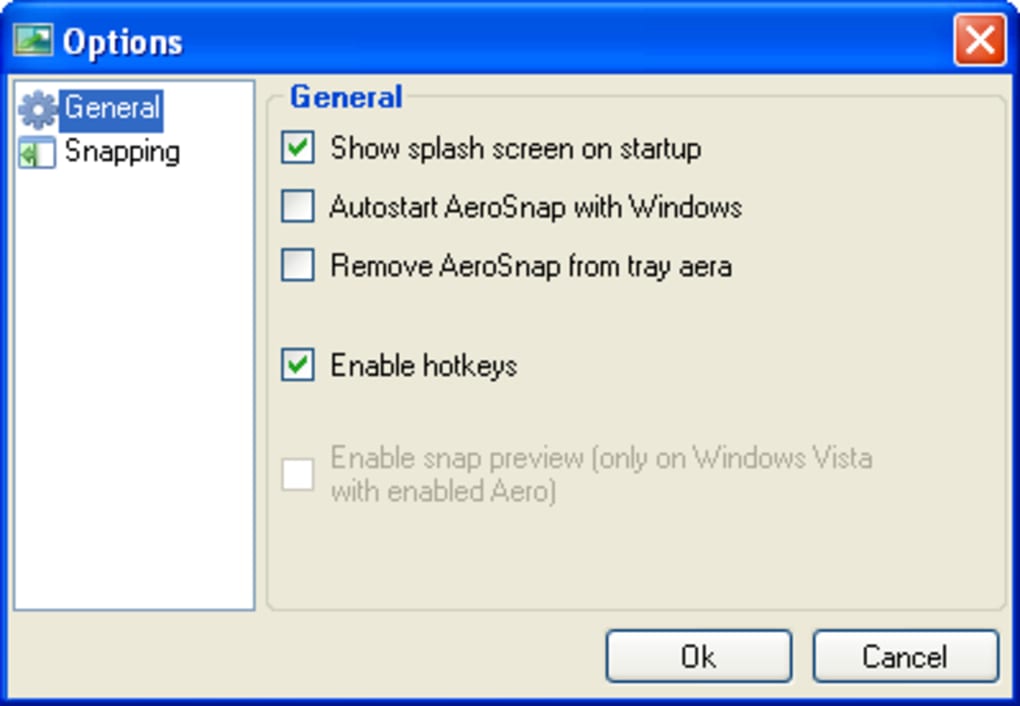
Beyond the core snapping functionality, AeroSnap offered a few customization options. Users could configure the snapping behavior to fine-tune how windows reacted to the hotkeys and mouse interactions. Further, the program allowed users to disable its automatic startup with Windows, granting control over its resource utilization. While these configuration options were minimal, they offered a degree of personalization, allowing users to tailor AeroSnap to their specific workflows and preferences. The lack of extensive features was a deliberate design choice, maintaining the program’s lean and focused approach.

User Experience and Performance
The intuitive design of AeroSnap made it relatively easy to learn and use, even for users unfamiliar with advanced window management techniques. The hotkeys and mouse interactions were designed to be natural and unobtrusive. However, some users reported an initial learning curve in mastering the precise movements required for consistent snapping. The act of “snapping” a window, while conceptually simple, sometimes required a certain level of precision that users needed time to master.
Despite its lightweight nature in terms of features, AeroSnap was reported to be surprisingly resource-intensive for a program with such a limited scope. Some users expressed concern about its memory footprint, noting that it consumed a larger-than-expected amount of system resources. This was a significant drawback, especially on older systems with limited RAM, which were precisely the systems AeroSnap was designed to enhance. The discrepancy between the program’s simple function and its resource consumption created a degree of tension for users who appreciated the functionality but were concerned about the performance impact. This raised questions about the efficiency of the application’s underlying code.

Advantages and Disadvantages
AeroSnap presented a compelling proposition for users who desired the convenience of Windows 7’s Aero Snap features on older operating systems. Its primary advantage was its successful replication of this functionality without requiring a full operating system upgrade. This offered a significant time and cost saving for users who were content with their existing system but wished to improve their multitasking workflow. The program’s ease of use further contributed to its appeal, making it accessible even to less technically inclined users.
However, the application’s resource consumption posed a significant disadvantage. The high memory usage was not in line with the perceived needs of such a simple program. This was a major criticism from users and limited the program’s appeal, particularly to those using older hardware with limited system resources. The trade-off between functionality and performance proved to be a significant factor affecting user satisfaction.
Comparison with Alternatives
While AeroSnap filled a niche need, it’s essential to consider the alternatives available for window management. Windows XP and Vista offered built-in window arrangement tools, though these lacked the streamlined elegance of Aero Snap. Many third-party applications offered more advanced window management features, often including virtual desktops and more sophisticated arrangement options. These alternatives, while potentially more complex, might have offered a superior overall experience, particularly for users with more demanding multitasking requirements. The choice between AeroSnap and these alternatives often depended on the user’s specific priorities: simplicity versus feature richness, and ease of use versus more advanced functionalities. The presence of these alternatives made AeroSnap’s slightly resource-intensive nature stand out more significantly as a negative.
Technical Aspects and Development
AeroSnap was developed by AeroSnap (the developer’s name and program’s name were identical), the program was a testament to the developer’s ability to create a functional and surprisingly useful small program for addressing a specific need. Information about the development process and techniques employed by the developer was scarce, leaving much open to speculation concerning the coding techniques that might have contributed to the application’s higher-than-expected resource consumption. An in-depth analysis of the codebase might have shed light on the efficiency of the implementation. The relatively old release date (January 21, 2010) suggests that the application might not have benefited from the advancements in software development techniques, potentially contributing to its performance issues.
User Reviews and Feedback
User reviews highlighted both the positive and negative aspects of AeroSnap. Many users praised its functionality, emphasizing how it improved their workflow and enhanced their multitasking abilities. However, the resource consumption was repeatedly cited as a major concern, even leading some users to uninstall the program despite appreciating its core functionality. Some users found ways to mitigate the performance impact by adjusting startup options or allocating more RAM to their system, showcasing the adaptive capacity of some users to overcome the limitations. Nonetheless, the consistent feedback on the memory usage suggests that it was a significant barrier for a number of potential users.
Conclusion
AeroSnap provided a valuable solution for users of older Windows operating systems who desired the convenience of Windows 7’s Aero Snap functionality. Its ease of use and simplicity were significant strengths. However, its surprisingly high resource consumption proved to be a notable drawback, which ultimately overshadowed its positive aspects for many users. While AeroSnap succeeded in its primary goal of replicating Aero Snap functionality, its performance issues prevented it from achieving widespread adoption and enduring popularity. Its legacy serves as a reminder of the importance of balancing functionality with efficiency in software development, highlighting the often-overlooked but critically important consideration of resource utilization. Its place in software history is thus a bit of a bittersweet one, representing a functional but flawed solution to a real problem.
File Information
- License: “Free”
- Version: “0.61”
- Latest update: “January 21, 2010”
- Platform: “Windows”
- OS: “Windows Vista”
- Language: “English”
- Downloads: “26.6K”
- Size: “946.25 KB”