
Affinity Photo is a powerful and comprehensive image editing software designed for professional photographers, graphic designers, and creative individuals. Boasting a vast array of tools and features, it provides a robust and efficient workflow for tasks ranging from basic photo retouching to the creation of complex, multi-layered compositions. This in-depth review explores its capabilities, advantages, and potential drawbacks, helping you determine if it’s the right choice for your needs.
A Feature-Rich Editing Environment
Affinity Photo stands out for its exceptionally rich feature set, exceeding the capabilities of many competing programs, even those at a higher price point. It’s not merely a photo editor; it’s a complete digital imaging suite packed into a user-friendly interface. This functionality caters to both casual users seeking basic editing tools and professionals requiring advanced capabilities.
Basic and Advanced Editing Tools: The software offers a comprehensive collection of tools covering the entire spectrum of image manipulation. Fundamental editing tasks, like cropping, resizing, and color adjustments, are seamlessly integrated alongside more advanced features. These advanced features include:
- Red-eye removal: A quick and efficient tool for eliminating distracting red-eye effects in portraits.
- Selection tools: Precise selection tools, including lasso, magic wand, and brush-based selections, allow for accurate isolation of specific image areas for editing or manipulation.
- Drawing and painting tools: A versatile suite of brushes, pencils, and other painting tools enables users to add creative elements, retouch images, or create entirely new artwork.
- Cloning stamp: This invaluable tool lets users sample and replicate sections of an image to seamlessly remove blemishes, objects, or unwanted elements.
- Lens distortion correction: Effectively corrects common lens distortions, such as barrel or pincushion distortion, ensuring images are geometrically accurate.
- Font effects: Apply a variety of font styles, effects, and customizations to text layers for enhanced visual appeal.
- Batch processing: Automate repetitive editing tasks across multiple images for increased efficiency.
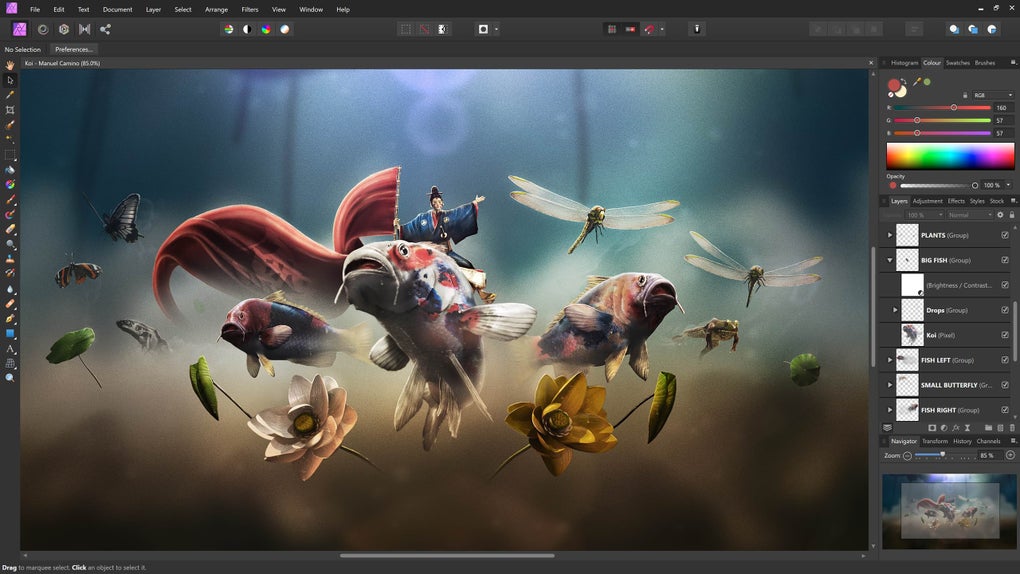
Layer-Based Editing: Affinity Photo employs a robust layer system, a cornerstone of professional-grade image editing. Users can work with multiple layers, applying edits independently and non-destructively. This allows for complex compositions and intricate edits without altering the underlying image data. The layer system supports:
- Raster layers: Standard image layers for pixel-based editing.
- Vector layers: Layers containing vector graphics, offering scalability without loss of quality.
- Mask layers: Precisely control the visibility and opacity of specific areas within a layer, enabling targeted edits and creative effects.
- Layer arrangement: Users have complete control over layer order, allowing them to manipulate the stacking order for precise visual control.
This flexible layer system provides unmatched control and precision, essential for creating sophisticated images and photo manipulations.
Extensive File Format Compatibility
Affinity Photo boasts extensive compatibility with a wide range of file formats, ensuring seamless integration with other software and workflows. The software supports over 15 file formats, including:
- JPG: The ubiquitous JPEG format for web and general use.
- RAW: Supports various RAW file formats from different camera manufacturers, allowing for non-destructive editing of raw image data.
- PNG: A lossless format suitable for images with sharp details and transparent backgrounds.
- TIFF: A high-quality format ideal for archival purposes and printing.
- GIF: Support for animated GIF images (although animation creation itself isn’t directly supported).
- PDF: Exporting images as high-quality PDFs is a crucial feature for print-related tasks.
- PSD: Compatibility with Adobe Photoshop’s PSD format ensures smooth transitions between the two software programs.
This broad format support avoids the common frustration of incompatibility issues, streamlining the workflow and providing users with flexibility in their file handling. The ability to handle RAW files directly is particularly valuable for professional photographers, allowing non-destructive editing and preservation of maximum image quality.
Optimized for Web and Print
Affinity Photo caters to both online and print media needs by providing various options for optimizing image size and compression. This is crucial for web publishing, where smaller file sizes are necessary for faster loading times. Users can manually adjust compression settings and image dimensions when saving files, optimizing them for different platforms and applications. Similarly, the program offers high-resolution export options tailored for print, ensuring high-quality outputs for professional printing. This dual functionality is a key advantage for professionals who need to prepare images for both digital and physical mediums.
User Experience and Accessibility
While Affinity Photo’s feature set is extensive and powerful, the software is generally considered user-friendly, even for those without extensive image editing experience. The intuitive interface minimizes the learning curve, allowing users to quickly find and utilize the tools they need. However, it’s worth noting that the sheer number of features may still pose a challenge to complete novices, perhaps making it less suitable for absolute beginners compared to more simplified image editors. The program’s comprehensive help documentation and online tutorials can prove invaluable for users navigating its more complex aspects.
Strengths and Weaknesses
Strengths:
- Extensive Feature Set: A wide range of tools and features suitable for both casual and professional users.
- Robust Layer System: Non-destructive editing with versatile layer controls for complex compositions.
- File Format Compatibility: Seamless integration with numerous file formats, including RAW, PSD, and more.
- Web and Print Optimization: Fine-tuned controls for optimizing images for various platforms and purposes.
- Affordable Pricing: Comparatively lower cost than many competing professional-grade image editors.
- Available for Mac and Windows: Cross-platform compatibility ensures accessibility across different operating systems.
Weaknesses:
- Steep Learning Curve for Beginners: The sheer volume of features can overwhelm inexperienced users.
- Limited Animation Support: While GIF support exists, the software doesn’t natively support animation creation.
- Community Support May Be Smaller Compared to Industry Giants: The user base and online support community are smaller than established players like Photoshop.
Conclusion
Affinity Photo provides a compelling alternative to more established image editing software, offering a powerful and comprehensive suite of tools at a competitive price point. Its strengths lie in its robust feature set, extensive file format compatibility, and user-friendly interface (once a basic level of understanding is achieved). While it might present a steeper learning curve for complete beginners compared to simpler image editors, the vast array of capabilities and the resulting creative potential make it an exceptionally attractive option for serious photographers, graphic designers, and creative professionals seeking a high-quality yet affordable image editing solution. Its lack of dedicated animation features might be a drawback for those requiring animation capabilities; however, for most professional image editing needs, Affinity Photo stands as a worthy contender in the digital imaging landscape.
File Information
- License: “Full”
- Version: “1.10.5”
- Latest update: “July 11, 2023”
- Platform: “Windows”
- OS: “Windows 10”
- Language: “English”
- Downloads: “27.3K”


