In an era dominated by streaming services and cloud-based music libraries, the concept of a standalone desktop audio player might seem like a relic of the past. Yet, for millions of users worldwide, the digital music collection residing on their hard drives remains the true heart of their listening experience. It’s for these discerning audiophiles and lovers of local media that AIMP Classic continues to shine – a powerful, versatile, and refreshingly old-school audio player that delivers unparalleled sound clarity and a wealth of features without bogging down your system. Born from the legacy of iconic players like Winamp, AIMP has carved out its own niche, proving that a dedicated, lightweight application can still offer a superior and deeply personal musical journey.
Released in its current stable version, AIMP stands as a testament to efficient software design, offering a crisp, clean sound that immediately distinguishes it from many of its contemporaries. From the very first track you play, the “crystal clear sound” that users consistently praise becomes evident, transforming your MP3s and other audio files into a vibrant auditory experience. It’s more than just playback; it’s a commitment to fidelity that respects the nuances of your music, presenting it with a clarity and depth that many other players simply cannot match. This dedication to audio quality, coupled with its broad compatibility and extensive customization options, solidifies AIMP’s position as a truly excellent alternative for anyone serious about their digital music collection.
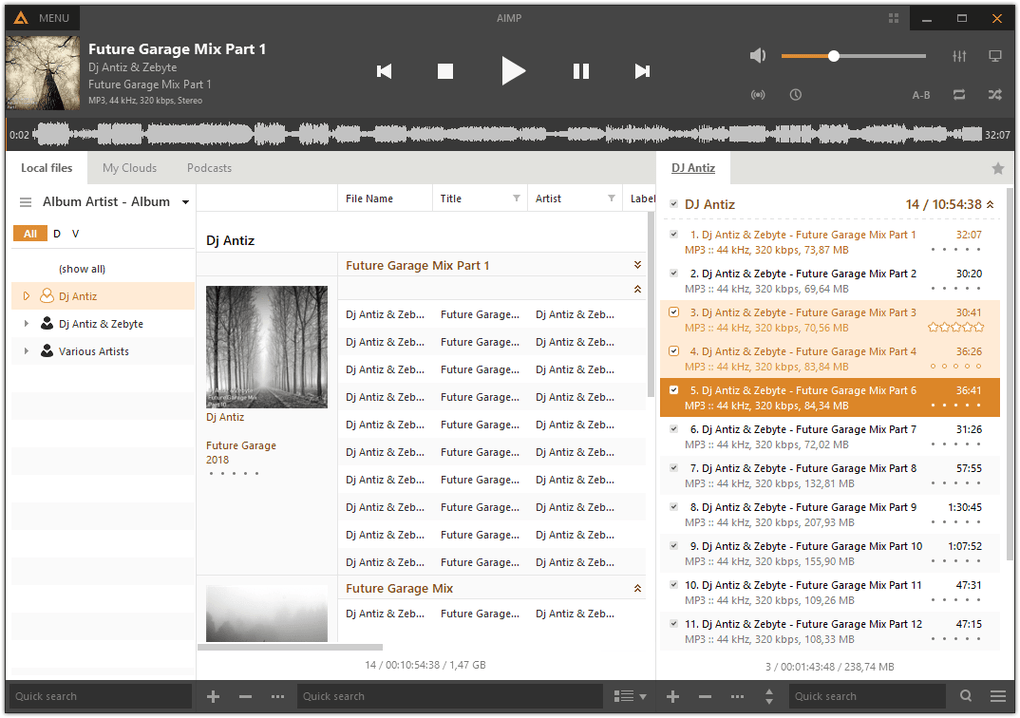
Multimedia Mastery: Unpacking AIMP’s Audio Capabilities
At the core of AIMP Classic’s appeal lies its extraordinary ability to handle virtually any audio format you throw at it. In a world where digital audio comes in a myriad of codecs and containers, a player that doesn’t discriminate is invaluable. AIMP boasts comprehensive support for an impressive array of audio formats, ensuring that your entire music library, no matter how eclectic or aged, is readily accessible. This includes, but is not limited to, popular formats like MP1, MP2, MP3, MPC / MP+, AAC, and AC3, as well as audiophile-preferred lossless formats such as Ogg, FLAC, APE, and WavPack. Even more niche or legacy formats like Speex, WAV, CDA, WMA, S3M, XM, MOD, IT, MO3, MTM, and UMX are handled with ease. This extensive compatibility means you no longer have to juggle multiple players for different file types; AIMP becomes your single, dependable gateway to all your stored audio.
Beyond mere playback, AIMP Classic is a comprehensive audio workstation in its own right. It goes the extra mile by allowing users to convert audio between various formats directly within the application. This is a crucial feature for anyone looking to standardize their collection, optimize files for different devices, or simply ensure future compatibility. Furthermore, the ability to edit ID3v1, ID3v2, APE, Vorbis, and WMA tags is a godsend for organization. Proper tagging is the backbone of any well-managed music library, and AIMP empowers users to maintain meticulous control over their track information, from artist and album details to genre and year, ensuring that their collections are searchable, browsable, and aesthetically pleasing.
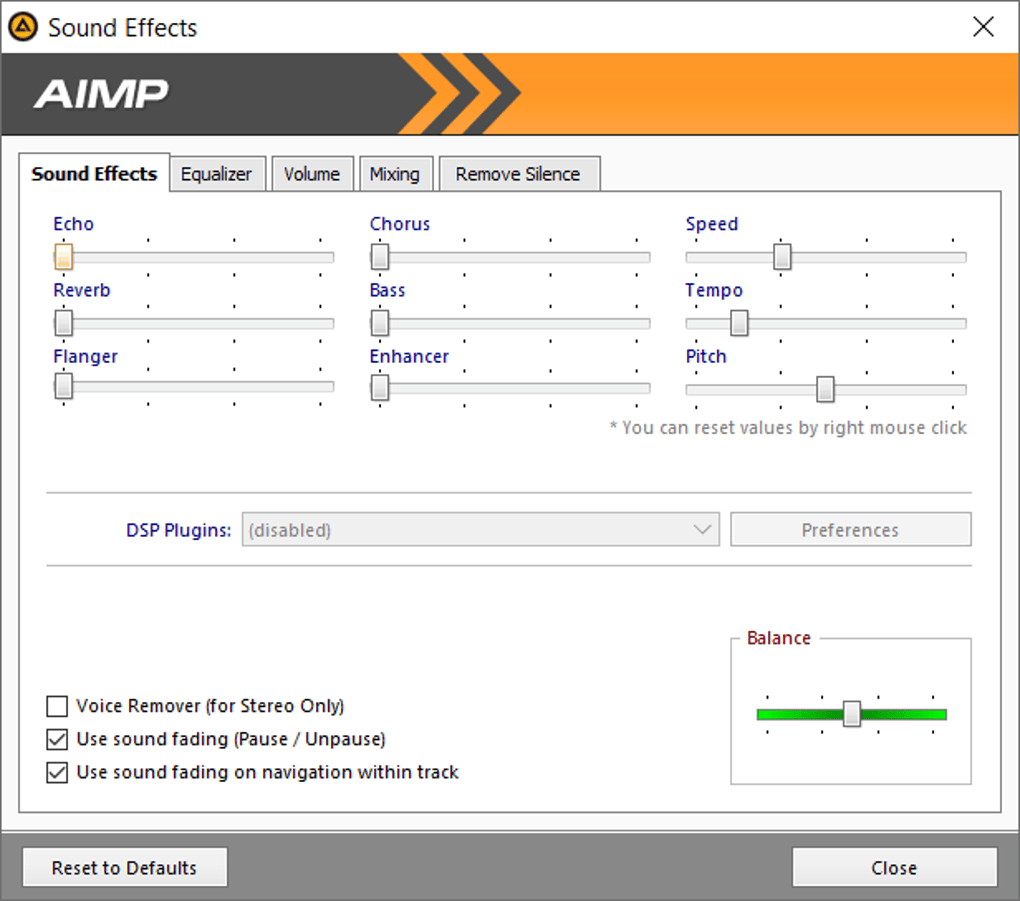
The audio experience is further enhanced by AIMP’s integrated equalizer and an array of audio effects. While the “crystal clear sound” is a baseline, the equalizer allows for granular control over frequencies, enabling users to tailor the sound output precisely to their headphones, speakers, or personal preferences. Whether you want to boost the bass, sharpen the highs, or flatten out a resonant frequency, AIMP provides the tools. Complementary audio effects can add spatial depth, reverb, or other acoustic enhancements, transforming a standard playback into a more immersive listening event.
But AIMP’s capabilities don’t stop at local files. For those who enjoy exploring new music or staying updated with global sounds, AIMP also supports the playback of internet radio stations. This feature seamlessly integrates streaming content with your local library, offering a versatile listening platform. Moreover, the player includes a handy function for downloading album covers, enriching your visual experience as much as it does your auditory one. Seeing the correct artwork for each track instantly elevates the user experience, providing context and an aesthetic flair that makes browsing your music all the more enjoyable.
And if all these features weren’t enough, AIMP embraces the open-source spirit through its robust plugin architecture. Users can further extend the player’s functionality by installing a wide variety of plugins available from its official website. This modular design means that AIMP can evolve and adapt to specific user needs, whether it’s adding niche audio processing tools, integrating with other applications, or introducing entirely new features. This extensibility ensures that AIMP remains a cutting-edge player, capable of meeting the demands of even the most technically inclined users.
Personalization and User Experience: Beyond the Default Skin
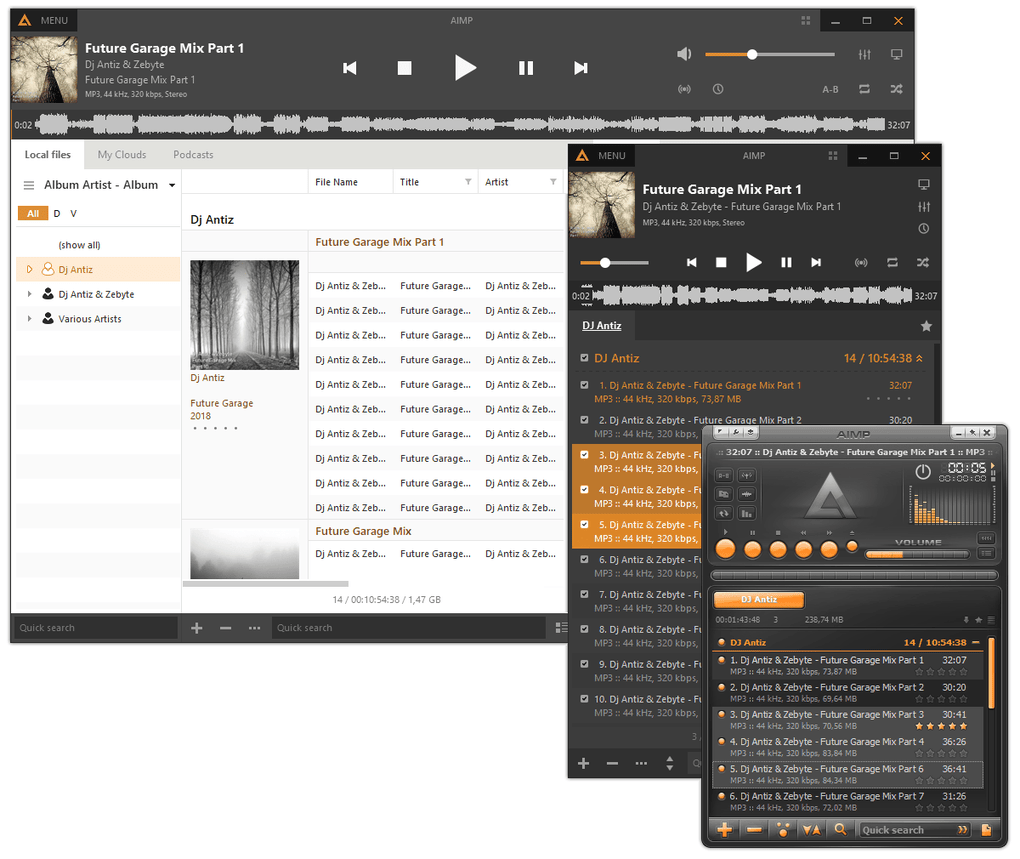
One of the most appealing aspects of AIMP Classic, and a key factor in its enduring popularity, is its deep commitment to personalization. Following in the footsteps of legendary players like Winamp, AIMP understands that the visual interface is just as important as the audio quality for many users. This is why it offers extensive support for “skins” or themes, allowing users to completely transform the program’s appearance to match their aesthetic preferences or workflow.
The official AIMP website, and the wider community, hosts a vast collection of skins, ranging from sleek, minimalist designs to vibrant, elaborate themes. The process of applying these skins is remarkably user-friendly; often, a simple double-click is all it takes to install a new design and instantly refresh the player’s look. This ease of customization encourages users to experiment, find a visual style that resonates with them, and truly make AIMP their own. Many of these community-created skins are of exceptionally high quality, showcasing the dedication of AIMP’s user base and the flexibility of its design architecture.
While the ability to switch skins is a major draw, AIMP’s default appearance is generally functional and appealing, especially once users become familiar with its layout. However, some users note that the default skin, while clean, might not be immediately intuitive for newcomers, requiring a brief period of exploration to discover the location and function of every button and menu option. This slight learning curve is a minor trade-off for the sheer power and configurability that AIMP offers, and it’s quickly overcome by the satisfaction of mastering a feature-rich player.
User reviews consistently highlight personalization as a major pro. Users praise the “interfaz grafica” (graphical interface) and the “miles de skin para personalizarlo” (thousands of skins to customize it). This focus on user-centric design means that AIMP isn’t just a powerful tool; it’s a personal statement. Whether you prefer a dark mode that blends seamlessly with your operating system, a retro look that harks back to classic audio equipment, or a futuristic interface packed with visualizers, AIMP provides the canvas for your creativity. This level of aesthetic control fosters a deeper connection between the user and their music player, transforming a utility into an extension of their personal style. It’s this fusion of high-fidelity audio with highly customizable visuals that truly sets AIMP Classic apart, offering a unique and deeply satisfying user experience that caters to individual tastes while delivering top-tier performance.
Utilities and Productivity: More Than Just a Player
While its primary function is music playback, AIMP Classic is far more than a one-trick pony. It bundles several utility features that significantly enhance its value, making it a powerful ally for anyone managing a substantial digital music library. These integrated tools contribute to an overall sense of productivity and efficiency, distinguishing AIMP from simpler, more focused media players.
One of the standout utility features is its practical audio file organizer. For users with hundreds or thousands of tracks, maintaining order can be a daunting task. AIMP’s organizer helps streamline this process, enabling users to sort, categorize, and manage their music files effectively. This goes hand-in-hand with its robust ID3 tag editing capabilities, allowing users to correct metadata, ensuring that their library is not only organized on the file system level but also perfectly indexed within the player. A well-organized library means less time searching and more time enjoying music, directly contributing to user productivity.
Another significant advantage, frequently highlighted in user reviews, is AIMP’s exceptionally low resource consumption. In an age where many applications can be memory hogs and CPU drainers, AIMP remains remarkably lightweight and efficient. This makes it an ideal choice for users who multitask extensively, as it allows them to listen to high-quality audio without perceptible slowdowns to other applications. As one user aptly put it, “navegar, grabar, descomprimir archivos, etc… si necesitas hacer todo esto oyendo música… este programa no come recursos y tiene un sonido deluxe.” (browse, record, decompress files, etc… if you need to do all this while listening to music… this program doesn’t consume resources and has deluxe sound). This is a critical factor for users with older hardware, limited RAM, or those running demanding applications concurrently. AIMP ensures that your music playback never interferes with your other computing tasks, providing a smooth and uninterrupted workflow.
The built-in audio converter is another powerful utility that elevates AIMP beyond a simple player. This tool allows users to convert audio files between different formats, which can be invaluable for a variety of reasons. Whether you need to convert a lossless FLAC file to a more compact MP3 for mobile device compatibility, or transform an older, less common format into something more widely supported, AIMP handles it with ease. This eliminates the need for a separate audio conversion program, consolidating essential tasks within a single, familiar interface and further enhancing user productivity.
Furthermore, user testimonials frequently commend AIMP’s stability. Users consistently describe it as a “gran programa, con una gran estabilidad y muchísimas funciones” (great program, with great stability and many functions). This reliability ensures that your music playback is consistent and free from crashes or glitches, which is paramount for any tool intended for daily use. The combination of stability, efficiency, and integrated utilities makes AIMP Classic not just an audio player, but a comprehensive management solution for digital music collections. It empowers users to take full control of their audio files, organize them meticulously, and enjoy them with unmatched clarity, all while maintaining optimal system performance.
A Legacy of Excellence: Why AIMP Classic Endures
In a landscape increasingly dominated by subscription-based streaming services, AIMP Classic remains a beacon for those who cherish their personally curated digital music collections. Its appeal lies in its fundamental strengths: a commitment to crystal-clear sound, comprehensive format support, vast customization options, and an impressive suite of integrated utilities. For the user who still maintains a robust library of MP3s, FLACs, and other audio files, AIMP isn’t just an alternative; it’s often the superior choice. It’s lightweight, incredibly efficient, and delivers your music with a renewed clarity that makes every listening session a pleasure.
Pros:
- Crystal Clear Sound: AIMP’s audio engine is highly praised for its exceptional sound quality, offering a noticeably clearer and more vibrant listening experience compared to many other players.
- Extensive Format Support: It handles virtually every audio format imaginable, from common MP3s to high-fidelity FLAC and APE files, ensuring compatibility with your entire music library.
- Highly Customizable: With robust support for skins/themes, an integrated equalizer, and audio effects, users can fully personalize both the appearance and sound output of the player.
- Integrated Utilities: Features like an audio converter, ID3 tag editor, and file organizer add significant value, making it more than just a player but a comprehensive music management tool.
- Low Resource Consumption: AIMP is incredibly efficient, requiring minimal system resources, which is ideal for multitasking or older computers.
- Plugin Support: Its modular architecture allows for extended functionality through a wide range of plugins, catering to specific user needs.
- Internet Radio Playback: Seamlessly integrates local files with access to thousands of online radio stations.
- Free to Use: Despite its rich feature set and high quality, AIMP is available completely free of charge.
Cons:
- Default Skin Intuitiveness: While functional, the default skin might require a brief learning curve for new users to discover all functionalities, though many excellent custom skins are available.
- Focus on Local Files: Primarily designed for local music collections, it doesn’t natively integrate with major streaming services, which might be a drawback for some users (though this is also its strength).
Details:
- License: Free
- Version: 5.03-build-2397 (as of May 23, 2023)
- Platform: Windows (compatible with Windows 11 and earlier versions)
- Available Languages: English, Spanish, German, French, Italian, Japanese, Polish, Chinese, and many more.
- Developer: AIMP
The consensus from users echoes this sentiment. Reviews consistently highlight its excellent sound, stability, and wealth of options. Users frequently praise its ability to offer a premium experience without consuming excessive system resources, making it a go-to choice for seamless background music during other computing tasks. As one user enthusiastically stated, “Es buenísimo, el sonido es explendido, consume poquísimos recursos y reproduce un gran número de formatos, en definitiva, un reproductor que merece la nota asignada por PhanMemFree.” (It’s excellent, the sound is splendid, it consumes very few resources and plays a large number of formats, in short, a player that deserves the rating assigned by PhanMemFree).
Whether you’re an audiophile meticulously curating your lossless collection, a casual listener seeking a reliable and high-quality player for your MP3s, or simply someone who appreciates efficient and powerful software, AIMP Classic is undoubtedly worth trying. Its commitment to sound fidelity, user control, and resource efficiency ensures its place as a classic in the world of digital audio. You can discover and download AIMP Classic for Windows for free at PhanMemFree.org, and experience the difference a truly dedicated audio player can make to your music.