
In an increasingly mobile-centric world, the ability to print documents, photos, and emails directly from our smartphones and tablets has become a necessity, not just a convenience. Apple’s AirPrint revolutionized this experience for its ecosystem, allowing users to effortlessly send print jobs from their iPhones, iPads, and iPod Touches to AirPrint-enabled printers. However, for a significant portion of the user base – those operating on Windows PCs – this seamless integration often remained out of reach, forcing a reliance on cumbersome cables, file transfers, or proprietary printer apps. Enter Air Printer, a remarkably innovative software developed by Flyingbee, designed to democratize wireless printing. Air Printer extends the convenience of AirPrint-like functionality to Windows users, transforming virtually any printer connected to a Windows machine into an AirPrint-compatible device. This eliminates the traditional hurdles associated with mobile printing, offering a streamlined, efficient, and hassle-free solution for anyone looking to print wirelessly from their Apple mobile devices to a PC-connected printer.
Air Printer stands out as a crucial utility for modern digital workflows. It addresses a common pain point: the disconnect between mobile devices and traditional desktop peripherals. By enabling a Windows PC to act as a bridge, Air Printer ensures that your digital content can transition to a physical format with just a few taps on your iOS device. This comprehensive review delves into the features, benefits, installation process, and overall user experience of Air Printer, highlighting why it has become an indispensable tool for enhancing productivity and simplifying printing tasks for Windows users who are deeply integrated into the Apple mobile ecosystem. Through its intuitive design and robust capabilities, Air Printer promises to make printing less of a chore and more of an effortless extension of your digital life, whether you’re at home, in a small office, or managing multiple printing needs.
Unleashing Seamless Wireless Printing for Windows Users
The core appeal of Air Printer lies in its ability to democratize wireless printing, bringing a coveted feature previously monopolized by Apple’s native AirPrint service to the expansive Windows user base. For years, Windows users with Apple mobile devices faced a frustrating dilemma: how to easily print from their iPhones, iPads, or iPod Touches without the hassle of transferring files to a PC, connecting via USB, or investing in expensive AirPrint-enabled printers. Air Printer by Flyingbee elegantly solves this problem, acting as an essential intermediary that allows any printer connected to a Windows computer – be it an older USB model or a network printer – to become accessible directly from your iOS device.
This fundamental shift in accessibility means that you no longer need to download and install specific printer applications on your Apple device. As long as your Windows PC, running Air Printer, is connected to the same network as your iPhone, iPod, or iPad, you can initiate print jobs directly from your mobile device. Imagine browsing a web page on your iPad, viewing an important email on your iPhone, or reviewing a document. With Air Printer, the option to print appears seamlessly within the share menu, just as it would with a native AirPrint printer. This level of integration is a game-changer for convenience and efficiency, significantly streamlining workflows for individuals and small businesses alike. The software essentially transforms your Windows machine into an AirPrint server, making all its connected printers available to your iOS devices.
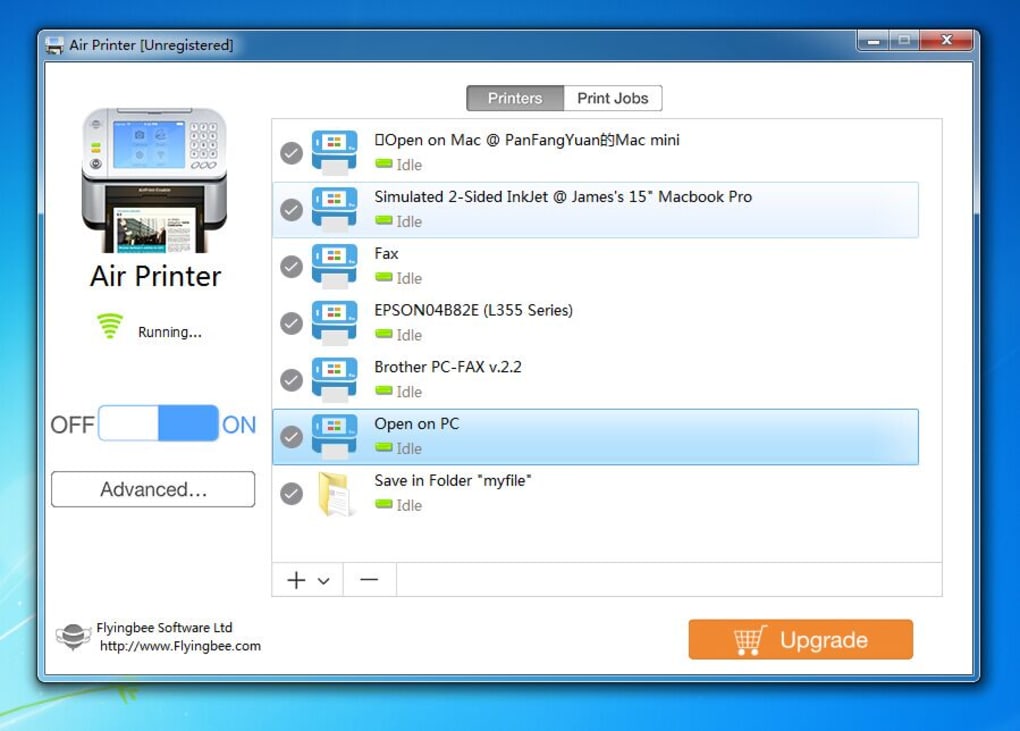
One of Air Printer’s standout features is its remarkable flexibility in managing multiple printers. In a typical office or home environment, it’s common to have more than one printer, perhaps a color inkjet for photos and a monochrome laser for documents. Air Printer allows users to connect and manage an array of printers, providing a centralized hub for all your wireless printing needs. This means you’re not limited to a single output device; you have the freedom to choose the most appropriate printer for each job, directly from your mobile device. This multi-printer support is incredibly helpful, especially when dealing with diverse printing requirements or high volumes of print jobs that can be distributed across different machines, optimizing speed and resource allocation.
Beyond mere printing, Air Printer also introduces an incredibly useful file conversion utility. As you transfer files from your mobile device to your PC for printing, the software offers the option to convert them into different document types. For instance, a Word Document file can be effortlessly transformed into a PDF format using Air Printer during the transfer process. This added functionality is invaluable for document management, archiving, and ensuring format consistency across various platforms. Converting files to PDF, for example, makes them universally readable, preserves formatting, and is ideal for sharing or long-term storage, all while integrating seamlessly into the printing workflow. This dual capability – wireless printing and on-the-fly file conversion – solidifies Air Printer’s position as a robust productivity tool.
The implications of Air Printer for time efficiency and operational simplicity are profound. The traditional method of printing from a mobile device often involved a series of convoluted steps: emailing the document to yourself, opening it on a PC, connecting the PC to the printer, and then finally printing. Air Printer eliminates these multi-step processes. There’s no longer any need to connect your device to your PC using wires and cables, nor are you restricted to a single PC or printer. This freedom from physical constraints means less time spent wrestling with technology and more time dedicated to productive tasks. For individuals and professionals on the go, or those who simply prefer a clutter-free workspace, Air Printer offers an intuitive, cable-free solution that makes the entire printing experience less complicated and more user-friendly.
Intuitive Setup and User-Friendly Operation
A common apprehension with new software, especially utilities that bridge different operating systems or devices, is the complexity of installation and setup. Air Printer, however, actively counters this concern with an installation process designed for maximum simplicity and speed. Installing Air Printer does not take ages to complete; it’s a straightforward procedure that even novice computer users can navigate with ease. After downloading the software from PhanMemFree, users simply need to run the executable file. An intuitive installation guide window will then appear on the screen, providing clear, step-by-step instructions. By following these prompts and agreeing to the terms, users can have the software installed and ready for use in a matter of minutes, reflecting Flyingbee’s commitment to a hassle-free user experience.
Once Air Printer is successfully installed and launched, users are greeted by a clean, well-organized interface that immediately puts key functionalities at their fingertips. The initial window serves as a central hub for managing your printing environment. Here, you can select and configure the number of printers you wish to connect and make available for wireless printing. This is particularly useful for environments with multiple printers, allowing users to precisely control which devices are shared via Air Printer. This flexible configuration ensures that only the desired printers are discoverable by your Apple mobile devices, enhancing security and organization.
Adjacent to the “Printers” option, another button allows users to define how files synced from their mobile devices should be handled. This is where Air Printer’s document management capabilities truly shine. Users can choose to either simply view the incoming files on their PC before printing, or convert them into other file types. This conversion capability, as mentioned earlier, is a powerful feature, allowing for on-the-fly format changes (e.g., converting an image into a PDF for easier archiving) that add significant value beyond basic printing. This level of control over file handling further demonstrates Air Printer’s utility as a comprehensive document solution.
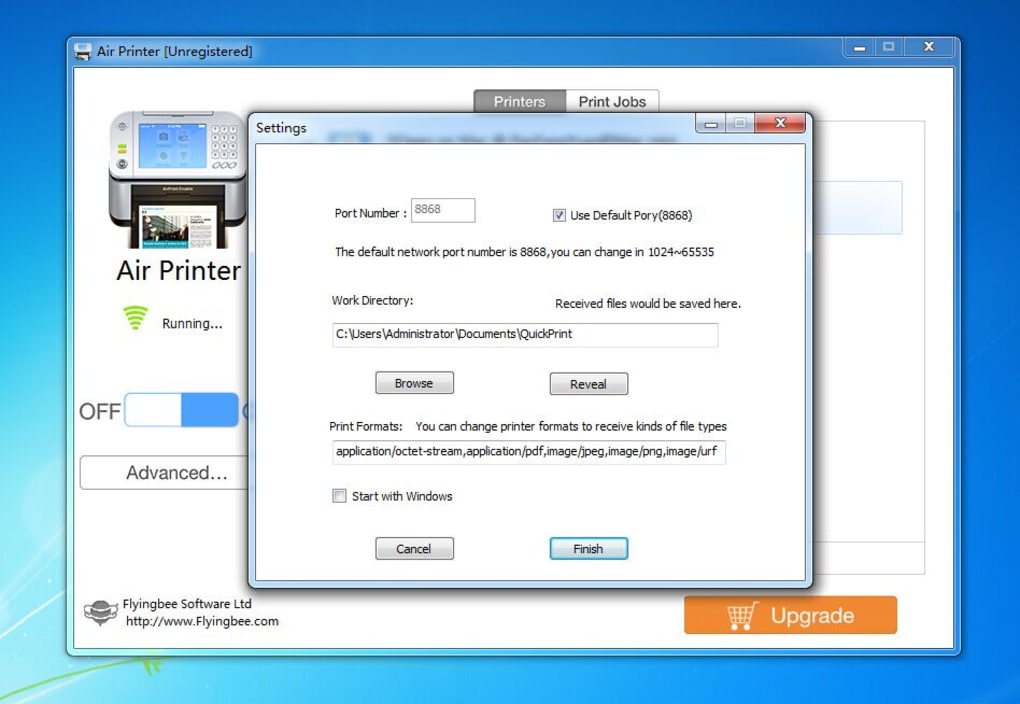
For those requiring more granular control, an “Advanced Settings” menu is readily available. This section allows users to specify which file types their Air Printer software should accept from mobile devices. This can be crucial for managing system resources, filtering unwanted file types, or ensuring compatibility with specific document processing workflows. The ability to customize accepted file formats provides an additional layer of control and optimization, catering to diverse user needs and preferences.
When it comes to the actual act of printing directly from an Apple mobile device, Air Printer integrates seamlessly with the iOS ecosystem. All the user has to do is determine which documents, photos, or emails they want to print from their iPhone, iPad, or iPod Touch. Upon selecting the print option within any iOS application, the connected printers that Air Printer has made available on the Windows PC will appear in the AirPrint menu (or the equivalent print selection interface on iOS). This intuitive discovery process mirrors the native AirPrint experience, ensuring that users can print with minimal effort or learning curve. The software intelligently broadcasts the availability of your PC-connected printers, making them instantly recognizable and selectable by your Apple devices.
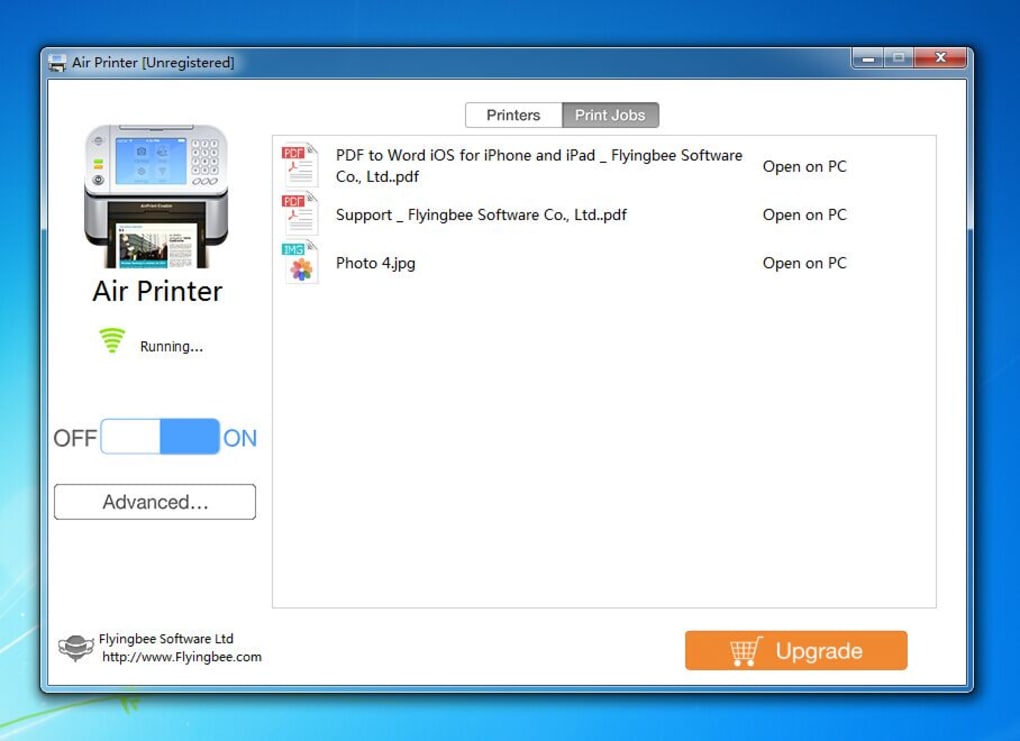
The overall design philosophy of Air Printer’s interface is one of neatness, simplicity, and clarity. It intentionally avoids clutter and unnecessary complexities, ensuring that all essential functionalities are laid out logically and are just a click away. The main window prominently features “On” and “Off” buttons for quickly enabling or disabling the Air Printer service, providing immediate control over its operation. Below these, the “Advanced Settings” button grants access to more detailed configurations. On the top of the window, users will find only two primary buttons: “Printers” and “Print Jobs.” The “Printers” button allows for the management and selection of connected printers, while the “Print Jobs” button provides a convenient overview of active and recently completed print tasks. This minimalistic yet functional design ensures that users can operate the software effectively without encountering any confusing menus or redundant controls, solidifying its reputation as an easy-to-understand and efficient tool.
Beyond Physical Prints: Virtual PDF Creation and Document Management
While Air Printer primarily shines as a solution for physical wireless printing, its capabilities extend significantly beyond merely putting ink on paper. One of its most innovative and frequently overlooked features is its ability to function as a virtual PDF printer. This functionality adds an entirely new dimension to document management, allowing users to “print” documents, emails, web pages, and photos directly from their Apple mobile devices to a digital PDF file saved on their Windows computer. This feature is particularly powerful for those who need to archive digital copies, create professional documents, or simply manage their information flow more effectively.
Imagine a scenario where you’ve received an important invoice via email on your iPhone, but you don’t need a physical copy. Instead, you want to save a high-quality, universally readable digital version for your records. With Air Printer, you can select the “print” option on your iPhone, choose Air Printer, and instead of selecting a physical printer, direct the output to the virtual PDF printer option. The document is then wirelessly transmitted to your Windows PC and automatically converted into a PDF file, which is saved to a specified folder on your hard drive. This process is seamless, efficient, and ensures that the integrity and formatting of the original document are preserved in a versatile PDF format.
The utility of these digitally “printed” PDF files is extensive. Once saved on your computer disk, these PDF documents can be opened with a wide array of applications. For instance, they can be readily accessed and viewed in popular readers like iBook or Adobe Reader, offering an optimal reading experience with consistent formatting across devices. This is invaluable for students, professionals, or anyone who frequently deals with documentation that requires long-term readability and archival quality. The ability to create these professional-grade PDFs without specialized software or complex workflows directly from your mobile device truly differentiates Air Printer.
Furthermore, the flexibility of these PDF files doesn’t end with viewing. Users can easily send these newly created PDFs by e-mail, making sharing documents incredibly simple. For collaborative projects or when submitting official documents, having a PDF version that maintains its layout is critical, and Air Printer facilitates this with remarkable ease. Additionally, these PDFs can be opened in other compatible applications on your PC for further editing or integration into larger projects. For Apple device users, there’s an added benefit: the generated PDFs can even be transferred back to an iPhone or iPad over USB using iTunes File Sharing, ensuring that important documents are accessible across all your devices, whether for offline viewing or further mobile interaction. This bidirectional flexibility reinforces the cohesive digital ecosystem Air Printer helps to create.
A significant economic advantage of Air Printer is that it eliminates the need to invest in expensive new printers or additional software components just to achieve wireless printing. Many users already own perfectly functional printers that lack native AirPrint support. Air Printer breathes new life into these existing peripherals, allowing them to participate in the modern wireless printing paradigm. This means significant cost savings, as there’s no pressure to upgrade hardware solely for mobile compatibility. Moreover, the software requires no modifications to your iPhone, Mac (if used as a bridge, though the primary focus is Windows), or PC. Printing becomes effortless, without the need to rethink your entire network infrastructure or purchase new, costly hardware. This makes Air Printer a highly cost-effective and environmentally friendly solution, maximizing the utility of current investments while delivering cutting-edge convenience. By simply running Air Printer on your Windows PC, you empower all printers attached to that machine to become wirelessly accessible from your Apple mobile devices, truly embodying the concept of “printing without rethinking.”
Advantages, Considerations, and the Future of Mobile Printing
Air Printer has clearly established itself as a valuable tool for bridging the gap between Apple mobile devices and Windows-connected printers, offering a robust set of features that enhance productivity and simplify printing tasks. However, like any software, it comes with its own set of advantages and considerations that prospective users should be aware of.
Key Advantages: The pros of Air Printer are compelling and directly address common user needs:
- Easy to install: As previously detailed, the installation process is straightforward and guided, ensuring users can get up and running quickly without technical expertise.
- Easy to use: The interface is clean, intuitive, and designed for simplicity. Print jobs are initiated seamlessly from the iOS device, mimicking the native AirPrint experience.
- Convenient: The elimination of cables and cumbersome file transfers makes printing genuinely hassle-free, saving time and reducing friction in daily workflows.
- Can connect to multiple printers: The ability to manage and select from multiple printers connected to the Windows PC offers unparalleled flexibility, catering to diverse printing needs in homes and offices.
- Virtual PDF Printing: This often-understated feature provides excellent document management capabilities, allowing users to create and save digital PDF copies directly from their mobile print jobs, enhancing archiving and sharing options.
- Cost-Effective: By leveraging existing printers and Windows PCs, Air Printer obviates the need for expensive hardware upgrades, making wireless printing accessible without significant investment.
Important Considerations: While the benefits are substantial, there are a few points to consider, some of which are inherent to the nature of wireless printing and software solutions:
- Only for Apple device users: It’s crucial to clarify this point, as it might seem contradictory to the “Windows users” claim. Air Printer’s primary function is to enable Apple mobile devices (iPhone, iPad, iPod Touch) to print wirelessly to printers connected to a Windows PC. It is not designed to enable Android devices to print wirelessly through Windows, nor is it a standalone AirPrint server for Macs. Its niche is specifically addressing the Apple iOS to Windows PC printer challenge.
- Device cannot detect printers sometimes: This is a common issue with wireless network communication, not exclusive to Air Printer. Potential causes include network interference, incorrect firewall settings on the Windows PC, or the Air Printer software not actively running. Users should ensure their Wi-Fi connection is stable, that the Windows firewall permits Air Printer’s communication, and that the software is always active when wireless printing is desired.
- Should always be running to be accessible: For Air Printer to function as a wireless print server, the application must be active on the Windows PC. This means the computer needs to be powered on and the Air Printer software launched and running in the background. While this is typical for any server-like application, it’s a dependency that users should be aware of; the PC cannot be in sleep mode or off if you intend to print wirelessly.
- Needs internet connection: While the actual data transfer between the iOS device and the Windows PC happens over the local network (Wi-Fi), the initial handshake or certain background services might rely on an internet connection. More importantly, if your original document source (e.g., an email, a web page) requires internet access, then a connection is obviously necessary for that content to even reach your mobile device before printing. For purely local documents, a local network connection is usually sufficient, but a stable internet connection for the PC running Air Printer is generally recommended for optimal performance and broader functionality.
Comparison with Alternatives: Air Printer operates in a landscape of various printing solutions. Alternatives like Google Cloud Print (now deprecated, but historically significant) offered cloud-based printing from various devices to connected printers, requiring an internet connection for all steps. PrinterShare provides a way to share printers over the internet, focusing on remote access. Apple’s native AirPrint is the gold standard for Apple-to-AirPrint-enabled printer connections, but Air Printer specifically targets the gap for Windows-connected printers. While driver packs like Epson L210 Drivers or HP LaserJet 1020 Drivers are essential for making printers work, they don’t offer the wireless mobile device integration that Air Printer does. Air Printer carves out a distinct niche by providing AirPrint-like functionality for Windows users, offering a localized, direct network solution without relying on external cloud services for the print job itself.
The Future of Mobile Printing with Air Printer: Air Printer represents a significant step forward in making mobile printing universally accessible, especially for the Windows-centric majority who use Apple mobile devices. By embracing a flexible, user-friendly approach, Flyingbee has created a tool that enhances productivity and minimizes technical frustrations. As mobile devices continue to be our primary interaction points for digital content, solutions like Air Printer will remain crucial in seamlessly integrating them with traditional computing environments and peripherals. Its ability to save time, reduce complexity, and provide additional document management features like PDF conversion solidifies its position as an indispensable utility.
In conclusion, Air Printer is more than just a convenience; it’s a productivity enhancer and a cost-effective solution for a pervasive modern challenge. For Windows users who frequently find themselves needing to print from their iPhone, iPad, or iPod Touch, Air Printer from PhanMemFree is an essential download that delivers on its promise of hassle-free, wireless printing. It empowers users to leverage their existing hardware investments while embracing the fluidity and efficiency of mobile technology, making printing an effortless extension of their digital lives.
File Information
- License: “Trial version”
- Version: “1.5.0.1”
- Latest update: “September 25, 2018”
- Platform: “Windows”
- OS: “Windows 8”
- Language: “English”
- Downloads: “25.5K”
- Size: “12.94 MB”


