
All Media Converter is a versatile video and audio conversion tool designed to handle a wide range of file formats and devices. This comprehensive guide explores its features, capabilities, and overall utility for users seeking a streamlined media conversion solution.
Core Functionality: Converting Videos and Audio
At its heart, All Media Converter functions as a robust all-in-one video converter, capable of handling a vast array of input and output formats. This means you can convert your video files from one format to another, regardless of their origin. Support for popular formats like AVI, MPEG, WMV, MP4, FLV, RM, MOV, Xvid, and 3GP is standard, ensuring compatibility with most video files you’re likely to encounter.
Beyond video conversion, All Media Converter excels in audio extraction. This feature allows users to isolate audio tracks from video files and save them in various audio formats, including MP3, WMA, WAV, M4A, AAC, and AC3. This functionality is invaluable for creating custom ringtones, audio books from video lectures, or simply separating audio content for easier management and portability. The software seamlessly handles this process, simplifying the often complex task of audio extraction.
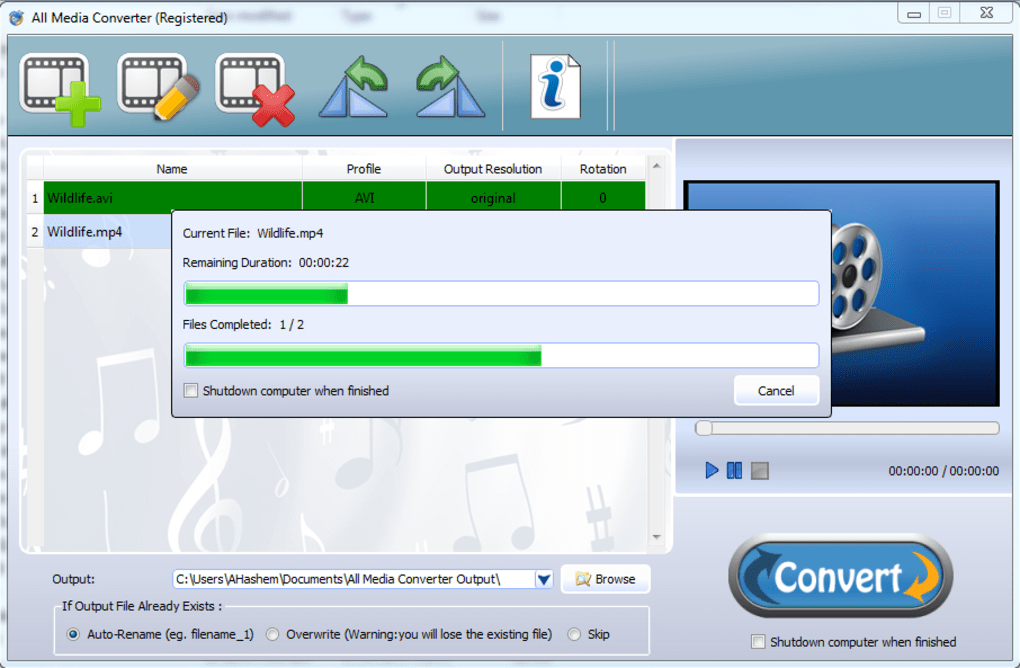
The software’s intuitive interface guides users through the conversion process, even for those lacking extensive technical expertise. The program’s straightforward layout eliminates the need for complex configuration or command-line inputs, prioritizing ease of use and accessibility.
Device-Specific Profiles: Seamless Compatibility
A significant advantage of All Media Converter lies in its predefined profiles. These profiles are pre-configured settings optimized for specific devices, eliminating the guesswork involved in choosing appropriate output settings. Whether you’re converting videos for playback on an iPhone, iPad, iPod, older generations of mobile phones, Xbox, Wii, PSP, PS3, Apple TV, Blackberry, or Android devices, All Media Converter provides ready-made profiles ensuring optimal compatibility and playback quality. This feature simplifies the conversion process, especially for users with a diverse range of devices. The inclusion of profiles for Windows phones adds another layer of versatility, accommodating a broader spectrum of devices and operating systems.
This built-in device compatibility is a key differentiator, saving users considerable time and effort in manually configuring output settings. The profiles are regularly updated to accommodate newer device models and software versions, ensuring ongoing compatibility and relevance.
Advanced Features: Enhancing Conversion Efficiency
All Media Converter goes beyond basic conversion. Several advanced features enhance efficiency and user control:
-
Batch Conversion: The software supports batch processing, allowing users to convert multiple files simultaneously. This is particularly beneficial when dealing with large collections of videos or audio files, significantly reducing overall processing time. The ability to queue multiple conversions allows for efficient multitasking, freeing up the user to focus on other activities while the program works in the background.
-
Customizable Profiles: While predefined profiles offer convenience, All Media Converter allows users to create and customize their own profiles. This level of control allows for fine-tuning output settings for specific needs, such as adjusting bitrate, resolution, frame rate, and other parameters to optimize file size and quality. This granular control caters to advanced users who require specific adjustments to meet their precise requirements.
-
Video Rotation: The ability to rotate videos during the conversion process is crucial for correcting orientation issues. This feature ensures that vertically shot videos play correctly, avoiding the annoyance of sideways videos. This simple but important function addresses a common user issue, providing a convenient solution without requiring additional editing software.
-
Multi-Core CPU Support: All Media Converter leverages multi-core processors for accelerated conversion speeds. This feature significantly shortens processing times, enhancing overall productivity. The software intelligently utilizes multiple cores, optimizing performance on modern multi-core systems. This translates to faster conversion times without compromising the quality of the output files.
-
Output Quality and Size Control: Users retain control over the balance between file size and quality. Options are available to prioritize either smaller file sizes for easier sharing or higher quality for optimal playback. This flexible approach caters to varying user preferences and bandwidth constraints.
-
Automatic Shutdown: Once the conversion process is complete, the software can be configured to automatically shut down the computer. This is a convenient feature for users initiating overnight conversions or leaving the system unattended during lengthy conversion tasks.
System Requirements and Software Compatibility
While specific requirements may vary slightly depending on the version, All Media Converter generally operates on Windows XP and later versions. The software’s relatively modest system requirements allow it to function effectively on a broad range of computer systems. However, it’s advisable to consult the official documentation for the most up-to-date system specifications for optimal performance. Regular updates are released to address bug fixes, improve performance, and expand compatibility.
The software’s compatibility with diverse hardware and software configurations is a strength, making it a versatile solution for a wide range of users.
Alternatives and Comparisons
While All Media Converter offers a comprehensive suite of features, alternative software exists in the market. Some free and open-source converters provide similar functionalities, albeit often with fewer advanced features or device-specific profiles. Paid alternatives may offer more sophisticated tools and editing options, catering to professional users. The choice depends on individual needs and preferences. A comparison with popular alternatives will clarify the advantages and disadvantages of All Media Converter in relation to other media conversion solutions.
Conclusion: A Powerful and Versatile Tool
All Media Converter stands as a powerful and versatile tool for converting video and audio files. Its comprehensive format support, device-specific profiles, and advanced features streamline the media conversion process, making it accessible to both novice and experienced users. Its intuitive interface and efficient batch processing capabilities save users time and effort. While alternatives exist, All Media Converter provides a well-rounded solution that balances ease of use with powerful functionality, solidifying its position as a valuable tool for anyone managing their digital media.
File Information
- License: “Trial version”
- Latest update: “September 17, 2012”
- Platform: “Windows”
- OS: “Windows XP”
- Language: “English”
- Downloads: “67K”
- Size: “13.94 MB”


