
All To MP3 Converter is a Windows-based application designed for straightforward audio file conversion. As its name implies, its primary function is to convert various audio file formats into the ubiquitous MP3 format. While not boasting the extensive feature set of some more advanced competitors, its ease of use and focused functionality make it an attractive option for users seeking a quick and simple solution for their audio conversion needs. This review delves into its strengths, weaknesses, and overall user experience.
Ease of Use and Functionality
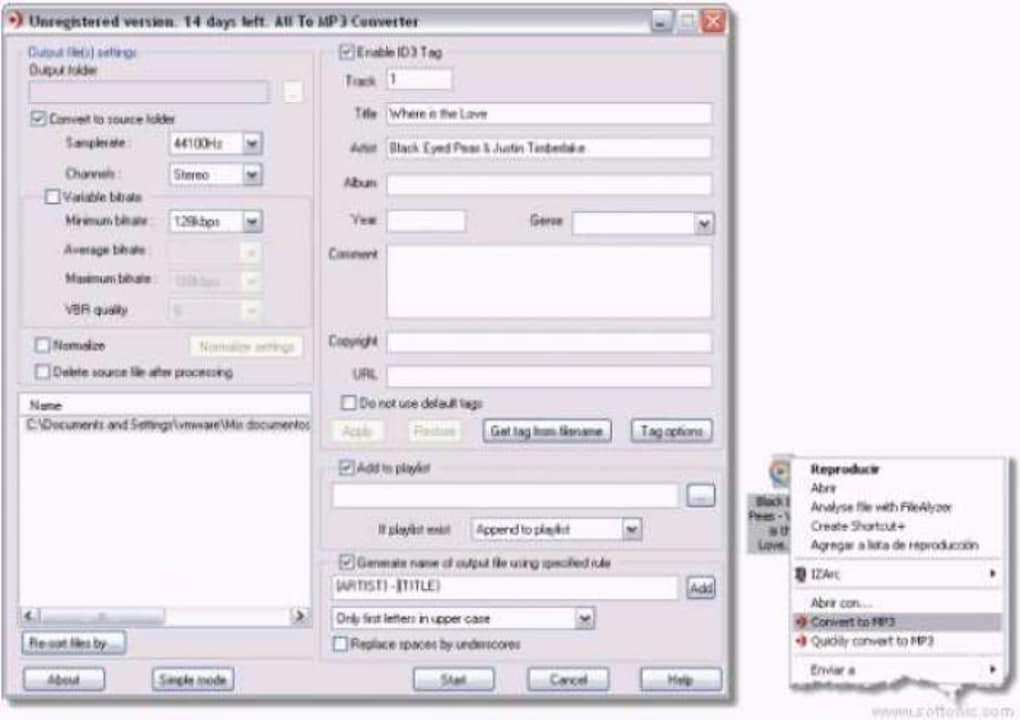
All To MP3 Converter distinguishes itself through its user-friendly interface and streamlined conversion process. The software integrates directly into the Windows operating system, adding a “Convert to MP3” option to the right-click context menu for compatible file types. This seamless integration eliminates the need for navigating complex menus or importing files manually, providing a highly intuitive user experience. Simply right-clicking on an audio file and selecting the “Convert to MP3” option initiates the conversion process, making it incredibly accessible for users of all technical skill levels. The software handles the technical aspects behind the scenes, requiring minimal user input. This simplicity is both a strength and a potential limitation, depending on the user’s needs and technical expertise.
The simplicity, however, also means a lack of advanced options. There’s no control over bitrate, sample rate, or other audio parameters. The conversion process is essentially a “one-size-fits-all” approach, which might not be suitable for users requiring fine-grained control over the output audio quality. This lack of customization could be a drawback for audiophiles or those working with professional audio projects.
Supported File Formats and Conversion Speed
All To MP3 Converter supports a wide range of input audio formats, making it a versatile tool for converting various media files. While the specific list of supported formats may vary slightly depending on the software version, it generally handles common formats such as WAV, WMA, AAC, and others. The software’s ability to handle a variety of input formats is a significant advantage, enabling users to consolidate their audio collections into a unified MP3 format without needing multiple converters.
The conversion speed is generally efficient, depending largely on the size and complexity of the input file. Larger files naturally take longer to convert, but the process is generally faster than some comparable software. The software is designed to optimize the conversion process for speed, although extreme file sizes may still take a notable amount of time. The lack of batch processing capabilities, however, limits the efficiency for users needing to convert numerous files. Each file requires individual conversion, adding considerable time if dealing with a large number of audio files.
Limitations and Missing Features
While All To MP3 Converter excels in its simplicity and ease of use, several limitations hinder its appeal for certain user groups. The most significant drawback is the absence of batch conversion. This feature, common in many competing applications, allows users to convert multiple files simultaneously, significantly improving efficiency. The lack of batch processing forces users to process each file individually, which can be tedious and time-consuming, especially for large collections of audio files.
Another notable limitation is the restricted output format. All To MP3 Converter only supports conversion to MP3. Users seeking to convert to other formats, such as WAV, FLAC, or AAC, will need to explore alternative applications. This limitation restricts its versatility and may exclude users needing to convert to formats beyond MP3.
Furthermore, the software lacks advanced features such as audio editing capabilities, metadata tagging options, or normalization settings. These advanced features are common in more comprehensive audio conversion tools and are valuable additions for users with specific audio editing needs. The omission of these features positions All To MP3 Converter as a basic conversion utility, appropriate only for users with minimal audio editing requirements.
Comparison with Alternative Applications
Compared to more feature-rich audio converters, All To MP3 Converter occupies a niche market focused on simplicity and ease of use. Applications such as Total Audio Converter or other comprehensive audio editing suites offer significantly more features but at the cost of increased complexity and potentially higher price tags. All To MP3 Converter’s value proposition is precisely its simplicity; it offers a hassle-free solution for basic MP3 conversion without the learning curve associated with more sophisticated tools.
Users needing batch conversion, multiple output formats, advanced editing capabilities, or metadata management will likely find more comprehensive solutions necessary. The choice between All To MP3 Converter and more advanced applications depends on the user’s specific needs and priorities. If simplicity and speed for single-file conversions are paramount, All To MP3 Converter could be a suitable choice. However, users with more demanding requirements will find themselves needing a more powerful and feature-rich application.
User Reviews and Feedback
User reviews on various software review platforms provide valuable insight into the user experience with All To MP3 Converter. While overall, the reviews are generally positive, highlighting the ease of use and quick conversion speed, some criticism focuses on the absence of batch conversion and advanced features. Many users appreciate the straightforward nature of the application, particularly those unfamiliar with audio editing software. However, users with more experience or those needing more advanced functionalities often find the limitations frustrating.
The lack of batch conversion consistently emerges as a major point of concern. Many users express the need for this feature, highlighting the inconvenience of converting each file individually. This suggests that while the simplicity of the application is a positive aspect for some, it creates a major bottleneck for users requiring efficiency in converting large numbers of files.
Conclusion
All To MP3 Converter is a lightweight, easy-to-use application ideally suited for users requiring straightforward MP3 conversion of individual files. Its seamless integration with the Windows context menu and fast conversion speeds make it a convenient tool for basic audio conversion tasks. However, its limitations – primarily the absence of batch processing, limited output formats, and a lack of advanced features – restrict its appeal for users with more demanding needs or larger audio collections.
For users prioritizing simplicity and speed above advanced features, All To MP3 Converter offers a compelling solution. Its intuitive design and quick conversion times make it an attractive option for casual users seeking a hassle-free way to convert their audio files. However, users seeking a more comprehensive audio conversion and editing solution should consider alternative applications offering batch processing, multiple output formats, and advanced features such as metadata editing, normalization, and audio effects. The decision ultimately depends on the individual’s specific needs and technical proficiency.
File Information
- License: “Trial version”
- Latest update: “May 23, 2023”
- Platform: “Windows”
- OS: “Windows 98”
- Language: “English”
- Downloads: “20.8K”
- Size: “21.77 MB”


