
All Video Downloader is a free video downloading software designed to simplify the process of acquiring videos from various online platforms. This review delves into its features, performance, limitations, and explores suitable alternatives for users seeking a more comprehensive solution.
User Interface and Functionality
All Video Downloader presents a streamlined user interface, prioritizing ease of use for users of all technical skill levels. The straightforward design minimizes complexity, enabling users to download videos with minimal effort. The core functionality revolves around pasting a video URL into the designated field, selecting download preferences (such as file format and resolution, where available), and initiating the download process. This simplicity is a key strength, making the software accessible even to those unfamiliar with video downloaders.
The software incorporates a search function, assisting users in locating videos across supported platforms. While the search functionality is described as efficient, the scope of its indexing and the accuracy of its results are not explicitly detailed. This lack of clarity leaves some uncertainty regarding the breadth of its search capabilities. Further investigation into the indexing of different platforms and the accuracy of search results would be helpful in determining its effectiveness.
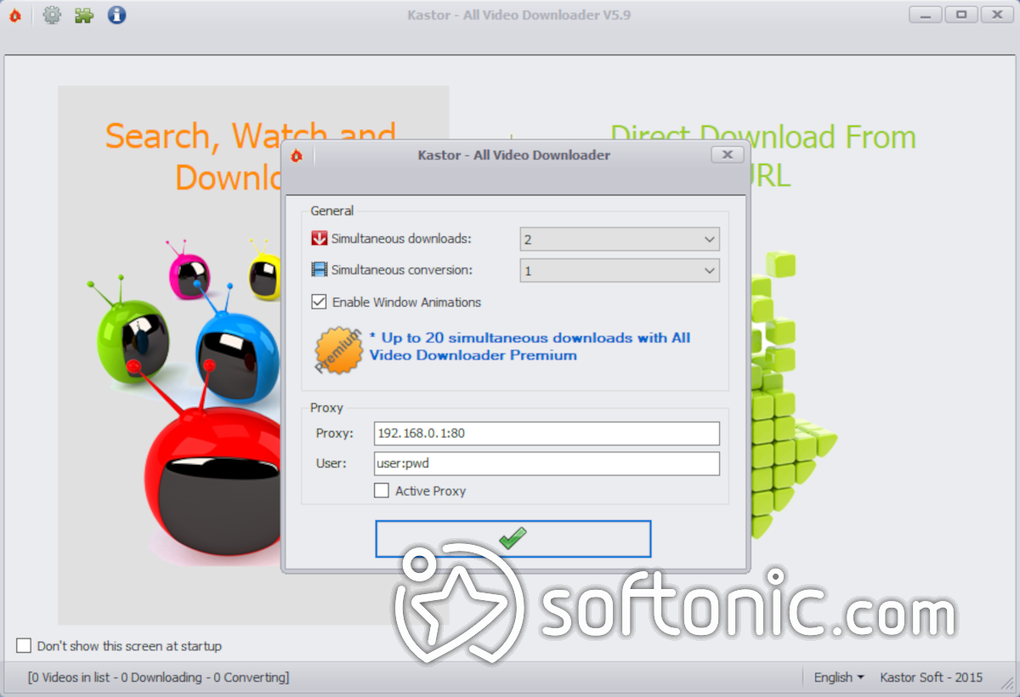
A notable feature is the batch mode, allowing users to queue multiple downloads simultaneously. This functionality significantly improves efficiency, allowing users to build their offline video library more rapidly. This batch processing feature is a valuable addition, especially for those intending to download numerous videos. However, the crucial limitation of concurrent downloads (only two at a time) significantly dampens the effectiveness of this batch mode. The benefit of queueing multiple downloads is diminished considerably when the software cannot process them concurrently.
Supported File Formats and Device Compatibility
All Video Downloader boasts support for a wide range of video file formats, ensuring compatibility across various devices and platforms. The supported formats include:
- AVI (Audio Video Interleave): A widely compatible format, suitable for a broad range of devices and players.
- MPEG (Moving Picture Experts Group): Encompasses several formats (e.g., MPEG-1, MPEG-2) offering different levels of quality and compression.
- WMV (Windows Media Video): Optimized for Windows platforms, providing efficient compression without significant quality loss.
- MP4 (MPEG-4 Part 14): A highly versatile and widely compatible format, striking a balance between file size and quality.
- FLV (Flash Video): Commonly used for online streaming, requiring Adobe Flash Player (often outdated or unsupported in modern browsers).
- 3GP (Third Generation Partnership Project): Designed for mobile devices, prioritizing small file sizes and efficient compression.
- MOV (QuickTime File Format): Associated with Apple’s QuickTime, readily compatible with Apple devices.
- MP3 (MPEG-1 Audio Layer 3): While primarily an audio format, the software supports MP3 extraction for audio-only downloads from videos.
This broad compatibility is advantageous, offering users flexibility in choosing the most suitable format for their specific needs and devices. The inclusion of MP3 support allows users to extract audio tracks from videos, providing additional versatility. However, the reliance on potentially outdated formats like FLV highlights a potential area for improvement.
Performance and Resource Utilization
While the download and conversion processes are described as fast and generally seamless, All Video Downloader suffers from significant resource consumption. This high resource usage can lead to noticeable performance slowdowns on less powerful systems, impacting other applications running concurrently. This performance issue is a major drawback, particularly for users with older or less powerful hardware. The software’s impact on system resources needs significant optimization to improve the overall user experience.
Another issue is the limitation of simultaneously downloading only two videos. This constraint considerably reduces efficiency, especially when compared to alternative downloaders allowing for unlimited concurrent downloads. This restriction drastically limits the practicality of the batch download functionality, defeating the purpose of queuing multiple downloads.
Finally, the software exhibits intrusive advertising, impacting the user experience. While the ads are not described as overtly malicious, their frequency and prominence detract from the overall user experience. The inclusion of adware during setup further compounds this issue, requiring users to exercise caution during installation to avoid unwanted software.
Limitations and Alternatives
All Video Downloader’s limitations include:
- Restricted Concurrent Downloads: The inability to download more than two videos simultaneously significantly hampers efficiency and limits the practicality of the batch download feature.
- High Resource Consumption: The software’s high resource usage can negatively impact overall system performance.
- Intrusive Advertising: Frequent ads and the potential for adware installation during setup disrupt the user experience.
- Manual Removal of Completed Downloads: The lack of automatic removal of completed downloads from the queue necessitates manual deletion, creating unnecessary inconvenience.
Several alternatives offer improved functionality and address these shortcomings:
- 4K Video Downloader: Supports unlimited simultaneous downloads, offers playlist downloading, subtitle extraction, and supports high-resolution videos. It is praised for its ad-free experience and lightweight performance.
- Freemake Video Downloader: Supports a vast array of video sites and enables easy conversion of downloaded files to various formats.
- YT-DLP: An open-source and highly customizable solution, providing flexibility and high download speeds. However, it may require some technical expertise.
- ClipGrab: A user-friendly alternative with a clean interface and support for various formats and resolutions, ideal for less technically inclined users.
Conclusion
All Video Downloader offers a simplistic and relatively straightforward approach to video downloading. Its intuitive interface and broad file format compatibility make it an accessible option for novice users. However, its significant limitations – particularly the restriction on simultaneous downloads, high resource consumption, and intrusive advertising – severely hamper its overall effectiveness. Users seeking a more efficient and less disruptive experience should consider the numerous alternatives offering superior performance and features. While All Video Downloader might suffice for occasional, low-volume downloads, it falls short as a robust and reliable solution for users with more demanding needs.
File Information
- License: “Free”
- Latest update: “November 27, 2024”
- Platform: “Windows”
- OS: “Windows 10”
- Language: “English”
- Downloads: “5.6M”
- Size: “11.92 MB”


