
In today’s digital age, online video content has become an integral part of our daily lives. From educational tutorials and entertaining vlogs to professional presentations and captivating movies, a vast ocean of visual information is constantly at our fingertips. However, accessing this content reliably, especially for offline viewing, converting it to specific formats, or simply ensuring its preservation, can often pose a significant challenge. This is where specialized tools like Allavsoft step in, offering a robust and intuitive solution for managing your digital video library. More than just a simple downloader, Allavsoft positions itself as a multifunctional powerhouse, designed to simplify and enhance the entire process of acquiring, converting, and organizing online multimedia.
For many users, the primary hurdle lies in the ephemeral nature of online content. Videos can be removed, platforms can change policies, or internet connectivity might be unreliable. Having the ability to download videos directly from the source provides unparalleled control and convenience. Allavsoft addresses this need head-on, delivering a powerful yet user-friendly experience that caters to both casual users and those with more advanced requirements. It acts as a bridge between the vast online video landscape and your personal media collection, ensuring that your favorite content is always accessible, regardless of internet availability or platform changes.
This article will delve deep into the capabilities of Allavsoft, exploring its core features, user experience, and the significant advantages it offers. We will examine its intuitive interface, its comprehensive downloading options, its versatile conversion tools, and the overall efficiency it brings to multimedia management. Furthermore, we will highlight how Allavsoft distinguishes itself in a crowded market of download managers, emphasizing its commitment to high-quality output and user satisfaction.
Unveiling Allavsoft: A Powerful Multifunctional Video Downloader
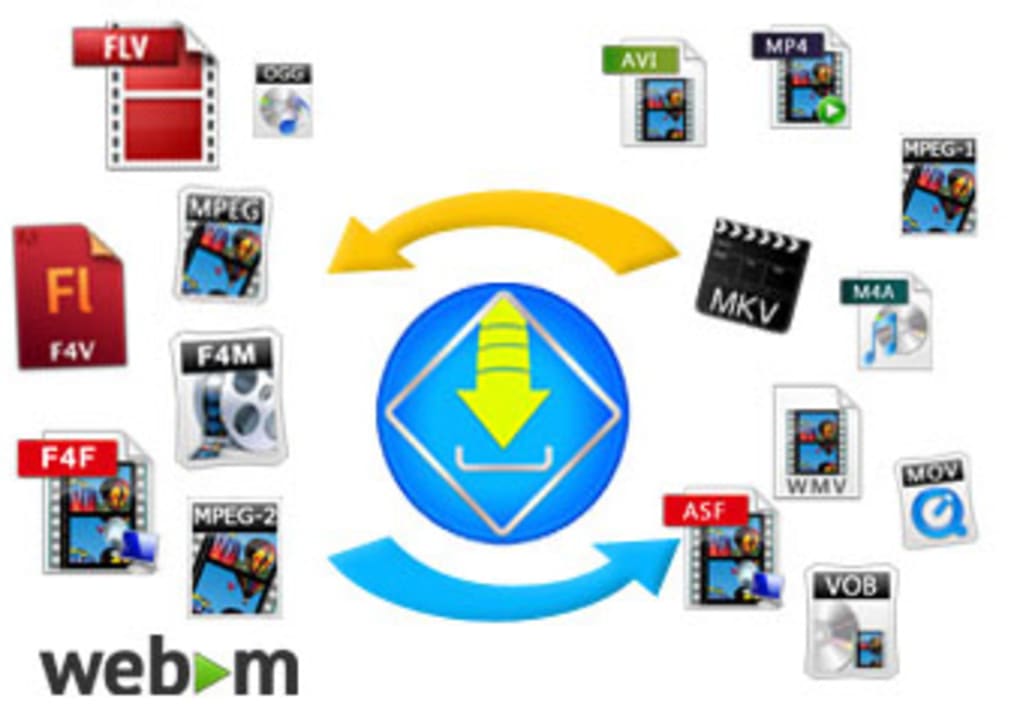
At its core, Allavsoft is engineered to be a powerful video download manager, yet its functionality extends far beyond mere downloading. It’s a versatile toolkit for anyone looking to gain greater control over their digital media. The application’s fundamental purpose is to enable users to capture videos directly from a vast array of online platforms, circumventing the usual restrictions that prevent direct saving. This capability alone makes it an invaluable asset for students, professionals, and casual viewers alike, who might need to refer to specific content repeatedly or in environments without consistent internet access.
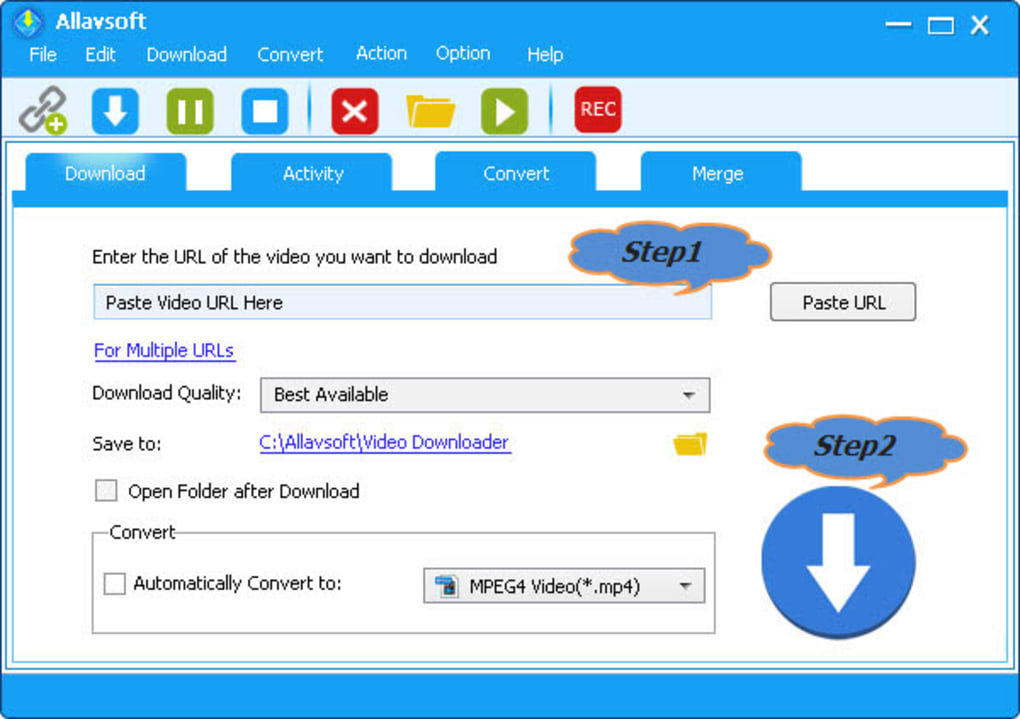
The initial impression of Allavsoft is one of efficiency and clarity. Unlike some software that inundates users with complex menus and obscure settings, Allavsoft prides itself on an intuitive and uncomplicated interface. When you first launch the application, you’re greeted by a main screen meticulously designed for immediate usability. All essential input fields, such as the URL paste area, and primary video download options are prominently displayed, ensuring that users can initiate downloads quickly without fumbling through layers of menus. This design philosophy significantly lowers the barrier to entry, making it accessible even for those who might not be technically inclined. The learning curve is remarkably gentle, allowing users to leverage its powerful features almost instantly.
Beyond the immediate download functionality, the interface thoughtfully incorporates additional tabs to expand its utility. These tabs are clearly labeled and logically organized, providing access to Allavsoft’s secondary, yet equally vital, features. For instance, a dedicated tab allows users to review their previous downloading activities, offering a history and status check for ongoing or completed tasks. This historical record is not just for convenience; it provides valuable oversight for managing a growing library of downloaded content. Another crucial tab is devoted to video conversion, enabling users to transform their downloaded files into a multitude of different formats. This feature is particularly useful for ensuring compatibility across various devices, from smartphones and tablets to smart TVs and gaming consoles. Lastly, a “Merge” tab offers the capability to combine multiple video segments into a single, cohesive file, a feature that proves incredibly handy for compiling episodes, stitching together fragmented content, or creating custom compilations. These integrated functionalities underscore Allavsoft’s commitment to providing a holistic multimedia management solution, moving beyond the singular act of downloading to encompass a broader spectrum of user needs.
Intuitive Design and Robust Download Capabilities
The true strength of Allavsoft lies in its meticulously crafted user experience, which combines an intuitive design with an array of robust download capabilities. This synergy ensures that users not only find the software easy to navigate but also highly effective in achieving their multimedia goals.
Streamlined User Interface for Effortless Navigation
The interface of Allavsoft is a testament to thoughtful design. Every element is placed with user accessibility in mind, minimizing clutter and maximizing efficiency. The main screen, as mentioned, is the central hub for all download activities. Its clean layout means that even first-time users can quickly grasp how to initiate a download: simply copy the URL of the video, paste it into the designated input field, and click the prominent download button. This straightforward, three-step process is a cornerstone of Allavsoft’s user-friendly approach, eliminating guesswork and accelerating task completion.
The additional tabs – for checking activity, converting, and merging videos – are equally well-organized. They provide a clear visual path to Allavsoft’s extended functionalities, preventing users from feeling overwhelmed by too many options on a single screen. This compartmentalized approach allows users to focus on one task at a time, whether it’s monitoring a batch download or preparing a video for a specific device. The consistency in design across all tabs further contributes to a seamless user experience, making the transition between different functions smooth and natural. The overall aesthetic is clean and modern, contributing to a pleasant and productive environment for managing your video content.
Mastering the Download Process: Options and Flexibility
Allavsoft empowers users with exceptional control over the downloading process, offering a level of flexibility that caters to diverse needs and preferences. This goes beyond merely saving a video; it allows for tailored downloads that align with specific quality requirements, storage constraints, and device compatibilities.
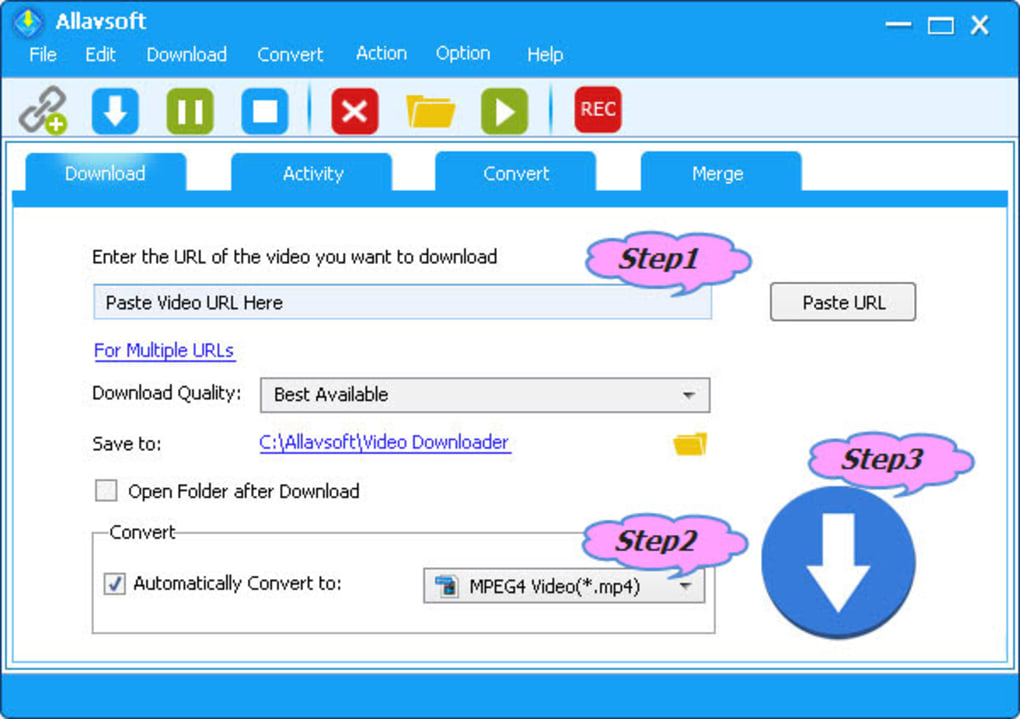
One of the most significant aspects of this control is the ability to choose the video resolution. Allavsoft robustly supports a vast spectrum of resolutions, ranging from the pinnacle of ultra-high definition (UHD) 4K video all the way down to standard definition (SD) 360p. This versatility is crucial in today’s multi-device ecosystem. For instance, if you’re aiming for the highest possible visual fidelity for playback on a large 4K monitor or TV, Allavsoft can capture videos in stunning 4096p or 4K. Conversely, if storage space is a premium on your mobile device, or if you simply need a smaller file for quicker sharing or less data consumption, opting for 360p or 480p is readily available. This choice impacts not only visual quality but also file size, empowering users to make informed decisions based on their immediate needs. The default behavior is typically to preserve the original video’s format, ensuring fidelity, but users have the option to set automatic conversion rules, adding another layer of convenience.
Furthermore, Allavsoft incorporates essential features that enhance the reliability and convenience of the download process. The ability to pause and resume downloads at any given time is a fundamental yet critical inclusion. This feature mitigates the common anxieties associated with large file downloads – concerns about internet connection drops, unexpected computer shutdowns, or needing to free up bandwidth temporarily. With Allavsoft, your download progress is securely maintained, allowing you to pick up exactly where you left off, providing peace of mind and flexibility in managing your download queue.
Allavsoft offers two primary methods for initiating video downloads, catering to different user workflows:
- Directly via the Application: This is the most common method. Users simply need to copy the URL of the desired video from their web browser. Once copied, this URL is pasted into the designated input field within the Allavsoft application. With a click on the large, clearly labeled “Download” button, the process commences immediately. This method is straightforward and efficient, making it ideal for targeted downloads.
- Browser Add-on Integration: For those who prefer a more integrated and seamless experience, Allavsoft provides a convenient browser add-on. Once installed, this add-on integrates a special download button directly onto the video page of supported websites. This means you no longer need to manually copy and paste URLs. Instead, while browsing, you can simply click the Allavsoft button that appears on the video page, select your preferred download resolution from a context menu, and the download will begin without ever leaving your browser. This method significantly streamlines the downloading workflow, making it incredibly convenient for frequent users.
Beyond Downloading: Integrated Conversion and Merging
Allavsoft’s utility extends significantly beyond its core downloading function, integrating powerful tools for video conversion and merging. These features transform it into a comprehensive multimedia management solution, allowing users to tailor their downloaded content to virtually any requirement.
The conversion capability is a standout feature. After downloading a video, or even as part of the initial download process, users can effortlessly convert it into a myriad of other file formats. This can be done automatically at the time of download – by setting a preferred output format – or manually through the dedicated “Convert” tab for existing files. Allavsoft boasts support for converting F4F, FLV, F4V, F4M, and WebM videos into popular formats such as MP4, AVI, MOV, WMV, MPG, and even extracting audio into MP3, WAV, AIFF, WMA, and M4A. This extensive format compatibility ensures that your videos are playable across a wide range of devices and platforms, eliminating compatibility headaches. Whether you need to prepare a video for an older device, extract an audio track for a podcast, or simply standardize your media library, Allavsoft provides the tools to do so with ease.
Equally valuable is the “Merge” tab, which allows users to combine several video files into a single, cohesive video. This is particularly useful for scenarios like compiling a series of short clips into a longer feature, merging different parts of a multi-segment download, or creating a highlight reel from various sources. The process is intuitive, allowing users to arrange the clips in their desired order before merging.
Crucially, Allavsoft supports batch processing for both downloading and converting tasks. This means you don’t have to tackle tasks one by one, which would be incredibly time-consuming for large collections. Instead, you can queue up multiple video URLs for download, or select a folder full of videos for conversion, and Allavsoft will process them sequentially or simultaneously (depending on settings and system resources). This batch capability is a significant time-saver, enhancing productivity for users who regularly deal with multiple video files. The ability to manage large volumes of media efficiently is a hallmark of a professional-grade tool, and Allavsoft delivers on this front without compromising ease of use.
A Deep Dive into Allavsoft’s Advanced Features
Allavsoft’s true prowess becomes evident when exploring its advanced features, which are meticulously designed to provide unparalleled versatility and efficiency in handling online video content. These capabilities elevate it beyond a simple utility, making it a robust tool for various multimedia needs.
Unparalleled Compatibility and High-Quality Output
One of Allavsoft’s most compelling attributes is its extraordinary compatibility with a vast number of online video sharing sites. The software is advertised to download movies, music videos, and playlists from over 100 video sharing sites. While specific names like Dailymotion, Facebook, and eHow are mentioned, user testimonials further expand this list to include popular platforms such as YouTube, Crunchyroll, Soundcloud, Spotify, and Udemy. This broad compatibility ensures that users are rarely limited in their ability to acquire content, making Allavsoft a truly universal solution for online video acquisition. Whether you’re downloading a lecture, a music track, a movie trailer, or a social media clip, Allavsoft aims to be your one-stop shop.
The commitment to high-quality output is another cornerstone of Allavsoft’s design philosophy. The software is capable of fast downloading videos in a staggering range of resolutions, from the cutting-edge ultra-high definition 4K (4096p) down to standard definitions like 480p or 360p. It also supports HD 1080p, 720p, 3K, and even 3D videos. This comprehensive resolution support is vital for future-proofing your media library and ensuring optimal viewing experiences across various display technologies. Downloading in 4K means you’re capturing content at the highest available fidelity, perfect for large screens and immersive viewing. Conversely, the option to download in lower resolutions provides practical flexibility for smaller devices, conserving storage, or managing data usage when bandwidth is limited. This granular control over output quality ensures that users can always get the right version of a video for their specific needs.
Furthermore, Allavsoft’s ability to download and convert in one step significantly streamlines the workflow. Imagine wanting to watch a YouTube video on your old tablet that only supports MP4, or needing an audio track from a music video in MP3 format. Allavsoft allows you to specify the desired output format before the download even begins. This eliminates the need for a separate conversion step, saving time and effort. The application handles the complex encoding and decoding processes efficiently, delivering the desired file format directly to your chosen destination. This intelligent integration of downloading and conversion is a powerful time-saving feature, especially for users who frequently require content in specific formats for different devices or purposes.
Enhancing Workflow with Batch Processing and Browser Integration
Efficiency is a key metric for any productivity software, and Allavsoft excels in this area through its robust batch processing capabilities and seamless browser integration. These features are designed to minimize manual intervention and maximize user productivity when dealing with multiple video files.
Batch downloading is a game-changer for anyone who needs to acquire several videos concurrently. Instead of initiating downloads one by one, Allavsoft allows users to input multiple video URLs into a queue. The software then systematically processes each URL, downloading the videos either simultaneously (depending on user settings and internet speed) or consecutively. This is particularly advantageous for downloading entire playlists, series of lectures, or large collections of music videos. The ability to “set it and forget it” means users can queue up their desired content and let Allavsoft handle the heavy lifting in the background, freeing up their time for other tasks. The batch feature is complemented by the pause/resume functionality, allowing for flexible management of large download queues without fear of interruption.
Similarly, batch conversion extends this efficiency to post-download processing. Users can select multiple downloaded videos and apply a conversion preset to all of them at once. For example, if you’ve downloaded a mixed bag of FLV and WebM files and want them all as MP4 for universal compatibility, you can select them all, choose MP4 as the target format, and initiate a single batch conversion. Allavsoft will then process each file, converting it to the desired format without requiring individual attention. This feature is invaluable for organizing and standardizing large media libraries, ensuring consistent format and quality across your collection.
Browser integration, primarily through its add-on, further enhances the workflow by making the downloading process incredibly fluid and intuitive. By embedding a download button directly onto video pages, Allavsoft removes the friction of copying and pasting URLs. This is not just a minor convenience; it fundamentally changes the user experience, transforming downloading from a deliberate, multi-step process into a quick, single-click action. Imagine browsing your favorite video site and instantly being able to save a video for offline viewing with just a click, complete with options for resolution and format directly from the browser window. This level of integration makes Allavsoft feel like an organic extension of your web browsing experience, rather than a separate application you need to switch to. It’s an excellent example of how thoughtful design can significantly improve user convenience and efficiency.
Why Choose Allavsoft? Performance, User Experience, and Technical Excellence
When considering a video downloader and converter, performance, user experience, and technical capabilities are paramount. Allavsoft consistently demonstrates strength in these areas, making a compelling case for its adoption over other solutions.
From a performance perspective, Allavsoft is engineered for speed and reliability. It aims to deliver fast download speeds, leveraging efficient algorithms to optimize the data transfer process. While actual speeds are inherently dependent on the user’s internet connection and the source server, Allavsoft minimizes any software-imposed bottlenecks. The ability to download in ultra-high definitions like 4K is not just about quality; it also implies that the software is robust enough to handle large data streams efficiently. The batch processing feature further underscores its performance, as it can manage multiple tasks without significant slowdowns, ensuring that users can tackle extensive media management tasks without frustrating delays.
The user experience is arguably where Allavsoft truly shines. Its “simple interface” is repeatedly highlighted as a major pro, indicating that the developers have prioritized ease of use without sacrificing functionality. The intuitive layout, clear labeling of features, and straightforward download process mean that users spend less time learning the software and more time getting their tasks done. This low barrier to entry is particularly appealing to a wide audience, from tech-savvy individuals to those less familiar with complex applications. The option for a browser add-on further streamlines the experience, turning what could be a cumbersome multi-step process into a seamless one-click operation directly within the web browser. The “pause anytime” download feature contributes significantly to user peace of mind, demonstrating a design philosophy centered on convenience and reliability.
Technically, Allavsoft exhibits excellence through its broad support for various video resolutions and file formats. The ability to handle everything from 360p to 4K ensures that it meets diverse user needs and prepares content for a wide array of playback devices. The extensive list of supported output formats for conversion, including popular video and audio codecs, speaks to its versatility. While the original content notes “Limited video editing features” as a con, it’s important to frame this within the context of Allavsoft’s primary purpose. Its core strength lies in downloading and converting, not editing. Therefore, this limitation is not a fundamental flaw but rather a reflection of its specialized focus, ensuring that its primary functions are executed with exceptional competence. For users seeking a dedicated downloader and converter, this focused approach is often an advantage, as it avoids unnecessary bloatware and concentrates on delivering a polished experience in its core competencies.
User feedback consistently reinforces Allavsoft’s positive reception. Reviewers praise its effectiveness, with one user noting it’s “highly recommended” for downloading from Crunchyroll, YouTube, and Soundcloud. Another reviewer lauded it as “a great software” for its ability to download from Udemy, YouTube, or music from Spotify. While one user mentioned having to go to the official website for the latest version to support more sites, this highlights the developer’s continuous efforts to update and expand compatibility, ensuring Allavsoft remains current and effective against the ever-evolving landscape of online video platforms. These testimonials collectively paint a picture of a reliable, efficient, and user-appreciated tool that delivers on its promises.
Considering alternatives, Allavsoft stands out by combining comprehensive download capabilities with powerful conversion and merging tools in an easy-to-use package. Many download managers might offer one aspect effectively, but Allavsoft’s integrated approach to acquiring, transforming, and organizing media makes it a more complete solution. It’s a tool that does its job well, providing users with high-quality output and the flexibility needed to manage their digital content effectively.
Conclusion: The Definitive Tool for Your Multimedia Needs
In the bustling digital ecosystem of online video content, the need for a reliable, efficient, and versatile tool to manage multimedia has never been more critical. Allavsoft emerges as a leading contender in this space, offering a comprehensive suite of features that address the multifaceted demands of modern users. From its intuitive design to its robust technical capabilities, Allavsoft is meticulously crafted to simplify and enhance your interaction with online videos.
The software’s primary function as a video downloader is executed with exceptional proficiency. It effectively bridges the gap between the ephemeral nature of online streaming and the user’s desire for permanent, accessible content. With support for a vast array of video-sharing platforms and the ability to download in an extensive range of resolutions, from standard definition to breathtaking 4K, Allavsoft ensures that your media library is future-proof and optimized for any viewing environment. The flexible download options, including pausing and resuming, and the convenient browser add-on, underscore its commitment to a user-friendly and hassle-free experience.
Beyond merely downloading, Allavsoft distinguishes itself through its integrated conversion and merging capabilities. The ability to transform downloaded videos into numerous video and audio formats, such as MP4, AVI, MOV, MP3, and WAV, directly within the application, eliminates the need for additional software. This versatility is crucial for ensuring compatibility across a diverse ecosystem of devices and applications. Furthermore, the batch processing functionality for both downloading and converting tasks significantly enhances efficiency, allowing users to manage large volumes of media with minimal manual effort, thereby saving invaluable time.
While Allavsoft is primarily focused on downloading and converting, and thus possesses “Limited video editing features,” this is not a drawback but rather a reflection of its specialized excellence. By concentrating on its core competencies, Allavsoft delivers a highly polished and effective solution for its intended purpose, avoiding unnecessary complexity or bloat. User reviews consistently highlight its reliability and effectiveness, reinforcing its standing as a trusted tool in the multimedia landscape.
In summary, Allavsoft is more than just a video downloader; it’s a powerful and user-centric multimedia manager. Its combination of an easy-to-use interface, comprehensive download options, versatile conversion tools, and efficient batch processing makes it an indispensable asset for anyone looking to curate and control their digital video content. Whether you’re an educator building a resource library, a creative compiling footage, or simply an individual wanting offline access to your favorite entertainment, Allavsoft provides the definitive solution to meet your multimedia needs. It’s a tool that performs its job exceptionally well, delivering high-quality results and an unparalleled user experience in the realm of video downloading and conversion.
Allavsoft for Windows Free In English V3.28.1.9305 4.9 (309) Free Download for Windows Buy now From trusted partner
Key Features of Allavsoft:
- One-step Download and Convert: Seamlessly download and convert videos from F4F, FLV, F4V, F4M, WebM to a multitude of popular formats like MP4, AVI, MOV, WMV, MPG, and even extract audio to MP3, WAV, AIFF, WMA, M4A.
- Broad Site Compatibility: Download movies, music videos, and playlists from over 100 video sharing sites, including popular platforms like Dailymotion, Facebook, eHow, YouTube, Crunchyroll, Soundcloud, Spotify, and Udemy.
- High-Quality & Fast Downloads: Rapidly download videos in ultra-high definition 4K (4096p), HD 1080p, 720p, 3K, 3D, or standard definition (SD) 480p or 360p, ensuring optimal quality for your needs.
- Batch Processing: Efficiently download and convert multiple files simultaneously or in sequence, saving time and effort for managing large media collections.
App specs:
- License: Free
- Version: 3.28.1.9305
- Latest update: July 15, 2025
- Platform: Windows
- OS: Windows 11
- Language: English
- Downloads: 39.4K
- Last month’s downloads: 297
- Developer: allavsoft
User reviews about Allavsoft:
- by luckyhealthy reviewed on April 15, 2021: “It is highly recommended. I use it to download from crunchyroll, youtube, and soundcloud.”
- by Cranfill Baker reviewed on June 18, 2019: “It is a great software. However, the software on PhanMemFree is not the latest version. Many of the website is not supported for this old version. I have to go to its official website to get more video and music website supported and updated.”
- by Harney David reviewed on May 28, 2018: “It works great in downloading videos from Udemy, YouTube or music from Spotify.”
Alternatives to Allavsoft:
- Neat Download Manager
- Free Download Manager
- VidMasta
- Internet Download Manager
- Free Facebook Video Downloader
- Web Gallery Downloader
- Windows Video Downloader
- MP3 Downloader
- UDL Client
- jDownloader Portable
- FlashGet
- AB Download Manager
- SaveVideo
- Imaget
- Tucan Manager
- MultiDownloader
Legal Information: Laws concerning the use of this software vary from country to country. We do not encourage or condone the use of this program if it is in violation of these laws. PhanMemFree may receive a referral fee if you click or buy any of the products featured here.
PhanMemFree Safety Guarantee: In PhanMemFree, we scan all the files hosted on our platform to assess and avoid any potential harm for your device. Our team performs checks each time a new file is uploaded and periodically reviews files to confirm or update their status. This comprehensive process allows us to set a status for any downloadable file as follows:
- Clean: It’s extremely likely that this software program is clean. We have scanned the file and URLs associated with this software program in more than 50 of the world’s leading antivirus services; no possible threat has been detected.
- Warning: This software program is potentially malicious or may contain unwanted bundled software. Based on our scan system, we have determined that these flags are possibly false positives. A false positive means a benign program is wrongfully flagged as malicious due to an overly broad detection signature or algorithm used in an antivirus program.
- We’d like to highlight that from time to time, we may miss a potentially malicious software program. To continue promising you a malware-free catalog of programs and apps, our team has integrated a Report Software feature in every catalog page that loops your feedback back to us. Flag any particular issues you may encounter and PhanMemFree will address those concerns as soon as possible.
Copyright PHANMEMFREE INTERNATIONAL S.A. © 1997–2025 — All rights reserved.
File Information
- License: “Free”
- Latest update: “July 15, 2025”
- Platform: “Windows”
- OS: “Windows 11”
- Language: “English”
- Downloads: “39.6K”


