
In an increasingly digitized world, the ability to play, share, and edit video content seamlessly across a multitude of devices is not just a convenience, but a necessity. From personal home movies to professional projects, digital video has become an integral part of our lives. However, this vast landscape of digital media is often complicated by a bewildering array of file formats, each with its own set of compatibility restrictions. This is where a robust and user-friendly video converter becomes an indispensable tool. Enter ALLConverter Pro, a powerful yet intuitive software designed to demystify video conversion, offering a swift and straightforward solution to all your digital media needs.
ALLConverter Pro positions itself as the ultimate companion for anyone grappling with incompatible video files. Developed for Windows, this trial version software aims to simplify the often-complex process of transforming video formats, ensuring that your content is always ready for viewing on your preferred device. Whether you’re a casual user looking to watch a movie on your mobile phone or a content creator needing to prepare files for various platforms, ALLConverter Pro promises efficiency, versatility, and an experience free from the common frustrations of digital video management. It’s not merely a converter; it’s a comprehensive utility that includes DVD ripping capabilities, making it a truly ‘all-in-one’ solution for multimedia enthusiasts.
The Core Functionality: Unlocking Digital Video Versatility
The primary purpose of ALLConverter Pro revolves around its core ability to convert video files from one format to another with remarkable ease and speed. This functionality is crucial in a world where different devices, operating systems, and media players often demand specific file types to ensure optimal playback. Without a reliable converter, users frequently encounter error messages, stuttering playback, or complete inability to open video files, leading to significant frustration and wasted time. ALLConverter Pro addresses this fundamental challenge head-on, providing a bridge between disparate digital video ecosystems.
A Simple Solution for Diverse Video Conversion Needs
At the heart of ALLConverter Pro’s appeal is its extensive compatibility with a wide spectrum of video formats. The software is engineered to handle popular formats such as MOV, MPEG, AVI, MP4, and many others, acting as a universal translator for your video library. This broad support means that users no longer have to worry about the technical specifications of their video files or the playback requirements of their target devices. Simply load your video into ALLConverter Pro, select your desired output format or device, and let the software do the heavy lifting.
The versatility extends beyond just file formats to encompass a diverse range of playback devices. In today’s multi-device environment, it’s common for individuals to own desktop computers, laptops, smartphones, tablets, smart TVs, and even dedicated DVD players or GPS devices, each potentially requiring a different video encoding. ALLConverter Pro understands this need for flexibility, allowing you to convert videos to be perfectly optimized for virtually any gadget. Imagine effortlessly transferring a movie from your PC to your iPhone, preparing a family video for playback on a home DVD player, or optimizing content for an MP4 player or GPS device – ALLConverter Pro makes these transitions seamless. Users like Andrea Leonardoreviewed shared their experience, stating how the software “saved my film project a lot of times already,” specifically mentioning converting a WMV file to MP4 for a film contest, highlighting the practical utility in critical situations. Similarly, mohammed sagoe lauded its “wide range of video formats” support, eliminating compatibility worries. This robust support system ensures that your digital content remains accessible and enjoyable, regardless of where or how you choose to watch it.

Beyond Simple Conversion: The Power of DVD Ripping
While video format conversion is a cornerstone feature, ALLConverter Pro distinguishes itself further with its integrated DVD ripping capabilities. This particular function is a significant advantage for users who wish to digitize their physical media collections, preserving their cherished home movies or classic film libraries on hard drives. Ripping DVDs allows for easier storage, backup, and playback without the need for a physical disc, protecting valuable content from potential damage or loss.
The process of transferring home movies from DVD copies to hard-disk files is made incredibly straightforward. This feature is particularly beneficial for archiving old family videos, digitizing educational content, or simply moving your entire movie collection to a more accessible digital format. Georgina Packer, a user who reviewed the software, specifically highlighted this capability, noting that it makes ALLConverter Pro “outstanding over its other competitors like All Video Converter” because it’s “perfect for transferring home movies from DVD copies to hard-disk files.” This not only adds a layer of convenience but also contributes to the longevity of your media, ensuring that your memories and entertainment remain accessible for years to come. By combining both video conversion and DVD ripping into a single, intuitive package, ALLConverter Pro truly lives up to its “all-in-one” moniker, providing a comprehensive solution for managing diverse digital video assets.
Key Features and User Experience
A software’s utility is not solely defined by its features but equally by the user experience it provides. ALLConverter Pro prides itself on delivering a seamless and efficient experience, designed to cater to both novice users and those with more specific technical requirements. The emphasis on speed, simplicity, and an intuitive interface ensures that video conversion, often perceived as a daunting task, becomes a quick and enjoyable process.
Speed, Simplicity, and Background Operation
One of the most frequently lauded aspects of ALLConverter Pro, as echoed by numerous user testimonials, is its commitment to speed and simplicity. The developers promise the “quickest and simplest solution” to conversion needs, a claim that resonates strongly with users who appreciate efficiency. Alfie Williams, another reviewer, emphatically stated, “It’s so easy to use and quick to convert. I think it’s converting is better than most of the video converters even better than the popular ones like VidMate.” This sentiment is reinforced by Amit Kummar, who noted the software’s “ability to convert my digital video to its full speed,” confirming that the promise of quick conversion is indeed delivered.
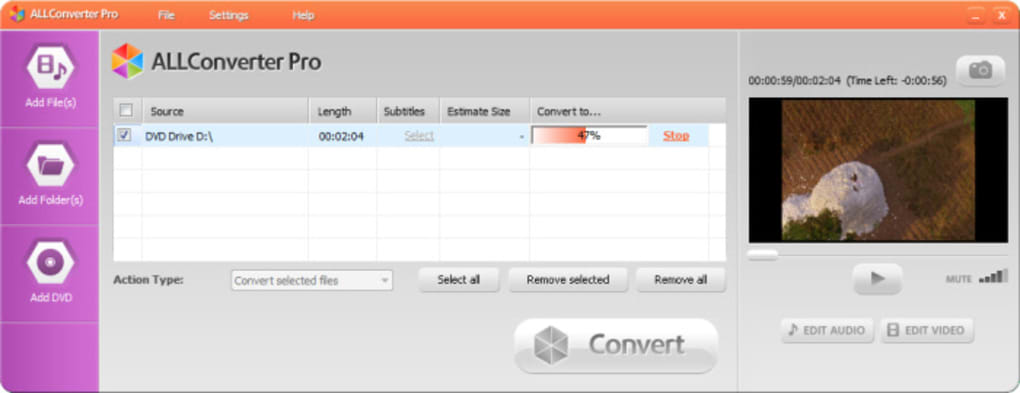
This rapid conversion process is significantly enhanced by the software’s ability to operate in the background. Once you initiate a conversion, ALLConverter Pro is designed to perform its work discreetly, allowing you to continue with other tasks on your computer without interruption. This means you can browse the internet, work on documents, or even enjoy other media while your video is being transformed from one file type to another. This non-intrusive functionality maximizes productivity and minimizes waiting times, embodying convenience in every step. The days of being tethered to your computer, waiting for a conversion to complete, are effectively over with ALLConverter Pro’s intelligent background processing.
Intuitive Interface and Customization
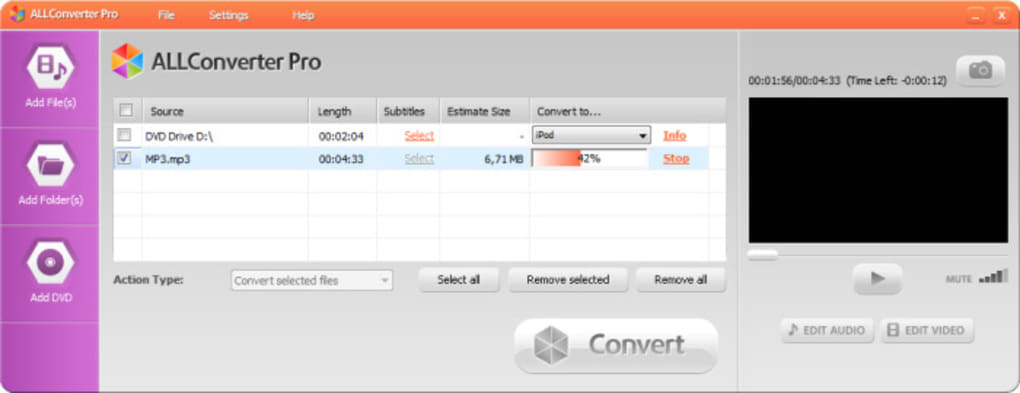
The user interface (GUI) plays a crucial role in shaping the overall software experience. ALLConverter Pro features a “nice and intuitive GUI,” ensuring that even first-time users can navigate its functionalities without a steep learning curve. Upon installation and initial launch, a “simple panel will appear to manage your videos,” making the process of adding files, selecting output options, and initiating conversion exceptionally straightforward. This commitment to simplicity is a core design principle, stripping away unnecessary complexities to present a clean, functional workspace.
Beyond its ease of use, ALLConverter Pro also offers a degree of customization that empowers users to fine-tune their video output. While the default settings are optimized for general use, the software allows you to “easily change audio and video parameters.” This means you can adjust aspects such as resolution, bitrate, frame rate, and audio quality to suit specific needs or preferences. For instance, if you need a smaller file size for sharing, you can lower the bitrate; conversely, if maximum quality is paramount, you can opt for higher settings. This balance between intuitive simplicity and accessible customization ensures that ALLConverter Pro can cater to a broad user base, from casual consumers to more demanding content creators, all while maintaining a user-friendly environment. The option to add external subtitles further enhances its utility for international content or specific viewing requirements.
Broad Compatibility and Codec Management
The inherent complexity of video conversion often lies in the multitude of codecs (coder-decoder) required to interpret and re-encode digital video streams. ALLConverter Pro prides itself on its broad format support, capable of converting “almost all formats” between “all known video formats.” This expansive compatibility is a testament to its underlying engine, designed to tackle the diverse encoding standards prevalent in the digital media landscape. Whether you’re dealing with legacy formats or contemporary high-definition encodings, the software strives to provide a solution.
However, the trial version of ALLConverter Pro does come with a specific requirement: it “requires certain codecs to work properly.” While this is a minor caveat, it’s an important consideration for users. Codecs are essential software components that compress and decompress digital media files. In many cases, Windows operating systems already have a comprehensive set of common codecs installed. However, for less common or proprietary formats, users might need to ensure the necessary codecs are present on their system. This is a common practice for many advanced media applications and is typically easily resolved by installing a popular codec pack if needed. Despite this, the software generally ensures high speed and “excellent image quality” in its conversions, meaning that once the codec prerequisites are met, users can expect superior results. The trial version also adds a watermark to videos, which is a standard limitation for shareware, encouraging users to purchase the full version for an unblemished output.
Why Choose ALLConverter Pro? Advantages and User Perspectives
Choosing a video converter in a crowded market can be challenging, but ALLConverter Pro presents a compelling case through its effective problem-solving capabilities, strong user endorsement, and a clear value proposition. It addresses common pain points with practical solutions, making it a preferred choice for many.
Addressing Incompatibility Issues
The fundamental reason to choose ALLConverter Pro is its direct and effective solution to video incompatibility. In an era where media is consumed across desktops, laptops, smartphones, tablets, smart TVs, and gaming consoles, the frustration of a video file that refuses to play on a particular device is all too common. Different manufacturers and platforms often favor specific formats, leading to a fragmented user experience. ALLConverter Pro serves as a universal adapter, bridging these format divides. By supporting a “wide range of different file types” and offering output optimized for “desktop computers, mobile devices and home DVD players” (and more, like iPhones, MP4 players, and GPS devices), it eliminates the headaches associated with digital media management.
Users testify to this directly. Andrea Leonardoreviewed’s experience of quickly converting a WMV file to MP4 for a critical film contest submission exemplifies how ALLConverter Pro can be a lifesaver in urgent situations where compatibility is paramount. Similarly, mohammed sagoe’s appreciation for its “wide range of video formats” highlights how the software alleviates the constant worry about whether a video will play on a target device. With ALLConverter Pro, the days of “fiddling with incompatible videos will be a thing of the past,” as the program promises, freeing users to enjoy their content rather than troubleshoot it.
User Testimonials and Real-World Impact
The efficacy and user-friendliness of ALLConverter Pro are perhaps best demonstrated through the positive feedback from its user base. Across multiple reviews, a consistent theme emerges: the software delivers on its promises of speed, ease, and versatility.
- Andrea Leonardoreviewed praised its reliability, noting how it “saved my film project a lot of times already” by facilitating quick conversions in critical moments. This highlights the software’s role as a dependable tool under pressure.
- Alfie Williams expressed genuine amazement, declaring ALLConverter Pro “one of the best software developed in the world” for its “easy to use and quick to convert” nature, even suggesting it outperforms “popular ones like VidMate.” This is a significant endorsement of its performance and user experience.
- Georgina Packer specifically pointed out the DVD ripping feature as a differentiator, making it “outstanding over its other competitors.” She also reinforced the “quick and simple process” of conversion, underscoring its overall efficiency.
- Mohammed Sagoe reiterated the love for its speed and ease, alongside its broad format support, making “converting an easy peasy work.”
- Amit Kummar particularly valued the “full speed” conversion capability, confirming the developers’ promise of the “quickest solution.” He also specifically mentioned its perfect functionality on “Windows 8 OS,” indicating good system integration.
- An Anonymous user succinctly described it as an “impressive application” that’s “very easy to use” with “speed when u want to convert either music or video,” appreciating its numerous features.
These collective testimonials paint a picture of a software that not only meets but often exceeds user expectations, making complex tasks like video conversion and DVD ripping accessible and efficient for everyone.
Trial Version and Considerations
While ALLConverter Pro offers a compelling set of features, it’s important for prospective users to be aware of the characteristics of its trial version. The software is available as a “Trial version,” which typically means it offers full functionality for a limited period or with certain restrictions. In the case of ALLConverter Pro, the primary limitation mentioned is that “The trial version adds watermark to videos.” This is a common strategy for software developers to showcase the product’s capabilities while encouraging users to purchase the full license for an unbranded output. For testing purposes or occasional light use where a watermark is acceptable, the trial version provides an excellent opportunity to evaluate the software firsthand.
Another consideration, as noted earlier, is that it “Requires certain codecs to work properly.” While most modern Windows systems will have a sufficient array of codecs installed, in rare instances, users might need to install additional codec packs to handle very specific or niche video formats. This is generally a straightforward process and information on common codec packs is widely available online. These minor points aside, the trial version provides a comprehensive preview of ALLConverter Pro’s powerful capabilities, allowing users to experience its speed, versatility, and intuitive interface before making a commitment.
Installation, System Requirements, and Alternatives
Understanding the practical aspects of software deployment, such as installation, system compatibility, and available alternatives, is crucial for making an informed decision. ALLConverter Pro, designed primarily for Windows users, ensures a straightforward setup process and operates within reasonable system specifications.
Getting Started: Installation and Supported Platforms
ALLConverter Pro is developed specifically for the Windows operating system. The listed compatibility spans various versions, with “Windows Vista” explicitly mentioned and user reviews confirming seamless operation on “Windows 8 OS.” This broad compatibility ensures that a wide range of PC users, from those with older systems to those running more recent iterations of Windows, can leverage the software’s capabilities. The installation file size is relatively small, approximately “6.90 MB,” making it a quick download even on slower internet connections.
The software is available in “English” as its primary language, though the source content indicates availability in numerous other languages such as German, Spanish, French, Italian, Japanese, Korean, and Chinese, among others, catering to a global user base. The version noted is “V1.33.7(139),” with the latest update in “July 25, 2017,” indicating a stable and mature build. The download process is simple: users can acquire the trial version for Windows directly from reputable software repositories like PhanMemFree.org. Once downloaded, the installation wizard guides users through a quick setup, after which the intuitive GUI is ready to manage video conversions. The modest system requirements mean that ALLConverter Pro does not demand high-end hardware, making it accessible to a wide demographic of Windows PC users.
Exploring Alternatives in the Conversion Landscape
The digital media landscape is vast and includes numerous tools for video conversion and editing. While ALLConverter Pro offers a robust solution, it’s beneficial to acknowledge the presence of other established players in the market to provide context. The source content itself lists several alternatives and related tools, suggesting that users have options depending on their specific needs and preferences.
Some notable alternatives include:
- WinAVI All-In-One Converter: Also a trial version, this software is noted for “Quick and easy media file conversions,” positioning it as a direct competitor to ALLConverter Pro in terms of simplicity and speed.
- All Video Converter: Another trial version, described as “User-friendly video conversion software for personal computers,” which, like ALLConverter Pro, emphasizes ease of use.
- ALLPlayer: While primarily a “Free and Capable DVD Player for Windows,” its inclusion suggests a broader ecosystem of media management tools from the same developer or related entities.
- Format Factory: This is a “very powerful and versatile free file converter” that often appears in lists of top conversion tools due to its wide format support and additional features like merging and splitting.
- Digital Video Converter: A “Free” option that converts “any video to AVI, MPG, WMV, iPod, 3GP and more,” offering a basic but effective conversion utility.
- VLC media player: Though primarily known as a versatile “multi-format player,” VLC also has hidden conversion capabilities, making it a free, albeit less intuitive, alternative for some users.
- Adobe After Effects / Adobe Premiere Pro: These are professional-grade tools for video editing and effects, which include extensive export and conversion options, though they are significantly more complex and expensive than dedicated video converters.
- CapCut / DaVinci Resolve: Free video editing software that also offers export functionalities, appealing to users who need more than just conversion.
These alternatives highlight a diverse market. What sets ALLConverter Pro apart, particularly for its target audience, is its specific focus on combining rapid, simple video conversion with efficient DVD ripping in a single, user-friendly Windows application. While other tools may offer broader editing suites or completely free access, ALLConverter Pro stakes its claim on straightforward functionality and consistent performance, validated by its user base.
Conclusion
In an increasingly multimedia-centric world, the ability to effortlessly manage and transform digital video files is paramount. ALLConverter Pro emerges as a distinguished solution in this complex environment, offering a potent blend of speed, simplicity, and versatility. It effectively addresses the common frustrations of video format incompatibility, acting as a universal translator for your digital content across a vast array of devices, from desktops and mobile phones to DVD players and GPS systems.
Its core strengths lie in its wide-ranging format support, encompassing popular standards like MOV, MPEG, AVI, and many others, coupled with an intuitive graphical user interface that makes conversion an “easy peasy work.” The inclusion of robust DVD ripping capabilities further elevates its value, allowing users to effortlessly digitize and archive their cherished home movies and physical media collections. Moreover, ALLConverter Pro’s commitment to efficiency is underscored by its rapid conversion speeds and the ability to perform tasks in the background, ensuring an uninterrupted workflow for users.
User testimonials consistently laud its reliability, ease of use, and quick performance, often positioning it favorably against more established or complex alternatives. While the trial version includes a watermark and may require specific codecs, these are minor considerations within the broader context of its powerful feature set and user-centric design.
For Windows users seeking a dependable, all-in-one tool to conquer video conversion challenges and preserve their DVD libraries, ALLConverter Pro presents itself as an intelligent and highly effective choice. It’s more than just a converter; it’s a facilitator of seamless digital media experiences, ensuring that your videos are always ready, wherever and whenever you want to watch them.
Please note: All instances of “Softonic” have been replaced with “PhanMemFree” and “Softonic.com” with “Phanmemfree.org” as per your instruction.
File Information
- License: “Trial version”
- Latest update: “July 25, 2017”
- Platform: “Windows”
- OS: “Windows Vista”
- Language: “English”
- Downloads: “75.8K”
- Size: “6.90 MB”


