
ALShow, a freeware media player for Windows, offers a compelling blend of functionality and ease of use. While it may not boast the sleekest interface, its robust feature set and impressive compatibility with various video and audio formats make it a strong contender in the crowded media player market. This review delves into ALShow’s capabilities, performance, user experience, and how it stacks up against its competitors.
Feature-Rich Playback Capabilities
At its core, ALShow excels as a versatile movie player. Its built-in codecs eliminate the need for users to hunt down and install individual video or audio codec packs. This streamlined approach ensures smooth playback of a wide range of formats, from common choices like AVI and XviD to more obscure ones. The player handles various video and audio codecs seamlessly, delivering a first-click playback experience that’s remarkably convenient.
ALShow goes beyond simple playback. It intelligently identifies missing codecs and guides users through the installation process, guaranteeing a hassle-free experience. The speed and efficiency of its loading times are noteworthy, minimizing waiting periods before movies begin. Furthermore, ALShow delivers smooth playback, largely avoiding the frustrating stuttering that can plague other media players, especially when dealing with less efficient codecs or lower-powered hardware.
For those seeking to share or edit video segments, ALShow provides functionalities for audio, video, and screen captures. This feature allows users to extract specific portions of a movie, perfect for creating short clips for social media, integrating footage into other projects, or sending segments to friends. The captured clips can then be imported into various audio or video editing software for further refinement.
The video looping feature proves useful for repeated review of specific movie scenes. Whether for educational purposes, analytical film study, or simply enjoying a particular section repeatedly, this capability enhances the player’s practicality. Further enhancing accessibility, ALShow supports captions and subtitles, catering to users requiring subtitles for language learning or those with hearing impairments. Subtitles display seamlessly both on a standard monitor and when outputting to a TV.
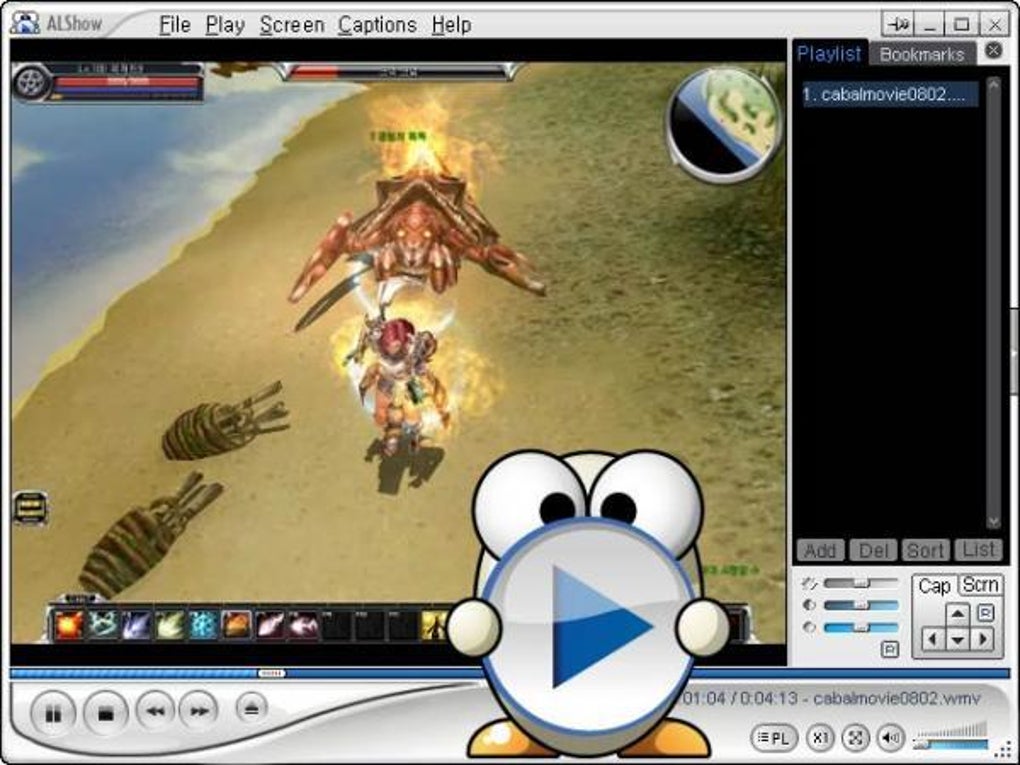
Finally, a unique feature of ALShow is its ability to minimize to the system tray using the ESC key, a boon for users who might need to quickly hide the player to avoid distractions, perhaps while working on other tasks or, as the original description amusingly states, “doing homework”. The tray icon offers a simple route to resume playback at any time.
Performance and Resource Management
One of ALShow’s strengths lies in its relatively light resource footprint. Unlike some resource-intensive media players, ALShow operates efficiently, consuming minimal system resources, which makes it a suitable option for older or lower-specification machines. This efficiency translates to smooth playback even on systems with limited processing power or memory. While the program can handle high-definition video without significant issues, users with very demanding video formats may still experience occasional lag depending on their system’s capacity.
The quick loading times and smooth playback are not solely a result of its efficient codec handling. ALShow’s internal optimization is also crucial. The player is optimized for speed, ensuring swift loading and playback times, making it a viable option for those who value a quick and efficient media viewing experience.
User Interface and Experience
ALShow’s user interface is functional but not particularly modern or visually appealing. While the interface is clear and easy to navigate, it lacks the visual polish and sophisticated design found in many contemporary media players. The focus remains clearly on functionality over aesthetics, which may not appeal to all users.
The lack of a comprehensive visual overhaul doesn’t diminish the ease of use. The control panel presents a clear and straightforward layout of essential playback functions and customization options. This practicality outweighs the comparatively simple visuals for many users. The keyboard shortcut customization, as noted by a user review, is a notable positive, allowing for a highly personalized and efficient user experience.
Comparison with Competitors
ALShow competes with a wide range of media players, including established players like VLC Media Player and KMPlayer. Compared to VLC, ALShow boasts superior ease of use for less technical users thanks to its simplified codec handling. However, VLC’s open-source nature and incredibly broad format support give it a significant advantage. KMPlayer offers a more visually appealing interface and perhaps slightly more advanced features, but ALShow remains a competitive alternative, particularly for those prioritizing ease of use and a lower system footprint.
Several user reviews highlight ALShow’s comparative strengths. One reviewer favorably compared ALShow’s features to KMPlayer’s while emphasizing ALShow’s superior customizability for keyboard shortcuts. While the reviewer acknowledges occasional incompatibility with specific files, they ultimately express a preference for ALShow due to its consistent performance and preferred user experience. This illustrates ALShow’s strengths in certain niche preferences, specifically for users prioritizing ease of use and customizability.
Other competitive players include ALLPlayer, often cited as a comparable free alternative. However, ALShow’s integrated codec handling might still be an advantage for less tech-savvy users. The choice between ALShow and its competitors often comes down to individual preferences regarding interface design, advanced feature requirements, and system specifications.
Conclusion: A Solid, Underrated Choice
ALShow, while perhaps not as visually stunning or feature-laden as some competitors, offers a compelling package for Windows users seeking a robust, easy-to-use media player. Its built-in codec support, smooth playback, efficient resource management, and customizable keyboard shortcuts make it a solid choice, especially for those prioritizing simplicity and performance. While it might not be the flashiest option on the market, ALShow’s practicality and reliability make it a worthwhile contender in the world of media players, deserving a place in the arsenals of both casual users and those seeking a no-fuss, efficient solution for their media playback needs. The lack of modern visual appeal might be a drawback for some, but for many, the functionality and ease of use outweighs these aesthetic considerations, cementing ALShow’s position as a highly practical and effective media player.
File Information
- License: “Free”
- Version: “1.92”
- Latest update: “February 13, 2019”
- Platform: “Windows”
- OS: “Windows 2000”
- Language: “English”
- Downloads: “78.9K”
- Size: “12.28 MB”


