
AMD Ryzen Master is a powerful utility designed for users of AMD Ryzen processors. This software provides a user-friendly interface for monitoring and manipulating crucial CPU settings, allowing for performance optimization through overclocking and fine-grained control over various parameters. While primarily aimed at experienced users comfortable with the intricacies of PC hardware, its intuitive design makes it accessible to a wider audience, albeit with a clear understanding of the potential risks involved. This in-depth review will explore the features, capabilities, and potential pitfalls of AMD Ryzen Master, guiding you through its functionality and helping you determine if it’s the right tool for your needs.
Understanding AMD Ryzen Master’s Core Functionality
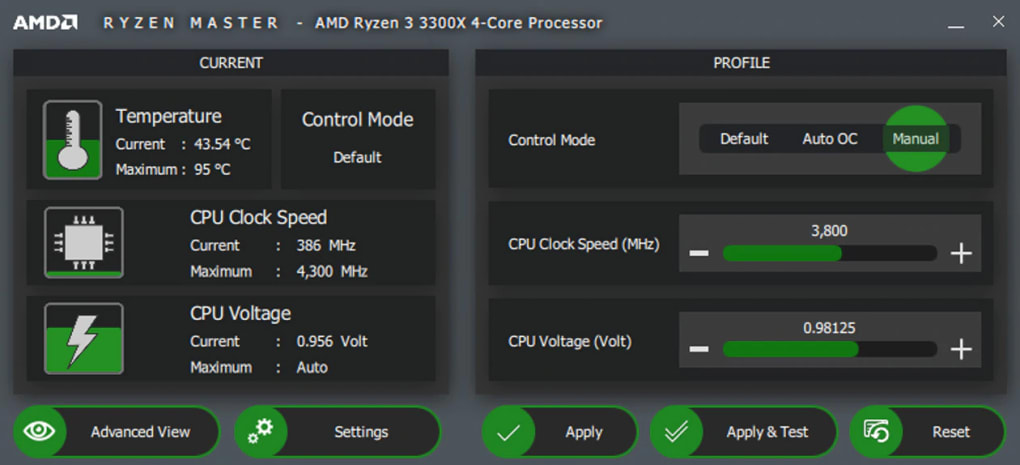
At its heart, AMD Ryzen Master is a real-time monitoring and control application for AMD Ryzen processors. It offers a comprehensive dashboard displaying vital information such as clock speeds, core voltages, temperatures, and power consumption. This real-time feedback is crucial for users aiming to overclock their CPUs, providing a clear picture of system stability under varying load conditions. The software’s capabilities extend beyond simple monitoring; it allows users to directly adjust key parameters, including:
-
CPU Clock Frequency: This is the fundamental setting for overclocking. By increasing the clock frequency, the processor completes more cycles per second, leading to a performance boost in applications and games. However, increasing the clock speed too much can lead to instability and potential damage.
-
Core Voltage: Adjusting the core voltage provides additional headroom for higher clock speeds. Higher voltages allow for increased performance but also generate more heat, necessitating effective cooling solutions. Improper voltage adjustment can severely damage the CPU.
-
Precision Boost Overdrive (PBO): PBO is a feature that allows the processor to dynamically adjust its clock speeds based on the workload and thermal headroom. AMD Ryzen Master enables users to fine-tune PBO parameters, further optimizing performance within safe thermal limits.
-
Configurable Power Limits: Users can set limits for both total power consumption and individual core power draw. These settings are essential for controlling heat generation and preventing system instability.
- Memory Settings (for compatible systems): Certain AMD Ryzen Master versions provide limited control over memory parameters. While not as comprehensive as dedicated memory overclocking tools, this functionality can still be beneficial for fine-tuning system performance.
Navigating the AMD Ryzen Master Interface
The software features a well-organized and relatively intuitive interface, even for those unfamiliar with CPU overclocking. The main dashboard provides a clear overview of current system parameters, with color-coded indicators alerting users to potential issues. Pre-configured profiles offer a straightforward starting point for various usage scenarios, eliminating the need for extensive manual configuration. These profiles typically include:
-
Creator Mode: This preset prioritizes multi-core performance and is ideal for applications demanding significant CPU resources, such as video editing, 3D rendering, and other computationally intensive tasks. This mode aims to maximize the utilization of all available cores and threads.
-
Game Mode: Optimized for gaming, this profile prioritizes single-core performance and reduces power consumption to maintain system stability during extended gaming sessions. This helps maintain frame rates and prevent performance drops.
-
Custom Profiles: The software allows the creation of multiple custom profiles, enabling users to tailor settings to specific applications or workloads. This flexibility is particularly valuable for users who frequently switch between different types of tasks.
The profile selection process is simple, involving a selection from the pre-defined options or the ability to create and save custom settings for personalized configurations. This flexibility allows the user to quickly switch between settings optimized for specific tasks, maximizing performance and efficiency for a given workload. Further customization allows for fine-grained tuning, adjusting individual core clock speeds and voltages. Users can experiment within safe limits to push their system’s performance. However, this requires a thorough understanding of the potential risks and the importance of adequate cooling.
Overclocking with AMD Ryzen Master: Risks and Rewards
Overclocking, the process of pushing a CPU beyond its factory-specified settings, offers potential performance gains but also carries significant risks. AMD Ryzen Master simplifies the overclocking process, but users must proceed with caution. Improper configuration can lead to:
-
System Instability: Overclocking can lead to system crashes, freezes, or data corruption. This can range from minor inconveniences to significant data loss.
-
Hardware Damage: Excessive overclocking can generate excessive heat, potentially damaging the CPU or other components. This can result in costly repairs or even complete hardware failure.
-
Reduced System Lifespan: While not always immediate, constant high-stress operation can reduce the overall lifespan of your CPU.
Before undertaking any overclocking, it is crucial to understand the thermal limits of your CPU and ensure you have adequate cooling, ideally a high-performance CPU cooler or an all-in-one liquid cooler (AIO). Monitoring system temperatures using AMD Ryzen Master or other monitoring tools is vital during overclocking experiments. Start with small incremental increases in clock speed and voltage, meticulously checking for stability at each step.
AMD Ryzen Master: Beyond Overclocking
While overclocking is the most prominent feature, AMD Ryzen Master offers more than just performance tuning. Its real-time monitoring capabilities are valuable for diagnosing system issues and monitoring performance under various loads. This information can be used to identify bottlenecks, optimize system configurations, and ensure stability. The ability to create custom profiles allows users to quickly switch between optimized settings for different tasks, maximizing efficiency and productivity.
Conclusion: A Powerful Tool for Experienced Users
AMD Ryzen Master is a powerful and versatile tool for managing and optimizing AMD Ryzen processors. Its user-friendly interface and comprehensive feature set make it accessible to a wide range of users, from seasoned overclockers to those simply seeking better performance. However, its capabilities require a degree of technical expertise, particularly when it comes to overclocking. Users should proceed cautiously, understand the inherent risks, and prioritize system stability above all else. Used responsibly, AMD Ryzen Master can unlock significant performance gains, providing a substantial boost to overall system responsiveness and efficiency. The software’s real-time monitoring and profiling features are useful tools for both performance optimization and system diagnostics, making it a valuable addition to the arsenal of any serious AMD Ryzen user. Remember to always consult AMD’s official documentation and support resources for the most accurate and up-to-date information.
File Information
- License: “Free”
- Version: “2.6.1.1797”
- Latest update: “January 31, 2023”
- Platform: “Windows”
- OS: “Windows 8.1”
- Language: “English”
- Downloads: “3.6K”
- Size: “137.85 MB”


