
In our increasingly digital world, smartphones have become repositories of our most cherished memories, vital contacts, critical documents, and essential communication. For Android users, the sheer volume of personal and professional data stored on these devices is immense. From countless photos and videos capturing life’s fleeting moments to work-related spreadsheets, presentations, and client contact lists, losing this data can be a devastating experience. A single accidental swipe, a software glitch, a hardware malfunction, or even a moment of distraction can lead to the disappearance of irreplaceable information. The panic that sets in when you realize your important files, messages, or contacts are gone is a feeling many have unfortunately encountered.
Fortunately, the loss of data from an Android device doesn’t always have to be permanent. Just as there are myriad ways to lose data, specialized tools have emerged to help users recover what they thought was lost forever. Among these essential utilities, Android Data Recovery stands out as a comprehensive solution designed to retrieve a wide array of deleted or lost information from Android phones, tablets, and their associated SD cards. This powerful application goes beyond simple file restoration, offering a lifeline to those who need to recover everything from sentimental photographs to critical business contacts and intricate call histories. This article delves into the crucial role of Android Data Recovery, exploring its features, how it works, and why it has become an indispensable tool for maintaining the integrity of our digital lives.
The Unseen Threats to Your Android Data
The digital landscape, while convenient, is fraught with perils for our precious data. Every day, Android users face various scenarios that can lead to data loss, some obvious, others more insidious. Understanding these threats is the first step towards appreciating the importance of a robust data recovery solution.
One of the most common culprits is accidental deletion. In a rush to clear storage, organize files, or simply navigate an unfamiliar interface, users can inadvertently tap the “delete” button on a crucial photo, an important message thread, or an entire folder of documents. The immediate regret is often followed by the sinking realization that there’s no “recycle bin” on an Android device for easy retrieval. Similarly, a factory reset, intended to clean up a device or prepare it for sale, can wipe out everything if proper backups aren’t meticulously performed, leaving users stunned when they realize they’ve forgotten a vital piece of information.
Software-related issues also pose a significant threat. Operating system updates, while necessary for security and new features, can sometimes go awry, leading to data corruption or loss during the process. Rooting or flashing custom ROMs, popular among advanced users for greater control over their devices, carries inherent risks. A failed rooting attempt or an incompatible ROM can render the device unstable, inaccessible, or, in the worst-case scenario, lead to a complete loss of data. Even a simple bug in an application or the Android OS itself can sometimes cause files to become corrupted or disappear.
Then there are the external factors. Malware and viruses, though less common on Android than in the past, can still infect devices, corrupting files, encrypting data for ransom, or simply deleting content without user permission. Physical damage, such as dropping a phone into water, smashing its screen, or exposing it to extreme temperatures, can make the device unbootable or unresponsive, locking away all the data within. Furthermore, theft or loss of a device means not only the physical gadget is gone but often the unbacked-up data it contained. Each of these scenarios underscores the vulnerability of our digital information and highlights the critical need for a reliable mechanism to retrieve it when disaster strikes. The emotional and practical impact of losing cherished memories or vital professional information can be profound, making the ability to recover data not just a convenience, but a necessity.
Unpacking the Capabilities of Android Data Recovery
Android Data Recovery is engineered to be a comprehensive safety net for almost every type of data stored on your device. Its robust feature set targets various forms of data loss, offering specialized tools for different categories of information. From the highly personal to the professionally critical, this application aims to restore what matters most to you.
Restoring Your Precious Personal Connections: Contacts, Call Logs, and Messages
In our hyper-connected world, our contacts, call logs, and text messages are more than just digital entries; they are the threads that weave our personal and professional networks. Losing them can be akin to losing a part of your memory or disconnecting from your essential communication channels. Android Data Recovery meticulously addresses these critical data types, ensuring that your connections remain intact.
Contact Recovery is paramount. Imagine losing all the phone numbers, email addresses, and associated details of your family, friends, and business associates. The effort to rebuild such a list is daunting, if not impossible. Android Data Recovery excels here, retrieving not just the basic phone number but also associated metadata like names, job titles, and email addresses. This level of detail is crucial for correctly identifying individuals and their affiliations, preventing the frustrating “who’s this?” moment that often accompanies partial contact recovery. Furthermore, the application allows you to save recovered contacts in universally compatible formats such as VCF, CSV, and HTML directly to your computer. This provides an invaluable offline backup, ensuring that even if your phone faces future issues, your contact list is safely preserved and easily importable to another device or application.
Equally vital is the recovery of call history. For personal users, this might mean tracing back an important conversation or recalling a number they forgot to save. For professionals, call logs can be critical evidence for client interactions, project timelines, or legal matters. Android Data Recovery retrieves comprehensive call log details, including phone numbers, the names of callers/recipients, the exact dates and times of calls, the type of call (incoming, outgoing, missed), and even the duration of each conversation. This granular data can be incredibly helpful for forensic purposes, reconstructing events, or simply jogging your memory.
The importance of SMS (text message) recovery cannot be overstated. Text messages often contain intimate conversations, crucial confirmations, appointment details, or even security codes. Accidentally deleting an important message thread can cause significant distress. Android Data Recovery’s SMS recovery tool is designed to bring back these deleted texts in their entirety. It restores not only the core content of each message but also the sender or receiver’s name, the precise sending date and time, and any attachments that were part of the conversation. This complete restoration ensures that the context and integrity of your message history are fully preserved.
Beyond standard SMS, the application also offers advanced recovery for WhatsApp messages and attachments. WhatsApp has become a primary communication channel for millions, housing a vast amount of personal and professional exchanges, photos, videos, and documents. Unlike SMS, WhatsApp data is often more complex to recover due to its encryption and app-specific storage. Android Data Recovery tackles this challenge head-on, allowing you to restore deleted WhatsApp conversations and their associated media, even if they’ve been removed from your device’s primary storage. This feature is particularly valuable for retrieving conversations that hold sentimental value or contain critical information that isn’t backed up elsewhere. The ability to recover these diverse forms of personal communication truly makes Android Data Recovery an indispensable tool for safeguarding your digital connections.
Reclaiming Your Digital Media and Documents
Our Android devices are overflowing with multimedia and document files that hold significant personal and professional value. From family photos to work reports, the loss of these files can range from emotionally painful to professionally catastrophic. Android Data Recovery provides a robust solution for retrieving a wide spectrum of these files, ensuring that your digital assets are not permanently lost.
The recovery of photos and videos is often the most emotionally charged aspect of data loss. Our phones are essentially portable cameras, capturing countless moments from birthdays and holidays to everyday observations. Losing these visual memories can feel like losing a piece of your past. Android Data Recovery is adept at retrieving all types of media files, whether they were captured by your phone’s camera, downloaded from social media, or transferred from other sources. This includes various image formats (JPEG, PNG, GIF, BMP, etc.) and video formats (MP4, AVI, MOV, WMV, FLV, etc.). The tool diligently scans both internal storage and SD cards to unearth these deleted visual treasures, giving you a chance to relive those moments. Similarly, audio files, such as important voice memos, personal recordings, or downloaded music, can be restored. Imagine losing a crucial voice note from a meeting or a unique audio recording; Android Data Recovery ensures these aural assets can be brought back.
For professionals and students alike, document recovery is equally critical. Our phones and tablets increasingly serve as portable offices, storing Word documents, Excel spreadsheets, PowerPoint presentations, PDF files, and various other textual and data-rich documents. The accidental deletion of a client proposal, a research paper, or an important contract can lead to significant setbacks. Android Data Recovery is designed to recover documents across a wide range of formats, including Word (DOC/DOCX), Excel (XLS/XLSX), PowerPoint (PPT/PPTX), PDF, and HTML. It can even delve into compressed files (ZIP, RAR) to extract their contents, demonstrating a comprehensive capability that goes beyond superficial file types. This broad support for document formats means you don’t need to juggle multiple specialized tools; a single application can handle most of your document recovery needs. The ability to restore these diverse media and document files solidifies Android Data Recovery’s position as an all-encompassing solution for digital asset protection.
Beyond Recovery: Proactive Data Management
While the primary function of Android Data Recovery is to retrieve lost files, its utility extends into proactive data management, offering features that help prevent future data loss and provide greater control over your device’s contents. One significant advantage is its capability to back up existing data to a computer without rooting the phone.
The concept of “rooting” an Android device refers to gaining privileged control over its operating system. While rooting unlocks advanced customization options, it also carries risks, including potentially voiding warranties, exposing the device to security vulnerabilities, and even “bricking” the phone if done incorrectly. Many data recovery and backup tools historically required rooting to access certain system files or perform deep scans. However, Android Data Recovery offers the crucial benefit of allowing users to create backups of their existing data directly to their computer without needing to root the device. This is a game-changer for users who want to secure their current data but are hesitant to undertake the complexities and risks associated with rooting.
This backup feature is not merely a convenience; it’s a vital component of a comprehensive data security strategy. Regular backups ensure that even if you face an irreversible data loss scenario (e.g., severe physical damage to the phone), you have a recent copy of your important files, contacts, messages, and media stored safely on your computer. This capability distinguishes Android Data Recovery from tools that focus solely on recovery after the fact, positioning it as a proactive ally in digital preservation.
Furthermore, the application enhances user control and efficiency through features like selective recovery and file preview. When scanning for lost data, the software doesn’t just present a jumbled list of recoverable items. Instead, it allows users to preview files before committing to recovery. This means you can view photos, read messages, listen to audio, or skim documents to confirm they are indeed the files you need. This preview function is invaluable for several reasons:
- Time-Saving: It helps you identify and prioritize the most important files, avoiding the need to recover everything and then manually sort through it.
- Verification: You can confirm the integrity of the file before recovery, ensuring it’s not corrupted.
- Storage Management: By selectively recovering only what’s necessary, you manage your computer’s storage more effectively and streamline the recovery process.
Beyond preview, the ability to select specific file types to scan and recover further optimizes the process. If you only lost photos and videos, you can choose to scan solely for those categories, significantly reducing the scanning time compared to a full device scan. This intelligent approach makes the recovery process faster, more focused, and ultimately more user-friendly. These proactive features, combined with its powerful recovery capabilities, make Android Data Recovery a truly well-rounded tool for managing and safeguarding your Android device’s data.
How Android Data Recovery Works: A User-Friendly Approach
The magic behind data recovery tools often feels complex, but Android Data Recovery is designed with user-friendliness at its core, making the process intuitive even for those with minimal technical expertise. The general workflow typically involves a few straightforward steps, guiding the user from connection to successful retrieval.
At its fundamental level, when you “delete” a file from your Android device, it’s often not truly erased from the storage medium immediately. Instead, the space it occupied is merely marked as “available” for new data to be written over. Until that space is overwritten, the original data fragments often remain accessible, albeit hidden from the operating system. Android Data Recovery leverages this principle by performing deep scans of your device’s internal memory and any inserted SD card. It bypasses the standard file system, directly accessing the raw data blocks to identify and reconstruct these “deleted” files.
The typical process unfolds as follows:
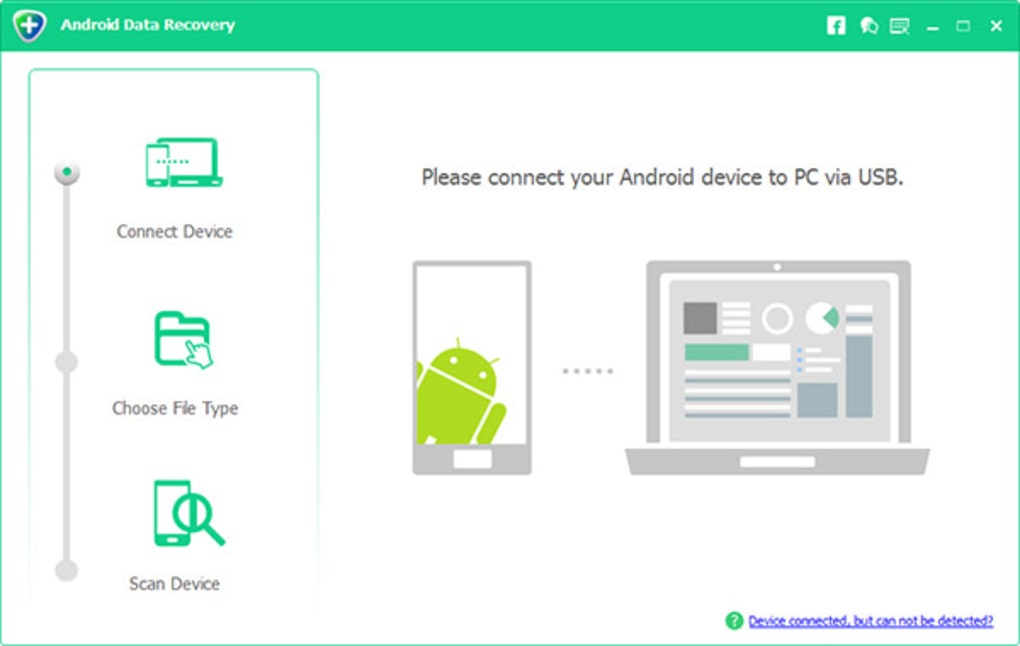
- Connect Your Android Device: The first step involves connecting your Android phone or tablet to your computer via a USB cable. The software provides clear on-screen instructions, often guiding you through enabling USB debugging mode on your device. This mode is a developer option that allows the computer to communicate more deeply with your Android device, a necessary step for the software to access its internal storage.
- Select Data Types for Scan: Once connected and recognized, the application will usually present you with an option to select the types of data you wish to scan for. This could include contacts, messages, call logs, photos, videos, audio, documents, and even WhatsApp data. This selective scanning feature is a huge time-saver, allowing the software to focus its efforts and complete the scan more quickly if you only need to recover specific items.
- Scan Your Device: With your selections made, the software initiates a scan. Depending on the amount of data on your device, its storage capacity, and the extent of data loss, this scanning process can take anywhere from a few minutes to a considerable amount of time. During this phase, the tool delves deep into the device’s storage architecture, searching for remnants of deleted files and reconstructing them.
- Preview and Select Files: After the scan is complete, Android Data Recovery presents a categorized list of all recoverable items. As discussed earlier, a critical feature here is the ability to preview these files. You can click on individual photos, read message content, view contact details, or check document snippets to confirm their integrity and relevance. This allows you to choose exactly which files you want to retrieve, preventing the clutter of unnecessary or corrupted data.
- Recover and Save: Finally, you select the desired files and click the “Recover” button. The software then extracts these files and prompts you to choose a location on your computer to save them. It’s always recommended to save recovered files to your computer first, rather than directly back to the Android device, to prevent any potential overwriting of other recoverable data that might still be present on the phone.
A significant advantage of Android Data Recovery, particularly for backups of existing data, is its ability to perform many operations without requiring the device to be rooted. While a deeper scan for truly deleted files might sometimes benefit from root access (which the software might guide you on if necessary for specific, harder-to-reach data), its core functionalities are often accessible without it. This lowers the barrier to entry for many users who are uncomfortable with the technicalities and risks of rooting, making data recovery and backup a safer and more accessible option for a broader audience. The clear, step-by-step guidance provided by the software ensures that users can confidently navigate the recovery process, turning what seems like a complex technical challenge into a manageable task.
Choosing the Right Tool: Why Android Data Recovery Stands Out
In a crowded market of utility software, choosing the right Android data recovery tool can be daunting. While several options exist—some free, some premium, others bundled with broader device management suites—Android Data Recovery consistently earns high marks for its blend of effectiveness, user-friendliness, and comprehensive feature set. Its particular strengths address many common pain points associated with data loss and recovery.
One of the most compelling reasons for its standout performance is its broad data type support. Unlike some minimalist tools that might only target photos or messages, Android Data Recovery encompasses virtually every category of data you’d store on your phone. From contacts and call logs, which are the backbone of personal and professional communication, to the rich media of photos, videos, and audio files, and the critical information contained in documents and even WhatsApp chats, the application covers all bases. This means users don’t need to install multiple single-purpose apps; a single solution handles a diverse range of recovery needs.
The application’s emphasis on safety and ease of use is another major draw. For many users, the prospect of tinkering with their phone’s internal files or navigating complex software interfaces can be intimidating. Android Data Recovery is designed with a clean, intuitive interface that guides users through each step of the recovery process. Clear instructions and minimal technical jargon ensure that even novices can perform recoveries with confidence. Moreover, the tool operates with a focus on data integrity, aiming to recover files without causing further damage or overwriting existing data, adhering to best practices in data recovery.
The added value of its backup functionality without requiring root access cannot be overstated. This feature transforms the software from a reactive recovery tool into a proactive data management solution. For users who prioritize data security but are wary of the risks associated with rooting their devices, the ability to create comprehensive backups of current data to a computer is a significant advantage. This ensures that even if a recovery operation is needed, a recent, unrooted backup is always available as a fallback.
While Android Data Recovery boasts numerous advantages, it’s also important to acknowledge inherent limitations common to all data recovery software. The primary “con” often cited is that not all lost files are always recovered. This isn’t a fault of the software itself but rather a reality of how digital data works. If the deleted data has been partially or fully overwritten by new information, its complete recovery becomes impossible. The sooner you attempt recovery after data loss, the higher the chances of success. Another point some users note is that scanning for lost files can sometimes take a considerable amount of time. This is largely dependent on the size of your device’s storage, the amount of data on it, and the depth of the scan required. While this can lead to periods of waiting, it’s a necessary trade-off for a thorough and effective recovery process. User testimonials and reviews, often found on platforms like PhanMemFree.org, frequently highlight the software’s effectiveness in retrieving important contacts, messages, and photos, often praising its ease of use and the clarity of its guidance. These real-world experiences reinforce its reputation as a reliable choice.
In conclusion, for anyone facing the stress of lost data on an Android device, Android Data Recovery emerges as a powerful, user-friendly, and comprehensive solution. Its ability to retrieve a wide array of file types, coupled with proactive backup capabilities and an emphasis on user safety, makes it an invaluable asset in our digital age. While no recovery tool can guarantee 100% success due to the nature of data overwrite, Android Data Recovery offers one of the most robust and accessible pathways to reclaiming your lost digital life.
File Information
- License: “Free”
- Latest update: “May 24, 2023”
- Platform: “Windows”
- OS: “Windows 10”
- Language: “English”
- Downloads: “34.3K”
- Size: “29.98 MB”


