
Animation Desk, developed by Kdan Mobile, is a user-friendly software application designed to empower both novice and experienced animators in creating captivating hand-drawn animations, storyboards, and GIFs. This software provides a streamlined platform for frame-by-frame animation, emphasizing ease of use and accessibility for individuals seeking to explore the world of traditional animation techniques in a digital environment. Whether you’re a seasoned artist looking for a quick and efficient animation tool or a complete beginner taking your first steps into the world of animation, Animation Desk offers a versatile and engaging experience.
Seamless Frame-by-Frame Animation Workflow
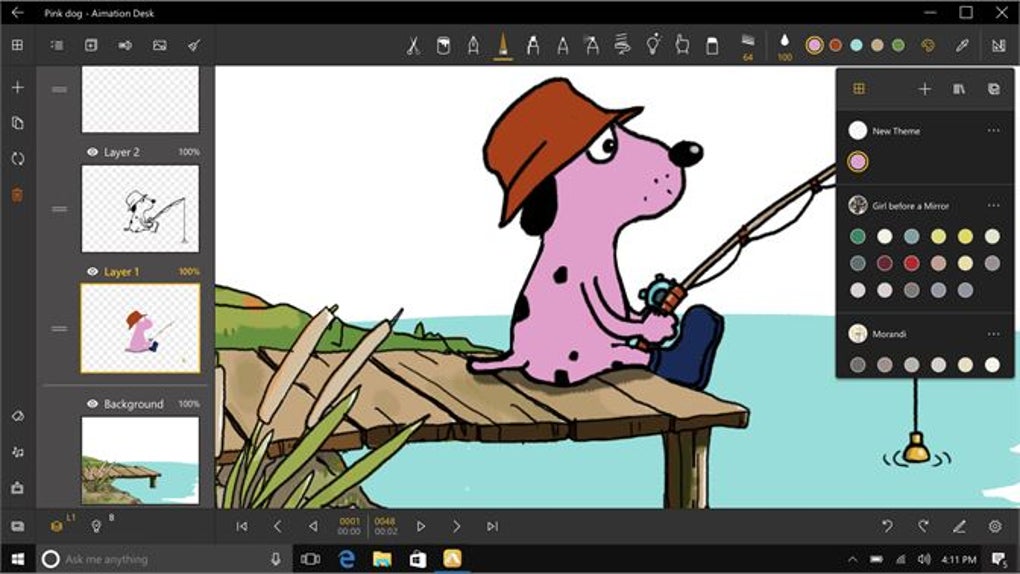
The core strength of Animation Desk lies in its intuitive frame-by-frame animation workflow. This approach, the bedrock of classic animation, involves meticulously drawing each individual frame to create the illusion of movement. Animation Desk simplifies this process significantly, providing a digital canvas upon which users can sketch and refine their animations. The application provides a variety of tools, mimicking traditional art supplies, to cater to various artistic styles and preferences. These include pencils, brushes, and pens, all designed to emulate the feel and texture of real-world counterparts. Users can experiment with different brush sizes, opacities, and colors, allowing for nuanced expression and control over their artistic output.
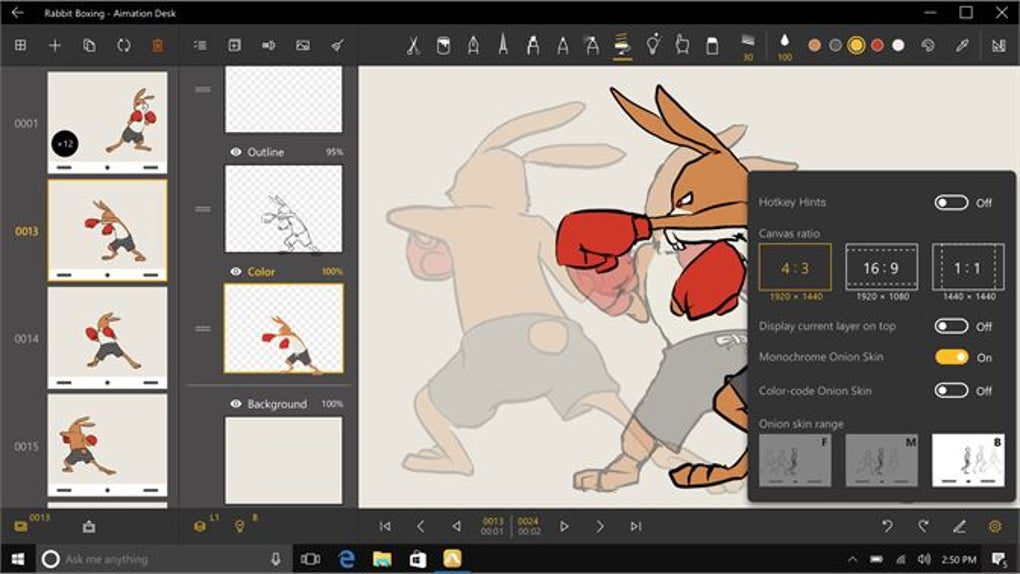
The software’s onion skinning feature proves invaluable in the frame-by-frame process. This function displays previous and subsequent frames as semi-transparent overlays, enabling users to seamlessly track movement and ensure fluid transitions between frames. This eliminates the need for constant flipping between frames, significantly accelerating the animation workflow and promoting smoother, more consistent animation.
Beyond the core drawing tools, Animation Desk incorporates a sophisticated timeline feature, pivotal for managing and organizing the sequence of frames. This timeline serves as a visual roadmap of the animation, allowing for easy navigation, insertion, deletion, and reordering of frames. This structured approach to animation management prevents the disorganization and confusion that can easily arise when working with numerous individual frames.
Export Options and Project Management
Once the animation is complete, Animation Desk offers a variety of export options tailored to different needs and platforms. Users can export their creations as video files in various formats, suitable for sharing on a wide range of platforms, from social media sites to dedicated video hosting services. The option to export as GIFs is particularly useful for online sharing, allowing for quick and easy distribution of animated sequences across social media channels and messaging applications.
Further enhancing project management, Animation Desk allows users to export their work as PDF storyboards. This functionality is particularly valuable for collaborative projects, presentations, or as a reference for later revisions. The PDF format ensures compatibility across various devices and platforms, maintaining the integrity of the storyboard’s structure and visuals.
The ability to save projects in various formats provides users with considerable flexibility and control over the distribution of their finished animations. This feature is crucial for those who wish to leverage their creations across diverse online platforms or for print-based applications.
Features and Limitations of the Free Version
Animation Desk offers a free version that provides access to the core features necessary for creating basic animations. This includes the fundamental drawing tools, the onion skinning feature, and the basic timeline functionality. The free version allows users to explore the software’s capabilities and get acquainted with its workflow before committing to a paid subscription. This trial period is instrumental for aspiring animators to determine if the software aligns with their artistic style and creative process.
However, the free version presents certain limitations. Most notably, the resolution of exported videos and GIFs is restricted, preventing the creation of high-definition content. This constraint is particularly relevant for users intending to showcase their animations on large displays or in professional settings. Additionally, some advanced features, including specific export options, may be locked behind a paywall.
Despite these limitations, the free version offers sufficient functionality for users to learn the fundamentals of frame-by-frame animation and create basic projects. It serves as an excellent entry point for those new to animation or who want to test the software’s capabilities before upgrading to the full version.
Comparison with Other Animation Software
Animation Desk sits comfortably amongst other animation software options, but its focus on hand-drawn frame-by-frame animation sets it apart. While sophisticated 3D animation software offers immense possibilities, they often have a steep learning curve. Animation Desk, on the other hand, prioritizes simplicity and ease of use, making it highly accessible to users unfamiliar with complex animation workflows.
Compared to other 2D animation software, Animation Desk’s strengths lie in its intuitive interface and its dedication to a traditional animation approach. While other programs may offer more advanced features or automated processes, Animation Desk’s focus on fundamental tools and the tactile experience of hand-drawing makes it a uniquely engaging platform for beginners and enthusiasts alike. The streamlined workflow minimizes distractions and allows users to focus on the creative process of animation.
The choice of animation software ultimately depends on individual needs and preferences. Aspiring animators seeking a straightforward and intuitive platform for mastering frame-by-frame animation techniques will find Animation Desk an ideal starting point. Its balance of ease of use and powerful features makes it a valuable tool, regardless of skill level.
Conclusion: Accessibility and Creative Potential
Animation Desk’s success lies in its successful bridging of traditional animation techniques with the convenience of digital technology. It empowers users to explore their creativity without being hindered by a complex interface or steep learning curve. The software’s intuitive design and focus on fundamental tools allow users to concentrate on the creative aspects of animation, fostering artistic expression and experimentation.
While advanced features and higher-resolution exports are available through paid subscriptions or in-app purchases, the free version provides a compelling introduction to the world of hand-drawn animation. This accessibility is a crucial factor in broadening the reach of animation creation, enabling individuals of all skill levels to explore their creative potential and bring their animated visions to life. Whether you’re aiming to craft professional-quality animations or simply experiment with the art form, Animation Desk offers a versatile and user-friendly platform to explore the fascinating world of hand-drawn animation. Its focus on simplicity and ease of use makes it an excellent tool for both beginners and seasoned animators seeking a straightforward yet powerful animation solution.
File Information
- License: “Free”
- Version: “1.17.4.0”
- Latest update: “July 21, 2025”
- Platform: “Windows”
- OS: “Windows 11”
- Language: “English”
- Downloads: “3.5K”


