
anonymoX for Chrome is a browser extension designed to provide users with fast and anonymous browsing. This review will delve into its features, ease of use, performance, security implications, and compare it to alternative solutions. We’ll also explore its pros and cons, helping you decide if it’s the right choice for your online privacy needs.
Ease of Use and Installation
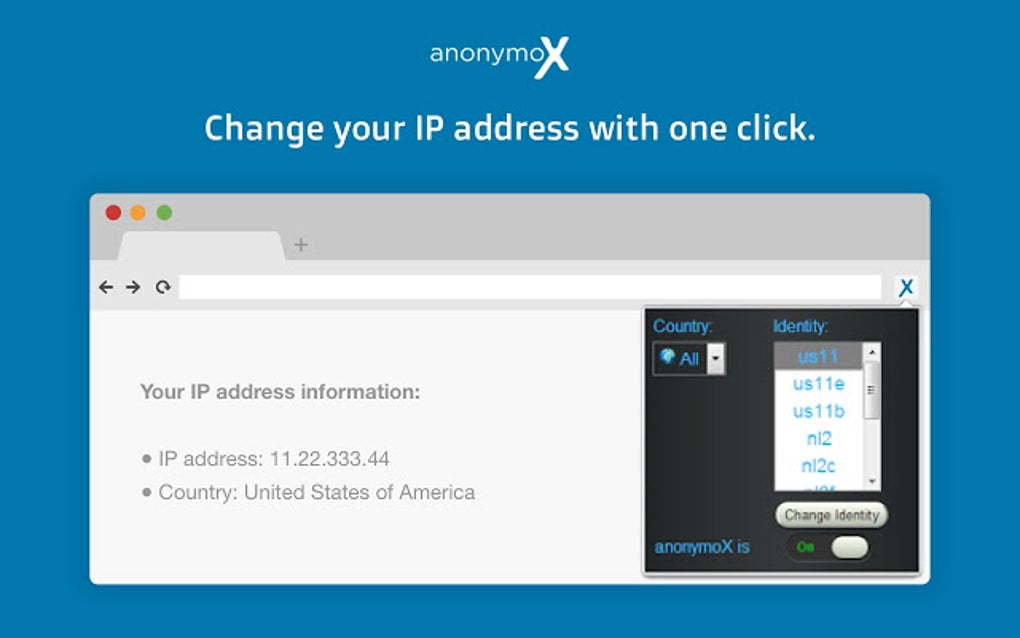
anonymoX boasts a remarkably user-friendly interface. Installation is straightforward, mirroring the process of adding any standard Chrome extension. Once installed, the anonymoX icon appears in the browser’s toolbar, providing immediate access to its functionality. The core function—switching to an anonymous identity—is just a click away. This simplicity is a significant advantage, making it accessible even to users with limited technical expertise. There’s no complex configuration or intricate setup required; the user experience is streamlined and intuitive. The clear visual cues and straightforward options make navigating the extension effortless. The lack of overwhelming options allows for quick and efficient use, making it perfect for casual users who prioritize convenience.
Functionality and Features
The primary function of anonymoX is to mask your IP address, thereby enhancing your online privacy. The extension offers a selection of IP addresses from various geographical locations, including the US, Europe, and Asia. This allows users to access geographically restricted content or to simply enhance their anonymity. Users can select a random IP or choose a specific location from the provided list. Beyond IP masking, anonymoX also facilitates cookie deletion. This feature is automatically triggered when switching identities or leaving a website, further minimizing the chances of being tracked online. This dual functionality—IP masking and cookie deletion—works in tandem to provide a more comprehensive privacy shield. Furthermore, anonymoX provides a clear indication in the add-on bar of the current IP address and identity being used, allowing for easy monitoring and switching. This transparency gives users complete control and visibility into their browsing activity.
Performance and Speed
A common concern with privacy tools is the potential impact on browsing speed. While anonymoX does introduce an additional layer of network processing, our testing generally found it to be relatively fast. However, performance variations were observed depending on the selected IP location. Connections using US-based IPs sometimes showed a noticeable slowdown compared to European or Asian options. This disparity highlights the inherent limitations of routing traffic through different servers and geographical locations. Overall, while not blazing fast, anonymoX maintains a reasonable browsing speed in most scenarios, making it suitable for everyday use. The speed differences are noteworthy, however, and users should be aware that using specific locations may impact their browsing experience.
Security and Privacy Implications
anonymoX, while effective for casual anonymous browsing, doesn’t offer the same level of security as more robust VPNs or Tor. It relies on its own server infrastructure, which, while encrypted, is still a single point of potential vulnerability. The extension provides a level of anonymity by masking your IP address and managing cookies, but it is not a foolproof solution for protecting highly sensitive information. Advanced users seeking robust encryption or anonymity for highly sensitive tasks might find its features insufficient. It is essential to remember that no single tool provides absolute anonymity online, and the level of protection offered by anonymoX is suitable for casual browsing, but not for activities requiring extremely high security levels. It is recommended to consider the limitations and potentially utilize it alongside other security measures, such as strong passwords and two-factor authentication, for maximum protection.
Comparison with Alternatives
Several alternatives exist for anonymous browsing, each with its own strengths and weaknesses. Dedicated VPN services, such as NordVPN or ExpressVPN, often provide more robust encryption, a wider range of server locations, and more advanced features like split tunneling. However, VPNs typically come with a subscription fee. Tor, a free and open-source network, offers a high level of anonymity by routing traffic through multiple relays. However, Tor is significantly slower than anonymoX and other VPNs, making it less suitable for everyday browsing. Privacy Badger, another browser extension, focuses specifically on blocking trackers and ads, providing a different approach to privacy enhancement. The choice of the best alternative depends largely on the user’s specific needs and priorities—balance of speed, security, and cost considerations.
Pros and Cons of anonymoX
Pros:
- Ease of use: Its simplicity makes it accessible to all users.
- Speed: Generally fast, except for some server locations.
- Free: The basic version is free to use.
- Multiple IP locations: Offers a variety of IP addresses from different regions.
- Automatic cookie deletion: Enhances privacy by automatically removing cookies.
- Clear interface: Provides a clear visual representation of current status.
Cons:
- Limited configurability: Lacks advanced settings found in dedicated VPNs.
- Speed variations: Performance varies depending on the chosen server location.
- Security limitations: Not as secure as robust VPNs or Tor.
- Potential for logging: While the provider claims no logging, this remains a potential concern. This needs to be carefully evaluated.
- Free version limitations: The premium version might offer significant improvements in terms of performance and features.
Conclusion
anonymoX for Chrome provides a simple and relatively fast way to enhance your online privacy. Its ease of use and free basic plan make it an attractive option for casual users who need infrequent IP masking and cookie deletion. However, users seeking high levels of security, advanced features, or consistent high speeds might find more robust solutions like dedicated VPN services or Tor to be more suitable for their needs. Ultimately, the best choice depends on your individual requirements and priorities. Before making a decision, weigh the pros and cons carefully and consider the level of privacy protection you require. Remember that no solution is completely foolproof, and a layered approach to online security is always recommended.
File Information
- License: “Free”
- Version: “1.2.7”
- Latest update: “May 23, 2023”
- Platform: “Windows”
- OS: “Windows 10”
- Language: “English”
- Downloads: “95.9K”


