
Anti Tracks Free Edition is a free data privacy tool designed for Windows operating systems. It goes beyond typical PC cleaners by targeting and securely deleting hidden data that most similar applications overlook. This comprehensive tool boasts a suite of features, including disk management, data protection, spam removal, and system maintenance, making it a potentially powerful addition to your PC’s security arsenal. However, its powerful capabilities also necessitate careful use to avoid unintended data loss. This review will delve into the specifics of Anti Tracks Free Edition, exploring its functionalities, advantages, disadvantages, and ultimately determining its suitability for your needs.
Functionality and Features: A Thorough Cleaning Approach
Anti Tracks Free Edition’s core functionality revolves around the secure deletion of data that could potentially compromise your privacy. While it effectively cleans typical junk files, its strength lies in its ability to identify and remove hidden data remnants, such as web browser history, that can reveal your online activity even after standard cleaning processes. This meticulous approach to data eradication sets it apart from many other PC cleaning utilities.
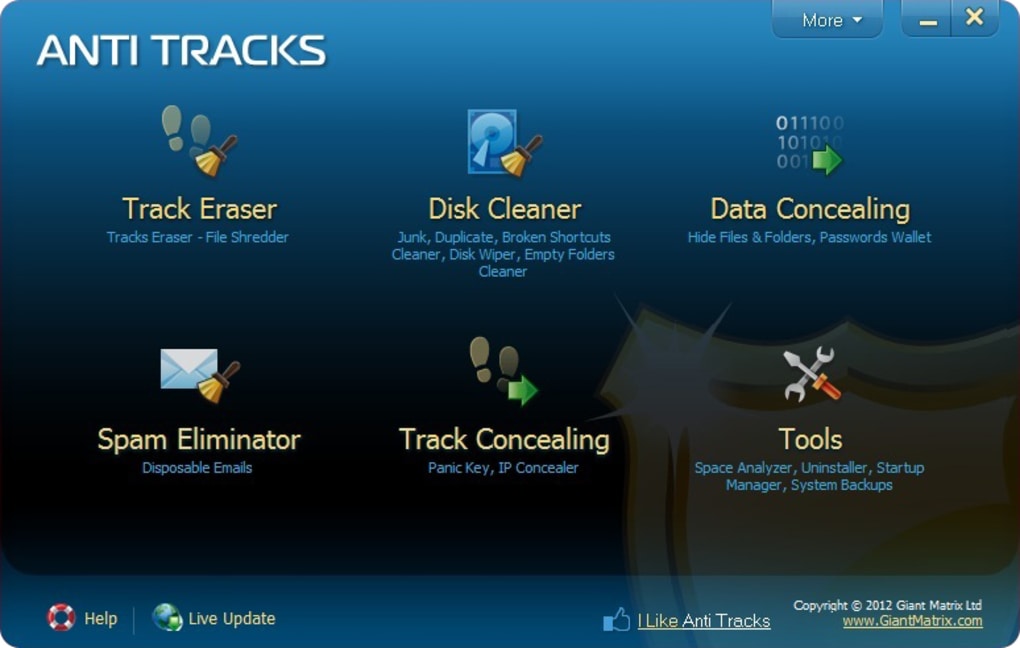
The software integrates several distinct tools, each focused on a specific task:
-
File Shredder: This feature allows for the secure deletion of files, ensuring that they cannot be recovered using standard data recovery methods. This is crucial for permanently removing sensitive documents or data you no longer need.
-
Spam and Junk Mail Remover: Anti Tracks Free Edition helps manage unwanted emails, cleaning your inbox and potentially improving your email client’s performance. This function targets spam and junk mail, but users should be cautious not to accidentally delete legitimate emails during this process.
-
Disk Management Tools: This integrated functionality provides users with tools to manage their hard drive space, potentially identifying large files that could be deleted to free up storage. Users, however, need to exercise caution to ensure they only delete unwanted files.
-
System Maintenance: The software offers system maintenance utilities to optimize your computer’s performance. These functions often include processes such as defragmentation (for traditional hard drives) and registry cleaning, although the specifics may vary. Users should carefully consider whether these system maintenance features are genuinely needed or potentially disruptive to their operating system’s stability.
-
Data Protection Features: While the exact details require further examination of the software’s functionality, this category likely incorporates data encryption or other methods aimed at securing sensitive information stored on the PC. However, the level of security and the specific methods employed should be critically evaluated to assess their effectiveness against modern threats.
The software is designed to work in a comprehensive manner, attempting to address multiple aspects of PC health and security. This all-in-one approach is beneficial in that it simplifies the process of system maintenance and data security, however, the range of functionalities also increases the chance of unintended consequences if not used carefully.
Advantages of Anti Tracks Free Edition
Anti Tracks Free Edition offers a number of advantages, making it a potentially appealing choice for users concerned about privacy and system performance:
-
Thorough Data Removal: The software’s primary strength lies in its ability to identify and delete hidden data files that are typically overlooked by simpler cleaning utilities. This contributes to enhanced privacy and security.
-
Permanent File Deletion: The integrated file shredder ensures that deleted files are unrecoverable using standard data recovery techniques. This is a significant benefit for users dealing with highly sensitive information.
-
Command-Line Support: The availability of command-line support caters to users who prefer automating tasks or integrating the software into more complex workflows. This expands the software’s utility beyond basic user interaction.
-
Spam Management: The incorporation of spam and junk email removal tools aids in maintaining a cleaner and more efficient email inbox, a task often neglected by standard PC cleaners.
-
Free Availability: The free licensing model makes the software accessible to a wide range of users without any upfront financial commitment. This broadens its potential user base.
Disadvantages and Potential Risks
Despite its advantages, Anti Tracks Free Edition also presents several potential drawbacks that users should be aware of:
-
Risk of Accidental Data Deletion: Due to the software’s powerful capabilities, there’s a significant risk of accidentally deleting important system files or user data. This necessitates extreme caution and careful selection of the files and processes targeted for deletion.
-
Difficulty in Uninstallation: Some users have reported difficulties in uninstalling the software, indicating potential issues with the uninstallation process. This should be considered if the software is intended for temporary use or trial purposes.
-
Slow Performance: The comprehensive nature of the software can lead to relatively slow processing speeds, particularly when dealing with large datasets. Users with limited time or patience may find this drawback problematic.
-
Potential for Interference with System Restore Points: There’s a risk that the software might interfere with or alter system restore points, impacting the ability to revert to previous system states in case of problems. This is a significant issue, as proper system restore points are vital for system stability and recovery.
-
Lack of Transparency in Data Handling: Users might be unclear about precisely which data the software identifies and deletes. This lack of transparency might cause concern about potential data loss or privacy breaches. Clearly understanding the scope of its operations is crucial before use.
Conclusion: A Powerful Tool Requiring Careful Consideration
Anti Tracks Free Edition is a powerful PC cleaning tool offering several advantages, particularly in terms of data security and thoroughness. Its ability to remove hidden data, coupled with its file shredding capabilities, makes it an attractive option for users seeking enhanced privacy. However, the software’s potential to accidentally delete important files, along with reported difficulties in uninstallation, necessitates a cautious approach. Users must carefully weigh the potential benefits against the risks of accidental data loss and take preventive measures, such as creating system restore points and backing up important data before using the software. While potentially valuable for users requiring comprehensive PC cleaning and data protection, the lack of transparency regarding its data handling processes warrants careful consideration of its use. Users should always prioritize thorough data backups and a comprehensive understanding of the software’s functionalities before initiating any cleaning or deletion operations. The software should be considered a tool requiring significant user expertise and caution, rather than a simple, “point-and-click” solution. Alternative software solutions should be explored for users seeking a less technically demanding approach to PC maintenance.


