
Any Video Converter (AVC) is a free, versatile video processing software developed by Anvsoft Inc. Designed for ease of use, it provides a comprehensive suite of tools for video conversion, editing, downloading, and burning, all within a single, user-friendly interface. This review delves into the capabilities of Any Video Converter, exploring its strengths and weaknesses to help you determine if it’s the right software for your video needs.
Feature Overview: An All-in-One Video Solution
Any Video Converter distinguishes itself as an all-in-one solution for various video-related tasks. Its core functionality revolves around video conversion, supporting a broad range of input and output formats. This ensures compatibility with a vast array of devices and applications. Beyond basic conversion, AVC integrates several powerful features, including:
-
Extensive Format Support: AVC boasts compatibility with a wide spectrum of video and audio formats, encompassing popular choices like MP4, MKV, AVI, WMV, MOV, FLV, and many more. This broad compatibility minimizes the need to use multiple conversion tools. The software also supports the HEVC/H.265 codec, enabling high-quality video output at compressed file sizes, making it ideal for users concerned with storage space.
-
Device Presets: To simplify the conversion process, Any Video Converter provides pre-configured output profiles optimized for specific devices. These presets automatically adjust the video and audio settings to ensure optimal compatibility and playback on target devices such as smartphones (Android and iOS), tablets, gaming consoles (PlayStation, Xbox), and portable media players (MP3 players, iPods). This feature eliminates the need for users to manually configure complex settings.
-
Online Video Downloader: AVC extends its functionality beyond simple conversion by incorporating a built-in online video downloader. This enables users to download videos and music from over 100 supported websites, streamlining the process of acquiring media content from various online platforms. This feature offers a convenient way to acquire videos from sources like YouTube, Vimeo, Dailymotion, and others, without needing separate downloading software.
-
DVD Burning and Audio Extraction: Adding to its versatility, Any Video Converter provides options for DVD burning, allowing users to create DVDs from their video collections. The software also facilitates the extraction of audio tracks from CDs, providing a convenient method to convert your music library into digital formats. This integrated DVD burning capability makes it a one-stop shop for users who need to both convert and archive their video files.
- Integrated Video Editor: AVC incorporates basic video editing capabilities, allowing for quick modifications before conversion or burning. These editing features include trimming and splitting videos, cropping unwanted sections, rotating videos to correct orientation, and joining multiple video clips into a single file. Users can also add audio tracks, apply visual effects, and even add watermarks to personalize their videos. While not a full-fledged video editing suite, this integrated editor provides sufficient tools for basic adjustments and enhancements.
User Interface and Ease of Use
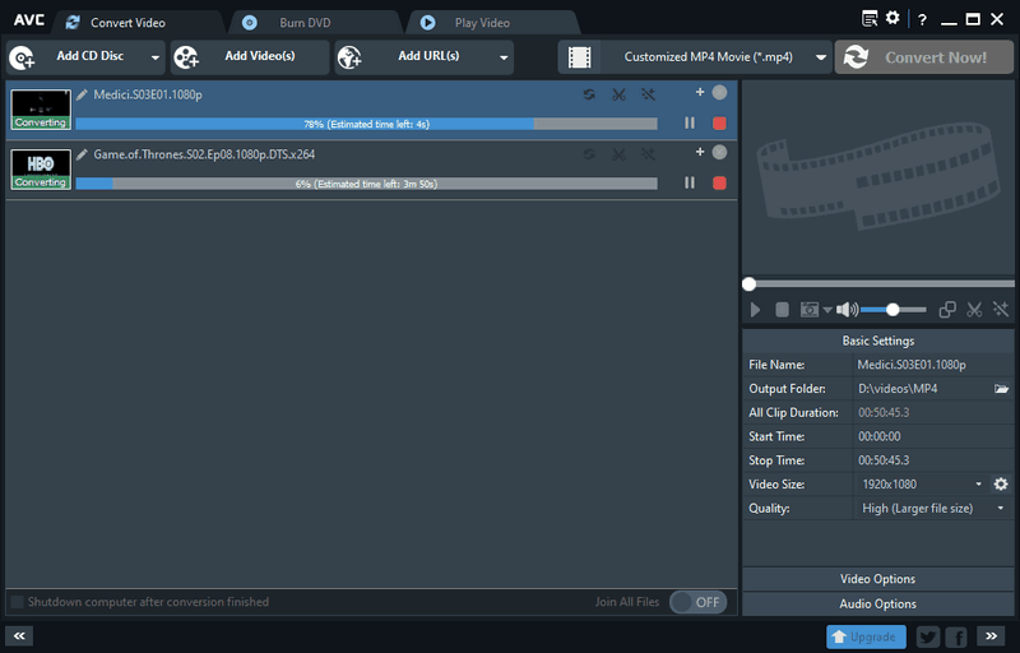
Any Video Converter’s strength lies in its intuitive and user-friendly interface. Even novice users can navigate the software easily, thanks to its clear and uncluttered layout. The main window presents a straightforward selection of options for converting, burning DVDs, and playing videos. The intuitive design makes the conversion process straightforward, even for users with limited technical expertise. The addition of visual cues, such as icons representing functions, further simplifies navigation.
The process of converting videos typically involves adding video files (or URLs), selecting a desired output format or device preset, and then initiating the conversion process with a single click. The software clearly displays progress bars to monitor the conversion speed and estimated completion time. The ease of use significantly contributes to the software’s popularity among users who desire a hassle-free video conversion experience.
Conversion Process and Performance
The conversion process in Any Video Converter is straightforward. Users can add files through a drag-and-drop interface or by using the file selection dialog. Once files are added, selecting an output format is simple, with readily available presets for various devices. The software then proceeds with the conversion, displaying the progress. The conversion speed varies depending on the length and complexity of the video, the output format, and the system’s processing power. However, user feedback suggests that the conversion speed is generally satisfactory and comparable to other similar applications.
Pros and Cons of Any Video Converter
Pros:
- All-in-one functionality: Combining video conversion, downloading, editing, and burning capabilities into a single package makes it highly efficient.
- User-friendly interface: The intuitive design caters to both beginners and experienced users, ensuring easy navigation and operation.
- Extensive format support: The software’s broad range of compatible formats ensures flexibility and compatibility across various devices and applications.
- Device presets: Pre-configured profiles for specific devices simplify the conversion process and ensure optimal output quality.
- Free version available: The availability of a free version makes the software accessible to a larger audience, although a pro version exists with advanced features.
Cons:
- Bundled software: The installation process may include offers for additional third-party software. Users need to pay close attention during installation to avoid unwanted programs.
- Basic editing features: While the integrated video editor is convenient, it is not a fully featured professional editor and lacks advanced capabilities.
- Potential for occasional bugs: Like many software applications, Any Video Converter may occasionally experience minor bugs or glitches, although user reviews suggest this is not a prevalent issue.
Comparison with Alternative Software
Any Video Converter competes with numerous other video conversion tools available on the market. While it excels in its all-in-one approach and ease of use, other applications may offer more advanced features or specialized functionalities. For instance, some professional video editing software packages offer more extensive editing capabilities but usually come at a higher price point and with a steeper learning curve. Users should consider their specific needs and priorities when comparing different options. Some popular alternatives include:
-
VLC Media Player: A powerful and versatile open-source media player that also handles video conversion, but with a less user-friendly interface than AVC.
-
HandBrake: A free, open-source video transcoder known for its advanced settings and ability to create high-quality conversions, but with a more complex interface than AVC.
-
Total Video Converter: Another all-in-one video solution, offering similar functionality but with a potentially more resource-intensive interface.
Conclusion
Any Video Converter presents a compelling option for users seeking a versatile, user-friendly video conversion and processing tool. Its all-in-one approach, comprehensive format support, and intuitive interface make it a convenient choice for everyday use. While it may not possess the advanced features of professional-grade software, its accessibility and ease of use make it ideal for users who require a simple yet effective solution for their video needs. Users should be aware of the potential for bundled software during installation, but this minor inconvenience is outweighed by the software’s numerous advantages. Overall, Any Video Converter receives a positive recommendation for its reliability, convenience, and user-friendly design.
File Information
- License: “Free”
- Latest update: “May 30, 2025”
- Platform: “Windows”
- OS: “Windows 10”
- Language: “English”
- Downloads: “1.5M”
- Size: “7.29 MB”


