
Any Video Converter Freeware is a versatile and free video processing utility designed for Windows users. This software offers a wide array of features beyond simple conversion, making it a powerful tool for managing and manipulating video files. Its ease of use and extensive capabilities make it a compelling choice for both novice and experienced users. This review delves into the software’s functionalities, strengths, and weaknesses, providing a thorough assessment of its value proposition.
Core Functionality: Video Conversion and Beyond
At its heart, Any Video Converter Freeware functions as a robust video converter, supporting a vast range of input and output formats. This allows users to seamlessly transform videos between virtually any common format, including but not limited to MP4, AVI, WMV, MKV, 3GP, FLV, MOV, GIF, and WEBM. This broad compatibility ensures that users can convert videos for virtually any device or platform, from smartphones and tablets to smart TVs and computers. The software’s efficiency is noteworthy, with conversions typically completed within a reasonable timeframe without significant compromises to video quality.
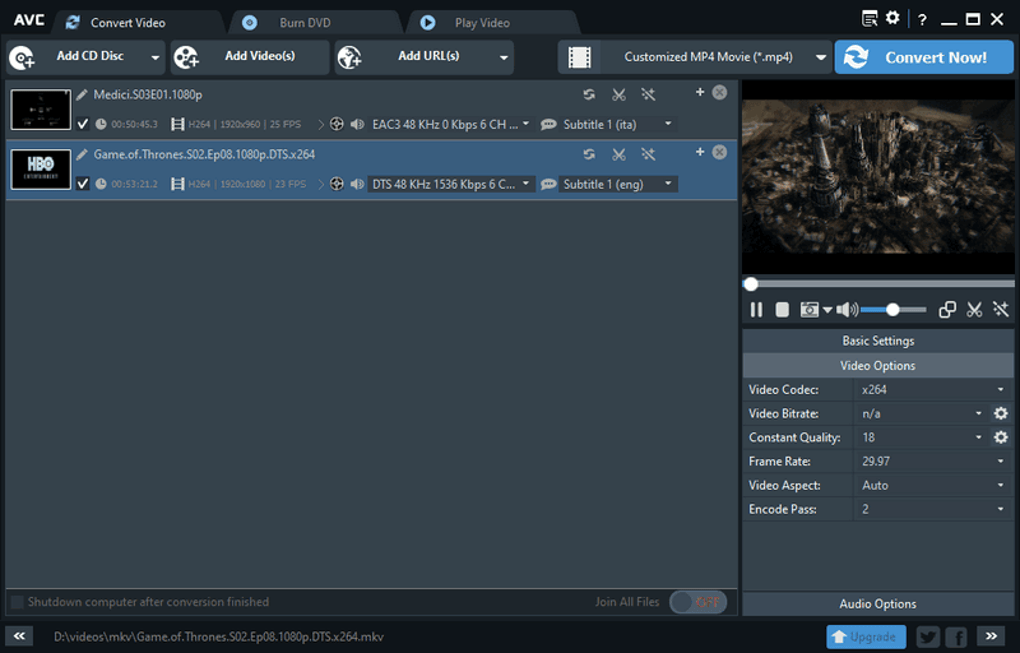
Beyond simple conversion, Any Video Converter Freeware integrates several advanced features, expanding its usefulness considerably. One prominent feature is its ability to extract audio tracks from both video files and audio CDs. Users can easily isolate and save audio in various formats, including MP3, AAC, WMA, OGG, WAV, and FLAC, providing flexibility for audio editing and playback across different devices. The software’s ability to handle background music from videos is a particularly useful feature for creating custom soundtracks or isolating musical elements.
Another key aspect of Any Video Converter Freeware is its DVD burning capabilities. The software allows users to burn converted videos onto DVDs, including the creation of custom DVD menus. This simplifies the process of archiving video content or creating personalized DVDs for sharing. The burning process is reportedly fast and efficient, producing high-quality DVDs playable on standard DVD players.
Video Editing Capabilities: A Basic but Useful Suite
Any Video Converter Freeware isn’t just a conversion and burning tool; it incorporates a basic video editing suite, adding further value to the software. While not as comprehensive as dedicated video editors, the integrated editing features provide sufficient tools for minor adjustments and modifications. Users can easily trim or crop videos, removing unwanted sections or adjusting the aspect ratio. The ability to split long videos into multiple segments or merge several clips into a single file is also highly beneficial for organizing and streamlining video projects.
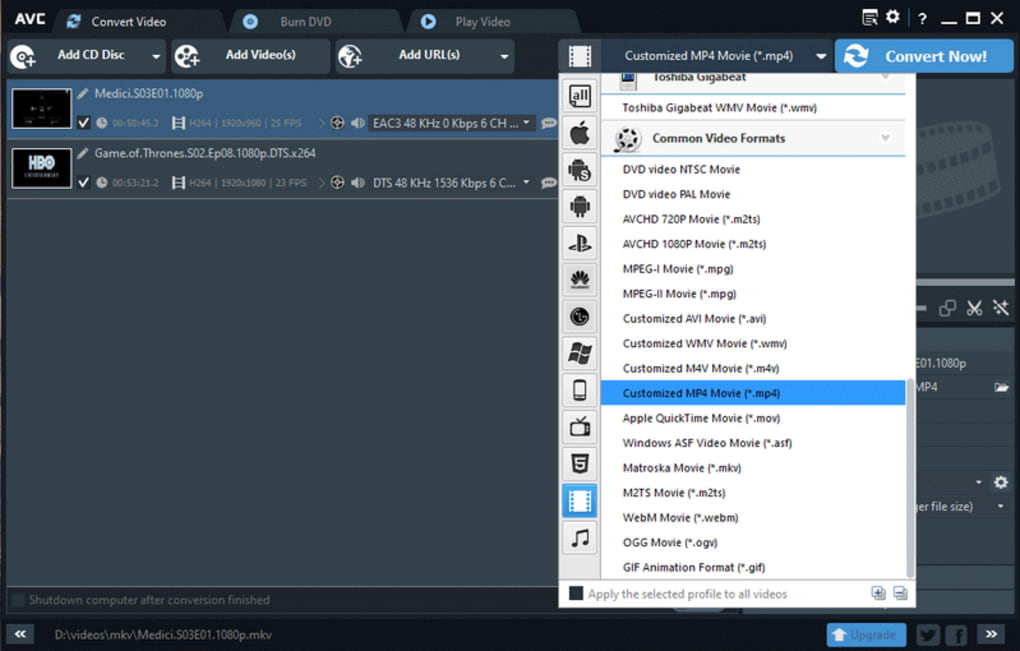
Furthermore, the software offers options for rotating and flipping videos, providing flexibility for correcting orientation issues or creating specific visual effects. Adding external SRT subtitles enhances accessibility and enables users to incorporate multilingual support. Watermarking allows users to add branding or copyright information, protecting their intellectual property. While the special effects options are limited, they still provide basic enhancements to enhance the visual appeal of videos.
Online Video Downloading and Management
Any Video Converter Freeware extends its reach beyond local files by offering the capability to download videos from a multitude of online platforms. Users can easily download videos from over 100 video-sharing websites, including popular platforms like YouTube, Facebook, Dailymotion, MetaCafe, Vimeo, and Howcast, among others. This is accomplished by simply pasting the URL of the desired video into the software. This functionality enhances the software’s practicality for collecting and organizing videos from various sources.
User Interface and Experience
The user interface of Any Video Converter Freeware is generally praised for its simplicity and ease of use. While some users have described the interface as somewhat “dull” visually, its straightforward design makes the software accessible to users of all technical skill levels. The intuitive layout and clear instructions minimize the learning curve, allowing users to quickly grasp the core functionalities and begin converting, editing, and burning videos.
The software’s overall performance is consistently commended for its speed and efficiency. Conversion times are generally fast, and the DVD burning process is equally swift. This speed doesn’t compromise the quality of the output videos or DVDs, ensuring the software’s efficiency is not at the cost of performance.
Comparison with Other Software and Alternatives
Any Video Converter Freeware stands out among its free counterparts due to its comprehensive feature set. When compared to other free video converters such as Freemake Video Converter and Total Video Converter, Any Video Converter Freeware often receives positive feedback for its speed and ease of use. While some competitors might offer slightly more advanced editing capabilities, Any Video Converter Freeware balances functionality with accessibility in a user-friendly package.
The software’s all-in-one approach, encompassing conversion, editing, downloading, and burning, distinguishes it from simpler converters focusing only on format transformation. This comprehensive nature reduces the need for multiple applications, streamlining the entire video management workflow.
Pros and Cons Summary
Pros:
- Free of charge: A significant advantage, removing any financial barriers to usage.
- Extensive format support: Handles a wide range of video and audio formats.
- Fast conversion and burning speeds: Efficient processing without compromising quality.
- Integrated video editing suite: Basic editing tools are directly incorporated.
- Online video download capabilities: Supports downloads from many popular websites.
- User-friendly interface: Simple and intuitive for easy navigation.
- All-in-one functionality: Combines conversion, editing, downloading, and burning.
Cons:
- Interface aesthetics: Some users find the visual design somewhat unappealing.
- Limited advanced editing features: While functional, editing features lack the depth of professional software.
- Potential for occasional bugs: Although infrequent, minor bugs have been reported by some users.
Conclusion
Any Video Converter Freeware presents a compelling solution for users seeking a free, versatile, and easy-to-use video processing tool. Its comprehensive functionality, encompassing conversion, editing, downloading, and burning, offers a significant advantage over simpler converters. While not a replacement for professional video editing software, its integrated editing tools provide ample functionality for basic video manipulation. The software’s speed and user-friendly interface make it accessible to a broad audience, solidifying its position as a valuable asset for managing and manipulating video files on Windows systems. Despite minor drawbacks regarding interface aesthetics and potential for occasional minor bugs, its strengths far outweigh its limitations, making it a highly recommended option for everyday video processing needs.
File Information
- License: “Free”
- Latest update: “January 31, 2025”
- Platform: “Windows”
- OS: “Windows 10”
- Language: “English”
- Downloads: “425.1K”
- Size: “75.12 MB”


