
AnyFix is a powerful and versatile tool designed to diagnose and repair a wide range of issues affecting Apple devices, including iPhones, iPads, iPods, and Apple TVs. This software, available for both Windows and macOS, offers a user-friendly interface and multiple repair modes to cater to varying levels of technical expertise and problem complexity. Whether you’re dealing with a minor software glitch or a major system failure, AnyFix provides a convenient and often data-preserving solution to get your Apple device back up and running.
Understanding AnyFix’s Capabilities: More Than Just a Driver Updater
While often categorized as a driver updater, AnyFix’s functionality extends far beyond this basic description. It’s a comprehensive system repair tool that addresses a vast library of known iOS and tvOS bugs, as well as iTunes-related errors. This makes it an invaluable asset for PC users who also rely on Apple devices, seamlessly integrating into their existing tech ecosystem.
The software boasts a comprehensive database encompassing over 130 identified iOS/tvOS glitches and more than 200 iTunes-related problems. This extensive coverage ensures that AnyFix can tackle a wide spectrum of issues, offering a potential solution even for complex or unusual malfunctions. The program’s strength lies in its ability to effectively troubleshoot and resolve these problems without necessarily requiring advanced technical skills.
The core value proposition of AnyFix rests on its ease of use and its ability to efficiently resolve various Apple device problems. The intuitive interface guides users through the repair process with clear instructions, minimizing the need for technical expertise. The program’s strength is amplified by its robust database of known issues and solutions, allowing it to quickly identify and address problems.
Multiple Repair Modes: Tailoring Solutions to Specific Problems
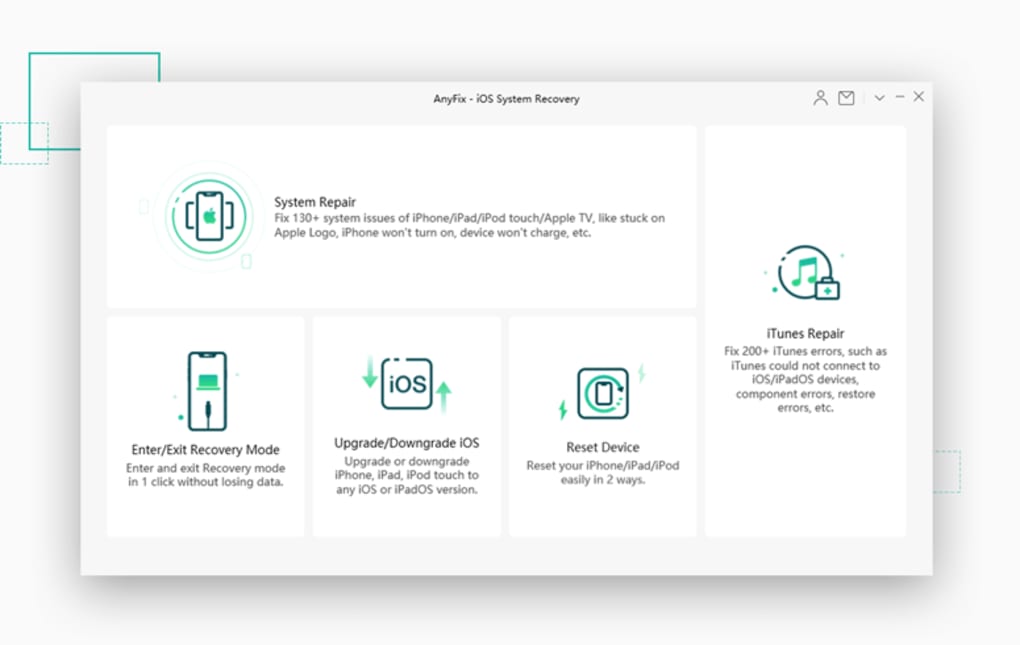
AnyFix provides three distinct repair modes, each designed to address different levels of system issues:
- Standard Repair: This mode is ideal for tackling common problems, such as an iPhone refusing to charge, experiencing persistent battery drain, or displaying minor software glitches. Standard Repair typically completes its function without any data loss, preserving the user’s valuable information and settings. This non-invasive approach makes it the preferred option for minor issues, allowing for quick resolution without the risk of data erasure.
-
Advanced Repair: For more complex problems that Standard Repair can’t address, AnyFix offers Advanced Repair. This mode can effectively resolve issues like devices failing to update, refusing to restart, or encountering other significant software problems. However, it’s crucial to note that Advanced Repair results in data erasure. Before initiating this repair mode, users are strongly advised to back up all essential data to prevent permanent loss. While data loss is a significant drawback, Advanced Repair provides a powerful solution for resolving stubborn system issues that may otherwise require professional intervention.
-
Ultimate Repair: As the most intensive repair option, Ultimate Repair is reserved for critical situations where the device is completely unresponsive. This includes scenarios like a frozen screen (stuck on a black or white screen), a device trapped in DFU (Device Firmware Update) mode, or a device that won’t power on at all. Ultimate Repair attempts to restore the device to a functional state, but this process also results in complete data erasure. Therefore, users should only employ Ultimate Repair as a last resort when all other options have failed and data recovery is not a priority. This aggressive approach provides a powerful last chance to revive a seemingly non-functional device, even if at the cost of all stored information.
This tiered approach to repair ensures that users can choose the most appropriate solution for their specific situation, balancing the need for effective repair with the importance of data preservation. The clear distinction between these modes ensures transparency and user control over the repair process.
Key Features and Functionality Beyond Repair: A Versatile Toolset
Beyond its core repair capabilities, AnyFix offers several additional features that enhance its overall utility:
-
Recovery Mode Management: AnyFix can easily help users enter and exit recovery mode without encountering common pitfalls. This is especially beneficial during iOS updates, where getting stuck in recovery mode can be a frustrating and time-consuming issue. The software streamlines this process, simplifying a potentially complex task.
-
iOS Version Management: Users can experiment with different iOS versions (including older versions) without affecting their existing data or iTunes installation. This feature allows for testing and troubleshooting without the risk of permanently altering the device’s configuration. It provides a safe space to explore software updates and roll back if needed.
-
Cross-Platform Compatibility: AnyFix’s compatibility with both Windows and macOS systems expands its accessibility and relevance to a broader range of users. This cross-platform functionality ensures its usability irrespective of the user’s primary operating system.
- Regular Updates: The software benefits from continuous updates to ensure compatibility with the latest iOS versions and hardware releases. This ensures that AnyFix remains a relevant and effective tool as Apple’s ecosystem evolves.
The combination of these features establishes AnyFix as a multifaceted utility, exceeding the capabilities of simple driver update tools or recovery applications. The integration of these diverse functions contributes to its overall effectiveness and versatility as a system maintenance tool.
System Requirements and Compatibility: Ensuring Seamless Operation
To ensure optimal performance, AnyFix requires the following minimum system specifications:
- Operating System: Windows 11, 10, 8, 7, and Vista (both 32-bit and 64-bit versions).
- Processor: 1 GHz or higher (32-bit or 64-bit).
- RAM: 256 MB or more (1024 MB recommended).
- Disk Space: At least 500 MB of free space.
- Other: iTunes must be pre-installed on your PC.
AnyFix maintains extensive compatibility, supporting all major iPhone and iPad models, including the latest releases, as well as the most recent iOS and iPadOS versions. This broad compatibility ensures its usefulness for a wide range of Apple device owners.
Freemium Model and Pricing: Flexible Options for Diverse Needs
AnyFix operates on a freemium model, offering basic diagnostic features for free. Advanced repair functions, however, require a paid license. The availability of different pricing tiers allows users to select the option best suited to their specific needs and the number of devices they need to manage. This flexible pricing approach caters to a broad range of users, from individuals with a single device to those managing multiple Apple products.
Benefits of Using AnyFix: A Cost-Effective and Efficient Solution
The benefits of utilizing AnyFix are numerous:
- Self-Service Repairs: Users can perform repairs independently, avoiding the cost and inconvenience of seeking professional assistance.
- Time Savings: The streamlined repair processes are generally quick, minimizing downtime for the device.
- Data Preservation (in most cases): Standard Repair avoids data loss, protecting valuable information.
- Intuitive Interface: Even users with limited technical skills can easily navigate the software.
- Comprehensive Support: For situations where AnyFix cannot resolve the issue, customer support is readily available.
The combination of these benefits establishes AnyFix as a cost-effective and efficient solution for managing and repairing Apple devices. It empowers users to take control of their device maintenance, reducing reliance on external technical assistance.
Conclusion: Why AnyFix Stands Out in the Data Recovery and Repair Landscape
AnyFix stands out as a leading application in the data recovery and system repair market due to its multifaceted capabilities, user-friendly design, and flexible pricing model. Its capacity to handle a vast array of iOS and iTunes-related issues, combined with its intuitive interface and various repair modes, makes it a valuable tool for PC users who also utilize Apple devices. The software effectively bridges the gap between technical expertise and user-friendly functionality, empowering users to resolve system problems independently and efficiently. Whether dealing with minor software glitches or critical system failures, AnyFix offers a powerful and often data-preserving solution to keep your Apple devices operating smoothly.
File Information
- License: “Free”
- Version: “1.2.1.20211018”
- Latest update: “April 10, 2025”
- Platform: “Windows”
- OS: “Windows Vista”
- Language: “English”
- Downloads: “16K”
- Size: “2.69 MB”


