
AnyToISO Converter is a free, user-friendly application designed for effortless conversion of various disk image formats into the widely compatible ISO format. This detailed guide explores its features, benefits, limitations, and alternatives, providing a comprehensive overview for users of all levels.
Understanding AnyToISO Converter’s Functionality
AnyToISO Converter simplifies the process of creating ISO images from a wide range of source formats. Its primary function is to act as a bridge between various disk image types and the universally accepted ISO standard. This means users can seamlessly convert files with extensions such as BIN, MDF, PDI, CDI, NRG, B5I, IMG, and DEB, along with CD/DVD-ROM images, all into the standardized ISO format. Furthermore, it boasts the capability to automatically extract DMG files (commonly used on macOS systems) and generate ISO images from their contents.
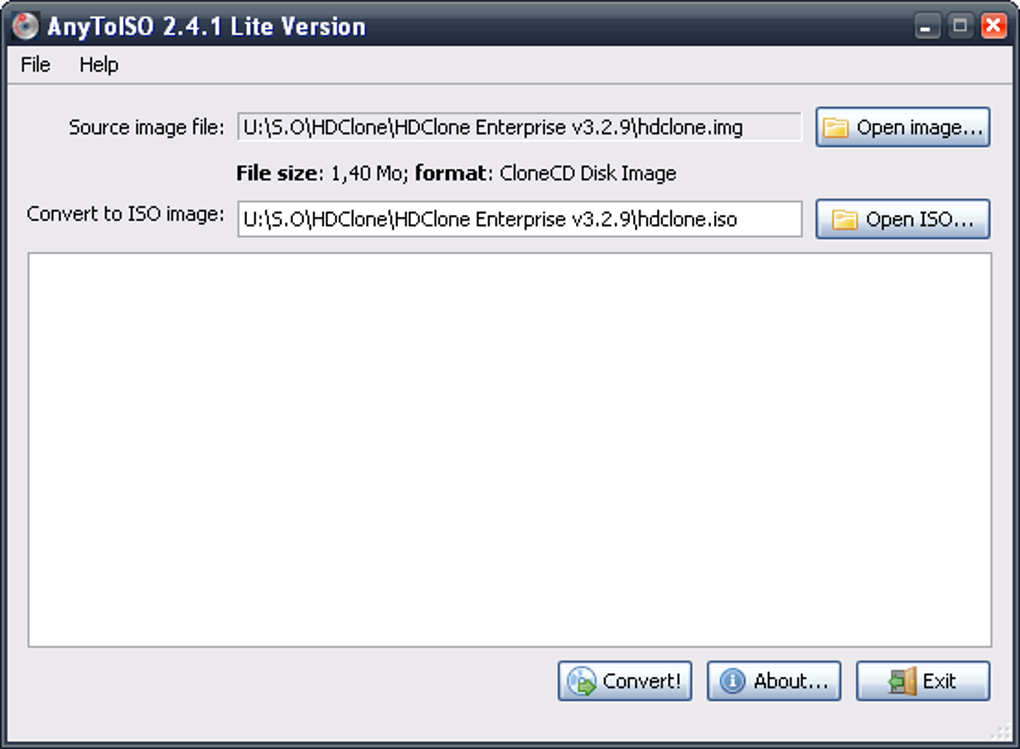
The software’s ease of use is a prominent feature. The conversion process involves minimal steps: users simply browse to the source file, select the desired save location for the resulting ISO file, and initiate the conversion with a single click. A progress dialog keeps users informed about the conversion’s status, offering transparency throughout the process. Conversions are generally quick and efficient, requiring minimal user intervention. This streamlined workflow is ideal for users who need a quick and straightforward solution without complex configuration settings.
However, a notable limitation is the lack of batch conversion support. While the individual conversion speed is commendable, users with numerous files to convert will need to process them one by one, which can be time-consuming for large projects. This omission is a key area for improvement that would enhance the software’s overall efficiency.
Key Features and Advantages
AnyToISO Converter’s strengths lie in its simplicity and efficiency. Its key advantages include:
-
Broad Format Support: Its compatibility with various image formats (BIN, MDF, PDI, CDI, NRG, B5I, IMG, DEB, CD/DVD-ROM, and DMG) caters to a wide array of user needs and existing file collections. This versatility makes it a practical tool for diverse users, from those working with older disc image formats to those needing to standardize their image files.
-
Intuitive Interface: The software’s user-friendly interface makes it accessible to users with varying levels of technical expertise. The straightforward workflow minimizes the learning curve, ensuring a smooth and hassle-free experience, even for first-time users. The lack of complex settings reduces the potential for errors and speeds up the conversion process.
-
Fast Conversion Speeds: AnyToISO Converter is designed for speed and efficiency. The conversion process is typically completed rapidly, making it a valuable tool for users needing quick turnaround times. This speed contributes significantly to its overall usability and practical appeal.
-
Free and Accessible: The software’s free availability significantly broadens its accessibility, making it a cost-effective solution for both personal and limited commercial use. This affordability removes financial barriers, enabling a wider range of users to benefit from its capabilities.
Limitations and Areas for Improvement
Despite its numerous advantages, AnyToISO Converter has some limitations:
-
Absence of Batch Conversion: The inability to process multiple files simultaneously is a major drawback, particularly for users dealing with large quantities of image files. This limitation significantly increases the time needed for bulk conversions, hindering efficiency. Implementing batch processing would greatly enhance the software’s functionality and appeal to a broader range of users.
-
Limited Configuration Options: While the simple interface is advantageous for ease of use, it also restricts customization possibilities. Advanced users might desire more granular control over the conversion process, such as the ability to specify compression levels or other settings.
-
No Built-in Editing Capabilities: The software solely focuses on conversion; it lacks built-in editing features. Users unable to directly modify or enhance the converted ISO images might need additional software for such tasks. While focused functionality is a strength, the addition of basic image editing capabilities could further improve its all-around utility.
Alternative ISO Creation Tools
While AnyToISO Converter offers a straightforward solution, several alternative tools provide additional functionalities or cater to specific needs. These alternatives offer different strengths and weaknesses, allowing users to choose the best fit for their individual requirements. Some popular alternatives include:
-
UltraISO: A commercial application providing more advanced features, such as ISO editing capabilities, CD/DVD burning, and enhanced customization options. Its broader functionality comes at a price, making it a suitable choice for users who require extensive features and are willing to pay for them.
-
PowerISO: Another commercial tool similar to UltraISO, offering a comprehensive set of features, including ISO creation, editing, burning, and mounting. Like UltraISO, its comprehensive functionality comes with a cost, making it suitable for users with professional needs and a budget for advanced tools.
-
ImgBurn: A free, open-source program focusing primarily on disc burning, but it also includes ISO creation capabilities. Its primary focus is burning discs, making it more suitable for users who need that functionality in addition to ISO conversion.
-
7-Zip: Although primarily a file archiver, 7-Zip can also handle various archive formats and can create ISO images from certain source types. This is often a preferred tool for users who already have it installed and primarily need basic ISO image creation capabilities.
Conclusion
AnyToISO Converter provides a user-friendly and efficient solution for converting a wide range of disk image formats into ISO. Its simplicity and speed make it a valuable tool for users seeking a straightforward conversion process. However, the lack of batch processing and limited configuration options are significant limitations that could be addressed in future updates. Users should consider their specific needs and the trade-off between simplicity and functionality when choosing between AnyToISO Converter and other available alternatives. Ultimately, the “best” tool will depend on the individual user’s workflow, technical expertise, and specific requirements. The choice between AnyToISO Converter and other options ultimately rests on a user’s priorities.
File Information
- License: “Free”
- Latest update: “December 18, 2024”
- Platform: “Windows”
- OS: “Windows 8”
- Language: “English”
- Downloads: “182.5K”
- Size: “11.39 MB”


