
anyTV is a free application for Windows that offers access to thousands of free TV channels and radio stations worldwide. This review delves into the program’s features, performance, strengths, and weaknesses, providing a comprehensive assessment of its usability and overall value.
Features and Functionality
anyTV presents a straightforward interface for accessing a vast library of streaming content. Its core function is to aggregate and provide access to TV channels and radio stations broadcasting online. The application boasts an extensive list of channels originating from hundreds of countries, categorized into TV channels, radio stations, and a “videos” section, likely containing web-based video content on various topics.
Users can easily filter the channel list based on several criteria, including topic, rating, bitrate, and genre. This filtering system allows for a more personalized experience, enabling users to easily locate content that matches their interests. The ability to arrange the channels by rating or bitrate is particularly useful, providing a way to prioritize channels based on viewing quality and user feedback. The integration of a favorites system allows users to save their preferred channels for quick access later. Users can also rate channels, thereby contributing to the overall quality assessment system within the application.
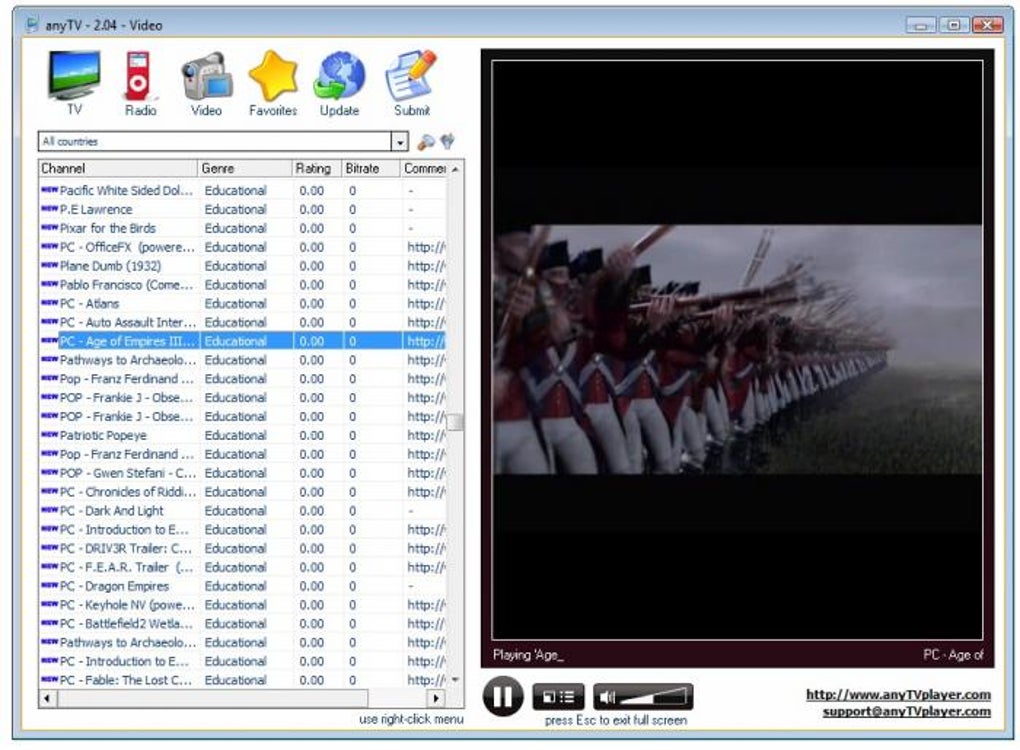
However, the sheer volume of channels can sometimes make navigating the list cumbersome. A significant drawback is the lack of a feature that allows users to quickly jump to a specific section of the channel list using the keyboard, such as by pressing the first letter of the channel name. This omission makes searching for specific channels within a large and unorganized list significantly more challenging.
The application also includes a built-in player for viewing and listening to the selected content. The player itself is relatively simple but functional, offering standard controls for play, pause, stop (which now acts as a pause button, according to the release notes), and volume adjustment.
Performance and Reliability
While anyTV boasts a substantial content library, its performance suffers from a notable inconsistency in channel availability. During testing, a significant number of channels either failed to load or functioned poorly. This inconsistency significantly detracts from the user experience, as there is no error message to explain why a channel isn’t working or to indicate the cause, such as missing codecs. The lack of diagnostic information prevents users from troubleshooting these issues effectively, leaving them with unreliable access to the promised extensive channel list. The application’s response to failed connections could be greatly improved by incorporating more informative error messages guiding users toward potential solutions.
Furthermore, the absence of any indication regarding the channels’ geographical availability or bandwidth requirements adds to the unpredictable nature of the streaming experience. Users may spend time attempting to access unavailable channels without any feedback from the application.
User Interface and Experience
anyTV’s interface is relatively user-friendly. The clean design makes the core features easy to find and use. The layout is intuitive, and the filtering and searching options are accessible and clearly labeled. The integration of user ratings and a favorites system enhances the overall user experience by enabling users to personalize their viewing preferences and quickly access their favorite channels.
However, the significant issue of non-functional channels significantly dampens the overall experience. The lack of an effective search function, coupled with the large size of the channel list, makes it challenging to find specific content. A significant improvement would be to implement a search function that allows searching by channel name, genre, or keyword, improving the discoverability of specific content.
The failure to load channels without providing any error messages is also problematic. A more informative error handling system, potentially suggesting troubleshooting steps or pointing to codec requirements, would significantly improve the user experience.
Updates and Improvements
The application has seen multiple updates aimed at improving functionality and fixing issues. Release notes highlight several key changes, indicating active development and an attempt to address user feedback. These updates include:
- Fixes for compatibility issues: Addressing problems with specific operating systems like Windows Vista, ensuring broader compatibility.
- Improved control functionality: Modifying the behavior of the stop button to function as a pause, providing a more intuitive user experience.
- Automatic screen saver management: Automatically disabling the screen saver when a channel is playing, preventing interruptions during viewing.
- Enhancements to the favorites system: Fixing issues related to adding and removing channels from the favorites list.
- Addressing display resolution issues: Resolving problems encountered on high-DPI displays.
These improvements demonstrate a commitment to improving the application’s stability and usability. However, despite these updates, the core problem of numerous non-functional channels persists.
Comparison with Alternative Applications
Several alternative applications offer similar functionalities. While anyTV provides a large channel selection, other applications may offer a more reliable streaming experience with fewer non-functional channels. For instance, applications like Readon TV Movie Radio Player and JLC’s Internet TV also provide access to streaming TV and radio channels. A direct comparison would require evaluating these alternative applications in terms of channel selection, reliability, user interface, and overall performance. The relative strengths and weaknesses of anyTV would become more apparent within the broader context of these alternatives. However, the issue of reliability persists, making anyTV’s value proposition less attractive when compared to other, potentially more stable applications offering similar services.
Conclusion
anyTV offers a potentially vast library of free TV channels and radio stations, but its inconsistent performance significantly detracts from its overall value. While the interface is relatively user-friendly and the inclusion of features like filtering, ratings, and a favorites system enhance usability, the significant number of non-functional channels creates a frustrating user experience. The lack of informative error messages further compounds this issue, hindering troubleshooting and leaving users uncertain about the causes of the streaming problems. The developers’ efforts to improve the application through ongoing updates are commendable, but addressing the fundamental issue of channel reliability remains crucial for anyTV to truly compete with its alternatives. Until the issues of channel availability and error messaging are comprehensively resolved, anyTV’s potential remains largely unfulfilled. The application’s promise of extensive content is undermined by its unreliable delivery. While it might serve as a supplementary application for users who already have access to other, more reliable streaming services, it does not currently constitute a primary, reliable source for online TV and radio streaming.
File Information
- License: “Free”
- Latest update: “July 11, 2023”
- Platform: “Windows”
- OS: “Windows XP”
- Language: “English”
- Downloads: “99.2K”
- Size: “2.21 MB”


