
AOMEI Partition Assistant Standard Edition is a free disk partition and management utility designed for Windows operating systems. It provides a range of tools for managing hard drives, enabling users to resize, move, merge, and split partitions, all without the risk of data loss. While offering a robust suite of features for its free tier, certain advanced functionalities are reserved for the paid Professional Edition. This review delves into the capabilities, limitations, and overall usability of the Standard Edition, comparing it to other similar software available in the market.
Core Features and Functionality
AOMEI Partition Assistant Standard Edition stands out as a user-friendly and efficient solution for managing disk partitions. Its intuitive interface makes it accessible to both novice and experienced users. The core functionality centers around providing a comprehensive toolkit for manipulating hard drive partitions. These include:
-
Resize/Move Partitions: This critical feature allows users to expand or shrink partitions without data loss. This is particularly useful for optimizing disk space, allocating more room to the system drive (typically C:), or creating new partitions for specific applications or data storage. The process is typically straightforward and guides users through each step, minimizing the potential for errors.
-
Merge Partitions: The ability to merge adjacent partitions simplifies disk organization. This can consolidate fragmented space, improving overall system performance. Merging unallocated space with an existing partition is a valuable function for maximizing disk usage efficiency.
-
Split Partitions: This function offers the reverse of merging, allowing users to divide a large partition into smaller, more manageable units. This is beneficial for organizing data into separate categories, improving accessibility, and potentially enhancing data security.
-
Create/Delete Partitions: These fundamental functions provide the capability to create entirely new partitions or remove existing ones. This flexibility allows for a complete overhaul of disk organization, according to the user’s specific needs. The software ensures data integrity throughout the process.
-
Partition Alignment: AOMEI Partition Assistant Standard Edition allows for proper partition alignment, which can significantly improve the performance of solid-state drives (SSDs). Aligned partitions reduce unnecessary read/write operations, leading to faster boot times and quicker application loading.
-
Extend System Partition: Addressing a common issue of low disk space, this feature allows extending the NTFS system partition without the need for a system restart. This is a significant advantage, eliminating downtime and maintaining workflow.
-
MBR/GPT Conversion: The ability to convert a data disk between MBR (Master Boot Record) and GPT (GUID Partition Table) styles is included. This is a crucial feature, especially when upgrading hardware or migrating to newer operating systems that may require a specific partition table style.
-
Copy Partition: The application provides a partition cloning function, enabling users to create an identical copy of a partition. This acts as a backup mechanism, ensuring data safety and enabling easy restoration in case of data loss or drive failure. This feature is particularly useful before performing more complex operations such as partition resizing or merging.
-
Migrate OS to SSD: A valuable feature, especially for users upgrading to a solid-state drive (SSD), the software facilitates migrating the operating system to the new drive. This streamlined process minimizes downtime and simplifies the transition. The utility handles the technical complexities, ensuring a smooth and successful migration.
-
Windows To Go Creator: The Standard Edition also incorporates a tool for creating a bootable Windows installation on a USB flash drive. This functionality creates a portable Windows environment, accessible from any compatible computer. This feature is useful for IT professionals, technicians, or those who need to access their Windows environment from multiple machines.
Limitations of the Standard Edition
While AOMEI Partition Assistant Standard Edition offers a wide array of features for its free version, it does have some limitations compared to its paid counterpart, the Professional Edition. These include:
-
Lack of Dynamic Disk Support: The Standard Edition cannot convert dynamic disks to basic disks. This is a significant limitation for users who utilize dynamic disk configurations. Dynamic disks offer features such as spanning volumes and disk striping, but migrating away from this type of disk configuration requires specialized tools, which are absent in the free version.
-
Conversion Between Primary and Logical Partitions: Another limitation is the inability to convert between primary and logical partitions. This restricts the options for managing partition types, which is essential for organizing and optimizing disk space effectively. These limitations are primarily addressed in the paid Professional edition.
-
Limited Advanced Features: Several advanced features, such as creating bootable rescue media, recovering lost partitions, and support for larger disk sizes, are restricted to the paid Professional Edition. This highlights a core difference between the free and paid versions, with advanced users likely requiring the Professional Edition’s capabilities.
-
Paywall for Certain Features: The inclusion of the “PC Cleaner” feature, which removes inactive files and bloatware, falls under the paid version. This seemingly standard utility is a drawback for users expecting comprehensive disk management within the free edition. The same holds true for the disk cloning feature, which is more limited in the standard edition.
User Interface and Experience
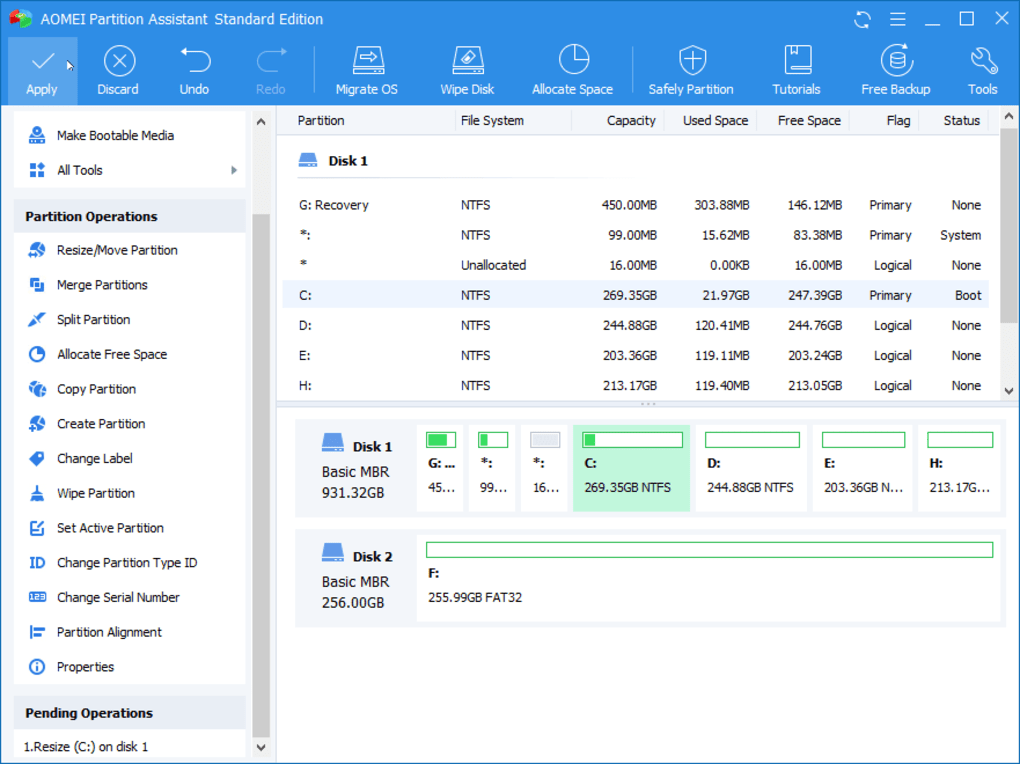
AOMEI Partition Assistant Standard Edition boasts a clean and intuitive user interface. The program’s design is simple, prioritizing ease of use without sacrificing functionality. Navigating the various features and options is straightforward, even for users unfamiliar with disk management tools. The step-by-step guidance throughout the process makes complex operations accessible to a wider audience.
The clear visual representation of hard drives and partitions provides an excellent overview of the current disk configuration, making it easier to understand the impact of any modifications. The absence of cluttered menus and confusing options contributes to the overall positive user experience. Even users with minimal technical expertise should find it easy to use.
Comparison to Other Partition Managers
AOMEI Partition Assistant Standard Edition stands tall against competitors such as MiniTool Partition Wizard and EaseUS Partition Master. While these alternatives offer similar functionalities, AOMEI’s strengths lie in its simple interface and the robust set of features available in its free version. While some advanced features are exclusive to the paid editions of competing software as well, the free version of AOMEI Partition Assistant offers a surprisingly comprehensive set of tools, making it a compelling alternative for many users.
Its user-friendly interface makes it a more approachable option than some of its competitors, which can appear cluttered or overly complex. The free version’s comprehensive range of tools compares favorably to the free versions offered by competitors, sometimes even exceeding them in functionality.
Conclusion: Is AOMEI Partition Assistant Standard Edition Right for You?
AOMEI Partition Assistant Standard Edition provides a potent combination of user-friendly design and effective partitioning tools. It’s a robust solution for users requiring basic to intermediate disk management capabilities. The free version’s features readily handle most typical partition management tasks, such as resizing, moving, merging, and splitting partitions.
While certain advanced functionalities are understandably limited in the free edition, the overall capabilities offer considerable value. Users seeking a simple yet powerful tool for managing their hard drives will likely find the Standard Edition to be a highly effective and practical choice. Those requiring advanced features or support for dynamic disks should consider upgrading to the Professional Edition. Overall, AOMEI Partition Assistant Standard Edition provides an excellent balance of functionality and ease of use, making it a strong contender in the free disk partition management software market.
File Information
- License: “Free”
- Latest update: “July 1, 2025”
- Platform: “Windows”
- OS: “Windows XP”
- Language: “English”
- Downloads: “48.2K”
- Size: “84.78 MB”


