
APK Installer and Launcher is a Windows utility designed to bridge the gap between the Android and Windows ecosystems, allowing users to manage and interact with Android Package Kit (APK) files directly on their computers. While APKs are the standard installation files for Android apps, they aren’t natively compatible with Windows. This software provides a solution for viewing, installing, and launching APKs on a Windows machine, either directly onto the computer (using an emulator) or onto connected Android devices. This detailed analysis explores the software’s functionality, advantages, disadvantages, and overall utility.
Understanding APK Files and the Need for an Installer
Android Package Kit (APK) files are the containers for all Android applications. They contain the application’s code, resources (images, sounds, etc.), and manifest file that describes the app’s features and permissions. While you can download APKs from various sources, they aren’t designed to be run directly on a Windows operating system. Opening an APK file on Windows typically yields nothing more than a cryptic file preview. This is where APK Installer and Launcher steps in. It acts as a facilitator, providing a user-friendly interface to interact with these otherwise inaccessible files.
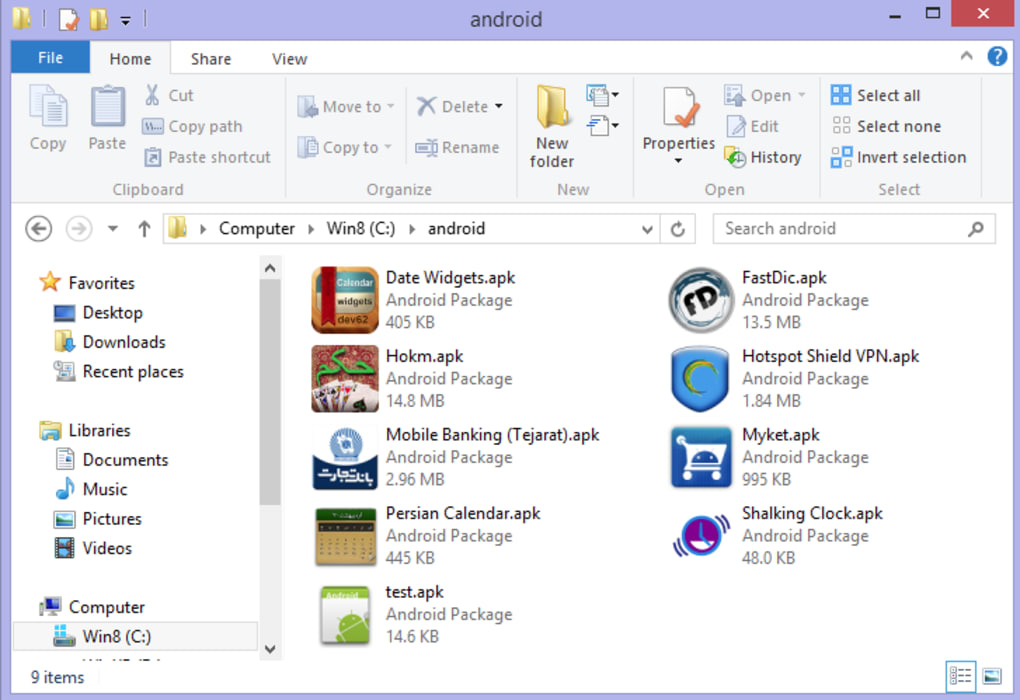
This software addresses a key need for users who want to:
-
Preview APK files: Before installing an app onto an Android device, users might want to preview its icon and potentially gather other information about it from the APK. The installer helps to reveal the visual aspects of the APK, providing a recognizable icon instead of a generic file representation.
-
Install APKs on a Windows PC (with emulation): For developers or those testing apps, the ability to install and run an APK on a Windows machine through an emulator is invaluable. This bypasses the need for a physical Android device for testing purposes.
-
Install and launch APKs on connected Android devices: The installer simplifies the process of transferring and installing APK files to mobile devices, removing the need for manual file transfers and installations.
Functionality and Features of APK Installer and Launcher
APK Installer and Launcher offers a streamlined approach to managing APK files on Windows. Its core functionality revolves around three key areas:
- Viewing APK Metadata: The primary function is to display visual information (like the app icon) associated with an APK. This is done by leveraging the Android Software Development Kit (SDK). This allows users to see a visual representation of the APK, facilitating easier identification and management within the Windows file explorer. Without this tool, APKs often appear as generic files, making them difficult to distinguish.
-
Installation onto an Emulated Android Environment: With the necessary Android SDK setup and configured within the APK Installer and Launcher software, users can install the APK onto their emulated environment, enabling them to test and interact with the application as if they were using it on a physical Android device. This requires the user to separately install and configure the Android SDK, a crucial dependency for this functionality.
-
Direct Installation onto Connected Android Devices: This is perhaps the most user-friendly aspect of the software. It facilitates a quick and easy process to transfer and install the APK directly to connected Android devices. This feature is particularly convenient for users wanting to quickly test apps or install them on devices without navigating through complex file management processes on the device itself. The software also supports this process via network connections, eliminating the need for a physical USB cable, providing a significant convenience boost, especially for users without easy access to a USB cable or if dealing with multiple devices. However, this requires the Android device to have USB debugging enabled.
System Requirements and Setup Process
Before using APK Installer and Launcher, users need to satisfy specific system requirements. This isn’t a standalone application; it relies on external components:
-
Android SDK (Software Development Kit): This is the most critical requirement. The software relies on the Android SDK to understand and interpret the APK files. Users must download and install the Android SDK separately and then configure the path to the SDK installation directory within the APK Installer and Launcher setup. This is a necessary step for many of its core functionalities, particularly for installation on an emulator.
-
Compatible Android Device (for direct installation): To install APKs directly onto an Android device, users need to have a compatible Android device connected to their computer. The device must also have USB debugging enabled to facilitate communication and the installation process. Again, this process also works via network connections if the user prefers.
-
Windows Operating System: The software is designed specifically for Windows and its compatibility with other operating systems is not guaranteed.
The setup process typically involves installing the APK Installer and Launcher itself, then locating and setting the path to the Android SDK installation within the software’s settings.
Advantages and Disadvantages
APK Installer and Launcher offers several distinct advantages:
-
Simplified APK Management: It brings order and visual clarity to APK files on a Windows system, something missing from the default Windows file explorer.
-
Quick Installation on Android Devices: The direct installation feature is a major time-saver, streamlining the often tedious process of sideloading APKs.
-
Emulation Capabilities: It allows testing APKs on a simulated environment without requiring a physical device – a valuable feature for developers and testers.
-
Network Connectivity Option: Eliminates the need for physical USB connections for installation on Android devices, enhancing convenience and flexibility.
However, the software also has some limitations:
-
Reliance on External Software (Android SDK): This is both a strength and a weakness. While it leverages existing powerful tools, it also increases the system requirements and setup complexity. Users need to be comfortable with installing and configuring the Android SDK separately.
-
Limited Functionality: It primarily focuses on installation and visual representation, lacking advanced features like APK extraction, manipulation, or detailed analysis.
-
Device Compatibility: Direct device installation depends on having a compatible Android device with USB debugging enabled. It does not directly support any specific set of devices. Any problems would lie within the Android device’s settings, not the APK Installer and Launcher itself.
Alternatives and Comparison
Several alternative tools offer similar or overlapping functionality:
-
Pure APK Install: This is a direct competitor focusing on downloading restricted Android apps.
-
App Installer: A more general-purpose software package installer, less focused on APKs specifically.
-
KOPLAYER APK Install: Another software designed to simplify APK downloading and installation.
-
Various Android Emulators: Many standalone Android emulators (like BlueStacks, NoxPlayer, etc.) can install APKs directly without the need for this additional software. These emulators, however, are often much more resource-intensive.
APK Installer and Launcher’s primary advantage over these alternatives lies in its simplicity and direct integration with Android device installation, making it convenient for users who primarily want a quick and easy method of getting APKs onto their Android devices. The emulators are far more powerful, but also significantly more complex to set up and use. Some users may find the simplicity of APK Installer and Launcher more appealing, while developers may prefer the full features of an emulator.
Conclusion
APK Installer and Launcher provides a niche but valuable service. It simplifies the process of managing and installing APK files on Windows. Its primary strength is its ease of use, making it an attractive option for users seeking a straightforward method for installing apps onto their Android devices. While it doesn’t replace a full-fledged Android emulator for comprehensive testing, it caters perfectly to those users who need a simple, easy-to-use tool for viewing APK information and installing apps quickly and conveniently onto their Android phones or tablets. The software’s dependence on the Android SDK, however, means it’s not a completely self-contained solution and requires a level of technical understanding from the user. Ultimately, its usefulness depends on the user’s specific needs and technical proficiency.
File Information
- License: “Free”
- Version: “1.0”
- Latest update: “January 29, 2019”
- Platform: “Windows”
- OS: “Windows 10”
- Language: “English”
- Downloads: “122.2K”
- Size: “2.34 MB”


