
Apktool is a free, open-source utility that has become an indispensable tool for Android developers, security researchers, and anyone interested in understanding the inner workings of Android applications (APKs). Its primary function is to reverse engineer APK files, allowing users to disassemble, modify, and reassemble them. This capability opens up a wide range of possibilities, from simple modifications like translating an app to more complex tasks like analyzing its security vulnerabilities or patching bugs. While requiring a certain level of technical expertise, Apktool’s power and versatility make it a cornerstone in the Android development and security communities.
Decompiling and Recompiling APKs with Ease
One of Apktool’s core strengths lies in its ability to simplify the often complex process of decompiling and recompiling APK files. An APK (Android Package Kit) is essentially a zip archive containing all the components of an Android application, including its code, resources (images, layouts, etc.), and manifest file (which describes the app’s permissions and other metadata). Decompiling an APK involves extracting these components and converting the compiled code into a more human-readable format, often using Java bytecode decompilers. Recompilation, conversely, involves rebuilding the APK from the modified components.
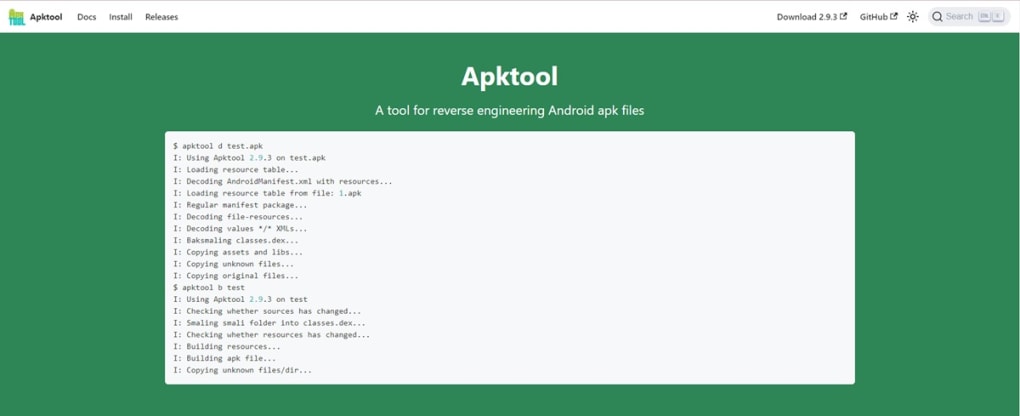
Traditional methods of decompiling and recompiling APKs were often laborious and error-prone. Apktool streamlines this process, providing a user-friendly command-line interface (or through various graphical front-ends) that automates many of the steps. This allows developers to focus on the actual modification or analysis rather than grappling with the technical intricacies of the process. The tool handles the complexities of resource extraction and reconstruction, preserving the original structure and functionality as much as possible.
Dissecting the Inner Workings of Android Applications
Apktool allows for a granular examination of an APK’s components. By decompiling an APK, users gain access to its:
-
Manifest File: This XML file contains critical information about the application, including its permissions, activities, services, and other metadata. Inspecting the manifest file is crucial for understanding an app’s functionality and potential security risks. Apktool makes this process easy by providing direct access to this crucial file in a readable format.
-
Code (smali): Apktool disassembles the application’s Dalvik bytecode (or ART bytecode for newer Android versions) into smali, an assembly-like language that is easier to understand than raw bytecode. While not as readable as high-level languages like Java, smali provides sufficient detail for developers to analyze the app’s logic and behavior, including identifying potential vulnerabilities or areas for improvement.
-
Resources: The resources folder contains all the non-code assets of the application, such as images, layouts (XML files defining the app’s user interface), strings, and other multimedia components. Apktool extracts these resources in a structured manner, making them readily accessible for modification or analysis. This allows for tasks such as localizing the app to different languages by simply replacing the string resources, or customizing the user interface by modifying the layout files.
This ability to dissect an APK into its constituent parts offers unparalleled insight into the application’s design, functionality, and potential weaknesses.
Modifying and Customizing Android Applications
Once an APK is decompiled with Apktool, modifications can be made to its code, resources, or manifest file. These modifications might include:
-
Translation: Changing the language of the app by modifying the string resources.
-
Permission Modification: Adjusting the permissions the app requests, though this must be done cautiously, as altering permissions incorrectly can render the application unusable or even introduce security vulnerabilities.
-
Feature Additions/Removals: Modifying the code to add new features or remove existing ones. This requires a significant understanding of smali and the application’s logic, and is generally a more advanced task.
-
Bug Fixes: Patching bugs within the application’s code.
-
Customization: Modifying UI elements, graphics, and other visual aspects of the application.
After making the desired modifications, Apktool can then be used to reassemble the APK, creating a modified version of the original application. This modified APK can then be installed and tested. It is important to remember that modifying an APK can have unpredictable consequences, and it is crucial to back up the original APK before making any changes. Furthermore, redistribution of modified APKs without the original developer’s consent is often a violation of copyright and licensing agreements.
Apktool’s Role in Security Research and Vulnerability Analysis
Apktool plays a significant role in Android security research. Researchers use it to analyze apps for vulnerabilities, such as:
-
Insecure Data Storage: Identifying instances where sensitive data is stored insecurely on the device.
-
Unvalidated Input: Detecting flaws that allow malicious actors to inject harmful code or data into the application.
-
Improper Authentication: Finding weaknesses in the app’s authentication mechanisms.
-
Code Injection: Analyzing the app to discover potential entry points for code injection attacks.
By dissecting an APK with Apktool, security researchers can identify these vulnerabilities and develop mitigation strategies. This is crucial in safeguarding against malicious applications and protecting user data.
Limitations and Considerations
While Apktool is a powerful tool, it’s essential to understand its limitations:
-
Technical Expertise Required: Apktool is not a user-friendly tool for beginners. Familiarity with command-line interfaces, smali, and the Android development process is essential.
-
Potential for Errors: Modifying and recompiling APKs is a complex process. Incorrect modifications can lead to application crashes or unexpected behavior.
-
Legal Implications: Modifying and distributing copyrighted applications without the owner’s consent is illegal. Apktool should be used responsibly and ethically.
-
Anti-Tampering Measures: Some applications employ anti-tampering techniques that may hinder the effectiveness of Apktool.
Conclusion
Apktool remains a crucial tool for anyone involved in Android development or security research. Its ability to decompile, analyze, and reassemble APKs provides invaluable insights into the inner workings of Android applications. While requiring a certain level of technical proficiency, its capabilities far outweigh the learning curve, making it an indispensable asset for both professionals and enthusiastic hobbyists alike. Remember to always use Apktool responsibly, ethically, and within the bounds of the law. By understanding its strengths and limitations, Apktool can be leveraged effectively for a wide range of beneficial purposes.
File Information
- License: “Free”
- Latest update: “June 23, 2025”
- Platform: “Windows”
- OS: “Windows 8”
- Language: “English”
- Downloads: “5.8K”
- Size: “24.56 MB”


