
iMovie, a free video editing application exclusively available from the Apple Store, offers a user-friendly approach to video creation, particularly well-suited for beginners. This review delves into its features, strengths, weaknesses, and overall suitability for various user needs, comparing it to other options on the market. Whether you’re a budding filmmaker looking to edit home videos or a YouTuber seeking a simple editing solution, this comprehensive assessment will help you determine if iMovie is the right tool for you.
User Interface and Ease of Use
iMovie boasts a clean, intuitive interface designed to minimize clutter and streamline the editing process. Upon launching, users are greeted with a straightforward project list, making it easy to start a new movie or revisit existing projects. The minimalist design, however, comes with a trade-off: the absence of explicit tutorials for new users. While tooltips appear upon hovering over various features, total beginners might find the learning curve steeper than with software offering more comprehensive onboarding guidance. This initial hurdle is offset by the app’s simple, logical workflow, allowing users to quickly grasp core functionalities like importing media, basic editing, and adding transitions and effects.
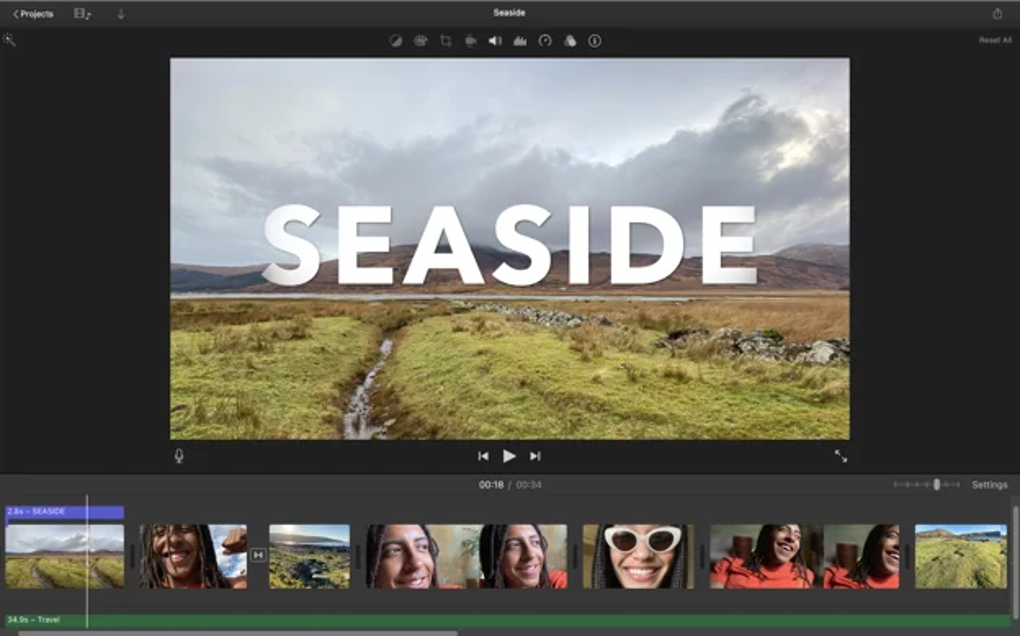
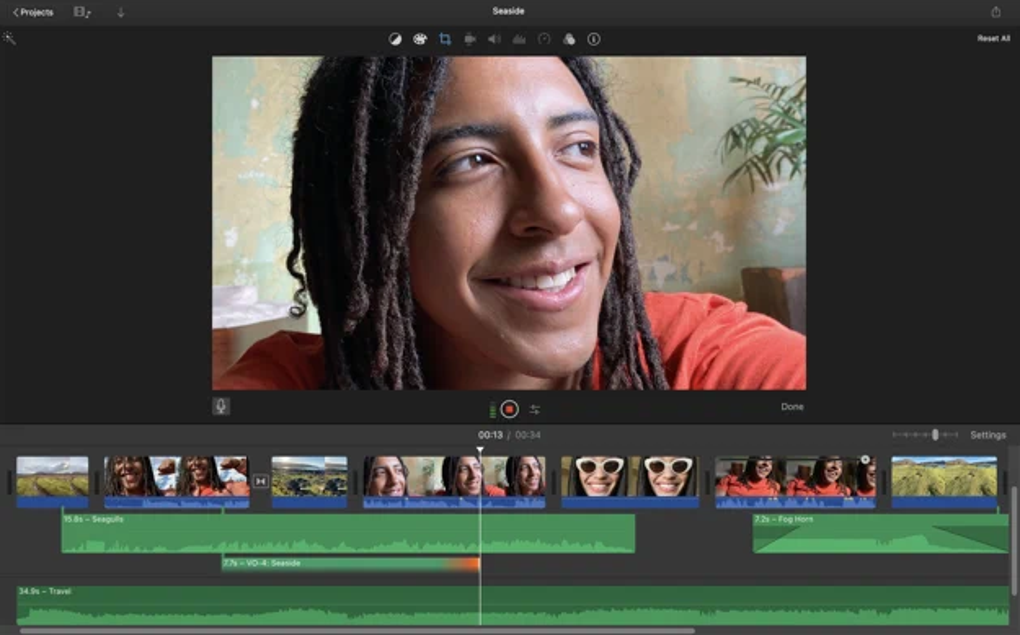
The application’s integration with other Apple services enhances its usability. Importing images from iPhoto and Photos, and integrating soundtracks from iTunes, streamlines the workflow, making the process more efficient. The ability to easily add voiceovers further enhances creative freedom. The app is designed to work seamlessly across Apple devices, enabling users to start editing on an iPhone or iPad and seamlessly continue on a Mac, promoting a consistent and familiar experience.
Features and Capabilities
iMovie provides a solid foundation of video editing tools. Users can easily cut, paste, and arrange video clips, incorporating a range of transitions, titles, backgrounds, soundtracks, and audio effects. The inclusion of green screen and blue screen support allows for more advanced special effects, enhancing creative possibilities. A selection of professionally designed templates and trailers allows users to create polished, Hollywood-style productions with minimal effort, offering impressive results even with limited prior editing experience.
The app’s support for 4K resolution allows users to create high-quality movies, ideal for sharing on platforms like YouTube. However, compatibility with certain video formats can be inconsistent. While it works best with DV formats and seamlessly handles footage shot on Apple devices, users may experience compatibility issues with some MP4 files. This limitation is a noteworthy drawback for those frequently working with diverse video sources.
Performance and Stability
While iMovie generally offers smooth performance, occasional instability issues have been reported. Some users have experienced the playback function (using the spacebar) ceasing to function, necessitating a program restart. Moreover, the app is prone to occasional freezing, a frustrating experience that highlights a potential need for performance optimization. The inclusion of regular autosaving of projects mitigates data loss during such freezes, a beneficial feature that reduces user frustration.
Sharing and Exporting
iMovie facilitates easy sharing of videos through several methods. Its integrated YouTube uploader streamlines the publishing process; however, some users have reported occasional failures in uploading or accurate video tagging. Direct sharing to Facebook and Vimeo is also supported, although it may require manual uploading in some instances. The option to share videos via email, using Mail Drop, offers additional sharing flexibility. This comprehensive range of sharing options caters to diverse user preferences and platform preferences.
Comparison to Other Software
iMovie excels as an entry-level video editing application, perfectly serving beginners who want a simple, intuitive way to create videos. However, its streamlined design also limits its appeal to advanced users. Professionals seeking a more robust set of tools and features might find iMovie’s functionalities insufficient.
For those seeking more advanced features, several alternative options exist. Final Cut Pro X, Apple’s professional-grade video editing software, offers a comprehensive suite of tools but comes at a higher price point. Lightworks, a sophisticated alternative, provides a wide range of professional editing capabilities, including advanced color correction and effects. Adobe Premiere Pro CC, another industry-standard option, is highly regarded for its comprehensive functionality and powerful features, but is a more demanding tool with a steeper learning curve.
iMovie’s Suitability for YouTube
For aspiring YouTubers just beginning their content creation journey, iMovie presents a compelling starting point. Its user-friendly interface, combined with integrated YouTube uploading capabilities, makes it easy to create and share videos online. While occasional inconsistencies in uploading and video tagging may arise, its ease of use and functionality more than compensate for these minor flaws.
Platform Availability and Alternatives
iMovie is exclusively available for macOS and iOS devices. Apple has not released, nor indicated plans to release, a Windows version of iMovie. Windows users seeking a comparable experience can explore alternatives like Filmora Video Editor, known for its user-friendly interface and practical layout. Filmora offers versions for both Windows and macOS, catering to a broader range of users.
Conclusion
iMovie stands out as a fantastic entry-level video editing application. Its intuitive interface, streamlined functionality, and robust integration with other Apple services make it an ideal choice for beginners. While it may lack the advanced features required by professional video editors, its ease of use, combined with its ability to produce high-quality videos, makes it a worthwhile tool for casual users and aspiring YouTubers. However, users should be aware of potential performance inconsistencies and limited format compatibility. The choice between iMovie and other video editing software ultimately depends on individual needs and experience levels. For beginners, iMovie is a strong contender, providing a readily accessible entry point into the world of video editing. For those seeking more advanced capabilities, professional-grade software like Final Cut Pro X, Lightworks, or Adobe Premiere Pro might better suit their requirements.
File Information
- License: “Free”
- Version: “10.4.3”
- Latest update: “June 9, 2025”
- Platform: “Mac”
- OS: “macOS 10.12”
- Language: “English”
- Downloads: “967.7K”


