
Application Mover is a lightweight Windows utility designed to simplify the process of relocating installed programs from one directory to another on your hard drive. This straightforward application offers a convenient solution for users seeking to reorganize their software installations, manage storage space, or address potential conflicts stemming from program installation paths. While relatively simple in its functionality, Application Mover provides a significant advantage over manually moving program files, which can often lead to instability or application malfunction. This detailed review explores its features, benefits, limitations, and alternatives.
Understanding the Need for Application Relocation
Maintaining a well-organized system is crucial for optimal computer performance and user experience. Over time, accumulating software installations can lead to fragmented file structures and potentially clogged hard drives. This can result in slower boot times, reduced application responsiveness, and increased risk of system instability. While some operating systems offer built-in mechanisms for managing files and folders, manually moving program files is fraught with potential issues. Incorrectly relocating program files can easily render applications unusable, requiring reinstallation or even system recovery.
Application Mover addresses this precise issue. It provides a safe and reliable method to relocate entire program installations without the risk of corrupting the application or causing system errors. This is especially beneficial in situations where:
-
Storage Space Optimization: Users might want to move large programs to a secondary hard drive or an external storage device to free up space on their primary drive. Application Mover simplifies this process, ensuring the integrity of the application after the move.
-
System Organization: A cluttered program directory can hinder system maintenance and troubleshooting. Application Mover allows users to organize their programs into logical directories, enhancing system clarity and ease of management.
-
Conflict Resolution: Occasionally, conflicting installation paths can cause issues between different programs. By moving applications to separate directories, Application Mover can help resolve these conflicts and prevent unexpected errors.
-
Backups and System Migrations: When creating system backups or migrating to a new hard drive, Application Mover can assist in seamlessly relocating applications while preserving their functionality.
Key Features and Functionality of Application Mover
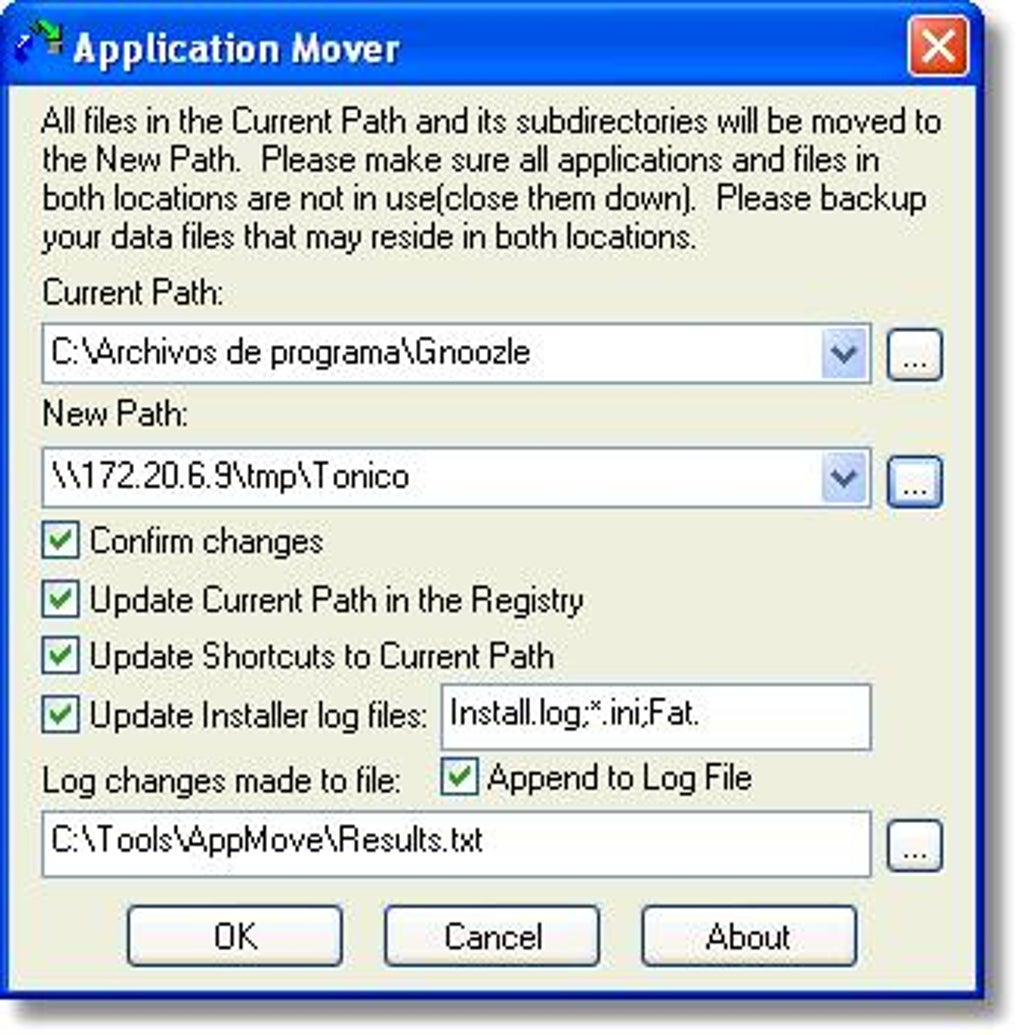
Application Mover’s primary function is the safe and efficient relocation of installed programs. Its core strength lies in its simplicity and ease of use. The software typically operates with a user-friendly interface, requiring minimal technical expertise. The process generally involves selecting the application to be moved and specifying the desired destination directory. The application then handles the intricate task of relocating all necessary files and registry entries, ensuring that the application remains fully functional after the move.
While specific features might vary slightly depending on the version, the core functionality generally includes:
-
Program Selection: A clear interface allows users to easily browse and select the programs they wish to relocate. This might involve a list of installed applications, allowing for quick identification and selection.
-
Destination Directory Selection: Users can specify the new location for the selected application, providing complete control over the organization of their software installations.
-
Automated File Relocation: Application Mover automatically handles the complex process of moving all necessary files and updating registry entries. This removes the risk of manual errors that can render applications unusable.
-
Error Handling and Reporting: A robust application should include error handling mechanisms, providing informative messages if any issues arise during the relocation process. This can help identify potential problems and prevent data loss.
-
Verification: Upon completion of the relocation, a verification step might be included to ensure the application functions correctly in its new location.
Advantages and Disadvantages of Using Application Mover
Using Application Mover presents several advantages over manual program relocation:
-
Reduced Risk of Errors: Manually moving program files carries a significant risk of corrupting the application or causing system instability. Application Mover significantly mitigates this risk by automating the process and handling necessary registry updates.
-
Time Savings: Manually relocating programs can be a time-consuming process, particularly for large applications with numerous files and registry entries. Application Mover streamlines this process, saving users valuable time.
-
Simplified System Management: By facilitating easy program relocation, Application Mover contributes to a more organized and efficient system, enhancing overall usability and maintainability.
However, Application Mover also has some limitations:
-
Limited Functionality: It primarily focuses on relocating programs, lacking advanced features found in more comprehensive system management tools.
-
Compatibility: Application Mover may not be compatible with all applications or versions of Windows. Checking compatibility before use is crucial to avoid potential problems.
-
Trial Version Limitations: Many versions of Application Mover are offered as trial versions, restricting some functionality until a paid license is acquired.
Alternatives to Application Mover
While Application Mover offers a useful solution for program relocation, several alternative tools provide similar or expanded functionality:
-
Portable Applications: Many applications are available in portable versions, eliminating the need to install them on the system drive. This eliminates the need for relocation altogether.
-
System Imaging Software: Tools like Macrium Reflect or Acronis True Image can create complete system images, simplifying system migration and making program relocation unnecessary.
-
Dedicated System Management Tools: Comprehensive system utilities such as CCleaner or Advanced SystemCare often include features that aid in organizing and managing applications, although they typically don’t directly offer program relocation capabilities in the same manner as Application Mover.
-
Manual Relocation with Caution: As a last resort, manual relocation is possible, but extreme caution is required to avoid damaging the application or the system. Thorough backup is absolutely essential before attempting manual relocation.
Conclusion: Application Mover’s Place in System Management
Application Mover provides a valuable service for users who need a simple and reliable method for relocating installed programs. Its ease of use and the reduction of error risk make it a convenient tool for managing software installations. However, users should be aware of its limitations and consider the available alternatives depending on their specific needs and technical expertise. For basic program relocation, Application Mover can be a valuable asset. For more comprehensive system management or complex relocation tasks, other tools might offer more suitable solutions. Ultimately, the choice of tool depends on the user’s individual requirements and comfort level with different software options. Always back up your data before undertaking any significant system changes, regardless of the tool employed.
File Information
- License: “Trial version”
- Version: “2.6”
- Latest update: “March 10, 2017”
- Platform: “Windows”
- OS: “Windows ME”
- Language: “English”
- Downloads: “8.3K”
- Size: “596.08 KB”


