
AppLocker is a powerful application control feature built into Windows that allows administrators and users to define granular rules about which applications are permitted to run on a system. This provides a robust mechanism for enhancing system security, improving user productivity, and preventing unauthorized software execution. Unlike simple application blockers, AppLocker offers sophisticated rule-based management, allowing for precise control over application access. This detailed exploration delves into the functionalities, benefits, limitations, and practical applications of AppLocker.
Understanding AppLocker’s Core Functionality
At its heart, AppLocker functions as a gatekeeper for application execution. It operates by enforcing pre-defined rules that specify which applications are allowed or denied access to the system. These rules are based on various criteria, allowing for a flexible and adaptable approach to application control. AppLocker’s strength lies in its ability to manage applications based on factors beyond simple file names, allowing administrators to target applications based on their publisher, path, file hash, and other attributes. This granular control significantly enhances security and reduces the risk of malicious software execution.
The core functionality of AppLocker revolves around the creation and enforcement of rules. These rules determine which applications are permitted or blocked, and the criteria used to identify those applications. Administrators can define rules based on various parameters, including:
-
Publisher: Identifying applications based on their digital signature. This helps to ensure that only trusted applications from verified publishers are allowed to run.
-
Path: Specifying the location of the executable file. This allows for precise control over applications located in specific directories.
-
File Hash: Utilizing the unique cryptographic hash of the executable file to uniquely identify an application. This is particularly useful for identifying and blocking malicious software variants.
-
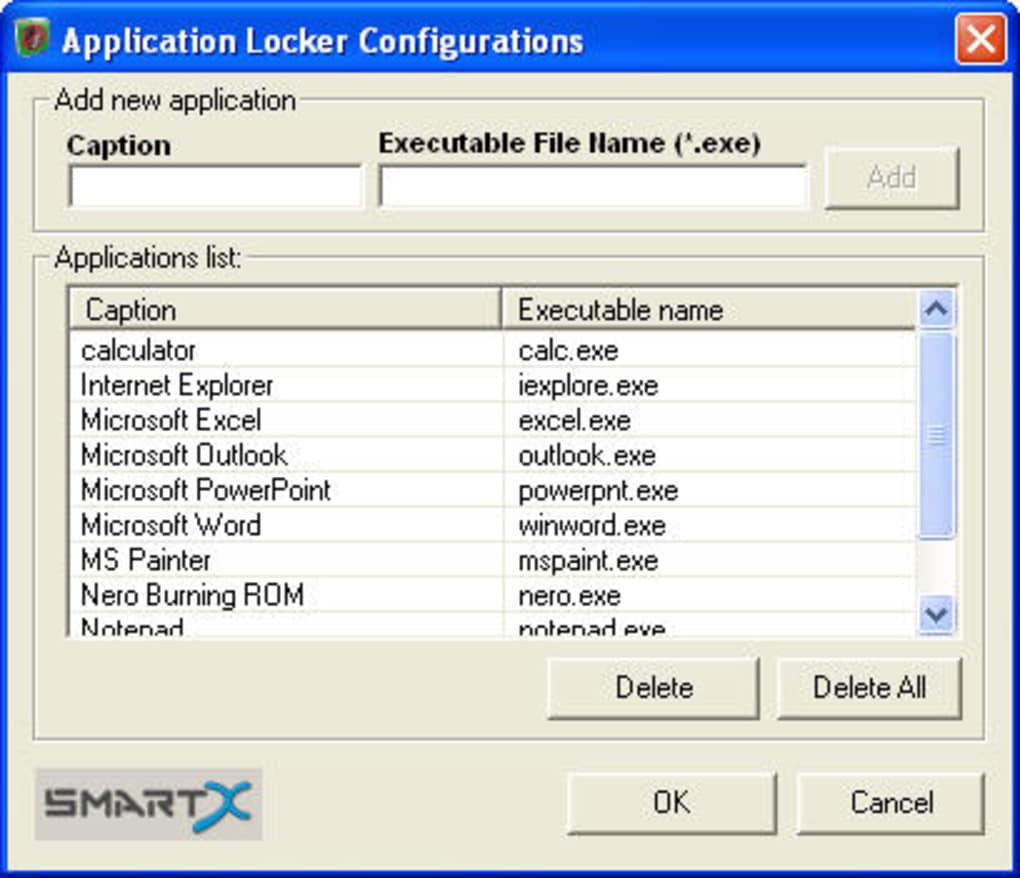
File Name: Using the name of the executable file as a simple identification criterion. While less precise than other methods, this remains a convenient option for simple application control rules.
These rules can be combined and layered to create a comprehensive security policy that addresses specific organizational needs and security requirements. The flexibility of AppLocker enables administrators to fine-tune the application control policy based on the specific threats and vulnerabilities prevalent within their environment.
Implementing and Configuring AppLocker
Implementing AppLocker involves several key steps, starting with the definition of the rules and their deployment. The configuration process typically involves the following stages:
-
Rule Creation: This is where the core of the application control policy is defined. Administrators use the AppLocker console to create rules that either allow or deny the execution of specific applications. The specific criteria used in each rule are determined by the administrator based on the desired level of control and the specific security requirements.
-
Rule Deployment: Once the rules are created, they must be deployed to the target systems. This usually involves using Group Policy Management or other system management tools to distribute the AppLocker policy to the client machines. The process ensures that the rules are consistently enforced across the target environment.
-
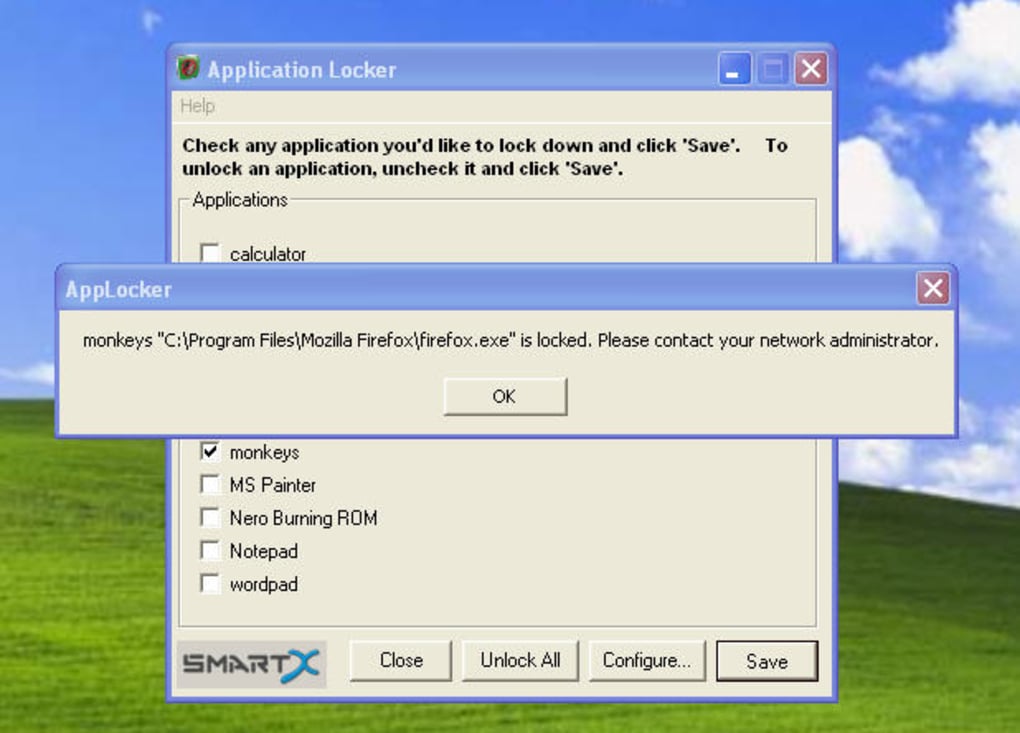
Policy Enforcement: After deployment, AppLocker actively monitors application execution and enforces the defined rules. If an application attempts to run that violates a rule, it is blocked, and the user receives a notification indicating that the application is restricted. The level of detail provided in the notification is configurable, allowing administrators to balance security with user experience.
-
Auditing and Monitoring: AppLocker provides comprehensive auditing and monitoring capabilities, allowing administrators to track application execution attempts and identify potential security breaches. This data provides valuable insights into application usage patterns and helps to identify potential threats or vulnerabilities. Regular monitoring of AppLocker logs is crucial for maintaining a secure environment and ensuring that the application control policy is effective.
Advantages and Benefits of AppLocker
AppLocker offers numerous advantages, making it a valuable tool for enhancing security and productivity in diverse organizational settings. Key benefits include:
-
Enhanced Security: By preventing the execution of unauthorized applications, AppLocker significantly reduces the risk of malware infections and other security breaches. This is particularly important in environments where users have extensive access to the system and may inadvertently install or execute malicious software.
-
Improved Productivity: By restricting access to distracting or non-essential applications, AppLocker helps to maintain user focus and enhance productivity. This is especially valuable in workplaces where employees need to concentrate on specific tasks and avoid interruptions.
-
Granular Control: AppLocker’s rule-based system enables administrators to achieve a fine-grained level of control over application access, allowing for tailored security policies that meet the needs of various user groups. This flexibility is crucial for environments with diverse security requirements.
-
Simplified Management: Centralized management of application control policies simplifies administration and reduces the overhead associated with managing individual user settings. The ability to manage policies centrally ensures consistency and reduces the risk of inconsistent security configurations.
-
Reduced Risk: By proactively preventing the execution of unauthorized applications, AppLocker minimizes the risks associated with software vulnerabilities and exploits. This proactive approach complements other security measures and strengthens the overall security posture of the system.
Limitations and Considerations
Despite its many advantages, AppLocker has certain limitations that should be considered:
- Complexity: Configuring AppLocker effectively can be complex and requires a thorough understanding of its functionalities and the various rule-setting options. Incorrect configuration can lead to unintended consequences, hindering user productivity or compromising security.
-
Maintenance: The effectiveness of AppLocker relies on ongoing maintenance and regular updates to the rules. As new applications are introduced or security threats emerge, the rules need to be adjusted to maintain the desired level of control.
-
User Experience: Blocking applications can lead to frustration among users, especially if the restrictions are not clearly communicated or seem arbitrary. Carefully planning and implementing the policy is crucial to minimize disruptions and ensure user acceptance.
-
EXE Focus: AppLocker primarily focuses on executable files (.EXE). While this covers many applications, it does not address other potential threats like scripts or other file types that could compromise system security.
-
No Drag-and-Drop Interface: The lack of a drag-and-drop feature to add applications to the block list makes the process slightly more cumbersome than it could be.
AppLocker: A Powerful Tool for Modern Security
In conclusion, AppLocker represents a significant advancement in application control for Windows operating systems. Its ability to define granular rules based on various criteria, coupled with its centralized management features, makes it an indispensable tool for enhancing system security, improving user productivity, and mitigating the risks associated with unauthorized software execution. While the configuration process can be complex, the benefits far outweigh the challenges for organizations seeking robust and flexible application control. By carefully planning, implementing, and maintaining the AppLocker policy, organizations can significantly strengthen their security posture and create a more productive and secure working environment. However, it’s crucial to remember AppLocker’s limitations and address them proactively through thorough planning and ongoing monitoring to ensure its effectiveness and minimize potential disruptions for users.
File Information
- License: “Free”
- Version: “1.3”
- Latest update: “November 22, 2023”
- Platform: “Windows”
- OS: “Windows 7”
- Language: “English”
- Downloads: “567.2K”
- Size: “728.88 KB”


