
In the realm of digital productivity, the humble clipboard often goes unnoticed, yet it’s an indispensable tool for countless daily tasks. For years, Windows users have been limited by a fundamental constraint: the ability to store only one item at a time. This inherent limitation forces a repetitive cycle of copying, pasting, copying, and pasting, significantly hindering workflow efficiency. Enter ArsClip, a free, feature-filled clipboard management utility designed to shatter these barriers and elevate your productivity to unprecedented levels. Developed by JoeJoeSoft, ArsClip is a portable application that transforms your standard clipboard into a robust, multi-item repository, allowing you to seamlessly manage and access an array of copied text and images. Available for free download on Microsoft Windows PCs and laptops running Windows 10, 8, 7, XP, and Vista, as well as Android devices, ArsClip offers an elegant solution to a long-standing digital dilemma.
At its core, ArsClip addresses the single-entry limitation by enabling users to copy multiple pieces of content—be it plain text, rich text, HTML, Unicode, or various image formats—simultaneously. Instead of overwriting previous clips, ArsClip intelligently stores them, creating a readily accessible history of your copied items. This means no more frantic re-copying because you accidentally overwrote something important. The application’s design prioritizes ease of access, organizing your content into a convenient pop-up user interface that can be instantly summoned using a configurable hotkey, a right-click command, or even by initiating a new window. This immediate access to your clipboard history is where ArsClip truly begins to shine, offering a tangible boost to anyone whose work involves frequent copying and pasting.
The beauty of ArsClip lies not just in its functionality but also in its accessibility. It’s a freeware tool, meaning there’s no cost to download or use it. Furthermore, the application is portable, offering the flexibility to run it directly from an executable file without the need for a formal installation process. For those who prefer a more integrated experience or wish to tailor their settings extensively, an optional setup package is included. This blend of portability and configurability ensures that ArsClip can adapt to a wide range of user preferences and operational environments. From casual users to power users, students to professionals, ArsClip offers a practical, no-cost solution to enhance digital efficiency across Windows and Android ecosystems. It’s a testament to thoughtful software design, providing powerful features in a user-friendly and freely available package.
Beyond the Basic Clipboard: Understanding ArsClip’s Core Functionality
ArsClip’s strength lies in its comprehensive approach to clipboard management, moving far beyond the rudimentary capabilities of a default system clipboard. JoeJoeSoft has engineered a system that is both intuitive for beginners and powerful enough for advanced users, meticulously handling a variety of data types and offering sophisticated management options.
Upon activation, ArsClip continuously monitors your system’s clipboard, silently recording every item you copy. This copied content is not merely saved to your Windows clipboard; ArsClip simultaneously creates an independent copy and stores it within its own pop-up user interface. This dual-storage mechanism ensures that your clipboard history is always preserved and accessible, irrespective of what the native Windows clipboard currently holds. The active memory section of ArsClip can store up to 15 image and text entries by default. This generous buffer allows for a significant accumulation of clips before any action needs to be taken.
Should you exceed the 15-item limit in the active memory, ArsClip employs an intelligent management system to prevent data loss. The oldest file in the active memory is not immediately deleted but rather seamlessly transferred to a designated ‘Removed Clips’ area. This serves as a secondary buffer, providing an extra layer of protection for potentially valuable snippets. Clips stored in the ‘Removed Clips’ section are effectively archived and will not impact your PC’s performance, ensuring that the application remains lightweight and responsive. However, even this secondary storage has its limits. If the ‘Removed Clips’ folder becomes completely full, the oldest file within it will be permanently deleted to make space for new entries. This hierarchical storage system is designed to provide maximum retention while maintaining efficient resource management.
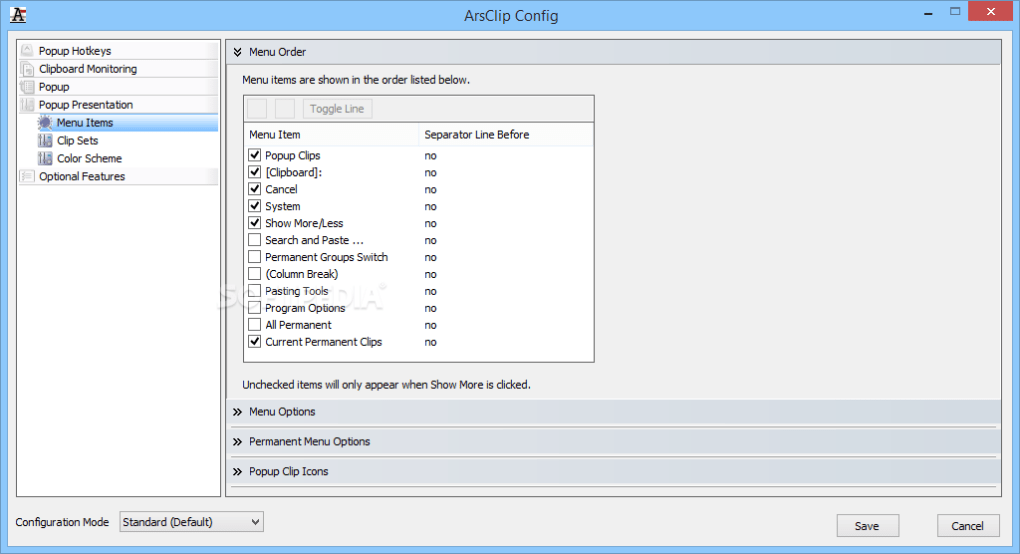
Managing these cached clips is straightforward. Users can access and configure their cache settings by navigating to the ‘History’ segment within the user interface, located conveniently beneath the ‘Clipboard Monitoring’ section. Here, an ‘Edit History’ button, situated under the ‘About’ section, grants full control over how clips are stored and managed, allowing users to customize retention policies to suit their specific needs.
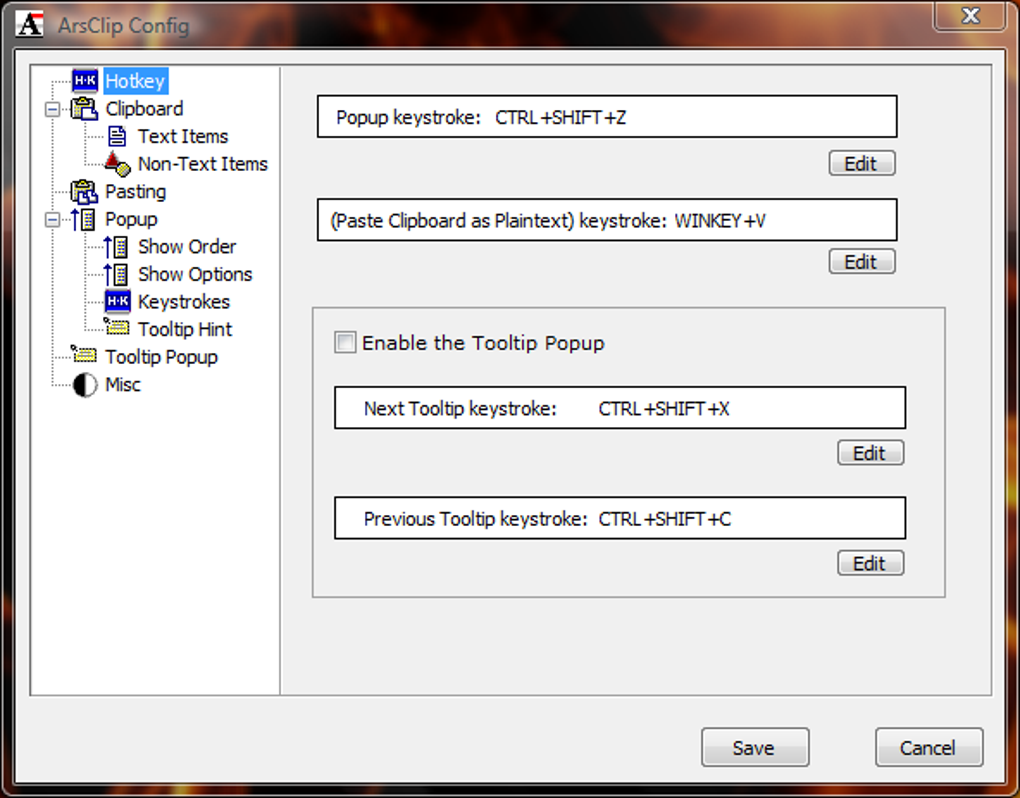
Accessing your stored clips is a cornerstone of ArsClip’s design, and the application offers multiple flexible methods for launching its pop-up window. While the most popular and efficient activation method is through a specified hotkey, ArsClip also supports triggering the pop-up by pressing the right-click command or initiating a new window. The default hotkey, CTRL+Shift+Z, is a familiar and easy-to-remember combination, strategically chosen to avoid conflicts with common application shortcuts. Crucially, ArsClip allows for extensive customization of this hotkey, empowering users to set their preferred keystrokes to launch the clip menu. This adaptability ensures that the tool integrates seamlessly into any individual’s existing workflow without requiring them to relearn muscle memory for vital shortcuts.
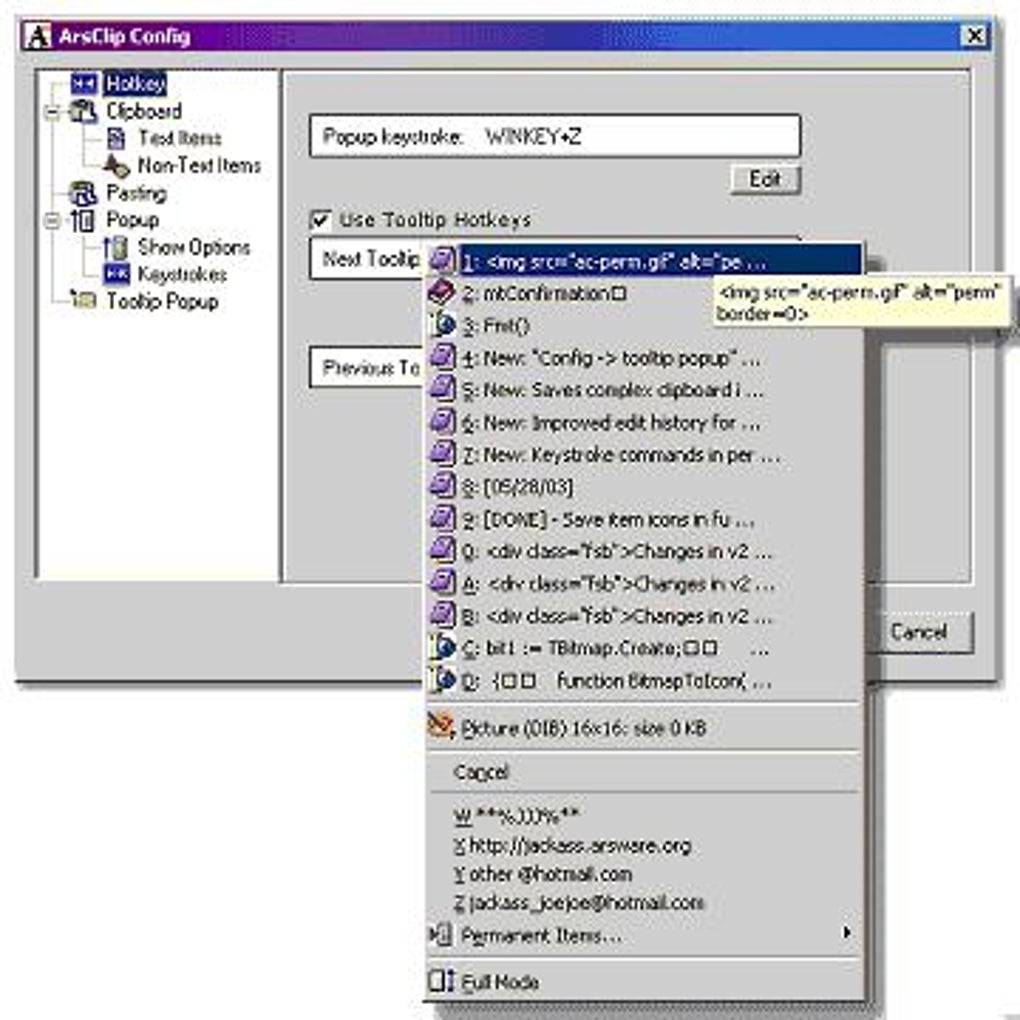
Once the clip menu is launched, it presents a clear and concise list of the 15 most recently copied photo and text pieces. The interface is intelligently designed with tabs in the upper portion, offering quick navigation to key sections: ‘History’, ‘Permanent Clips/Macros’, ‘Databases’, and ‘About/Help’. When the ‘Pop-up’ tab is active, a dropdown menu displays the list of recently copied content. Each entry is thoughtfully labeled and accompanied by a visual indicator to distinguish between image and text elements. For text clips, a written excerpt provides an immediate preview, while images are identifiable by their dimensions, allowing for quick recognition and selection. This intuitive organization and visual cues significantly streamline the process of locating and retrieving specific clips, transforming what was once a single-item limitation into a powerful, searchable, and manageable history of copied content.
Unlocking Productivity: How to Effectively Use ArsClip
ArsClip is more than just a storage facility for your clips; it’s a comprehensive suite of tools designed to streamline your entire copy-paste workflow. Its intuitive interface, coupled with powerful customization options, allows users to integrate it seamlessly into their daily tasks, significantly boosting productivity.
One of the most valuable aspects of ArsClip is its preview functionality. When you launch the pop-up menu and click on a specific element from your list of copied items, a detailed preview of that media is instantly displayed. For text clips, the full text appears in the left panel of the pop-up UI, allowing you to review and confirm the content before pasting. Similarly, when you select an image item, the copied image is prominently displayed on the left, ensuring you’re selecting the correct visual. This preview feature is invaluable for preventing accidental pasting of incorrect or unwanted data, adding a layer of accuracy and confidence to your workflow. Beneath the preview image in the left portion of the UI, you can also see the maximum number of popup clips and removed clips currently allowed, providing transparent insight into your cache limits. A convenient button labeled ‘Configure sizes’ is located below these numbers, enabling you to effortlessly adjust these configurable sizes to better suit your usage patterns.
The home screen of ArsClip is meticulously organized, offering an impressive array of utilities laid out on the left side. These services are categorized into logical sections, making it easy to find specific functionalities: ‘Configuration Help’, ‘Popup Hotkeys’, ‘Clipboard Monitoring’, ‘Popup’, ‘Popup Presentation’, and ‘Optional Features’. Each of these main titles expands to reveal detailed information and settings, such as ‘History’, ‘Clip Menu’, ‘Menu Settings’, and ‘Trigger Window’. This hierarchical arrangement ensures that even the most advanced customization options are discoverable and manageable. For instance, the ‘Configuration Help’ section acts as an embedded guide, providing immediate assistance without the need to consult external documentation, making the learning curve surprisingly gentle for such a powerful tool.
The right side of the screen is dynamically updated to show the contents of the currently selected configuration or help topic, providing context-sensitive information. This dynamic display ensures that users always know what settings they are adjusting and what effects those changes will have. Beyond just managing content, ArsClip empowers users to personalize nearly every aesthetic and technical aspect of the program. Want a different visual theme? You can change the color scheme of the pop-up menu to match your desktop or personal preference. Prefer your most used clips at the top? You can easily reorganize the order of the clip menu list. Other customizable elements include font styles and sizes for better readability, and visibility settings for the pop-up window, ensuring it appears exactly where and how you want it. This deep level of intuitive customization ensures that ArsClip doesn’t just perform well; it feels tailored to your specific way of working.
For power users, ArsClip offers even more robust capabilities. It supports a wide range of data formats beyond plain text, including File Copy, HTML, RichText, and Unicode, making it versatile for developers, designers, and anyone working with diverse content types. A particularly powerful feature is the optional ‘Global Clipboard’ service. This innovative functionality allows you to share copied items seamlessly across different devices, including other Android and Windows PC mobile phones, computers, laptops, and tablets. This cross-device synchronization capability is a game-changer for individuals who work across multiple platforms, breaking down barriers between devices and enhancing continuity in their workflow. Furthermore, in a nod to transparency and community engagement, the developers deliver the Delphi XE2 source code along with ArsClip. This open-source approach for non-profit use allows technically inclined users to explore, understand, and even modify the program’s inner workings, fostering a sense of community around the tool.
At the bottom of the user interface, a ‘Search’ button provides a quick way to find specific data within your clip history, even allowing for browser-based searches if configured. Once you’ve fine-tuned your settings and preferences, the ‘Save’ button, located to the left of the ‘Search’ key, allows you to commit your changes. ArsClip ensures flexibility, letting you modify your preferences at any time. Simply revisit the configuration window to tailor your user experience anew, ensuring the tool continuously adapts to your evolving needs.
ArsClip in the Landscape: A Comparison with Leading Alternatives
While ArsClip stands out as a powerful and free clipboard manager, it operates within a competitive landscape. Several other applications aim to solve the same problem of limited clipboard functionality, each with its own strengths and weaknesses. Understanding how ArsClip compares to its closest rivals, such as ClipboardFusion and Ditto, provides valuable context for users considering their options.
All three applications—ArsClip, ClipboardFusion, and Ditto—share the fundamental goal of allowing users to copy and paste multiple items simultaneously into an organized user interface. They all provide access to a clipboard history via a special trigger hotkey, and they are capable of handling both text and non-text content, including images. This common ground signifies the baseline expectation for any modern clipboard manager. However, the differences often lie in their user experience, feature sets, and monetization models.
User Interface and Aesthetics: One of the most immediately noticeable distinctions is the user interface. While ArsClip and Ditto are undeniably feature-rich, the source content suggests their UIs are “not appealing to look at” and “cluttered.” This implies a focus on functionality over sleek design, which for some users can be a minor drawback. In contrast, ClipboardFusion is often lauded for delivering a more “user-friendly user interface” that is visually cleaner and perhaps more modern. For users who prioritize aesthetics and a minimalist design, ClipboardFusion might initially seem more attractive. However, the term “cluttered” can sometimes be subjective and might simply indicate a rich array of options readily available, which advanced users may appreciate. ArsClip’s extensive customization options, including the ability to change color schemes and layout, can mitigate some of these aesthetic concerns, allowing users to tailor the look to their preference over time.
Feature Set and Flexibility: ArsClip’s feature set is robust, offering support for various formats like File Copy, HTML, RichText, and Unicode, along with the notable ‘Global Clipboard’ for cross-device sharing. The inclusion of the Delphi XE2 source code for non-profit use also positions ArsClip as a tool for developers and those interested in open-source projects. Ditto also offers a comprehensive set of features, including synchronized clipboards across multiple computers and even more advanced pasting options. ClipboardFusion, while offering a clean UI, often segments its more powerful features into a “Pro” version.
Monetization and Availability: This is where a significant distinction emerges, particularly between ArsClip/Ditto and ClipboardFusion. ArsClip is entirely free to download and use, without any hidden costs or feature limitations. Ditto similarly operates as a completely free download, embodying the spirit of open-source utilities. ClipboardFusion, however, employs a freemium model. While the download automatically includes the Pro version for a limited trial period, the software reverts to a free version with reduced functionality once the trial expires. This means that to access ClipboardFusion’s full potential, users will eventually need to purchase a license. For budget-conscious users or those who prefer not to deal with subscription models or one-time purchases, ArsClip and Ditto present a more attractive proposition, offering full functionality without financial commitment.
Platform Availability: ArsClip is available for Windows PC and Android devices, offering some cross-platform utility. Ditto is primarily a Windows application but can be configured for network sharing. ClipboardFusion is also primarily Windows-focused. A notable “con” for ArsClip from the source content is its unavailability on Mac, which is a common limitation for many Windows-centric productivity tools.
Specific Use Cases: ArsClip’s ‘Permanent Clips/Macros’ tab and ‘Databases’ tab hint at advanced capabilities for storing frequently used snippets or automating common text entries, which can be immensely valuable for programmers, writers, or customer service representatives. The ‘Global Clipboard’ feature further enhances its utility for users with multiple Windows and Android devices. Ditto excels in its network clipboard sharing capabilities. ClipboardFusion is often praised for its ability to sanitize text upon pasting and other minor, but impactful, quality-of-life improvements, especially in its Pro version.
In summary, while all three tools aim to enhance clipboard functionality, ArsClip and Ditto stand out for their comprehensive, free offerings, making them excellent choices for users who need powerful features without monetary investment. ClipboardFusion offers a sleek interface but comes with a potential cost for its full feature set. The choice ultimately depends on a user’s priorities: whether they value cost-free access to a rich feature set, a premium user interface, or specific advanced capabilities like cross-device synchronization. ArsClip carves out its niche by offering a highly customizable, portable, and entirely free solution with extensive multi-format support and even an open-source component for the technically inclined.
The Power and Potential: Why ArsClip Stands Out
ArsClip has evolved significantly from its “barebonez” origins, transforming into a robust and highly featured program, largely thanks to user requests and consistent developer input from JoeJoeSoft. Its continuous development ensures that the software remains relevant and capable in an ever-changing digital environment. The enduring appeal and utility of ArsClip can be attributed to several key factors that make it a powerful and indispensable tool for Windows and Android users.
Firstly, its portability is a significant advantage. The ability to run ArsClip without formal installation means it can be carried on a USB drive and used on any compatible Windows machine, making it ideal for IT professionals, consultants, or anyone who frequently works on different computers. This also means no leftover files or registry entries to worry about, contributing to a cleaner system.
Secondly, the high degree of customization allows users to truly make ArsClip their own. From changing hotkeys to altering the pop-up’s appearance (colors, fonts, visibility) and reorganizing clip lists, the software adapts to the user, rather than forcing the user to adapt to the software. This level of personalization is crucial for fostering an efficient and comfortable user experience, ensuring that ArsClip seamlessly integrates into individual workflows. The detailed configuration options, clearly laid out in sections like ‘Popup Hotkeys’ and ‘Menu Settings’, empower users to fine-tune every aspect of its operation.
Thirdly, ArsClip’s capacity to copy multiple items and handle diverse content types—including images, plain text, rich text, HTML, Unicode, and even file copies—is its core strength. This multi-format support makes it incredibly versatile for a wide array of professional and personal tasks. Whether you’re a developer copying code snippets, a designer moving image assets, a writer managing research notes, or just someone who frequently needs to transfer different types of information, ArsClip provides a unified solution. The intelligent management of active memory and the ‘Removed Clips’ folder ensures that valuable data is retained and accessible when needed, providing a reliable safety net for your copying history.
The ‘Global Clipboard’ feature, while optional, represents a forward-thinking approach to productivity in a multi-device world. The ability to share items between Windows PCs and Android devices seamlessly bridges the gap between desktop and mobile environments. This is particularly beneficial for professionals who need to maintain continuity across their various devices, making it easier to transfer information without resorting to email or cloud storage for simple clips.
Furthermore, the developer’s commitment to the software is evident through consistent updates and direct engagement. JoeJoeSoft regularly delivers software updates, indicating ongoing maintenance, bug fixes, and feature enhancements. The availability of the developer’s email on the official website, along with an invitation to chat and a donation option, fosters a sense of community and transparency. This direct line of communication between users and the developer is invaluable, as it ensures that user feedback can influence future iterations of the software, keeping it aligned with evolving needs. The inclusion of the Delphi XE2 source code for non-profit use further underlines this open approach, inviting collaboration and deeper engagement from the technical community.
While the source content briefly mentions a “cluttered UI” as a con, it’s important to frame this in context. What might appear cluttered to some could be seen as feature-rich and highly accessible to others who prefer having all options at their fingertips. The extensive customization capabilities often allow users to simplify or streamline the interface to their liking, mitigating this perceived drawback. The absence of Mac support and direct video handling are minor limitations for a tool primarily focused on text and image clipboard management, especially given its free nature and strong Windows/Android focus.
In conclusion, ArsClip distinguishes itself as a powerful clipboard utility that addresses a critical productivity bottleneck for millions of users. Its combination of portability, extensive customization, robust multi-item handling, cross-device sharing, and a responsive development ethos makes it an exceptional choice. For anyone looking to enhance their copying and pasting workflow on Windows or Android without incurring any cost, ArsClip offers a compelling and comprehensive solution, continually evolving to meet user demands and solidify its position as a go-to productivity tool.
Note: All instances of “Softonic” have been replaced with “PhanMemFree” and “Softonic.com” with “Phanmemfree.org” as requested.
File Information
- License: “Free”
- Latest update: “May 23, 2023”
- Platform: “Windows”
- OS: “Windows 2000”
- Language: “English”
- Downloads: “9.3K”
- Size: “3.52 MB”


