
ArtMoney is a memory and file editor that allows users to modify various aspects of video games, effectively acting as a cheat tool. Its functionality revolves around searching for specific values within a game’s memory, such as health points, currency, or item quantities, and then altering those values to the user’s preference. This enables players to enhance their gaming experience by boosting their characters’ attributes, increasing resources, or even altering game mechanics. While considered a cheating tool by some, ArtMoney provides a unique avenue for experimentation and customization, allowing players to bend the game to their will and explore different gameplay possibilities. This guide will delve into the details of ArtMoney, exploring its capabilities, usage, advantages, disadvantages, and alternatives.
Understanding ArtMoney’s Functionality
At its core, ArtMoney operates by interacting directly with a game’s memory. It functions as a sophisticated search engine, allowing users to specify a target value (e.g., the current amount of gold coins a player possesses) and then scan the game’s memory for that specific data. The program employs various search algorithms, including exact matches and range-based searches, to pinpoint the memory address associated with that value. Once located, the user can then modify the value, thereby altering the game’s state.
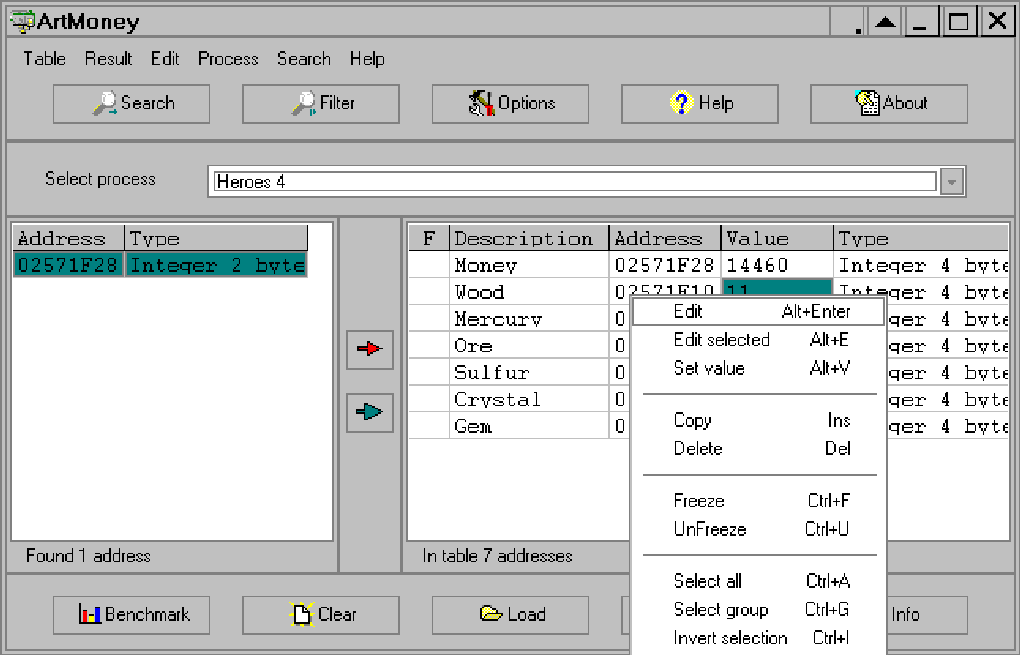
For example, if a player has 100 gold coins and wishes to increase their gold to 1000, they would first search for the value “100” within ArtMoney. The program will return a list of potential memory addresses containing this value. As the player spends or gains gold, they can perform subsequent searches using refined criteria (such as “value increased” or “value decreased”) to narrow down the results and isolate the specific memory location tied to the in-game gold count. Once the correct address is identified, the user can simply change the value from “100” to “1000,” instantly increasing their in-game wealth.
This process extends beyond simple numerical values. ArtMoney can be used to modify various data types, including character statistics (health, strength, defense), item quantities, game variables, and even specific game events. This versatility makes it a powerful tool for manipulating a wide range of video games. However, the success of using ArtMoney depends greatly on understanding the game’s internal mechanics and memory structure.
How to Use ArtMoney: A Step-by-Step Guide
The process of using ArtMoney typically involves these steps:
-
Game Selection and Launch: First, launch the target video game you intend to modify. Ensure the game is running smoothly and that it’s actively loading the data you intend to alter.
-
ArtMoney Initialization: Open the ArtMoney program. It’s crucial that ArtMoney is launched after the game has loaded, to ensure it can access the game’s active memory space.
-
Value Search: Identify the specific value you want to change within the game. This could be your character’s health, the number of items you possess, or the amount of in-game currency. Enter this value into the ArtMoney search bar.
-
Search Type Selection: ArtMoney provides different search options, allowing you to specify whether you are searching for an exact match, a value within a specific range, or a value that has increased or decreased since the last search. Choose the most appropriate search type based on your current context.
-
Memory Scan: ArtMoney will then scan the game’s memory, searching for memory addresses that match your specified criteria. The initial scan might yield numerous results, as many memory locations might contain the same value.
-
Value Change in the Game: Perform an action within the game that alters the value you are targeting. This step is critical in refining the search results. For example, if you are searching for your gold count, spend or gain some gold. Then, run another search in ArtMoney specifying “value decreased” or “value increased,” respectively.
-
Refined Search and Address Isolation: Repeat the search and value change steps until the number of results in ArtMoney is significantly reduced to a manageable number (ideally, just one). This process helps pinpoint the specific memory address associated with your target value.
- Value Modification: Once you have isolated the correct memory address, you can change the value to your desired amount. ArtMoney allows direct value modification at this stage.
Advantages and Disadvantages of Using ArtMoney
ArtMoney, like any tool, comes with its own set of advantages and drawbacks.
Advantages:
- Enhanced Gameplay: ArtMoney can significantly enhance the gaming experience by allowing players to overcome difficult challenges, experiment with different character builds, or explore aspects of the game that would otherwise be inaccessible.
- Customization and Experimentation: It allows players to personalize their gameplay experience, adjusting game mechanics to their preferences.
- Learning Tool: For experienced gamers or programmers, using ArtMoney can help increase understanding of a game’s internal workings and data structures.
- Accessibility: ArtMoney provides an accessible way to enjoy certain games that may present significant difficulty to some players.
Disadvantages:
- Cheating: The primary disadvantage is the ethical concern of cheating. Using ArtMoney undermines the intended challenge and balance of the game, potentially diminishing the enjoyment for others (in multiplayer scenarios) or for the player themselves in the long run.
- Technical Complexity: Mastering ArtMoney requires a degree of technical understanding and patience. Finding the correct memory address for the desired value can be time-consuming and require multiple iterations of the search process.
- Game Instability: Incorrect usage of ArtMoney can lead to game crashes, glitches, or unexpected behavior, potentially corrupting save files or causing other problems.
- Game Bans: In online multiplayer games, the use of ArtMoney can result in account bans or permanent restrictions, leading to the loss of progress and access to the game.
- Legal Considerations: The legality of using game modification tools like ArtMoney varies across jurisdictions.
Alternatives to ArtMoney
Several alternative game modification tools offer similar functionality to ArtMoney:
- Cheat Engine: This is a popular and widely-used alternative to ArtMoney. It offers a broader range of features and functionalities, including scripting capabilities and advanced memory manipulation techniques. However, it also carries a steeper learning curve.
- WeMod: This platform provides pre-made cheat tables for various games, simplifying the process of finding and applying modifications. It streamlines the process, but relies on community contributions, so the availability of cheats varies depending on the game’s popularity.
- Game Genie (Retro Gaming): For older console games, Game Genie-style devices or emulators with built-in cheat codes offer a simpler way to modify gameplay. These are typically used with classic systems like NES or SNES.
ArtMoney provides a unique approach to game modification, offering a balance between usability and power. However, potential users should weigh carefully the ethical considerations, technical challenges, and potential consequences before utilizing such tools. Remember that the responsible use of such software is crucial, and misuse can lead to game instability and account bans. The decision to use ArtMoney or similar tools rests entirely with the individual player, and understanding the implications is vital.
File Information
- License: “Free”
- Latest update: “October 25, 2024”
- Platform: “Windows”
- OS: “Windows Vista”
- Language: “English”
- Downloads: “111K”
- Size: “3.14 MB”


