
Artweaver is a free digital painting software that provides a robust set of tools for both beginners and intermediate artists. While not as feature-rich as industry-standard software like Photoshop, it offers a surprisingly capable alternative for those seeking a free and user-friendly option. This review delves into the program’s strengths and weaknesses, examining its brush tools, interface, features, and overall performance.
A Diverse Palette of Brushes
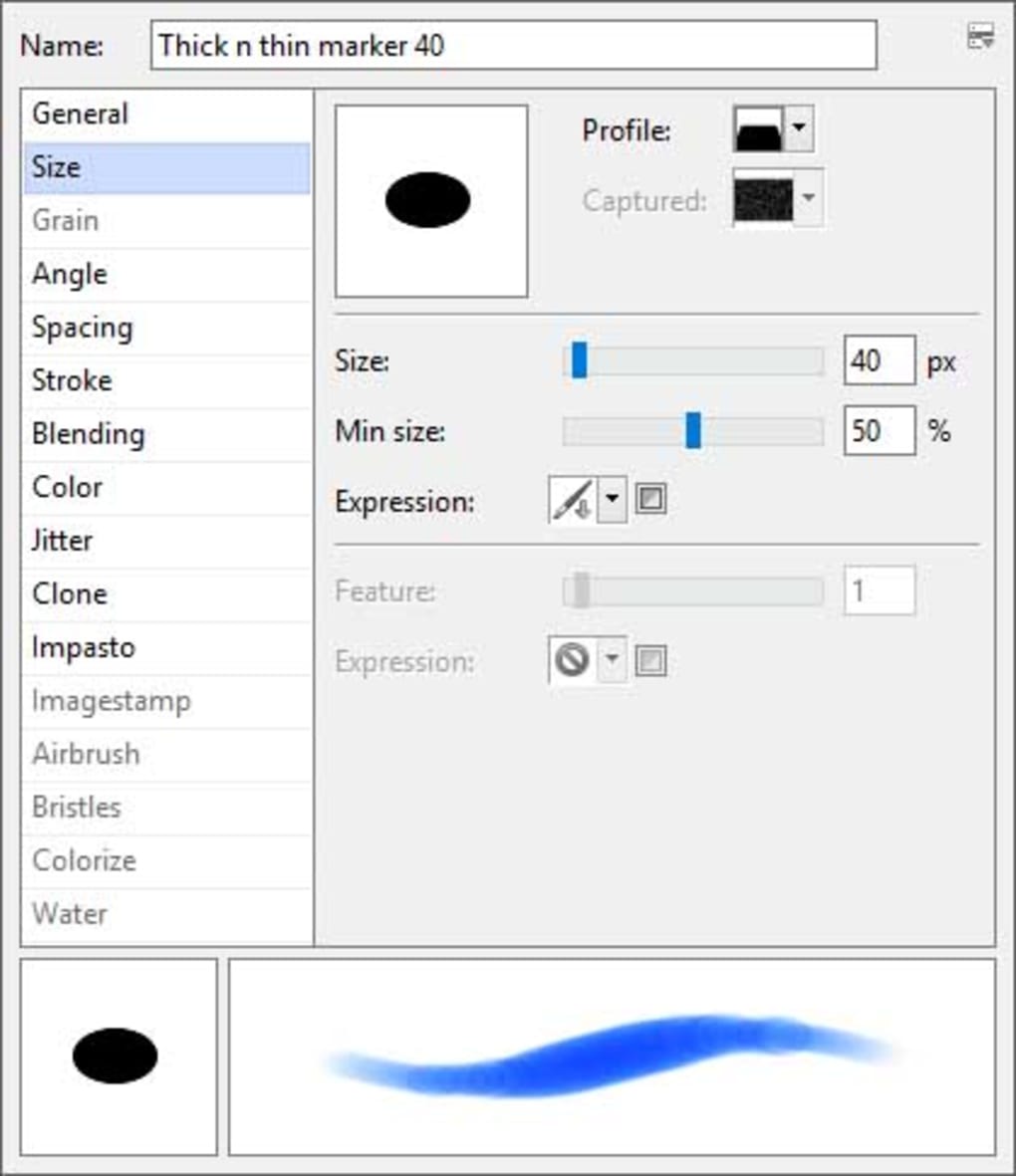
One of Artweaver’s strongest aspects is its extensive collection of digital brushes. The program boasts a range of options mimicking traditional art media, including acrylics, chalk, charcoal, felt pens, pastels, oils, and pencils. Each brush offers customizable settings, allowing users to fine-tune aspects like size, opacity, pressure sensitivity, and texture. This level of control allows for considerable artistic flexibility, enabling the creation of diverse textures and styles. The brush simulation aims for realism, striving to replicate the natural strokes and behaviors of physical art tools. While not perfectly replicating every nuance, the effort towards realistic brush strokes is noteworthy, particularly considering the software’s free nature.
The inclusion of numerous brush types caters to a wide range of artistic preferences. Users can experiment with different media to find their preferred styles, and the customization options allow for the creation of unique brushes tailored to individual needs. This versatility is a significant advantage, making Artweaver suitable for various artistic expressions, from detailed sketches to expressive painterly works.
User Interface and Workflow
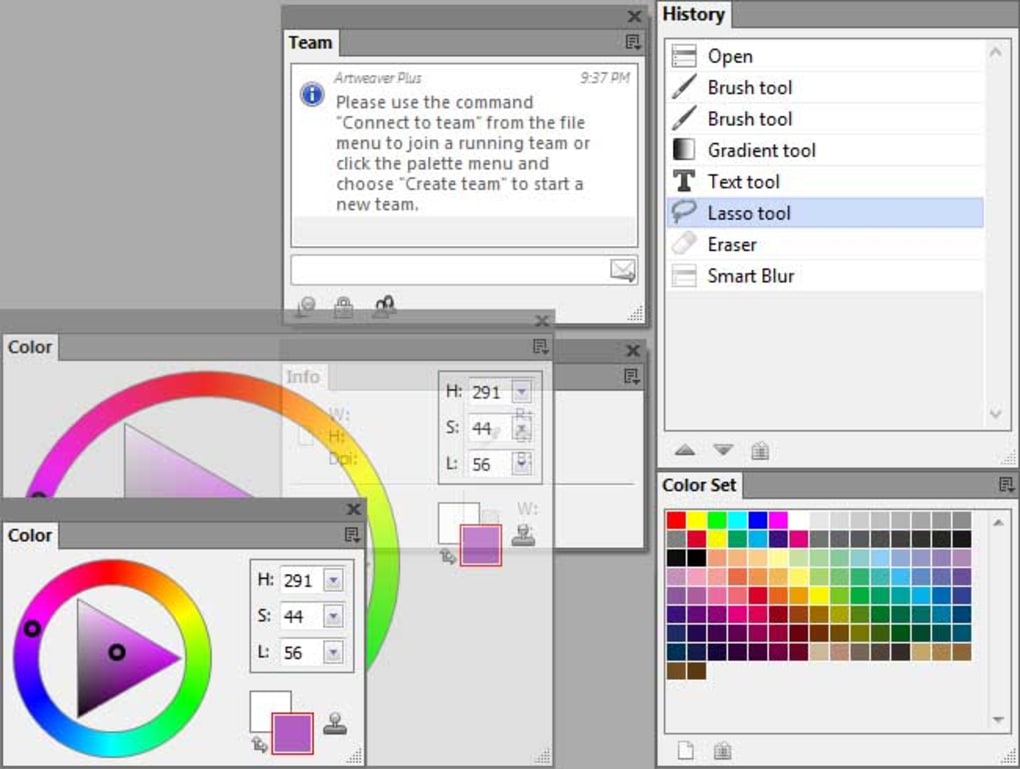
Artweaver’s interface is generally intuitive and well-organized, though it might present a steeper learning curve compared to extremely simplified drawing apps. The layout is clean, and the tools are easily accessible. Experienced users familiar with other image editing software will find the workflow relatively straightforward. However, beginners might require some time to familiarize themselves with the various menus and options. The customizable nature of the interface allows users to tailor the workspace to their preferences, further enhancing usability.
A notable feature is the inclusion of a history window, similar to that found in professional software like Photoshop. This feature allows for easy undo and redo actions, a crucial component for any digital art program. The ability to revert changes quickly reduces frustration and allows for more experimentation.
Key Features and Functionality
Beyond its brush collection, Artweaver provides a range of essential features that contribute to its effectiveness as a digital painting tool:
-
Layer Support and Transparency: Artweaver fully supports layers and transparency, a fundamental feature for digital art creation. Layers allow artists to work on different elements of a piece independently, maintaining organization and flexibility. Transparency enables the blending and layering of elements, creating depth and visual interest. This feature alone elevates Artweaver beyond simpler painting tools.
-
Standard Image Editing Tools: In addition to its drawing capabilities, Artweaver integrates standard image editing tools, including gradient, crop, fill, and selection tools. These tools are useful for image manipulation and enhancing existing artwork or photographs. While not as comprehensive as dedicated photo editing software, these basic tools expand the software’s utility.
-
File Format Compatibility: The program boasts broad compatibility with common file formats, including AWD (Artweaver’s native format), BMP, GIF, JPEG, PCX, TGA, TIFF, PNG, and PSD (though PSD layer support might be limited). This ensures seamless integration with other creative software and allows for efficient file sharing.
-
Filters and Adjustments: A selection of filters, such as sharpen, blur, emboss, and mosaic, provides additional image manipulation capabilities. These are helpful for adding stylistic effects or correcting imperfections.
-
Text Layers: The ability to add and edit text layers directly within the program enhances functionality, making it suitable for creating works that incorporate text elements.
-
Plugin Support: Artweaver supports plugin modules (for the Standard version), expanding its functionality and providing potential for customization through third-party extensions. This feature significantly increases the software’s potential for growth and adaptation to user needs.
-
Pen Tablet Compatibility: Artweaver provides excellent support for pen tablets, enhancing the natural feel of digital painting. This feature is crucial for artists who prefer a more traditional, tactile experience when creating digital artwork.
-
Multilingual Support: Artweaver’s availability in multiple languages improves accessibility for a global user base.
Limitations and Areas for Improvement
While Artweaver offers substantial value for a free program, it’s important to acknowledge its limitations:
-
Photo Editing Capabilities: Artweaver’s focus remains primarily on painting and drawing. Its photo-editing capabilities are relatively basic, lacking the advanced tools found in professional photo editing software. Users seeking extensive photo-editing functionality should consider other options.
-
Limited Advanced Tools: Some advanced tools commonly found in professional software are absent in Artweaver. This can be a limitation for experienced digital artists accustomed to a broader range of functionalities.
-
User Experience Challenges: Although the interface is generally intuitive, some users report minor challenges in navigating certain aspects of the software or understanding particular tool functionalities. More comprehensive tutorials and improved tooltips could address these concerns.
User Reviews and Community Feedback
User reviews are mixed, reflecting the program’s strengths and weaknesses. Some users praise Artweaver’s brush collection, ease of use for beginners, and overall performance. Others point to limitations in the range of tools and find the software too basic for advanced projects. This duality underscores the fact that Artweaver best serves intermediate-level artists or those seeking a free, powerful introductory tool; It likely won’t entirely satisfy seasoned professionals accustomed to much more comprehensive software.
Comparison with Alternative Software
Several alternative digital painting programs are available, both free and paid. MyPaint, GIMP, and PaintTool SAI are often cited as competitors. MyPaint, similar to Artweaver, is free and focuses on painting; however, it may lack some of the organization and editing tools found in Artweaver. GIMP is a more comprehensive free image editing and manipulation software, but its interface can be more complex. PaintTool SAI is a paid program known for its smooth brush engine and generally easier workflow than GIMP, making it a better option for advanced users who are willing to pay for the extra capabilities. The choice ultimately depends on individual preferences, skill level, and budget.

Conclusion
Artweaver represents a solid choice within the landscape of free digital painting software. Its comprehensive brush collection, strong layer support, intuitive interface (for its features), and overall performance make it a valuable tool for artists of various skill levels. While its photo editing capabilities and the limited range of advanced tools represent clear limitations, the program’s ease of use and power in its core functionalities, combined with its free price point, make it a compelling option for those seeking a flexible and capable digital painting platform. It’s particularly suitable for beginners seeking to develop their digital art skills and intermediate artists who might find it a suitable alternative for less intensive projects, potentially serving as a supplement to other, more resource-intensive software.
File Information
- License: “Free”
- Latest update: “June 12, 2025”
- Platform: “Windows”
- OS: “Windows 11”
- Downloads: “194.2K”
- Size: “17.46 MB”


