
aSc TimeTables is a software application designed to simplify and expedite the complex process of creating school timetables. The program caters to the needs of educational institutions of all sizes, offering a powerful yet user-friendly interface to manage various aspects of scheduling, from assigning teachers to classrooms to accommodating diverse class structures and constraints. This in-depth review explores the features, benefits, drawbacks, and overall effectiveness of aSc TimeTables.
Key Features and Functionality
aSc TimeTables distinguishes itself through its comprehensive suite of features designed to address the multifaceted challenges of school timetable creation. The core functionality revolves around efficiently assigning teachers, students, subjects, and classrooms to specific time slots, taking into account various constraints and preferences. The program excels in handling complex scheduling scenarios, allowing for the seamless integration of various factors that might otherwise complicate the process.
One of its standout features is the ability to create and manage multiple timetable configurations simultaneously. This is particularly useful for schools needing to create different schedules for different academic years, semesters, or even specific programs. The software allows users to easily switch between these configurations, facilitating comparisons and modifications as needed.
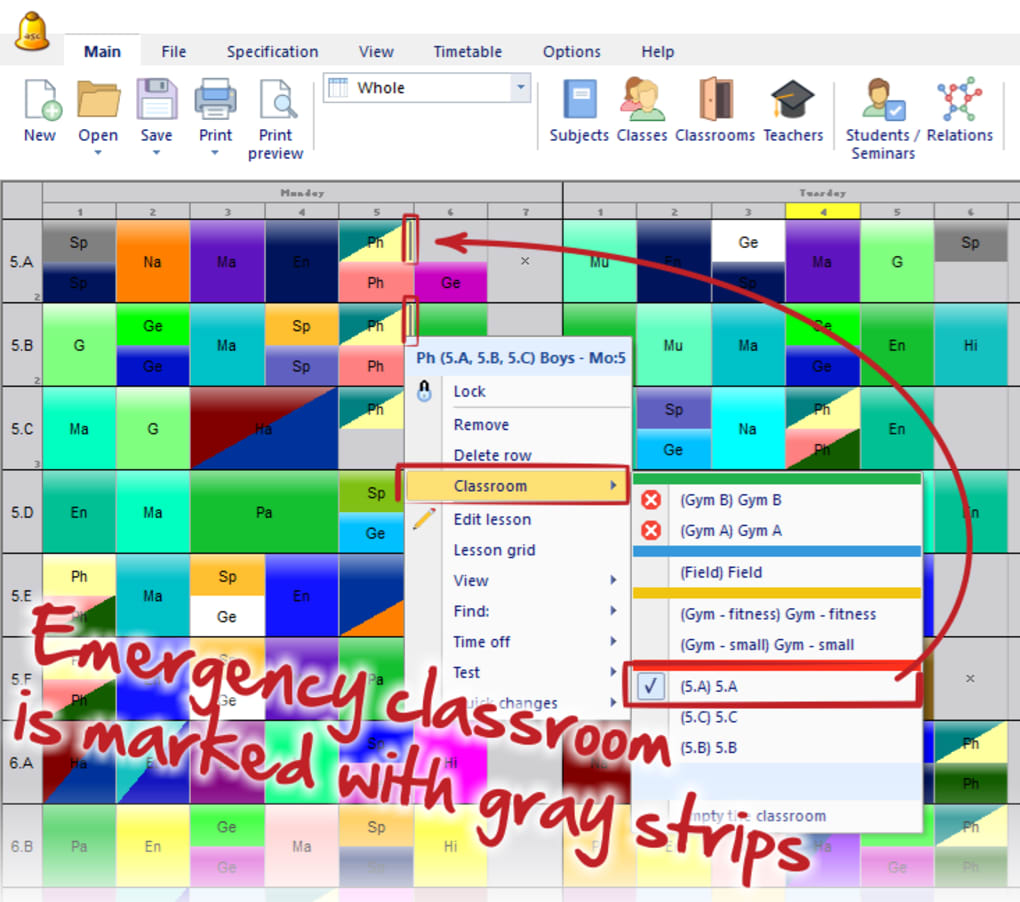
The program’s constraint handling capabilities are noteworthy. Users can define and specify numerous constraints, such as teacher unavailability, classroom capacity limitations, student conflicts, and subject prerequisites. aSc TimeTables then uses sophisticated algorithms to generate timetables that comply with these predefined restrictions, minimizing conflicts and maximizing efficiency.
Beyond basic scheduling, aSc TimeTables offers advanced features to enhance the timetable creation process further. These include:
-
Teacher and Student Preferences: The software allows users to input teacher and student preferences regarding teaching times, days, or classroom preferences. This facilitates the creation of schedules that align, as much as possible, with individual needs and preferences, improving overall satisfaction.
-
Resource Management: The program allows for meticulous management of various resources, including classrooms, labs, equipment, and specialized facilities. This ensures that resources are allocated efficiently, minimizing conflicts and maximizing their utilization.
-
Curriculum Integration: aSc TimeTables can integrate with school curriculum databases, allowing for the automatic generation of timetables based on subject requirements and student enrollment data. This streamlines the scheduling process considerably and helps ensure that all subjects are adequately covered within the timetable.
-
Conflict Resolution: The software incorporates intelligent conflict resolution mechanisms that identify and flag potential scheduling conflicts. It proactively alerts the user to potential issues, enabling them to make necessary adjustments before finalizing the schedule.
- Reporting and Export: aSc TimeTables provides robust reporting features, allowing users to generate comprehensive reports on various aspects of the schedule. These reports can be exported in different formats for printing, sharing, or further analysis.
User Experience and Interface
The user interface of aSc TimeTables is designed with usability in mind. While the range of features might initially seem overwhelming, the intuitive layout and clear navigation help users quickly grasp the core functionalities. The program employs a straightforward and visual approach to timetable creation and management, allowing users to easily view, edit, and manipulate various aspects of the schedule.
The software provides a clear visual representation of the timetable, simplifying the process of identifying potential conflicts or inefficiencies. Users can easily drag and drop classes, teachers, and rooms to adjust the schedule as needed. This drag-and-drop functionality, combined with intuitive menus and toolbars, makes timetable modifications a straightforward and intuitive process.
However, the software’s complexity might present a learning curve for users unfamiliar with timetable management software. While the interface is designed to be user-friendly, a degree of familiarity with scheduling principles is beneficial for effective utilization of all the program’s advanced features. Comprehensive documentation and tutorials are crucial for minimizing this learning curve and ensuring efficient onboarding for new users.
Pros and Cons of aSc TimeTables
Advantages:
-
Comprehensive Feature Set: aSc TimeTables offers an extensive range of features to handle complex scheduling requirements. Its ability to manage various constraints, preferences, and resources significantly simplifies the process for large institutions.
-
Efficient Timetable Generation: The software employs powerful algorithms to generate optimized timetables that comply with user-defined constraints, minimizing conflicts and maximizing resource utilization.
-
User-Friendly Interface (for experienced users): While there is a learning curve, the interface is generally considered intuitive and visually appealing, facilitating ease of use for those familiar with timetable management software.
-
Multiple Timetable Configurations: The ability to manage multiple timetables concurrently is a significant advantage, particularly for schools with varied schedules or programs.
-
Customizability: aSc TimeTables offers a high degree of customizability, allowing users to tailor the software to meet the specific needs of their institution.
Disadvantages:
-
Complexity: The sheer number of features can initially overwhelm new users, requiring significant time investment in learning the software’s functionalities. Proper training and documentation are essential to overcome this challenge.
-
Auto-Generation Limitations: While the auto-generation feature is helpful, it is not always perfect. Manual adjustments and refinements are often necessary to address any conflicts or inefficiencies.
-
Exporting Challenges: Exporting data can sometimes be more complicated than expected, requiring careful configuration and understanding of the various export options.
-
Infrequent Updates: The infrequent release of updates may lead to delays in incorporating new features or addressing bugs. A more frequent update cycle would significantly enhance the software’s overall usability and stability.
-
Potential for Errors: As with any sophisticated scheduling software, there’s a potential for errors in timetable generation. Careful review and manual adjustments are necessary to ensure accuracy and efficiency.
Alternatives to aSc TimeTables
Several alternative school timetable scheduling programs exist, each offering its own set of features and functionalities. The choice of the best alternative depends on the specific needs and requirements of the institution. Some popular alternatives include:
-
SchoolTime: A web-based solution that emphasizes ease of use and collaboration.
-
Timetable Pro: Known for its powerful algorithms and ability to handle complex constraints.
-
Feasibility: Often preferred for its intuitive interface and user-friendly design.
The best alternative will often depend on factors like budget, institution size, and specific scheduling requirements. A thorough comparison of features and functionalities is crucial before making a decision.
Conclusion
aSc TimeTables is a powerful and comprehensive school timetable management software. Its extensive feature set, including constraint handling, resource management, and reporting capabilities, caters to the complex needs of educational institutions. While the initial learning curve can be steep, its intuitive interface (once mastered) and powerful functionalities make it a valuable tool for streamlining the timetable creation process. However, potential users should carefully weigh the software’s complexities against the benefits, considering alternatives if the learning curve or potential for errors is a significant concern. The infrequent updates are also a point to consider for potential long-term users. For institutions requiring a robust and feature-rich solution, despite the complexities, aSc TimeTables remains a strong contender in the school scheduling software market.
File Information
- License: “Free”
- Latest update: “June 13, 2025”
- Platform: “Windows”
- OS: “Windows 11”
- Language: “English”
- Downloads: “51.2K”


