
ASIO4ALL is a free, universal ASIO driver designed for Windows operating systems. It provides a low-latency audio solution for Digital Audio Workstations (DAWs) without the need for dedicated ASIO-compatible hardware. This powerful utility acts as an emulation layer, creating a virtual ASIO environment that allows DAWs to bypass the standard Windows audio mixers. This bypass significantly improves audio output speed and reliability, addressing a common bottleneck in audio production. While similar in function to other driver management software, such as Realtek HD Audio Drivers, ASIO4ALL’s specialized focus on providing a universal, low-latency ASIO environment makes it a highly sought-after tool for Windows users involved in digital audio production.
Enhancing Audio Output for All Users
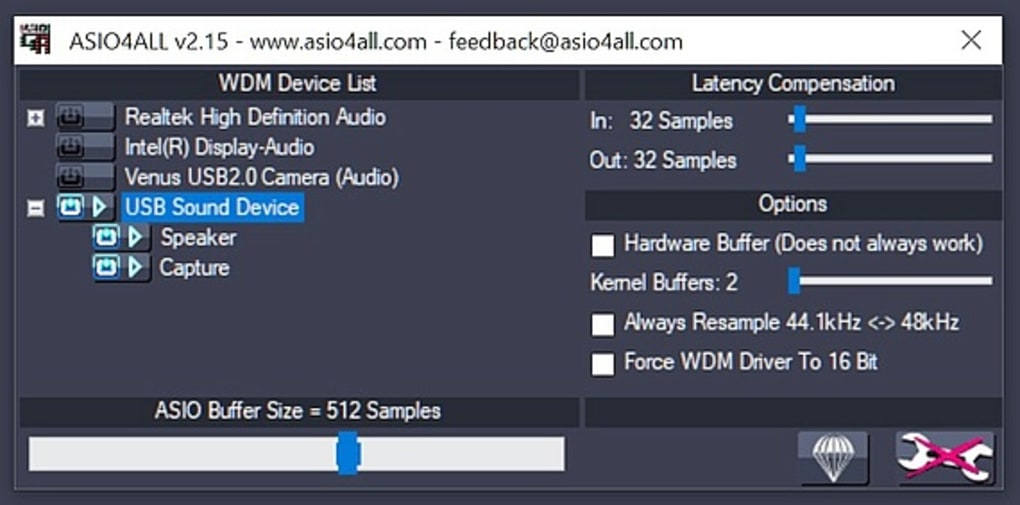
The installation of ASIO4ALL is remarkably straightforward. After downloading, users simply select the program as their preferred audio driver within their DAW’s settings. This direct access to the audio driver is crucial, enabling essential DAW functionalities and dramatically minimizing latency issues during both recording and playback. This simplicity extends to compatibility; ASIO4ALL boasts broad compatibility, working seamlessly with virtually all DAWs and across a wide range of Windows versions, from Windows XP to the latest Windows 11 releases. It supports both 32-bit and 64-bit operating systems and offers multilingual support, further broadening its accessibility.
The primary advantage of ASIO4ALL is its ability to democratize professional audio production. Traditionally, ASIO drivers were exclusively associated with specific external sound cards, posing a significant financial barrier for many aspiring musicians and producers. ASIO4ALL circumvents this limitation, serving as an essential bridge between audio production software and a computer’s integrated sound card. This accessibility opens up a world of possibilities for users who may not have the budget for professional audio interfaces.
The software’s ability to optimize audio performance is equally impressive. By allowing for smaller buffer sizes, ASIO4ALL minimizes delays without compromising the integrity of the audio signal. This enhanced control over buffer size is a crucial aspect of achieving low-latency performance, vital for tasks such as recording live instruments or using virtual instruments with minimal delay. However, this control comes with a caveat: ASIO4ALL requires exclusive access to the computer’s audio driver. This exclusivity can sometimes lead to conflicts with other applications or audio devices.
Challenges and Limitations of ASIO4ALL
Despite its significant advantages, ASIO4ALL is not without its limitations. One notable drawback is its susceptibility to occasional crashes. Users have reported instances where the program unexpectedly terminates, requiring a restart. While not consistently problematic for all users, the unpredictability of these crashes can be frustrating, especially during critical recording or mixing sessions. This unreliability can disrupt workflow and lead to lost work. The frequency of these crashes varies depending on the system configuration and other software in use.
Another significant limitation is the lack of comprehensive tutorials or user documentation. While the installation process is relatively straightforward, configuring ASIO4ALL for optimal performance and troubleshooting potential issues can be challenging for novice users. The absence of readily available support resources increases the learning curve, potentially deterring some from utilizing this otherwise beneficial tool. The cryptic error messages that can appear during crashes or conflicts further exacerbate the difficulty for those unfamiliar with the program’s inner workings. This lack of readily accessible information necessitates online searches and community forums for solutions, adding a layer of complexity that could be avoided with better documentation.
The requirement for exclusive access to the audio driver is a double-edged sword. While it is essential for achieving low latency, it can also lead to conflicts with other applications that require audio access. This can lead to unexpected behavior in other programs, such as audio playback interruptions or distorted sound. Careful management of audio-related applications is necessary to avoid such conflicts. Furthermore, troubleshooting these conflicts can be difficult without detailed understanding of the ASIO4ALL driver’s interactions with the operating system and other software.
ASIO4ALL: A Free Solution with Trade-offs
In summary, ASIO4ALL represents a powerful and versatile free solution for achieving low-latency audio on Windows systems. Its universal compatibility with various DAWs and its ability to bypass Windows’ default audio mixers make it an attractive option for many audio professionals and enthusiasts. The ease of installation and broad operating system support further contribute to its appeal.
However, the potential for crashes, the lack of user-friendly documentation, and the requirement for exclusive audio driver access present significant drawbacks. These shortcomings can create a frustrating experience, particularly for users who lack technical expertise in audio drivers and troubleshooting. The potential for conflicts with other audio applications necessitates careful system management.
Ultimately, the decision of whether to use ASIO4ALL hinges on a careful evaluation of the trade-offs. For users who prioritize low-latency audio and are comfortable troubleshooting potential issues, ASIO4ALL offers significant benefits. However, those seeking a more stable and user-friendly experience may find the program’s limitations outweigh its advantages. The lack of user-friendly documentation and error reporting mechanisms makes the troubleshooting process more complex than it should be.
The future development of ASIO4ALL would greatly benefit from addressing these weaknesses. The inclusion of comprehensive tutorials, improved error handling, and better conflict resolution mechanisms would significantly improve the user experience and further solidify its position as a leading solution for low-latency audio on Windows. More robust error logging and informative error messages would assist users in diagnosing and resolving problems more effectively. Even a simple FAQ section addressing common issues would significantly reduce the burden on users seeking assistance.
Despite its flaws, ASIO4ALL continues to be a popular choice for many users due to its effectiveness in achieving low latency audio on Windows. It remains a powerful tool capable of significantly improving the audio performance of various DAWs, but potential users should be aware of its limitations before implementation. Regular updates and community support help mitigate some of these challenges, but a more user-centric approach in future development would be a welcome improvement.
File Information
- License: “Free”
- Latest update: “May 26, 2025”
- Platform: “Windows”
- OS: “Windows 8.1”
- Language: “English”
- Downloads: “490.7K”
- Size: “390.93 KB”


