
Assetto Corsa, a highly realistic racing simulator, offers an immersive driving experience. However, enhancing this experience often involves installing modifications, or “mods,” which can significantly alter the game’s content, adding new cars, tracks, and visual enhancements. Managing these mods can be challenging, but the Assetto Corsa Content Manager (ACM) simplifies this process, offering a user-friendly interface for installation, organization, and even repair of your game’s modifications. This guide explores the features and functionality of ACM, guiding both novice and experienced users through its capabilities.
Streamlining Mod Installation and Management
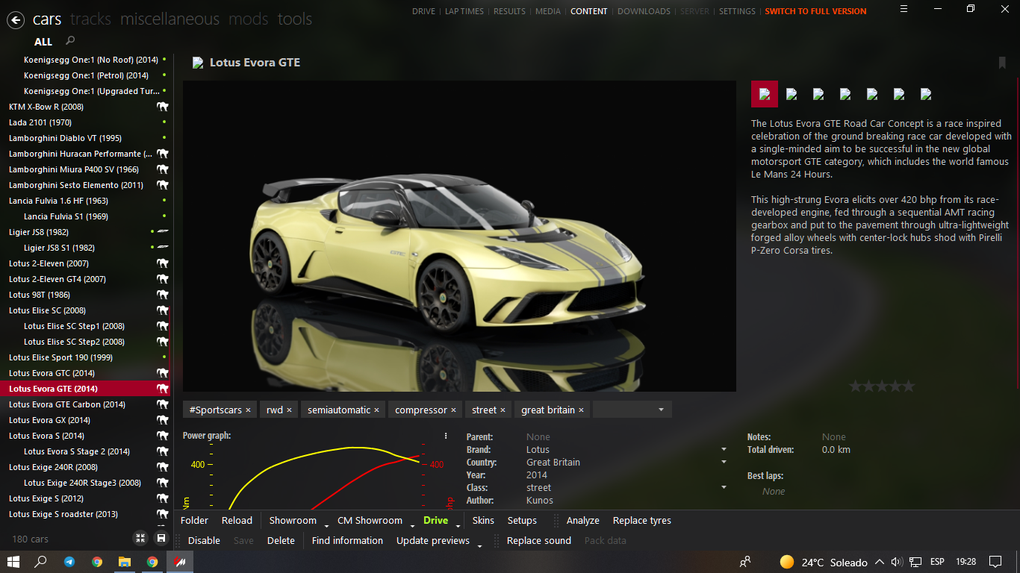
The primary function of Assetto Corsa Content Manager is to simplify the often tedious process of installing and managing game modifications. Unlike the standard Assetto Corsa installation method, which can be prone to errors and require manual file manipulation, ACM provides a drag-and-drop interface. Users simply locate their downloaded mod files (typically compressed archives like .zip or .rar) and drag them into the designated area within the ACM application. The software then handles the extraction and installation process automatically, placing the mod files into the correct directories within your Assetto Corsa installation folder.
This simplified approach minimizes the risk of manual errors, a common issue when dealing with game modifications. Incorrect placement of files can lead to crashes, malfunctions, or even complete game instability. ACM’s automated system eliminates this potential for error, ensuring a smoother and more reliable modding experience. Beyond simply installing mods, ACM excels at organization. It allows users to categorize and manage their various downloaded assets, keeping everything neatly organized within the application’s intuitive interface. This organization is particularly helpful for users with extensive mod collections, enabling them to quickly locate and select specific mods for use without navigating complex file structures.
Organizing Your Assetto Corsa Content
ACM goes beyond simple mod installation, functioning as a comprehensive content management hub for all aspects of your Assetto Corsa experience. This includes not just car modifications, but also a wide range of other downloadable content. The application allows users to efficiently manage:
- Cars: Install and organize new vehicle models, from classic race cars to modern hypercars. ACM simplifies the selection and loading of vehicles, ensuring the correct files are loaded into the game without any conflict.
- Car Skins: Customize the appearance of your vehicles with a diverse selection of skins, liveries, and decals. ACM meticulously tracks and manages these skins, preventing compatibility issues or accidental overwriting.
- Showrooms: Enhance the visual presentation of your garage with custom showrooms, providing a more immersive and visually appealing environment to view your collection.
- Fonts: Modify the in-game text displays with different fonts, offering a personalized aesthetic touch to the user interface.
- Weather: Install and manage various weather modifications, altering the atmospheric conditions within the game for a more dynamic and engaging driving experience. ACM streamlines the selection and application of weather presets, allowing users to customize the lighting, precipitation, and overall ambiance of their races.
This centralized management system ensures that all aspects of your customized Assetto Corsa experience are integrated and readily accessible within a single application.
Beyond Installation: Repair and Maintenance Tools
ACM’s capabilities extend beyond simple installation and organization. It incorporates a valuable repair tool specifically designed to address common issues with obsolete or corrupted car mods. These mods, often downloaded from various online sources, can sometimes contain errors or become incompatible with updates to the base game. ACM’s integrated repair function analyzes the mod files, identifying and fixing common errors, restoring functionality to problematic mods without requiring manual intervention.
This feature significantly reduces the frustration associated with incompatible or malfunctioning mods. Instead of manually troubleshooting and potentially needing to re-download corrupted files, users can rely on ACM’s repair tool to automatically resolve many common issues, ensuring a stable and enjoyable gameplay experience.
User-Friendly Interface and Functionality
ACM boasts a user-friendly interface, making it accessible to users with varying levels of technical expertise. The application’s intuitive design guides users through the installation and management process, requiring minimal prior knowledge of file management or game modding. The clear visual cues and straightforward instructions allow even novice users to efficiently manage their Assetto Corsa content.
The application also features a robust search function, enabling users to quickly find specific mods or content within their extensive collection. This search functionality further enhances the efficiency of managing a large amount of game modifications, making it simple to locate and activate particular items.
Unlocking Full Functionality: Donation Model
While ACM offers a free, lite version, certain features and functionalities are limited in this version. The full version, which unlocks complete access to all features, including new releases, work-in-progress sections, and pre-release builds, is supported through a donation-based model. This allows the developers to continue improving and expanding the application’s capabilities.
This donation-based approach provides a sustainable model for the continued development and improvement of ACM, ensuring users have access to a regularly updated and enhanced tool for managing their Assetto Corsa modifications. It’s a fair exchange; users benefit from a high-quality application, and the developers receive the support necessary to maintain and expand its functionality.
Should You Download Assetto Corsa Content Manager?
While not strictly required for playing Assetto Corsa, ACM significantly enhances the user experience for those who enjoy modding and customizing their game. Its simplified installation process, comprehensive organization tools, and built-in repair function reduce frustration and streamline the often-complex process of managing game modifications. The user-friendly interface makes it accessible to everyone, regardless of technical skill.
However, users should be aware of the limitations of the free version. If you intend to extensively use mods and regularly access new releases and features, the donation-based upgrade to the full version is a worthwhile investment. Weighing the convenience and efficiency of ACM against its cost (a donation) will help you determine whether it aligns with your Assetto Corsa modding habits and preferences.
Conclusion
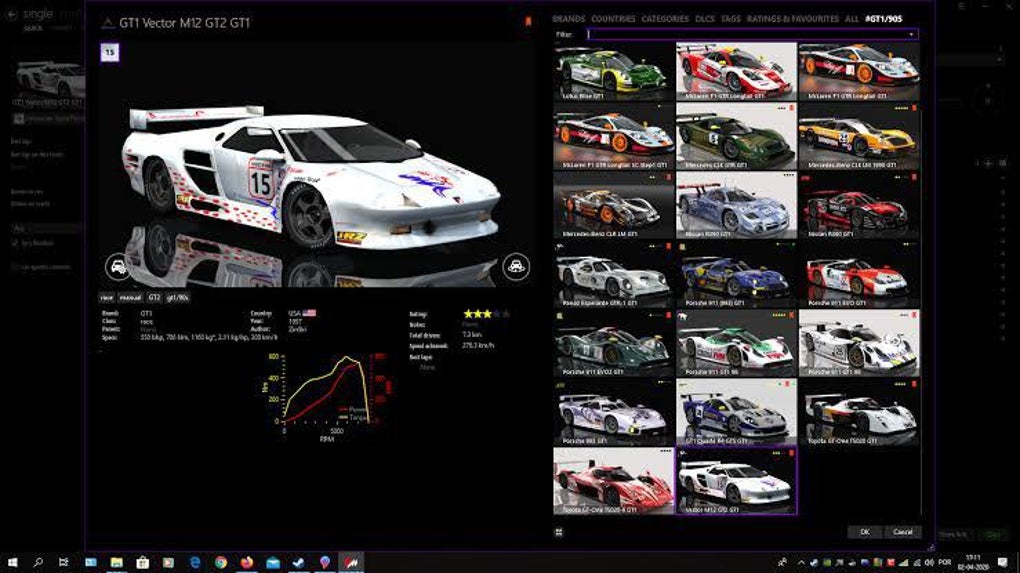
Assetto Corsa Content Manager is a powerful and user-friendly tool that dramatically simplifies the process of installing, organizing, and maintaining modifications for Assetto Corsa. Its intuitive interface and robust features make it an invaluable asset for any player looking to customize and enhance their racing experience. While the free version offers a good introduction, the full version, accessible through a donation, unlocks the complete potential of this highly useful application. The decision to use ACM ultimately depends on the extent of your modding activities and your willingness to support its ongoing development.
File Information
- License: “Free”
- Version: “0.8.1976.36095”
- Latest update: “January 31, 2023”
- Platform: “Windows”
- OS: “Windows 10”
- Language: “English”
- Downloads: “38.8K”
- Size: “7.43 MB”


