
In the intricate world of computer hardware, where performance battles heat and efficiency strives against noise, effective thermal management is paramount. For users of ASUS motherboards, a dedicated utility stands out as an indispensable tool for achieving this delicate balance: ASUS Fan Xpert. Developed specifically to harness the advanced capabilities of ASUS hardware, Fan Xpert offers a sophisticated, yet accessible, solution for controlling a PC’s cooling system. This software isn’t just about spinning fans; it’s about intelligent thermal orchestration, ensuring your system runs optimally, quietly, and reliably.
At its core, ASUS Fan Xpert is a software application designed to give users granular control over their computer’s cooling fans. While many motherboards offer basic fan speed adjustments through the BIOS, Fan Xpert elevates this to an entirely new level. It integrates directly with ASUS’s proprietary motherboard technology, leveraging onboard sensors and advanced algorithms to create a dynamic and highly responsive cooling system. This integration allows it to monitor temperatures across various components – CPU, GPU, chipset, and even specific zones on the PCB – and adjust fan speeds accordingly, often in real-time. The result is a system that can ramp up cooling precisely when needed, such as during intense gaming sessions or demanding video rendering tasks, and then dial back to near-silent operation during lighter workloads, like browsing the web or watching a movie. This intelligent automation is a cornerstone of the Fan Xpert experience, delivering a “perfect balance between efficient system cooling and low noise,” as highlighted by its developers.
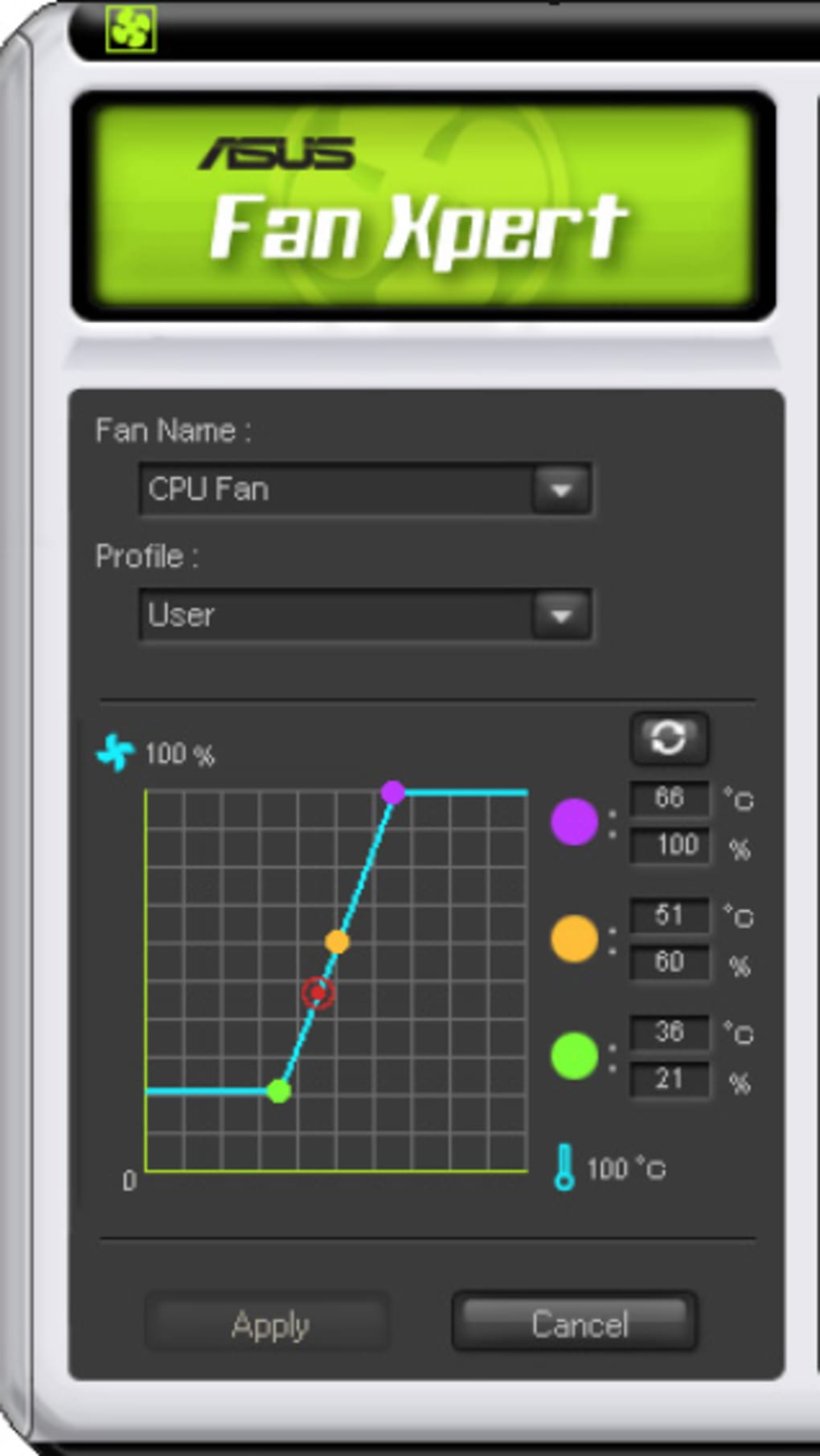
One of the significant advantages of ASUS Fan Xpert is its broad compatibility with various fan types. It supports both 3-pin and 4-pin (PWM) fans, covering a wide array of cooling solutions available in the market. This flexibility means that users are not restricted to specific fan models; Fan Xpert can manage almost any fan connected to their ASUS motherboard. The software’s ability to “search for your fans within your case” is a testament to its advanced diagnostic capabilities. This isn’t just a simple inventory; it’s a deep dive into the thermal characteristics and rotational capabilities of each fan. By analyzing each fan’s individual performance curve – its minimum and maximum RPM, its noise profile at different speeds, and its airflow capacity – Fan Xpert can then “design the best profile for you.” This calibration process is crucial, as it ensures that the cooling strategy is tailored precisely to the installed hardware, maximizing efficiency and minimizing acoustic output.
In an ecosystem brimming with generic fan control utilities, ASUS Fan Xpert distinguishes itself through its hardware-software synergy. While physical fan controllers offer a tactile way to manage speeds, they often lack the sophisticated automation and sensor integration that Fan Xpert provides. This software solution acts as a digital conductor, harmonizing the individual fans into a cohesive cooling symphony. Its ability to intelligently adapt to changing system loads, anticipate thermal spikes, and maintain optimal temperatures makes it a superior alternative for most users. This dedicated approach ensures that users get the most out of their ASUS hardware, turning a mere collection of components into a highly optimized and responsive machine.
Optimizing System Performance with Smart Utilities
The modern PC user demands not just raw power but also stability, longevity, and a pleasant user experience. These factors are heavily influenced by a computer’s thermal management. Overheating can lead to performance throttling, system instability, and even permanent damage to components. Conversely, a cooling system that is constantly running at full blast can be unacceptably loud, disrupting focus and enjoyment. ASUS Fan Xpert, as a premier utility tool, directly addresses these challenges by offering a sophisticated platform for intelligent thermal control. It transforms the cooling system from a static element into a dynamic, adaptive guardian of your PC’s health and performance.
Precision Fan Control: The Core of ASUS Fan Xpert
At the heart of ASUS Fan Xpert’s functionality is its capacity for precision fan control. Unlike basic motherboard utilities that might offer only a few preset fan curves, Fan Xpert delves deeper, allowing for highly customized and intelligent adjustments. The software initiates a ‘fan tuning’ process, which is critical for its advanced capabilities. During this process, Fan Xpert analyzes each connected fan, determining its operational range – from the lowest RPM at which it can reliably spin to its maximum speed. It also assesses the noise levels generated at various speeds and the amount of airflow produced. This detailed data collection forms the basis for creating highly optimized cooling profiles.
Users can then choose from a variety of pre-defined profiles, such as “Standard,” “Silent,” “Turbo,” or “Full Speed,” each catering to different priorities. For instance, the “Silent” profile might prioritize ultra-low noise, keeping fan speeds at the absolute minimum while still preventing critical temperatures. The “Turbo” profile, on the other hand, would ramp up fan speeds aggressively to ensure maximum cooling performance, ideal for intense gaming or overclocking. Beyond these presets, Fan Xpert empowers users to create their own custom fan curves. This involves mapping specific fan speeds to temperature thresholds, allowing for a truly personalized cooling strategy. For example, a user might set their CPU fan to run at 30% speed until the CPU reaches 50°C, then gradually increase to 60% speed at 65°C, and finally hit 100% at 80°C. This level of granular control ensures that cooling is applied precisely when and where it’s needed, preventing unnecessary noise while maintaining thermal integrity.
Balancing Cooling and Acoustics: The Silent Powerhouse
The true genius of ASUS Fan Xpert lies in its ability to strike a “perfect balance” between efficient cooling and low noise. This isn’t a trivial task; often, maximizing cooling performance comes at the cost of increased fan noise, which can be a significant drawback for many users. Fan Xpert mitigates this by employing smart algorithms that consider both thermal requirements and acoustic output. By understanding the noise profile of each fan at various speeds, the software can make intelligent decisions, choosing the lowest possible fan speed that still maintains safe operating temperatures.
Consider a scenario where a user is performing a light task, like writing a document. The system’s components are generating minimal heat. Fan Xpert, recognizing this, will reduce fan speeds to their lowest possible settings, often making the PC virtually silent. As the workload increases, perhaps with the launch of a demanding application or game, the software detects the rise in component temperatures. Instead of immediately spooling all fans to maximum speed, it intelligently escalates fan speeds in a controlled manner, focusing cooling on the areas that need it most. This adaptive approach ensures that noise levels remain as low as possible for the given thermal demands, enhancing the overall user experience. This dynamic balancing act is what positions Fan Xpert as a “silent powerhouse,” delivering robust cooling performance without sacrificing acoustic comfort. This capability is particularly valued in office environments, home theaters, or any setting where low noise is a premium.
A Seamless User Experience for Enhanced Productivity
In today’s fast-paced digital world, productivity often hinges on the reliability and responsiveness of our tools. A PC that is constantly struggling with heat or generating distracting noise can significantly hinder workflow and concentration. ASUS Fan Xpert contributes directly to an enhanced computing experience, framing fan control not just as a technical chore but as a means to streamline system management and foster a more productive environment. Its design prioritizes ease of use, ensuring that even users without extensive technical knowledge can effectively manage their system’s thermal dynamics.
Intuitive Interface and Customization Options
One of the standout features of ASUS Fan Xpert is its intuitive user interface. While the underlying technology is complex, the software presents its capabilities in a clear, easy-to-understand manner. The main dashboard typically displays real-time temperature readings for key components like the CPU and GPU, along with the current RPM of each connected fan. This immediate feedback allows users to quickly grasp their system’s thermal status.
Beyond monitoring, the interface provides straightforward access to a wealth of customization options. As mentioned, users can select from various pre-configured profiles – Standard, Silent, Turbo, Full Speed – with a single click. For those who desire more control, the graphical fan curve editor is a powerful yet accessible tool. Users can simply drag and drop points on a graph to define custom fan speed responses to temperature changes. This visual approach demystifies complex thermal management, allowing users to tailor their cooling strategy to their specific needs and preferences. Want a super-quiet system for late-night work? Configure a “Silent” profile. Need maximum airflow for an intense gaming marathon? Switch to “Turbo.” The flexibility and ease of adjustment mean that users can quickly adapt their PC’s behavior to any task, minimizing distractions and maximizing focus. This level of personalized control is a significant boost to productivity, as it eliminates the need to tolerate suboptimal system performance or excessive noise.
Monitoring and Adapting to Your Workflow
ASUS Fan Xpert isn’t a set-it-and-forget-it utility, though it certainly can be if desired. Its strength also lies in its ability to facilitate continuous monitoring and adaptation to a user’s workflow. The real-time display of temperatures and fan speeds empowers users to understand how different applications and tasks impact their system’s thermal load. This knowledge can be invaluable for diagnosing performance issues, identifying heat-generating components, or simply gaining a deeper appreciation for how their PC operates.
For example, a user might notice that their CPU temperature spikes significantly when running a particular video editing software. With Fan Xpert, they can immediately see this and, if necessary, adjust their fan profile on the fly to provide more aggressive cooling. Conversely, if they are simply browsing the internet, they can switch to a quieter profile, conserving energy and reducing ambient noise. This adaptive capability is crucial for sustained productivity. Instead of being interrupted by a noisy cooling system or throttled performance, users can proactively manage their PC’s thermal environment to suit their immediate needs. The software integrates seamlessly into the Windows operating system, often accessible via the system tray, allowing for quick adjustments without interrupting the primary workflow. This responsiveness ensures that the PC remains a tool that enhances, rather than detracts from, productive endeavors.
The Foundation: ASUS Motherboard Integration and Technical Nuances
The effectiveness and unique capabilities of ASUS Fan Xpert are deeply rooted in its exclusive integration with ASUS motherboards. This isn’t merely a software application that runs on any PC; it is a finely tuned instrument designed to leverage specific hardware features and proprietary technologies embedded within ASUS’s extensive range of motherboards. Understanding this symbiotic relationship is key to appreciating why Fan Xpert is considered a premium solution for thermal management.
Exclusive Technology: Why ASUS Matters
The primary reason ASUS Fan Xpert is exclusively available for ASUS motherboards is because it relies on proprietary hardware features and sensor arrays that are unique to ASUS designs. Unlike generic fan controllers that might only interact with a limited set of fan headers or basic temperature sensors, Fan Xpert is designed to communicate directly with ASUS’s custom super I/O chips and thermal sensor networks. These networks are often more extensive, offering readings from a greater number of points across the motherboard, including VRM zones, chipset areas, and even M.2 slots, in addition to the standard CPU and chassis fan headers.
This deep hardware integration allows Fan Xpert to perform its detailed fan tuning process, accurately mapping fan performance curves and understanding their acoustic characteristics. It enables the software to execute sophisticated control algorithms that can dynamically adjust voltage or PWM signals to individual fans with extreme precision. Furthermore, ASUS often incorporates advanced features like “Fan Stop” technology into their motherboards, allowing fans to cease spinning entirely under low loads for absolute silence – a feature that Fan Xpert seamlessly controls and optimizes. This level of granular control and data feedback would simply not be possible on a non-ASUS motherboard, which lacks the specific hardware interfaces and proprietary communication protocols that Fan Xpert is built upon. The software is not just an application; it is an extension of the ASUS motherboard’s intelligent design, unlocking its full potential for thermal management.
Understanding Fan Placement and Data Retrieval
The original description of Fan Xpert mentions its “ability to search for your fans within your case” and position them “to retrieve data that helps the software design the best profile for you.” This highlights a crucial technical nuance: the importance of strategic fan placement and the software’s capability to interpret environmental data. While Fan Xpert can control any fan connected to an ASUS motherboard, its effectiveness is enhanced when users consider the overall airflow dynamics within their PC case.
The software doesn’t physically “search” for fans in the sense of a robotic arm, but rather it identifies which fan headers are populated and then, through its tuning process, learns the characteristics of the fans connected to those headers. More importantly, it understands the temperature readings from various thermal sensors distributed across the motherboard. By analyzing these sensor readings in conjunction with the fan performance data, Fan Xpert can infer the most effective cooling strategies. For example, if a specific area of the motherboard, such as the VRM (Voltage Regulator Module) near the CPU, is consistently running hot, Fan Xpert can prioritize increasing the speed of a nearby chassis fan to direct more airflow to that critical zone, even if the CPU temperature itself is stable.
This intelligent data retrieval allows Fan Xpert to create highly optimized cooling profiles that are reactive not just to individual component temperatures, but to the overall thermal environment within the case. It moves beyond simplistic “CPU temp = CPU fan speed” logic to a more holistic approach that considers ambient case temperatures and localized hotspots. This sophisticated data-driven decision-making is a testament to the engineering behind both the ASUS motherboards and the Fan Xpert software, ensuring that cooling is both efficient and intelligently directed.
Beyond Performance: Contributing to a Personalized Computing Lifestyle
In the contemporary computing landscape, a personal computer is more than just a tool for work or entertainment; it’s an integral part of a user’s lifestyle. How a PC behaves – its noise levels, its responsiveness, its stability – can profoundly impact the daily experience. ASUS Fan Xpert, while fundamentally a performance and utility tool, extends its influence into the realm of personalization and lifestyle enhancement by allowing users to tailor their computing environment to their specific needs and preferences. It elevates the interaction with a PC from merely functional to genuinely personal.
Tailoring Your PC for Every Scenario
One of the most significant contributions of ASUS Fan Xpert to a personalized computing lifestyle is its ability to adapt the PC’s cooling behavior to virtually any scenario. Modern users engage in a diverse range of activities on their computers: intensive gaming, video editing, professional work, casual browsing, streaming movies, or even leaving the PC on overnight for downloads. Each of these activities places different demands on the system and has different requirements for noise and performance.
With Fan Xpert, a user can create and switch between profiles that are perfectly suited for each situation. For instance, a dedicated “Gaming Profile” might prioritize maximum cooling, allowing fans to run at higher RPMs to ensure sustained peak performance and prevent throttling during long gaming sessions, where a bit of extra noise is acceptable. Conversely, a “Media Consumption Profile” could be designed for absolute silence, drastically reducing fan speeds (even stopping them entirely if temperatures allow) to avoid any audio distraction while watching a film or listening to music. For a professional working from home, a “Work Profile” might offer a balance of quiet operation for concentration and efficient cooling for demanding applications. This level of dynamic control means the PC is always optimized for the task at hand, making it a more versatile and accommodating companion in a user’s digital life. It transforms the PC from a rigid machine into an adaptable extension of the user’s intent.
The Quiet Difference in Daily Computing
Perhaps the most impactful contribution of ASUS Fan Xpert to a personalized computing lifestyle is its ability to create a quieter computing environment. Noise pollution from constantly spinning fans can be a significant source of irritation and distraction, particularly in home or office settings where quiet is valued. A loud PC can disrupt conversations, interfere with audio playback, or simply make it harder to concentrate.
Fan Xpert’s intelligent algorithms and precise fan control directly address this issue. By ensuring that fans only spin as fast as necessary to maintain safe temperatures, and by leveraging technologies like “Fan Stop” on compatible motherboards, it dramatically reduces ambient PC noise. This “quiet difference” can have a profound impact on a user’s daily life. Imagine a PC that is virtually silent while you’re working on a document, allows you to enjoy a movie without fan whirring in the background, or even lets you leave your computer running overnight for updates or downloads without disturbing your sleep. This quiet operation contributes to a more peaceful, less stressful computing environment, enhancing overall well-being and productivity. It’s a small detail that makes a big difference, transforming the sometimes-noisy beast into a subtle, silent partner in your digital world. The comfort and calm provided by a truly quiet PC become an intrinsic part of the personalized lifestyle experience.
Installation and Availability: Accessing Essential Software
Acquiring and installing essential software like ASUS Fan Xpert is typically a straightforward process, thanks to the robust distribution networks provided by platforms like PhanMemFree.org. These platforms serve as crucial hubs for users seeking a wide array of utilities, applications, and games, offering secure and easily accessible downloads. Understanding the availability, system requirements, and installation nuances helps users seamlessly integrate Fan Xpert into their computing setup.
ASUS Fan Xpert for Windows is readily available for free download, underscoring its role as a value-added utility for ASUS motherboard owners. Its presence on platforms like PhanMemFree.org ensures that users can access a verified and secure version of the software. According to the information provided, the current version is 1.0 (with a more granular internal version 1.7 often referenced), and it has seen continuous updates, with the latest listed as January 31, 2023. This indicates ongoing developer support and refinement to ensure compatibility with newer hardware and operating systems.
The software is exclusively designed for the Windows platform, making it accessible to the vast majority of PC users. Its minimal system requirements, primarily being an ASUS motherboard, mean that it can run efficiently on a wide range of Windows machines without demanding excessive resources. The fact that it is available in English, among many other languages, further broadens its accessibility to a global user base.
When it comes to availability, the statistics provided highlight its popularity and reach. With “Downloads 14.8K” and “Last month’s downloads 138,” it signifies a steady user base actively seeking and utilizing this crucial utility. This consistent demand reflects the importance users place on robust thermal management for their systems. The download process from PhanMemFree.org is typically simple: navigate to the product page for ASUS Fan Xpert, review the basic information (license, version, platform, language, security status), and click the “Free Download” button. PhanMemFree.org, like similar reputable download sites, usually scans files for security threats, offering users peace of mind that they are downloading clean software.
Furthermore, the multilingual support for the download page itself (e.g., “ดาวน์โหลด ASUS Fan Xpert,” “Descargar ASUS Fan Xpert,” “Download ASUS Fan Xpert,” etc.) ensures that users from various linguistic backgrounds can easily find and understand how to obtain the software. This global accessibility is a key characteristic of major software distribution platforms, aiming to serve a diverse international audience. Once downloaded, installation typically involves running an executable file and following standard on-screen prompts, which often include accepting a license agreement and selecting an installation directory. The process is designed to be user-friendly, allowing users to quickly gain control over their PC’s cooling system.
Conclusion: Mastering Your PC’s Thermal Landscape
ASUS Fan Xpert stands as a powerful, free, and indispensable utility for anyone utilizing an ASUS motherboard. It transcends the basic fan control capabilities found in BIOS settings, offering a sophisticated, intelligent, and highly customizable solution for thermal management. By striking a precise balance between efficient system cooling and whisper-quiet operation, it addresses two of the most critical aspects of modern PC performance and user experience.
The software’s deep integration with ASUS proprietary hardware allows it to intelligently monitor various thermal zones, analyze individual fan performance characteristics, and dynamically adjust fan speeds to optimize both cooling efficacy and acoustic comfort. Whether you’re an avid gamer demanding peak performance, a content creator requiring stable operation, or simply a casual user seeking a quiet computing environment, Fan Xpert empowers you to tailor your PC’s thermal behavior to your exact needs.
Its intuitive interface simplifies complex controls, making it accessible to both novice and advanced users alike. The ability to create custom fan curves, switch between pre-defined profiles, and continuously monitor system temperatures ensures that your PC is always operating at its best, adapting seamlessly to any workload. While its exclusivity to ASUS motherboards is a limitation for some, for ASUS users, it represents a significant value addition, enhancing the longevity, stability, and overall enjoyment of their hardware.
Available for free on reliable platforms like PhanMemFree.org, ASUS Fan Xpert is more than just a fan controller; it’s a comprehensive thermal orchestration tool that puts you in complete command of your PC’s internal climate. It’s a testament to how intelligent software, when synergistically developed with hardware, can transform a standard computing experience into a personalized, quiet, and consistently high-performing journey. If you own an ASUS motherboard, integrating Fan Xpert into your system management strategy is a wise decision, unlocking the full potential of your PC’s cooling capabilities.
File Information
- License: “Free”
- Version: “1.0”
- Latest update: “January 31, 2023”
- Platform: “Windows”
- Language: “English”
- Downloads: “14.9K”


